
Quiz
Database midterm
This quiz has question types that open in the usual player.
Questions in this quiz (52)
1ER diagram looks like the following:
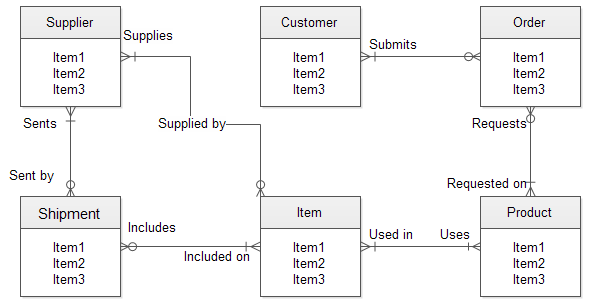
- Athis one
- Bnot this one
2Bubble diagram looks like the following:
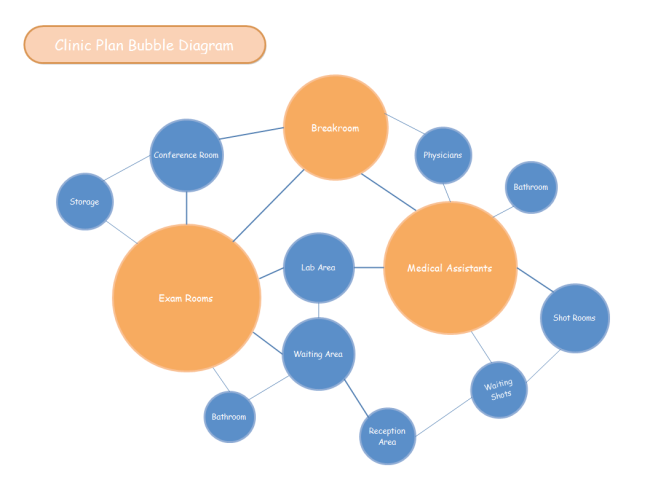
- Athis one
- Bnot this one
3Entity: An entity is any object in the system that we want to model and store information about.
- ATrue
- BFalse
4Entity class is essentially a table of data within the database.
- ATrue
- BFalse
5Metadata: data that describes the properties and context of user data
- ATrue
- BFalse
6Attributes: Properties or characteristics of an entity or relationship type
- ATrue
- BFalse
7Types of attributes:
[blank_start]Required[blank_end] Attribute: A required attribute is an attribute that must have a data value.
[blank_start]optional[blank_end]: An ... attribute may not have a value in it and can be left blank.
[blank_start]Simple[blank_end]: The attributes which cannot be divided into smaller subparts are called ... (age of employee)
[blank_start]composite[blank_end]: Attribute can be subdivided into two or more other Attribute. (Name can be divided into First name, Middle name and Last name)
[blank_start]single[blank_end] value: An attribute, that has one value for a particular entity. (age of a employee)
[blank_start]multi[blank_end] value: An attributes that may have many values for the same entity. (colors of a car)
[blank_start]stored[blank_end]: An attribute, which cannot be derived from other attributes (BirthDate of employee)
[blank_start]derived[blank_end]: Attributes ... from other stored attributes. (Date of Birth and Today’s date)- ARequired
- Boptional
- CSimple
- Dcomposite
- Esingle
- Fmulti
- Gstored
- Hderived
8Types of identifiers (keys) are:
[blank_start]Key[blank_end]: An attribute or combination of attributes that uniquely identifies individual instances of an entity type.
[blank_start]Primary[blank_end] key: A ... key is a one or more fields that uniquely identifies a row in a table
[blank_start]Foreign[blank_end] key: A ... key is a relationship between columns in two database tables
[blank_start]Composite[blank_end] key: A primary key composed of one or more columns (table STAFF contains the fields FNAME and LNAME for first and last names)- AKey
- BPrimary
- CForeign
- DComposite
9Database relationship: A relationship is established between two database tables when one table has a foreign key that references the primary key of another table
- ATrue
- BFalse
10Fill in the relationship type
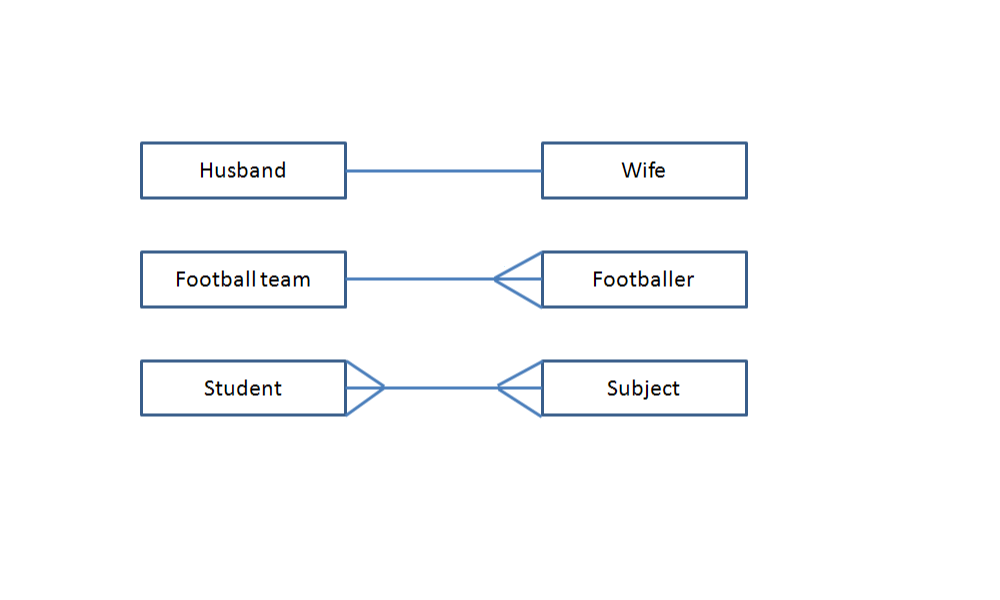
- Aone to one
- BOne to many
- Cmany to many
11Label the relationships:
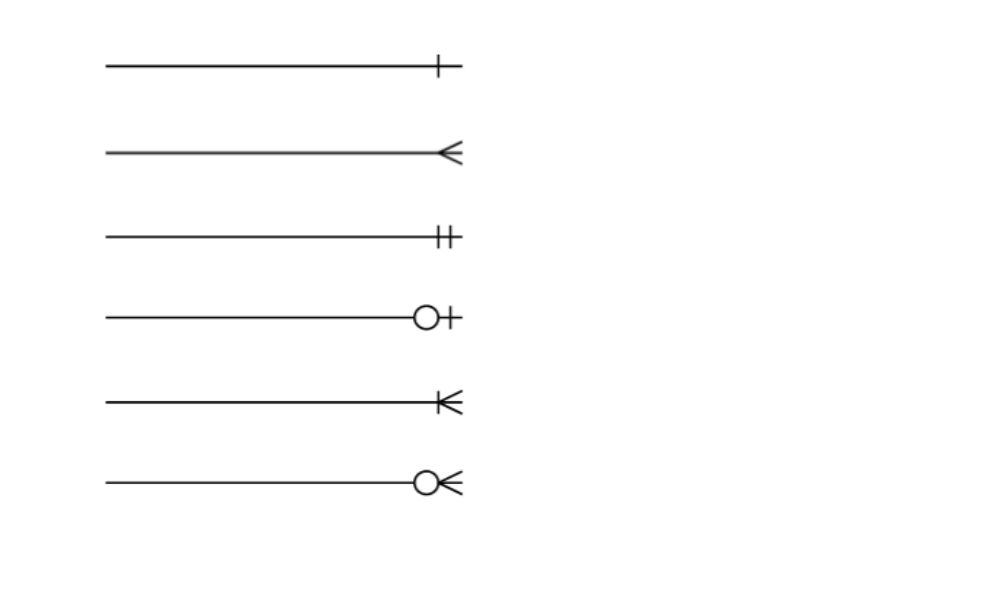
- AOne
- BMany
- CMandatory One
- DZero to one
- EOne to many
- FZero to many
12Degree of relationships
[blank_start]Unary[blank_end] - One entity related to another of the same entity type
[blank_start]Binary[blank_end] - Entities of two different types related to each other
[blank_start]Ternary[blank_end] - Entities of three different types related to each other- AUnary
- BBinary
- CTernary
13Example of an ER diagram
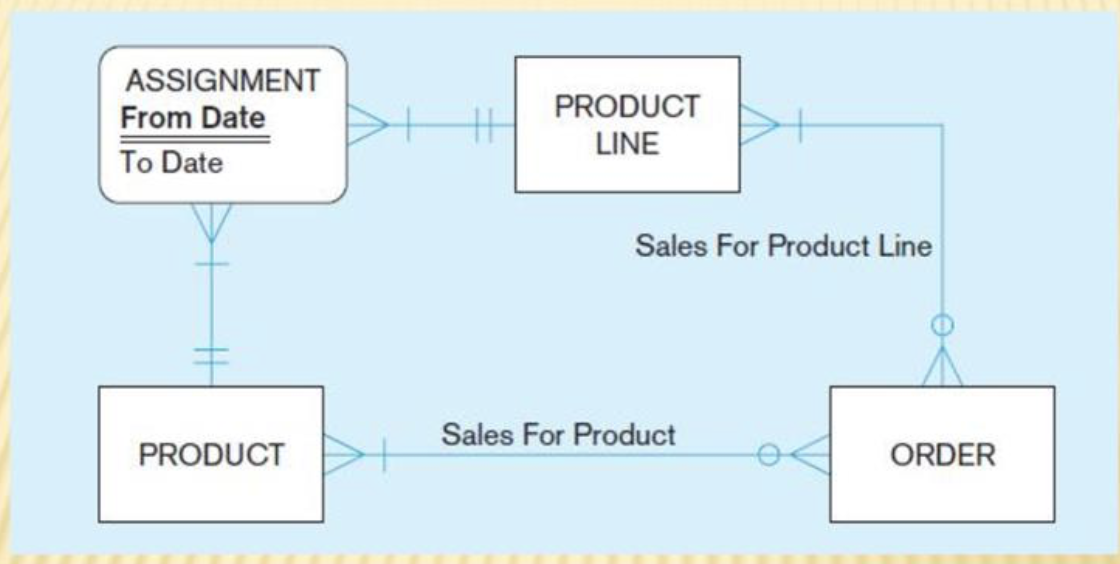
- Athis one
- Bnot this one
14Normalize the following table (type next in blank for correct):
Do this on separate page or application and compare with the following questions.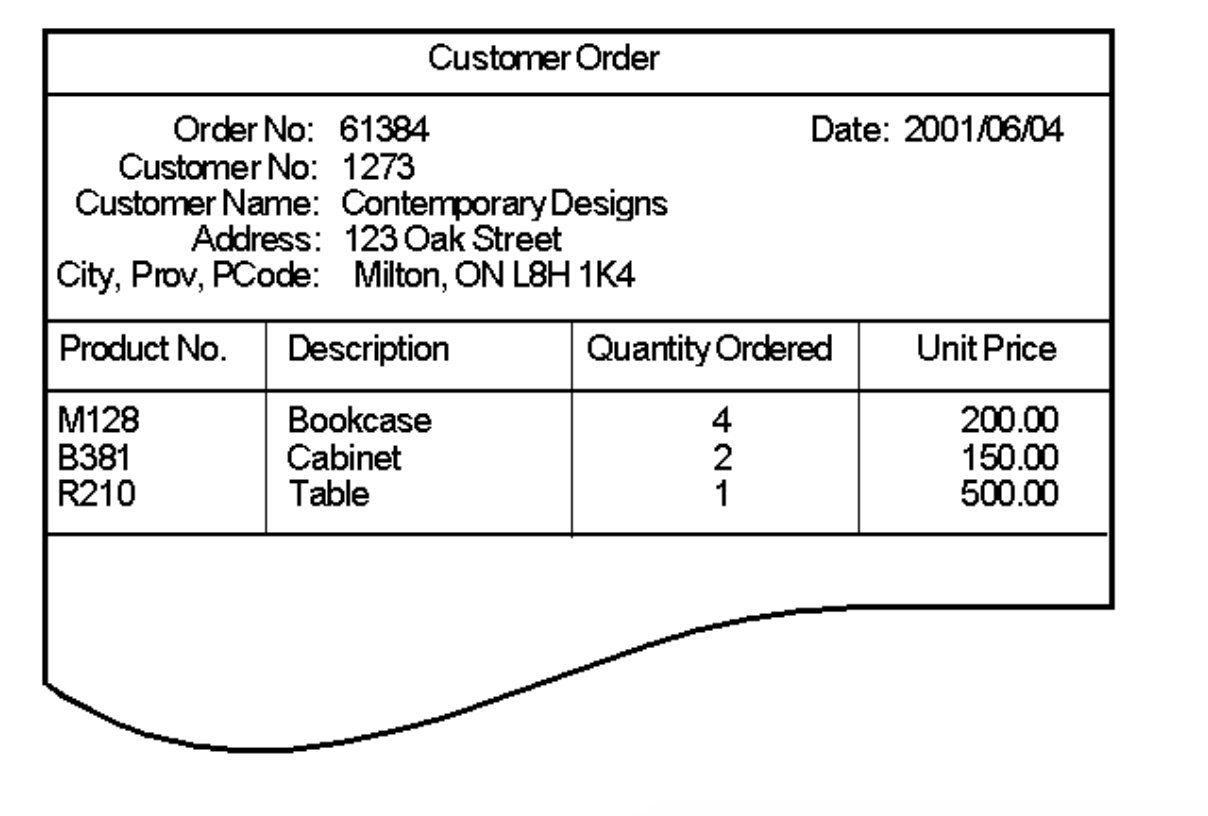
- Anext
150NF (list all the fields, data in [ ] brackets are multi value type)
Order(Order#, OrderDate, Customer#, CustomerName, CustAddr, Custcity, CustProv, CustPostal, [Product#, ProdDesc, QtyOrdered, UnitPrice])- ATrue
- BFalse
161NF: Repeating groups are removed into a new table, new table will have a concatenated name and concatenated key
(separate the [ ] data into another table, link it to main table with a primary key, first value of the [ ] data becomes a primary key in new table)
Order(Order# (PK), OrderDate, Customer#, CustomerName, CustAddr, Custcity, CustProv, CustPostal)
OrderProduct(Order# (PK), Product# (PK), ProdDesc, QtyOrdered, UnitPrice)- ATrue
- BFalse
172NF: Partial dependencies are removed, only table from [ ] one is inspected
(Further break down the created table from 1NF into separate tables with data the can be uniquely identified by a key, IF YOU CAN, this is not always possible)
Order(Order# (PK), OrderDate, Customer#, CustomerName, CustAddr, Custcity, CustProv, CustPostal)
OrderProduct(Order# (PK), Product# (PK), QtyOrdered, UnitPrice)
Product(Product# (PK), ProdDesc)- ATrue
- BFalse
183NF: Transitive dependencies are removed,
(Typically you separate customer data in this step)
Order(Order# (PK), OrderDate, Customer# (FK))
Customer(Customer# (PK), CustomerName, CustAddr, Custcity, CustProv, CustPostal)
OrderProduct(Order# (PK), Product# (PK), QtyOrdered, UnitPrice)
Product(Product# (PK), ProdDesc)- ATrue
- BFalse
19Normalize the following table (type next in blank for correct):
Do this on separate page or application and compare with the following questions.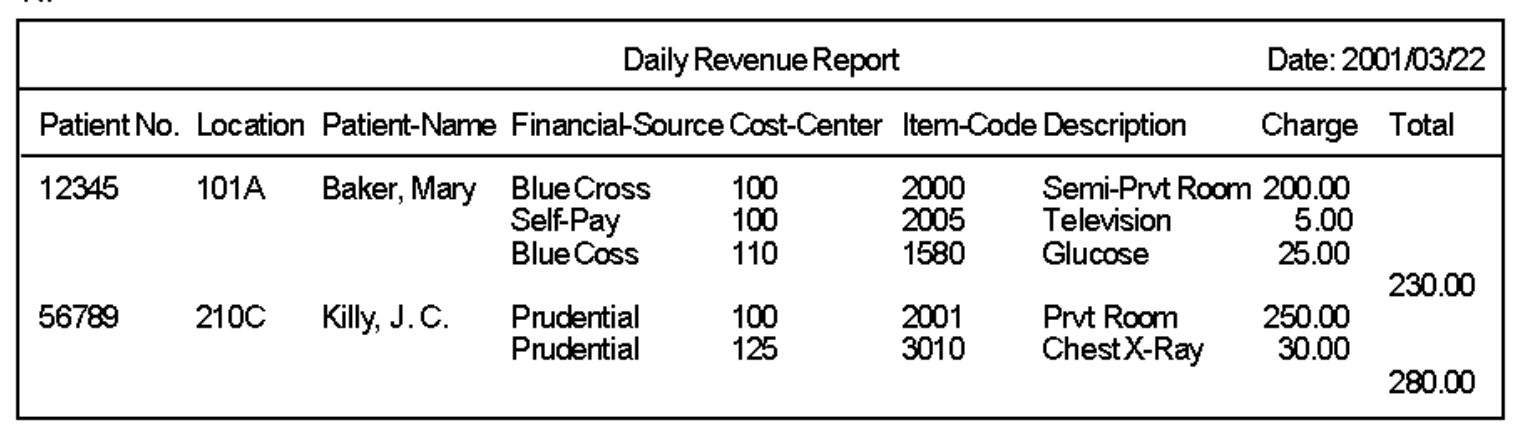
- Anext
200NF
DRevRep(Date, [Pat#, Loc, PatName, [FinSource, [CC, [ItemCode, Desc, Charge]]], Total])- ATrue
- BFalse
211NF
DrevRep(Date(PK))
DRevRepPat(Date(PK), Pat#(PK), Loc, PatName, Total)
DRevRepPatFin(Date(PK), Pat#(PK), FinSource(PK))
DRevRepPatFinCC(Date(PK), Pat#(PK), FinSource(PK), CC(PK))
DRevRepPatFinCCItem(Date(PK), Pat#(PK), FinSource(PK), CC(PK), ItemCode(PK), Desc, Charge)- ATrue
- BFalse
222NF
DrevRep(Date(PK))
DRevRepPat(Date(PK), Pat#(PK), Loc, Total)
DRevRepPatFin(Date(PK), Pat#(PK), FinSource(PK))
DRevRepPatFinCC(Date(PK), Pat#(PK), FinSource(PK), CC(PK))
DRevRepPatFinCCItem(Date(PK), Pat#(PK), FinSource(PK), CC(PK), ItemCode(PK))
Patient(Pat#(PK), PatName)
Item(ItemCode(PK), Desc, Charge)- ATrue
- BFalse
233NF (no change)
DrevRep(Date(PK))
DRevRepPat(Date(PK), Pat#(PK), Loc, Total)
DRevRepPatFin(Date(PK), Pat#(PK), FinSource(PK))
DRevRepPatFinCC(Date(PK), Pat#(PK), FinSource(PK), CC(PK))
DRevRepPatFinCCItem(Date(PK), Pat#(PK), FinSource(PK), CC(PK), ItemCode(PK))
Patient(Pat#(PK), PatName)
Item(ItemCode(PK), Desc, Charge)- ATrue
- BFalse
24write SQL command to get data from s9.tbl_customer:
[blank_start]SELECT * FROM s9.tbl_customer;[blank_end]- ASELECT * FROM s9.tbl_customer;
25write SQL command to get custnum and custname column data from s9.tbl_customer:
SELECT [blank_start]custnum, custname FROM s9.tbl_customer;[blank_end]- Acustnum, custname FROM s9.tbl_customer;
26write SQL command to get custnum from s9.tbl_customer and display column name as cust_no
SELECT [blank_start]custnum AS cust_no[blank_end] FROM s9.tbl_customer;- Acustnum AS cust_no
27write SQL command to get a total value price of saleprice and quantity from s9.tbl_orderline and display as totalprice
SELECT [blank_start]saleprice * quantity AS totalprice[blank_end] FROM s9.tbl_orderline;
(tip: for more complex SELECTS where you have to calculate multiple fields, you can separate by brackets)- Asaleprice * quantity AS totalprice
28write SQL command to get the difference in salary from max_salary and min_salary from hr.jobs and display as difference
SELECT [blank_start]max_salary - min_salary AS difference[blank_end] FROM hr.jobs;- Amax_salary - min_salary AS difference
29When formatting strings, you can use:
CHR(10) for new line
CHR(9) for tab space- ATrue
- BFalse
30write SQL command to get first_name and last_name seperated by a tab space in hr.employees
SELECT [blank_start]first_name || CHR(9) || last_name[blank_end] FROM hr.employees;- Afirst_name || CHR(9) || last_name
31TO_CHAR converts a number, date, or expression to TEXT in a specified format
- ATrue
- BFalse
32SYSDATE returns todays date and time
- ATrue
- BFalse
33ROUND will round a number to closest whole and can specific number of decimal places
SELECT ROUND(123.456, 2) FROM table;- ATrue
- BFalse
34write SQL command to get the day, month and year from orderdate and display as separate columns from s9.tbl_orders, display the column names as d, m, y
(hint: use EXTRACT)
SELECT [blank_start]EXTRACT (day FROM orderdate) AS d[blank_end],
[blank_start]EXTRACT (month FROM orderdate) AS m[blank_end],
[blank_start]EXTRACT (year FROM orderdate) AS y[blank_end],
FROM s9.tbl_orders;- AEXTRACT (day FROM orderdate) AS d
- BEXTRACT (month FROM orderdate) AS m
- CEXTRACT (year FROM orderdate) AS y
35write SQL command to get ordernum, orderdate, and days passed from current date and orderdate displayed as numofdays from s9.tbl_orders;
SELECT ordernum, orderdate, [blank_start]ROUND(SYSDATE - orderdate) AS numofdays[blank_end] FROM s9.tbl_orders;- AROUND(SYSDATE - orderdate) AS numofdays
36write SQL command to get first_name, last_name and years the employee has been working displayed as "Years" from hr.employees
(hint: use hire_date)
SELECT first_name, last_name, [blank_start]ROUND((SYSDATE - hire_date)/365)[blank_end] AS "Years" FROM hr.employees;- AROUND((SYSDATE - hire_date)/365)
37write SQL command to select all employees with department_id of 100 and salary greater than or equal to 7000 from hr.employees
SELECT * FROM hr.employees WHERE [blank_start]department_id = 100 AND salary >= 7000;[blank_end]- Adepartment_id = 100 AND salary >= 7000;
38write SQL command to get all customers who live in Toronto from s9.tbl_customer
SELECT * FROM s9.tbl_customer [blank_start]WHERE UPPER(city) = 'TORONTO';[blank_end]
(since Oracle data is case-sensitive, you must use UPPER)- AWHERE UPPER(city) = 'TORONTO';
39The comparison operators in SQL are:
[blank_start]=[blank_end] | Equal to
[blank_start]>[blank_end] | Greater than
[blank_start]>=[blank_end] | Greater than or equal to
[blank_start]<[blank_end] | Less than
[blank_start]<=[blank_end] | Less than or equal to
[blank_start]<>[blank_end] | Not equal to- A=
- B>
- C>=
- D<
- E<=
- F<>
40Other types of comparisons are:
BETWEEN .. AND ..
IN(set)
LIKE
IS NULL- ATrue
- BFalse
41write SQL command to get all employees with salary between 2000 and 4000 from hr.employees
SELECT * FROM hr.employees [blank_start]WHERE salary BETWEEN 2000 AND 4000;[blank_end]- AWHERE salary BETWEEN 2000 AND 4000;
42write SQL command to get all customers with creditlimit greater than 0 and live in any city starting with Tor from s9.tbl_customer
SELECT * FROM s9.tbl_customer WHERE [blank_start]creditlimit > 0 AND city LIKE 'Tor%';[blank_end]- Acreditlimit > 0 AND city LIKE 'Tor%';
43write SQL command to get all unique salary fields from hr.employee
SELECT [blank_start]DISTINCT salary[blank_end] FROM hr.employees;- ADISTINCT salary
44write SQL command to get all employees with department_id of 100 and salary is greater or equal to 7000, order by first_name from hr.employees
SELECT * FROM hr.employees
WHERE [blank_start]department_id = 100 AND salary >= 7000[blank_end]
[blank_start]ORDER BY first_name;[blank_end]- Adepartment_id = 100 AND salary >= 7000
- BORDER BY first_name;
45The aggregate functions of SQL are:
AVG() - calculates the average)
SUM() - calculates the total
MIN() - gets the lowest
MAX() - gets the highest
COUNT() - gets the number of times a value appears- ATrue
- BFalse
46write SQL command to get the employee with the highest salary from hr.employees
SELECT [blank_start]MAX(salary)[blank_end] FROM hr.employees;- AMAX(salary)
47write SQL command to get the amount of customers displayed as numofcust from s9.tbl_customer
SELECT [blank_start]COUNT(*) AS numofcust[blank_end] FROM s9.tbl_customer;- ACOUNT(*) AS numofcust
48write SQL command to get the average salary of all employees with department_id of 100, round the result to 2 decimal from hr.employees
SELECT [blank_start]ROUND(AVG(salary), 2)[blank_end]
FROM hr.employees
[blank_start]WHERE department_id = 100;[blank_end]- AROUND(AVG(salary), 2)
- BWHERE department_id = 100;
49In SQL you can subqueries SELECT statements:
WHERE field = (SELECT ... return single value)
WHERE field NOT IN (SELECT ... use DISTINCT if needed)
WHERE field IN (SELECT ... use DISTINCT if needed)- ATrue
- BFalse
50write SQL command to get which employee_id left the company on 2007-12-31 from hr.employees and hr.job_history
SELECT * FROM hr.employees
[blank_start]WHERE employee_id IN[blank_end]
(SELECT [blank_start]employee_id FROM hr.job_history[blank_end] WHERE [blank_start]end_date = '2007-12-31'[blank_end]);- AWHERE employee_id IN
- Bemployee_id FROM hr.job_history
- Cend_date = '2007-12-31'
51write SQL command to get which unique productnum has never been ordered from s9.tbl_orderline
SELECT * FROM s9.tbl_product
WHERE [blank_start]productnum NOT IN[blank_end]
(SELECT [blank_start]DISTINCT productnum[blank_end] FROM s9.tbl_orderline);- Aproductnum NOT IN
- BDISTINCT productnum
52write SQL command to get which product has the most expensive msrp price from s9.tbl_product
SELECT * FROM s9.tbl_product
[blank_start]WHERE msrp =[blank_end] (SELECT [blank_start]MAX(msrp)[blank_end] FROM s9.tbl_product);- AWHERE msrp =
- BMAX(msrp)
Information
- Description
- Computer Science Quiz on Database midterm, created by Duncan Levings on 18/06/2018.
- Author
- Duncan Levings
- Language
- English
- Views
- 17
- Tags
- Rating
- No ratings yet Rate this quiz