
Quiz
N5 Computing Science (WDD) - HTML + CSS
This quiz has question types that open in the usual player.
Questions in this quiz (4)
1Place the HTML tags in the correct location so that the webpage will look like the one shown in the image.
<!DOCTYPE html>
[blank_start]<html>[blank_end]
<head>
<title>Headings[blank_start]</title>[blank_end]
</head>
<body>
[blank_start]<h6>[blank_end]Smallest[blank_start]</h6>[blank_end]
[blank_start]<h3>[blank_end]Medium[blank_start]</h3>[blank_end]
[blank_start]<h1>[blank_end]Largest[blank_start]</h1>[blank_end]
</body>
</html>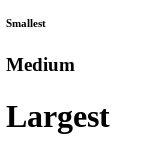
- A<html>
- B</title>
- C<h6>
- D</h6>
- E<h3>
- F</h3>
- G<h1>
- H</h1>
2Place the HTML tags in the correct location so that the webpage will look like the one shown in the image.
[blank_start]<h1>[blank_end]Goose Week 2020[blank_start]</h1>[blank_end]
[blank_start]<p>[blank_end]Portlethen Academy is delighted to offer a range of trips, activities and experiences to first and second year pupils during GOOSE 2020.[blank_start]</p>[blank_end]
[blank_start]<h4>[blank_end]Please note that 20th – 22nd May are not additional holiday days and your child is expected to be on a school trip or in school throughout. A timetable of classes will be provided for pupils who do not wish to participate in any of the activities.[blank_start]</h4>[blank_end]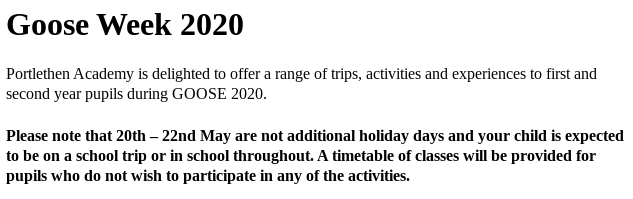
- A<h1>
- B</h1>
- C<p>
- D</p>
- E<h4>
- F</h4>
3Place the HTML tags in the correct location so that the webpage will look like the one shown in the image.
<body bgcolor="[blank_start]#800080[blank_end]">
<p>One of the activities is to go to Codonas.</p>
[blank_start]<!-- codonas.jpg -->[blank_end]
<img src="codonas.jpg" width=[blank_start]150[blank_end] height=150>
<p>Later there will be a game of bowling.[blank_start]</p>[blank_end]
<!-- bowling.jpg -->
[blank_start]<img src=[blank_end][blank_start]"bowling.jpg"[blank_end] width=200 height=[blank_start]200[blank_end]>
[blank_start]</body>[blank_end]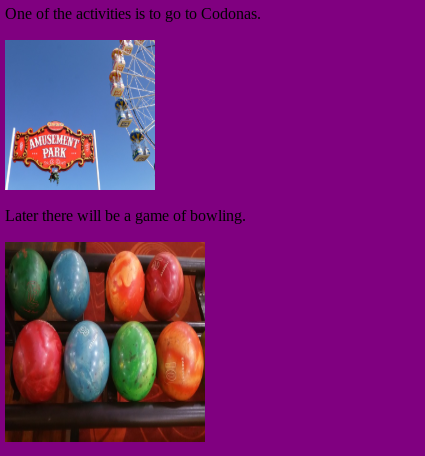
- A#800080
- B#808000
- C#00BFFF
- D<!-- codonas.jpg -->
- E150
- F200
- G"bowling.jpg"
- H"codonas.jpg"
- I<img src=
- J<a href=
- K</p>
- L</body>
- M</h1>
4Place the HTML tags in the correct location so that the webpage will look like the one shown in the image.
[blank_start]<!DOCTYPE html>[blank_end]
<html>
<head>
<title>Tables</title>
</head>
<body>
<table [blank_start]border=1[blank_end] width=100%>
<tr height=100>
[blank_start]<td style="background-color:#FF0000">[blank_end]</td>
[blank_start]<td style="background-color:#FFA500">[blank_end]</td>
[blank_start]<td style="background-color:#808000">[blank_end]</td>
</tr>
[blank_start]</table>[blank_end]
</body>
</html>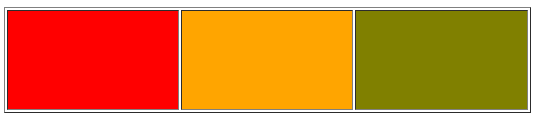
- A<!DOCTYPE html>
- Bborder=1
- Cborder=0
- D<td style="background-color:#FF0000">
- E<td style="background-color:#FFA500">
- F<td style="background-color:#808000">
- G</table>
- H</a>
Information
- Description
- Drag and drop tasks for students to complete to show their understanding of HTML tags.
- Author
- Ian Simpson
- Language
- English
- Views
- 229
- Tags
- Rating
- 5.0 out of 5 · 1 rating Rate this quiz