
EQ Parameters
Slides in this set (5)
-
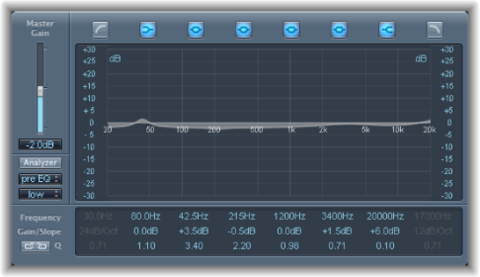
- EQ (equalisation) is a very common plugin which affects the levels of different frequencies ranges in an input signal. This is normally presented in a visual formal, with multiple different curves and shelves to produce the resultant curve desired.
- Caption: Logic's graphic equaliser plugin
-
- In an EQ plugin, there is a gain setting for each curve or shelf, and one gain setting for a flat boost or reduction of the entire signal.
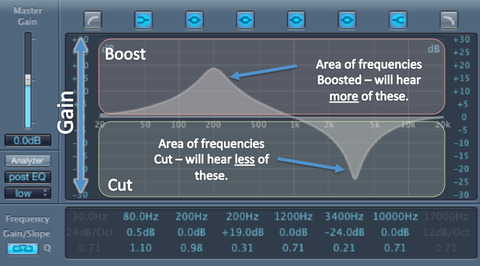
- Caption: Two EQ curves on the default Logic Pro Channel EQ plugin, showing a boosted frequency curve and a reduced frequency curve on the left and right respectively
-
- For each band, the centre point for the curve, or start point for the shelf is determined by the frequency parameter.
- Basic EQs come only with 'high', 'mid', and 'low' parameters to change the gain of. With parametric or graphic EQs, the centre frequency can be set for each.
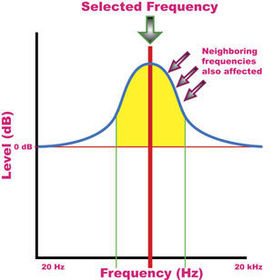
- Caption: An EQ graph showing a single curve boost
-
- Yes, just 'Q'.
- This is the parameter which changes the slope of the curve on a boost or shelf, and affects how much the neighbouring frequencies of the centre of the curve are changed by the curve. It is also referred to as the bandwidth, but can be bunched in with the 'slope' setting as one, as it is in Logic Pro's EQ plugin.
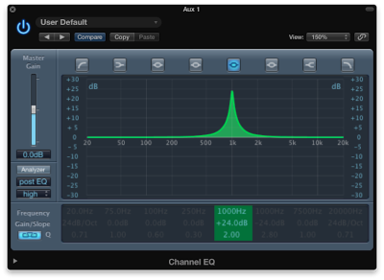
- Caption: A single band with a steep slope and thus narrow range of effect
-
- There are multiple different kinds of curve within an EQ plugin that are used to affect the frequency range.
- These include:
- Single band
- Shelf
- Cutoff
- Rolloff
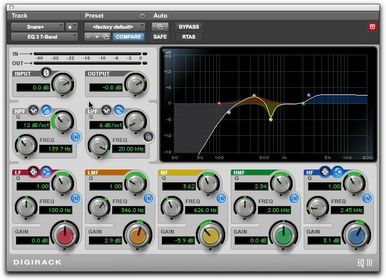
- Caption: Rolloff at 138Hz, single band gain at 356Hz, high shelf at 2450Hz
Information
- Description
- A brief overview of the different parameters present in EQ plugins and the explanations of what they each are.
- Created by
- j.reilly
- Views
- 110
- Tags
- Rating