
Flashcards
Capítulo 2 Git (Parte 1)
Cards in this deck (51)
- 1Guardar cambios en el repositorioRequiere algunos cambios, y confirmar instantáneas de esos cambios a tu repositorio.
- 2Estados de los archivos-Bajo seguimento (tracked)
-Sin seguimento (untracked) - 3Bajo seguimento (tracked)Los archivos bajo seguimiento son aquellos que existían en la última instantánea; pueden estar sin modificaciones, modificados, o preparados.
- 4-Sin seguimiento (untracked)Cualquier archivo de tu directorio que no estuviese en tu última instantánea ni está en tu área de preparación.
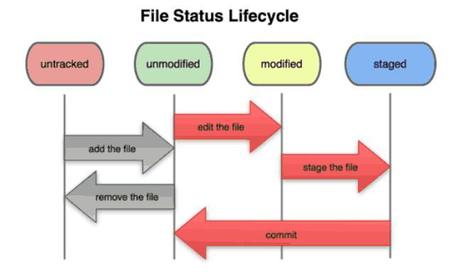
- 5Ciclo de vida de los archivos
- 6Comando para comprobar el estado de los archivosgit status
Respuesta:
$ git status
# On branch master
nothing to commit, working directory clean - 7Al añadir un archivo a un proyecto y el archivo no existía al ejecutar "git status"$ vim README
$ git status
# On branch master
# Untracked files:
# (use "git add ..." to include in what will be committed)
#
# README
nothing added to commit but untracked files present (use "git add" to track) - 8Seguimiento de nuevos archivosComando "git add"
¿Preparado? Cabecera "Changes to be committed".
Si confirmas ahora, la versión del archivo en el momento de ejecutar git add será la que se incluya en la instantánea. - 9Modificar archivo bajo seguimientoEjecutar "status"
Respuesta:
$ git status
# On branch master
# Changes to be committed:
# (use "git reset HEAD ..." to unstage)
#
# new file: README
#
# Changes not staged for commit:
# (use "git add ..." to update what will be committed)
#
# modified: benchmarks.rb
# - 10Cabecera "Modificados pero no actualizados"Significa que un archivo bajo seguimiento ha sido modificado en el directorio de trabajo, pero no ha sido preparado todavía.
- 11Comando para preparar"git add"
- 12Respuesta$ git add benchmarks.rb
$ git status
# On branch master
# Changes to be committed:
# (use "git reset HEAD ..." to unstage)
#
# new file: README
# modified: benchmarks.rb
# - 13Modificar el archivoAl ejecutar "git status", muestra:
$ vim benchmarks.rb
$ git status
# On branch master
# Changes to be committed:
# (use "git reset HEAD ..." to unstage)
#
# new file: README
# modified: benchmarks.rb
#
# Changes not staged for commit:
# (use "git add ..." to update what will be committed)
#
# modified: benchmarks.rb
# - 14¿Por qué el archivo aparece listado como preparado y como no preparado?Git prepara un archivo tal y como era en el momento de ejecutar el comando git add. Si haces git commit ahora, la versión que se incluirá en la confirmación será la que fuese cuando ejecutaste el comando git add. Si modificas un archivo después de haber ejecutado git add , tendrás que volver a ejecutar git add para preparar la última versión.
- 15Respuesta$ git add benchmarks.rb
$ git status
# On branch master
# Changes to be committed:
# (use "git reset HEAD ..." to unstage)
#
# new file: README
# modified: benchmarks.rb
# - 16Ignorar archivos generados automáticamente. Ejemplo: .gitignoreEjecutar:
$ cat .gitignore
*.[oa]
*~ - 17Comandos para ignorar*.[oa] = ignora archivos con extensión .o y .a
*~ = ignora todos los archivos que terminan en tilde ( ~ ) - 18Configurar un archivo .gitignoreReglas para los patrones:
Se puede:
Las líneas en blanco, o que comienzan por #, son ignoradas.
-Usar patrones glob estándar.
-Indicar un directorio añadiendo una barra hacia delante ( / ) al final.
-Negar un patrón añadiendo una exclamación ( ! ) al principio. - 19Patrones globSon expresiones regulares simplificadas que pueden ser usadas por las shells. Un
asterisco ( * ) reconoce cero o más caracteres; [abc] reconoce cualquier carácter de los especificados
entre corchetes (en este caso, a, b o c); una interrogación ( ? ) reconoce un único carácter; y caracteres
entre corchetes separados por un guión ([0-9] ) reconoce cualquier carácter entre ellos (en este caso, de 0 a 9). - 20Cambios preparados y no preparadosComando "git diff" responde a preguntas: ¿qué has cambiado pero aún no has preparado?, y ¿qué has preparado y estás a punto de confirmar?
- 21Confirmar los cambiosComando "git commit"
- 22Respuesta# Please enter the commit message for your changes. Lines starting
# with '#' will be ignored, and an empty message aborts the commit.
# On branch master
# Changes to be committed:
# (use "git reset HEAD ..." to unstage)
#
# new file: README
# modified: benchmarks.rb
~
~
~
".git/COMMIT_EDITMSG" 10L, 283C - 23Saltear el área de preparaciónComando:
"git commit -a" - 24Respuesta$ git status
# On branch master
#
# Changes not staged for commit:
#
# modified: benchmarks.rb
#
$ git commit -a -m 'added new benchmarks'
[master 83e38c7] added new benchmarks
1 files changed, 5 insertions(+), 0 deletions(-) - 25Eliminar archivosComando "git rm" elimina archivo del área de preparación
- 26Respuesta$ git rm grit.gemspec
rm 'grit.gemspec'
$ git status
# On branch master
#
# Changes to be committed:
# (use "git reset HEAD ..." to unstage)
#
# deleted: grit.gemspec
# - 27Eliminar de git sin eliminar del disco duroComando:
$ git rm --cached readme.txt - 28Forzar la eliminación de archivos ya modificados y en el área de preparaciónOpción -f
- 29Renombrar archivoscomando "mv"
- 30Respuesta$ git mv README.txt README
$ git status
# On branch master
# Your branch is ahead of 'origin/master' by 1 commit.
#
# Changes to be committed:
# (use "git reset HEAD ..." to unstage)
#
# renamed: README.txt -> README
# - 31Ver historial de confirmacionesComando "git log"
- 32Respuesta$ git log
commit ca82a6dff817ec66f44342007202690a93763949
Author: Scott Chacon
Date: Mon Mar 17 21:52:11 2008 -0700
changed the version number
commit 085bb3bcb608e1e8451d4b2432f8ecbe6306e7e7
Author: Scott Chacon
Date: Sat Mar 15 16:40:33 2008 -0700
removed unnecessary test code
commit a11bef06a3f659402fe7563abf99ad00de2209e6
Author: Scott Chacon
Date: Sat Mar 15 10:31:28 2008 -0700
first commit - 33Opciones de "git log"-p: muestra las diferencias introducidas en cada confirmación.
-2: que hace que se muestren únicamente las dos últimas entradas del historial. - 34Revisar cambios a nivel palabraComando --word-diff
- 35Respuesta$ git log -U1 --word-diff
commit ca82a6dff817ec66f44342007202690a93763949
Author: Scott Chacon
Date: Mon Mar 17 21:52:11 2008 -0700
changed the version number
diff --git a/Rakefile b/Rakefile
index a874b73..8f94139 100644
--- a/Rakefile
+++ b/Rakefile
@@ -7,3 +7,3 @@ spec = Gem::Specification.new do |s|
s.name = "simplegit"
s.version = [-"0.1.0"-]{+"0.1.1"+}
s.author = "Scott Chacon" - 36Ver estadísticas de cada confirmaciónComando: "$ git log --stat"
- 37Respuestacommit ca82a6dff817ec66f44342007202690a93763949
Author: Scott Chacon
Date: Mon Mar 17 21:52:11 2008 -0700
changed the version number
Rakefile | 2 +-
1 files changed, 1 insertions(+), 1 deletions(-)
commit 085bb3bcb608e1e8451d4b2432f8ecbe6306e7e7
Author: Scott Chacon
Date: Sat Mar 15 16:40:33 2008 -0700
removed unnecessary test code
lib/simplegit.rb | 5 -----
1 files changed, 0 insertions(+), 5 deletions(-)
commit a11bef06a3f659402fe7563abf99ad00de2209e6
Author: Scott Chacon
Date: Sat Mar 15 10:31:28 2008 -0700
first commit
README | 6 ++++++
Rakefile | 23 +++++++++++++++++++++++
lib/simplegit.rb | 25 +++++++++++++++++++++++++
3 files changed, 54 insertions(+), 0 deletions(-) - 38Opciones-"--pretty" Modifica el formato de la salida
-"oneline" imprime cada confirmación en una única línea
-"short , full y fuller":agregan o disminuyen información - 39Opción "format"Especifica un determinado formato
- 40Respuesta$ git log --pretty=format:"%h - %an, %ar : %s"
ca82a6d - Scott Chacon, 11 months ago : changed the version number
085bb3b - Scott Chacon, 11 months ago : removed unnecessary test code
a11bef0 - Scott Chacon, 11 months ago : first commit - 41Opciones de "format"Opción Descripción de la salida
%H Hash de la confirmación
%h Hash de la confirmación abreviado
%T Hash del árbol
Opción Descripción de la salida
%t Hash del árbol abreviado
%P Hashes de las confirmaciones padre
%p Hashes de las confirmaciones padre abreviados
%an Nombre del autor
%ae Dirección de correo del autor
%ad Fecha de autoría (el formato respeta la opción -–date )
%ar Fecha de autoría, relativa
%cn Nombre del confirmador
%ce Dirección de correo del confirmador
%cd Fecha de confirmación
%cr Fecha de confirmación, relativa
%s Asunto - 42opción "--graph"Acompaña a "oneline" y "format": muestra historial, ramificaciones y uniones.
- 43Respuesta$ git log --pretty=format:"%h %s" --graph
* 2d3acf9 ignore errors from SIGCHLD on trap
* 5e3ee11 Merge branch 'master' of git://github.com/dustin/grit
|\
| * 420eac9 Added a method for getting the current branch.
* | 30e367c timeout code and tests
* | 5a09431 add timeout protection to grit
* | e1193f8 support for heads with slashes in them
|/
* d6016bc require time for xmlschema
* 11d191e Merge branch 'defunkt' into local - 44Opciones de "git log" para limitar las confirmaciones que se muestran-(n) Muestra solamente las últimas n confirmaciones
--since, --after Muestra aquellas confirmaciones hechas después de la fecha especificada.
--until, --
before
--author Muestra sólo aquellas confirmaciones cuyo autor coincide con la cadena especificada.
--committer
Muestra aquellas confirmaciones hechas antes de la fecha especificada.
Muestra sólo aquellas confirmaciones cuyo confirmador coincide con la cadena
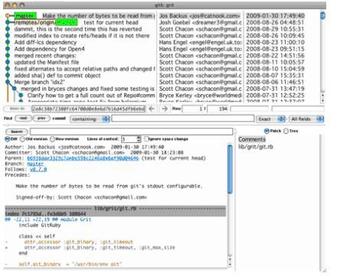
especificada. - 45Interfaz gráfica Tcl/Tk permite visualizar el historial
- 46Deshacer una confirmaciónComando "$ git commit --amend"
- 47Deshacer la preparación de un archivoComando "reset HEAD ..."
- 48Respuesta$ git reset HEAD benchmarks.rb
benchmarks.rb: locally modified
$ git status
# On branch master
# Changes to be committed:
# (use "git reset HEAD ..." to unstage)
#
# modified: README.txt
#
# Changes not staged for commit:
# (use "git add ..." to update what will be committed)
# (use "git checkout -- ..." to discard changes in working
directory)
#
# modified: benchmarks.rb
# - 49Deshacer la modificación de un archivoComando "git checkout -- ..."
- 50Respuesta$ git checkout -- benchmarks.rb
$ git status
# On branch master
# Changes to be committed:
# (use "git reset HEAD ..." to unstage)
#
# modified: README.txt
# - 51Opción "--amend"Deshace cualquier cosa que esté confirmada