
Mapa mental
Folio Challenge 2
Contenido del mapa
Folio Challenge 2
Available Resources
- Hardware
- Laptop
- Provided by the school with limited charge, data storage capacities, speed and processing capabilities
- Laptop
- Software
- Python
- Thonny
- Arcade library
- A simplified series of commands that allows a programmer to code sophisticated programs easily.
- Functions
- Classes
- Animation
- User control
- Keyboard
- Mouse
- Keyboard
- Collision Detection
- Sprites (Personal or Public)
- Functions
- Transfer to Thonny : import arcade
- A simplified series of commands that allows a programmer to code sophisticated programs easily.
- Arcade library
- Thonny
- Python
- Research/Information
- The internet
- The Arcade Library
- Provides snippets of code, examples, explanations, etc
- https://arcade.academy/
- Kenney Assets
- Provides sprite kits for ease of coding
- https://www.kenney.nl/assets
- The Arcade Library
- The internet
- School
- The teacher
- For questions, guidance and feedback
- BlackBoard Elearn
- For lessons and information
- The teacher
- Hardware
Prescribed Criteria
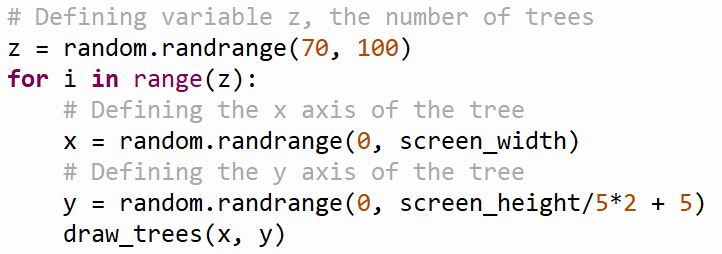
- Use 'for' loops to create and position multiple items
- Loops simplify the code, removing repetition.
- Loops simplify the code, removing repetition.
- Allow user to control a player sprite using a mouse or keyboard
- Control a sprite
- Construct a sprite with a class of properties
- Use a sprite from Kenney Assets
- The UP, DOWN, LEFT, RIGHT arrow keys
- Easier to control, less freedom of direction
- A mouse
- Harder to control, more fluidity and manoeuvre capabilities
- Control a sprite
- Do not allow the player sprite to go off screen or through walls
- Use collision and wall detection
- Use collision and wall detection
- Add something for the user to collect
- Keep score of how many items were collected and display on screen
- Add 1 to a variable everything there is a collision
- Add 1 to a variable everything there is a collision
- Collect with sprite
- Coins, gems, flowers, etc
- Use sprite collision detection
- Coins, gems, flowers, etc
- Keep score of how many items were collected and display on screen
- Use 'for' loops to create and position multiple items
Self-prescribed Critera
- There must be a background
- Folio Challenge 1 could be used to shorten time and add depth and detail
- Must be recognisable as an image
- Landscape/maze
- The code must be clean
- The code must be as simple as possible
- All of the steps must be orders and spaced correctly. It must not be messy .
- Use comments/hashtags to define parts
- Use functions to shorten necessary lines
- Use classes to group properties
- The code must be as simple as possible
- There must be a background
Constraints/Limitations
- Time
- 6 weeks
- The given time must be split between two tasks
- The result must not be too complicated or detailed to complete within the time limit
- There must also be time for documentation
- The given time must be split between two tasks
- 6 weeks
- Hardware
- Laptop
- Limited charging, data processing, storage and software capabilities
- If the animation is too large or complex, the actions will be slow and jerky
- Limited charging, data processing, storage and software capabilities
- Laptop
- Software
- The Arcade library
- It is likely very extensive and flexible and there will be no issue
- The Arcade library
- Knowledge/skill
- Limited to what has been learnt in the weeks before the task
- Also limited to what can be learnt during the task
- Search capabilities on the internet
- Also limited to what can be learnt during the task
- Limited to what has been learnt in the weeks before the task
- The theme
- There must be elements of SCALE in the result
- Cannot simply do anything
- There must be elements of SCALE in the result
- The prescribed criteria
- Must complete the prescribed criteria
- Use loops, add a collectable, keep a score, collision detecting, add user control
- Must complete the prescribed criteria
- Time
Non Functional Requirements
- The result must have depth
- Must be multilayered and without large blank spaces
- For example : A starry sky instead of solid midnight blue
- Must be multilayered and without large blank spaces
- The result must be aesthetically pleasing
- The background must be attractive
- Must have more complexity than one solid colour
- All of the elements of the result must be connected and complement each other
- No terribly clashing bright colours
- No wildly different concepts
- For example : A hippo eating curtains
- The background must be attractive
- The result must have depth
Functional Requirements
- Use Python Thonny
- Use Arcade library
- Transfer into program : import arcade
- Use Arcade library
- Implement elements of the theme SCALE
- May be direct or conceptual
- For example : A cooking scale or a comparison of size
- May be direct or conceptual
- The result must be sensical and recognisable
- Must be a completed concept
- Cannot be a mix of random shapes and colours
- Must be a completed concept
- Use Python Thonny
Ideation
- Background
- Use Folio Challenge 1
- Modify Folio Challenge 1
- Remove the animation so that there is not too much to process
- Add a sprite with user control
- Modify Folio Challenge 1
- Form a new one
- Maze
- For the sprite to navigate through
- Landscape
- Seasons : Summer, winter, spring, autumn
- Forest, mountain, jungle
- City : Buildings, subway, skyscraper, house
- Obstacle course
- For the sprite to navigate around/through
- SIlhouette
- Colour
- https://arcade.academy/arcade.color.html?highlight=color
- Maze
- Use Folio Challenge 1
- Sprite
- Take from Kenney Assets library
- https://www.kenney.nl/asset
- Make an original
- Use a Class to define a series of properties
- An animal
- Cat, dog, insect, rodent, elephant, reptile, marine, giraffe
- An object
- Plane, flower, ball, robot
- Make a function with shapes
- Circles, rectangles, polygons
- Circles, rectangles, polygons
- Take from Kenney Assets library
- User control
- Method
- Mouse
- Less control, more movement
- Less control, more movement
- Keyboard
- More control, less movement
- More control, less movement
- Mouse
- Walls and borders
- Collision detection
- Collision detection
- Collectables
- Gems, coins, other small objects
- Upon collision, they disappear
- 1 is added to the counter
- Upon collision, they disappear
- Gems, coins, other small objects
- Method
- Theme
- SCALE
- Can be direct or conceptual
- Ideas
- A background with the image of a scale
- A game about balancing scales
- A game where the sprite increases in size with every collectable
- A game where the sprite must navigate through an enormous world
- As if the sprite had shrunk
- A game with obstacles with distorted size
- A tiny skyscraper and a giant flower
- Ideas
- Can be direct or conceptual
- SCALE
- Background
Imágenes y archivos del mapa










Información
- Descripción
- Year 10 Digital Technologies Mapa Mental sobre Folio Challenge 2, creado por Julia de Beer el 14/05/2020.
- Creado por
- Julia de Beer · may 2020
- Actualizado
- 16 jun 2020
- Visitas
- 2
- Valoración
Más sobre Game Project Planning and Documentation