
Mapa mental
Python
Contenido del mapa
Python
Basic information
- Compilation vs. interpretation
- Python is an interpreted language.
- debugger
- a computer program that assists in the detection and correction of errors in other computer programs.
- console :text-only computer interface,
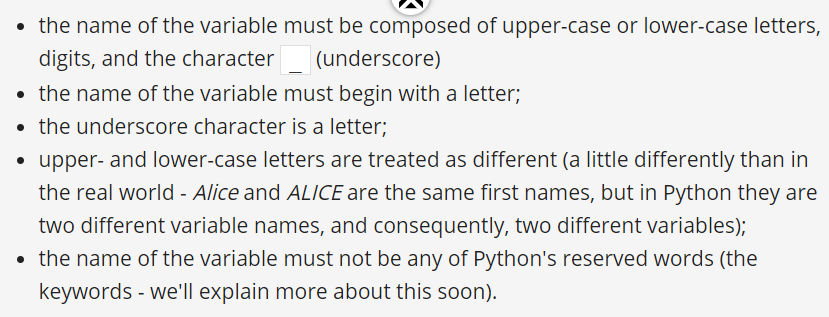
- case sensitive.
- Python is a cross-platform programming language, which means that it can run on multiple platforms like Windows, macOs
- , Cython and Jython : interpreter
- Cython:Python programming language, designed to give C-like performance with code that is mostly written in Python.
- dynamically-typed language, which means you don't need to declare variables in it
- CPython
- Compilation vs. interpretation
Data types
- A literal is data whose values are determined by the literal itself. Ex : 12 The simplest expression is a literal itself.
- Integers int
- The use of underscores in numeric literals is ok EX: 111_111
- octal value. = 0o456 = zero + o , Base 8
- hexadecimal numbers. = 0x345 = zero + x , Base : 16
- floating-point : float
- scientific notation. = 5E6
- Strings
- An empty string still remains a string
- Boolean values
- True1 - False 0 / case-sensitivity.
- None
- type(x) = return the data type
variables
operators \modulo
- https://edube.org/learn/pe-1/operators-data-manipulation-tools-29
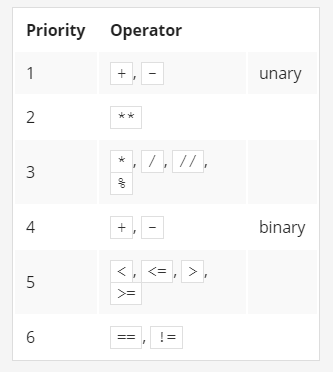
- +, -, *, /, //, %, **
- 2 ** 3 = 2 to the power 3.
- when both ** arguments are integers, the result is an integer, too;when at least one ** argument is a float, the result is a float, too int & int = int int & float = float float & int = float float & float = float print(2 ** 2 ** 3) = 2 ** 3 → 8; 2 ** 8 → 256 right-sided binding.
- / division
- int & int = int int & float = float float & int = float float & float = float
- floor division\integer division : 6 // 4 = 1
- rounded to the nearest integer value that is less than the real (not rounded) result. int & int = int int & float = float float & int = float float & float = int
- remainder (modulo): %
- the value left over after dividing one value by another to produce an integer quotient.
- 2 ** 3 = 2 to the power 3.
- compound assignment operators (shortcut operators)x *= 2 \ variable op= expression \ var = var / 2 ⇒ var /= 2
function
- https://docs.python.org/3/library/functions.html
- print()
- multiple arguments : print( variable , "string" , "nhhnjj")
- float(x)
- str()
- Rounf
- input()
- the result of the input() function is a string.
escape character,
- \n newline
- \\ display \
- \" display "
keyword arguments - parameters
- end = " " : print("My name is", "Python.", end=" ")
- determines the characters the print() function sends to the output once it reaches the end of its positional arguments. EXprint("My name is", "Python.", end="salma ") print("Monty Python.") out My name is Python.salma Monty Python.
- sep= "" : print("My", "name", "is", "Monty", "Python.", sep="-")
- My-name-is-Monty-Python.
- end = " " : print("My name is", "Python.", end=" ")
Extra note
- "string" * 2 = will produce "stringstring"
Expression
Comment
- to add : #
- To uncomment multiple lines : Ctrl + \
Conditional Execution
- if true_or_not: do_this_if_true
- the if keyword;one or more white spaces;an expression (a question or an answer) whose value will be interpreted solely in terms of True (when its value is non-zero) and False (when it is equal to zero);a colon followed by a newline;an indented instruction or set of instructions (at least one instruction is absolutely required); the indentation may be achieved in two ways - by inserting a particular number of spaces (the recommendation is to use four spaces of indentation), or by using the tab character; note: if there is more than one instruction in the indented part, the indentation should be the same in all lines; even though it may look the same if you use tabs mixed with spaces, it's important to make all indentations exactly the same - Python 3 does not allow mixing spaces and tabs for indentation.
- if true_or_not: do_this_if_true
Loops
relational operators
- Comparison == \ low priority
- Inequality !=
- > >= < <+ priority is greater than that shown by == and !=
Imágenes y archivos del mapa
Información
- Descripción
- Mapa Mental sobre Python, creado por salma abdullah el 11/12/2020.
- Creado por
- salma abdullah
- Visitas
- 0
- Valoración