
Mapa mental
Revison
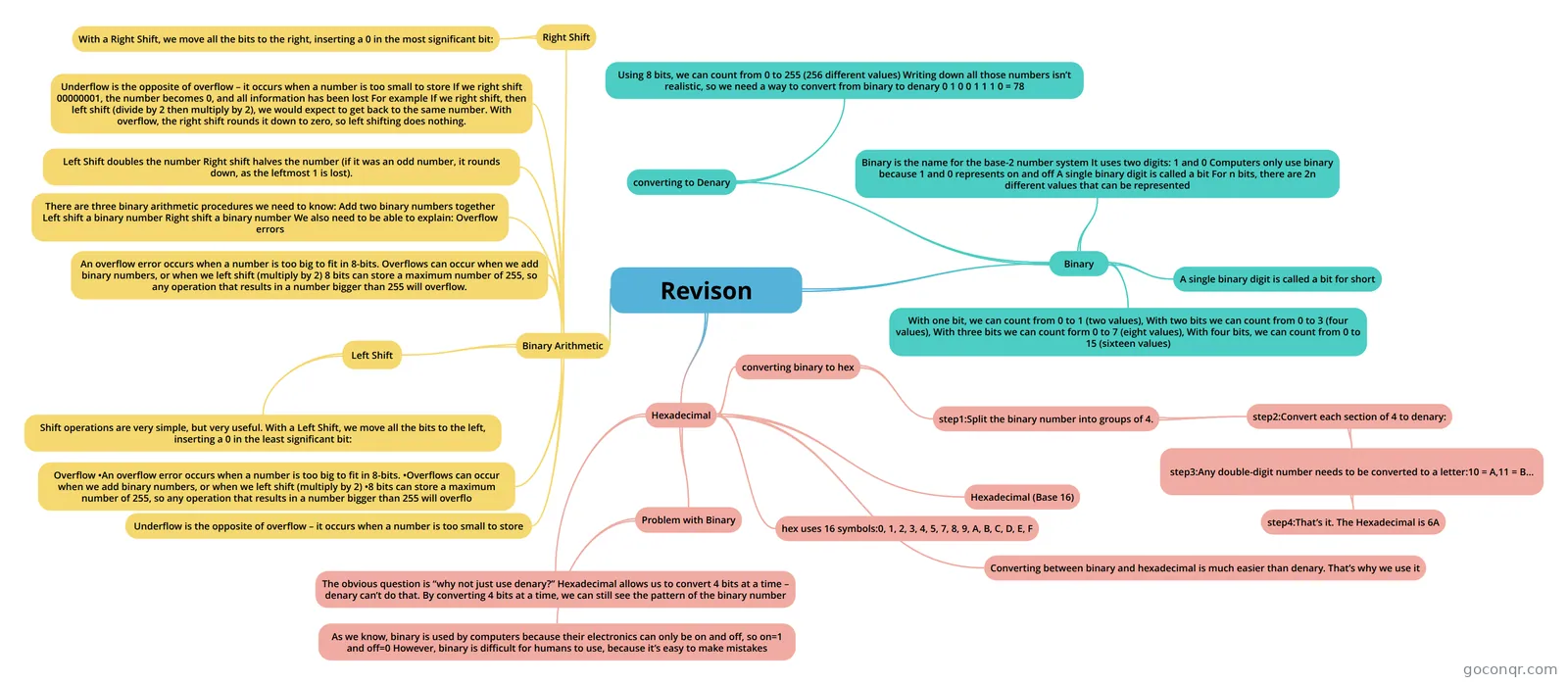
Mind map: binary revision
Contenido del mapa
Revison
Binary
- A single binary digit is called a bit for short
- With one bit, we can count from 0 to 1 (two values), With two bits we can count from 0 to 3 (four values), With three bits we can count form 0 to 7 (eight values), With four bits, we can count from 0 to 15 (sixteen values)
- Binary is the name for the base-2 number system It uses two digits: 1 and 0 Computers only use binary because 1 and 0 represents on and off A single binary digit is called a bit For n bits, there are 2n different values that can be represented
- converting to Denary
- Using 8 bits, we can count from 0 to 255 (256 different values) Writing down all those numbers isn’t realistic, so we need a way to convert from binary to denary 0 1 0 0 1 1 1 0 = 78
Hexadecimal
- Problem with Binary
- As we know, binary is used by computers because their electronics can only be on and off, so on=1 and off=0 However, binary is difficult for humans to use, because it’s easy to make mistakes
- Hexadecimal (Base 16)
- hex uses 16 symbols:0, 1, 2, 3, 4, 5, 7, 8, 9, A, B, C, D, E, F
- Converting between binary and hexadecimal is much easier than denary. That’s why we use it
- converting binary to hex
- step1:Split the binary number into groups of 4.
- step2:Convert each section of 4 to denary:
- step3:Any double-digit number needs to be converted to a letter:10 = A,11 = B…
- step4:That’s it. The Hexadecimal is 6A
- step3:Any double-digit number needs to be converted to a letter:10 = A,11 = B…
- step2:Convert each section of 4 to denary:
- step1:Split the binary number into groups of 4.
- The obvious question is “why not just use denary?” Hexadecimal allows us to convert 4 bits at a time – denary can’t do that. By converting 4 bits at a time, we can still see the pattern of the binary number
- Problem with Binary
Binary Arithmetic
- There are three binary arithmetic procedures we need to know: Add two binary numbers together Left shift a binary number Right shift a binary number We also need to be able to explain: Overflow errors
- Left Shift
- Shift operations are very simple, but very useful. With a Left Shift, we move all the bits to the left, inserting a 0 in the least significant bit:
- Right Shift
- With a Right Shift, we move all the bits to the right, inserting a 0 in the most significant bit:
- Left Shift doubles the number Right shift halves the number (if it was an odd number, it rounds down, as the leftmost 1 is lost).
- An overflow error occurs when a number is too big to fit in 8-bits. Overflows can occur when we add binary numbers, or when we left shift (multiply by 2) 8 bits can store a maximum number of 255, so any operation that results in a number bigger than 255 will overflow.
- Underflow is the opposite of overflow – it occurs when a number is too small to store If we right shift 00000001, the number becomes 0, and all information has been lost For example If we right shift, then left shift (divide by 2 then multiply by 2), we would expect to get back to the same number. With overflow, the right shift rounds it down to zero, so left shifting does nothing.
- Overflow •An overflow error occurs when a number is too big to fit in 8-bits. •Overflows can occur when we add binary numbers, or when we left shift (multiply by 2) •8 bits can store a maximum number of 255, so any operation that results in a number bigger than 255 will overflo
- Underflow is the opposite of overflow – it occurs when a number is too small to store
Información
- Descripción
- Mapa Mental sobre Revison, creado por Willow Munton el 04/10/2022.
- Creado por
- Willow Munton
- Visitas
- 0
- Valoración
Más sobre Binary, Decimal and Hexadecimal