
Test
SMART Notebook Assessment
Este test tiene tipos de pregunta que se abren en el reproductor de siempre.
Preguntas del test (2)
1Label the parts numbered 1 to 11
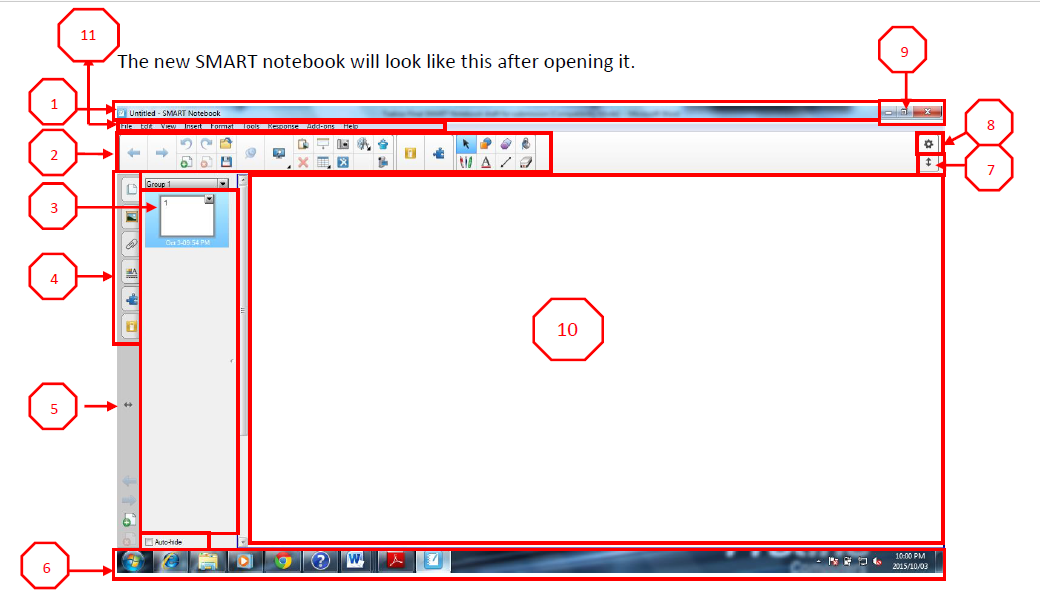
- ATitle bar
- BTool bar
- CThumb nail
- DSide tab
- ESide tab switch
- FTask bar
- GTool bar Switch
- HCustomize tool bar
- IMinimize button
- JPage viewer
- KMenu bar
2You can access additional tools on the floating tool by clicking the [blank_start]customize menu[blank_end] bar.
The [blank_start]menu[blank_end] bar allows the user to get the tools that are used in the software. An interactive whiteboard device can be a stand-alone [blank_start]computer[blank_end] or a large screen functioning as a [blank_start]touchpad[blank_end] for computers to use.
An on-screen [blank_start]keyboard[blank_end] can be invoked by a user to put in text on an interactive whiteboard.
An interactive board emulates both a [blank_start]mouse[blank_end] and a Keyboard.- Atouchpad
- Bkeyboard
- Cmouse
- Dcustomize menu
- Emenu
- Fcomputer
Información
- Descripción
- ICT Integration
- Autor
- Malebogo Shiburi
- Idioma
- English
- Visitas
- 98
- Etiquetas
- Valoración
- Aún sin valoraciones Valora este test