
Computing
Diapositivas del conjunto (11)
-
- binary is a system of two numbers (0 and 1)
- measured by the output voltage of a circuit to determine whether a component is on or off
- easier for computers to figure whether a component is on or off rather than measuring analogue value or property; this is why digital computing is faster
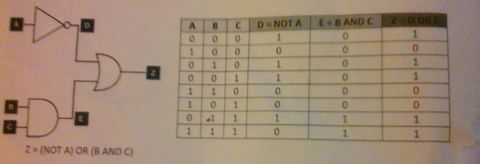
- Pie de imagen: I need to understand all 3 logic gates showcased in this photo and the truth table that showcases this
-
- Secondary Storage is additional storage for data and programs. It is needed so that data does not get deleted when a computer is turned off; this means it is permanent and can be altered
- Capacity - he amount of data that can be stored
- Portability - how easy a device is to carry around
- Reliability - likeliness to fail
- Durability - resistance to pressure, temperature or damage
- Speed - how fast the data can be read or written to the device
- Optical storage uses light from lasers to change the colour of the surface of the data area, which is read from and written to. e.g. CDs and DVDs
- Magnetic Storage consists of disks coated in a magnetic material and a read-write head that moves to read or write the data. e.g. Hard Drives, Floppy Disks, Zip Disks
- Solid State storage has slower access times than RAM, but faster than magnetic storage. It has no moving parts(durable) but constant writing of data can cause deterioration - eventually failure. e.g. USB flash drives, Memory Cards
-
- Input and output devices are vital for the user to interact with the computer system
- Input devices are used to enter data into the computer to be processed. e.g. microphone, webcam, scanner, etc.
- Output devices are used to display the result of processing data to the user. e.g. monitor(screen), projector, plotter, etc.
- Input and output devices for user with specific needs:
- Concept Keyboards - larger keys, further apart for people with limited mobility or vision
- Tracker Ball - upside down mouse so people with limited arm or hand movements can use flat of the hand
- Suck and Puff Switches - cursor controlled by inhaling or exhaling through a tube; people with no hand movement
- Eye Gaze Devices - users navigate and control computer with just eyes
- Braille Keyboards - allows visually impaired to enter data
- Screen Magnifiers - placed over screen to help V.I
- Screen Readers - convert text to speech and read out what is on screen to benefit V.I
- Braille Printers - can be used to output hard copies of documents in Braille format
-
- computers use the flow of electrons to represent information
- they are digital and do not measure voltage size but whether there is a voltage or not (true or false) so binary code represents data in a computer as it only has 2 digits
- Instructions from a programming language are converted into machine code as binary instructions.
- Machine code is a system of binary instructions carried out directly by the computer's CPU.
- These bit patterns consist of:
- Op-Code - sets the operation to be performed. Mnemonics represent op-codes, when written in assembly language e.g. Op-Code 011 stands for instruction ADD, 001 stands for LOAD, 010 stands for STORE
- Number Bit - tells the computer whether the operand is either a value or an address e.g. 1 stands for value, 0 means address
- Operand - contains either data or the address to be processed
- The CPU will always attempt to process the first three digits of a bit pattern as an OP-Code instruction; if this is given incorrectly an error will occur. The computer cannot distinguish between the instruction and data that it is given.
-
- Each character is given a numeric code, stored in binary. This allows the user to input characters into the computer i.e. via a keyboard, and view characters outputted by the computer i.e. on a monitor.
- Character set - a defined list of characters which are recognised by the computer system
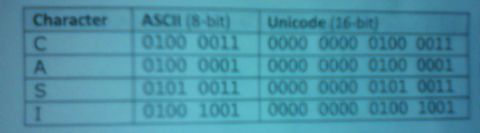
- In the ASCII character set, each specific character is given an 8-bit binary code. Therefore, only 256 characters can be represented in this system.
- In the Unicode character set, each specific character is given a 16-bit binary code - more characters can be represented using this system.
-
- ROM - needed to permanently store the programs and data to boot the system; computer wouldn't be able to turn on itself
- RAM - provides temporary storage for data and programs being used by the computer; allows CPU to retrieve them quickly when required whereas storing this on a secondary storage device would take longer to retrieve and slow down CPU's processing speed
- Virtual Memory - sections of the hard disk used to store items of the RAM which are not currently being used; allows more programs and data to be loaded when RAM is insufficient (has become full) but this is a lot slower
- Cache Memory - located between CPU and RAM and stores recently used data or likely to be used again; allows CPU to check cache memory first (faster) then main memory (slower)
- Flash memory - type of storage media device whose contents can be electrically erased or programmed. It is non-volatile, quick to read and write to and has no moving parts so requires little power; it is quite expensive, so used in smaller amounts
- Flash memory allows storage in a very small form, so has influenced the design of laptops, smart phones and MP3 players.
-
- The Central Processing Unit processes data using 3 main parts:
- Control Unit - controls the operation of the rest of the CPU by issuing control signals to other parts, instructing on what to perform next
- Arithmetic/Logic Unit - carries out mathematical and logical computations
- Registers - memory locations within the CPU that store data and instructions to be processed
- Instructions are fetched from memory to the CPU
- Decoder in the Control Unit works out what the instruction means
- Control Unit tells ALU to execute instruction and result stored in register
- Clock Speed is measured in Hertz and 1 Hz would mean 1 instruction is carried by the CPU per second. Increasing clock speed makes the CPU work faster but overclocking the computer (making it faster than the manufacturer specified) can result in the computer crashing or overheating
- Number of CPU Cores in the processor can be increased to work together on the same program or work on different programs at the same time
- Cache Size can be increased to make the computer run faster because more data can be stored locally, so accessed quicker from the CPU
-
- A translator is needed to convert high level programming languages into something understandable for a computer since they only understand binary
- Syntax Errors occur when the source code does not conform to the syntax of the programming language. e.g. spelling mistakes; missing brackets or quote marks, etc.
- Logic errors are mistakes in the source code of a program resulting in incorrect or unexpected behaviour; this type of runtime error may simply produce the wrong output or cause the program to crash whilst running
- Types of Code
- Translators
- IDE facilities
-
- The internet is a worldwide collection of computer networks. This is the software needed to collect to the internet:
- Modem - converts between digital sound produced by computer and analogue signals sent over telephone network; connects to your Internet Service Provider
- Router - allows many devices to communicate with each other and share resources i.e. internet connection
- Network Adaptor - enables your computer to connect a network - it may be built in like an Ethernet port on a PC or an add-on like a Wi-Fi dongle
- ___________________________________________________________________
- An IP address is a unique identifier for every computer accessing the internet. Static IP addresses do not change as they are required by users accessing the web. Whereas, dynamic IP addresses occasionally change, for example PCs.
- Domain names identify IP addresses; they are easier to remember than four 8-bit numbers. Domain Name Service translates domain names into corresponding IP addresses.
- Hyper Text Markup Language is used for the creation of webpages. It is a text file containing tags which indicate how the text and content of the web page should be displayed. It is important that web pages use HTML because it is an open accepted standard for all web browsers to interpret and display data correctly.
- ___________________________________________________________________
- By compressing, the size of the file that needs to be transmitted is reduced which decreases download time and internet traffic
- Lossy - when data is compressed the difference between the original is so small and unnoticeable e.g. Music Files(mp3)
- Lossless - when data is uncompressed it is restored completely to the original file; redundant data is removed so that it only contains it once e.g. Text Files
Información
- Descripción
- GCSE Computing Diapositivas sobre Computing, creado por Kwame Oteng-Adusei el 10/01/2016.
- Creado por
- Kwame Oteng-Adusei
- Visitas
- 292
- Valoración