
Flashcards
Untitled
Cards in this deck (27)
- 1What is Network? Series of computers and other devices that connect to share data. Eg. InternetDifference between Internet and
World Wide Web:
The Internet is an International Network of computers – a network of networks.
The World Wide Web is one use we get from that network and how we access the internet. - 2Local Area Network (LAN)Covers a small geographical area that's located in a single site.
-All hardware owned by organisation.
-LAN can be wired (Eg. Eternal) or wireless.
-Uses in: Schools, companies, etc.
-LAN connects various devices: PCs, Tablets, etc. - 3Wide Area Network (WAN) (Connects LANs)Covers a Large geographical area that connects 2 or more devices together.
-Lots of LANs are connected to a WAN.
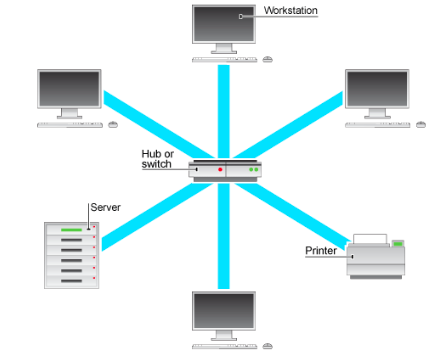
-Connected using telephone lines (Copper or Fibre optic).
-Internet is biggest WAN. - 4Personal Area Network (PAN)Connects devices from a short range for a single user.
-Eg. Smartphones, headphones, etc.
-Uses Wireless (Eg. Bluetooth) to connect devices~Strong signals.
-Don't require additional hardware, just devices. - 5Routers: Sends data packets on their way in best direction. Switch: Smart multi-plug adaptor that only sends packets to the intended recipient using destination MAC address.
- 6Network Computing: Benefits and DrawbacksBenefits:
-Sharing files is easier
-Share with multiple devices (Eg. Printer)
-Download Software on all computers at once
-Communicate across network cheaply & easily (Eg. email)
-User accounts stores centrally, can access anywhere
Drawbacks:
-Expensive to set up as extra hardware
-IF hacked can access all data
-IF one serve go down so will the rest
-Difficult to manage - 7Network Interface Card (NIC) is a piece of hardware inside device that allows access to network.Switches are used to connect devices on LAN, while Routers transmit data between different networks.
Mostly used to connect to Internet. - 8Wired NetworkDifferent cables to connect devices-choice depend on cost, bandwidth and transmit data.
-Fibre optic-transmit data as light- high
performance & expensive.
Don't interfere & transmit over very large
distances at high bandwidth without loss of
signal quality.
Copper Wires:
-CAT 5e & CAT 6~types of Ethernet cable-Contain pairs of copper wires which r twisted together to reduce interferences.
Cheaper & have decent bandwidth- common in homes and offices to connect to LAN.
-Coaxial cables made from single copper wires- surround by plastic layer of insulation &
metallic mesh- provides shielding from outside interferences.
Very cheap BUT low bandwidth. - 9Wireless Network (use Radio Waves to transmit data)-Local wireless are (WLANs) Wireless LANs ~ Wi-fi is specifically family of WLAN protocols.
-To set up W.N you need Wireless Access Point (WAP) device- a switch that allows to connect wirelessly.
-To connect you need Wireless Capability- usually built in~ otherwise use USB dongle. - 10Wireless: Benefits and DrawbacksBenefits:
-Move around~(Without wire)
-Cheaper as you don't need wires and better for environment.
-Easy to ass more users to a wireless network- don't need extra wires.
Drawbacks:
-Less secure- many other devices can access~hackers
-Interferences from different users/objects
-Limits to how far your distance is
-Lower Bandwidth and less reliable - 11Factors affecting network performance: Bandwidth-Amount of data that can be carried at a time. Connection Speed- Measured in Megabits per Second (Mbps)Latency-Time delay of transmitted data travelling from the sender to recipient.
Errors/collisions in network traffic- Lost.corrupt packets need to resent slows down performance. - 12Star Topology (All connected to centre/serve controls the network)Central switch allows many devices to access the server simultaneously. Star networks may be wired or wireless.
Pros:
-IF device fails/cable disconnect, all network is unaffected.
-Simple to add more devices using separate cables
-Better performances- dats goes straight to central decides so all can transmit data at same time.
-Very few date collisions.
Cons:
-Every device needs cables to connect to server-Expensive (Eg office building 50 needed)
-Switch itself is expensive piece of hardware.
-IF problem with server, it effects whole network.
-Maximum n. of connection to switch - 13Bus Topology (All devices connected to single cable)Two terminators places at each end to stop data relegating back along bus. Without it signals would interference.
Pros:
-unaffected if 1 device fails.
-Aren't depend on central switch working to keep whole network running.
-Cheap to set up, less wires needed & Hardware cheaper than switches both to buy and maintain.
Cons:
-Data collisions are more common, has to be resent slows network down.
-More devices leads to more collisions unsuitable for large network.
-IF bus cables breaks it splits network apart, since there is not terminators at both ends-shut network down.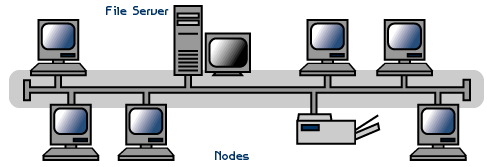
- 14Networks need Protocols to set rules.-Protocol is a set of rules for how devices communicate transmit data across a network.
-Cover communication between 2 devices on how they should start&end~how the data should be organised~what devices should do when they go missing.
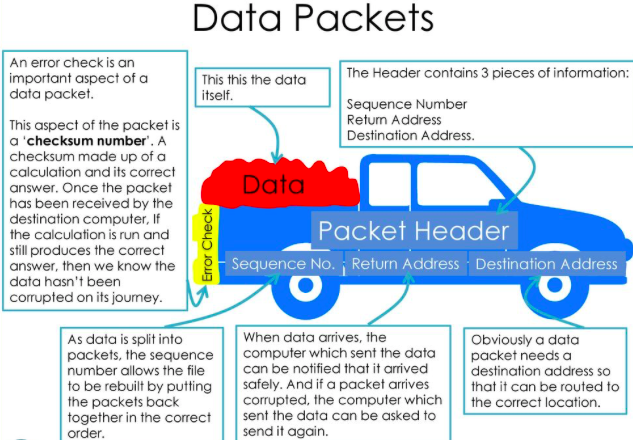
-Data sent between network r split in equal sizes packets~ each contain info. like destination & source addresses & a checksum. - 15Network protocols are divided into layers.-A layer is a group of protocols which have similar functions.
-Layers are self-contained-protocols in each layers do their job without affection other layers.
-Each layer server above it-hidden work needed for action on layer above.
Eg. When you send an email (Layer4)this triggers actions of (Layer3),which triggers actions of (Layer2), all the way down to (Layer1) - 16Layers of TCP/IPAdvantages of Layers:
-Breaks network communication into manageable pieces-Helps developer concentrate on important areas.
-As layers r self-contained, they can be changeable.
-Having set of rules for each layer forces companies to make compatible, universal hardware & software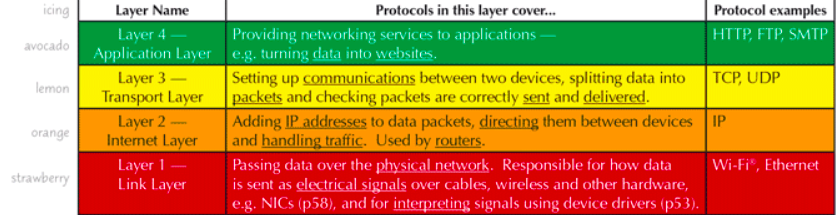
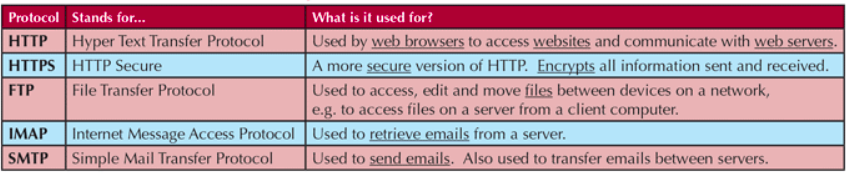
- 17Application layers. Responsible for files, emails and data transfer.
- 18Transport layer (TCP) and User Datagram Protocol (UDP) spilt data into Packets.
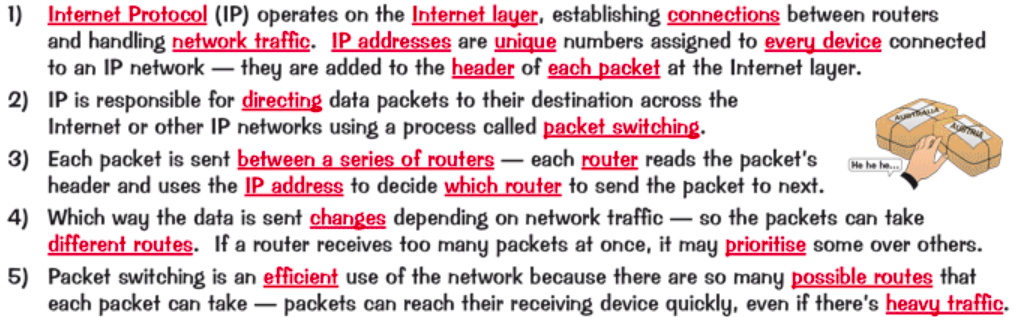
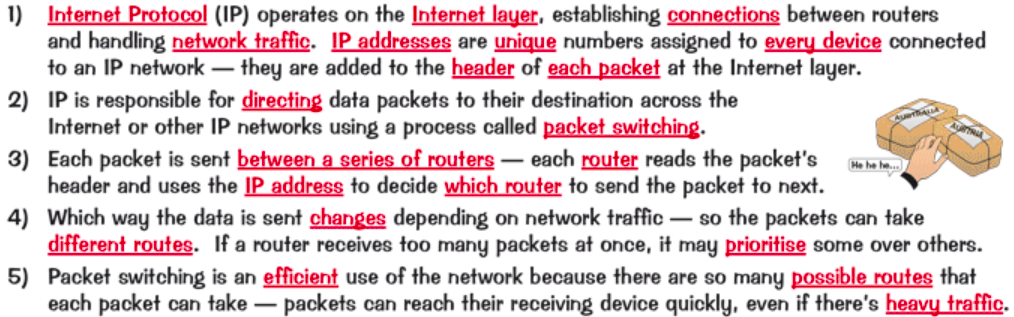
- 19IP is responsible for Packet Switching
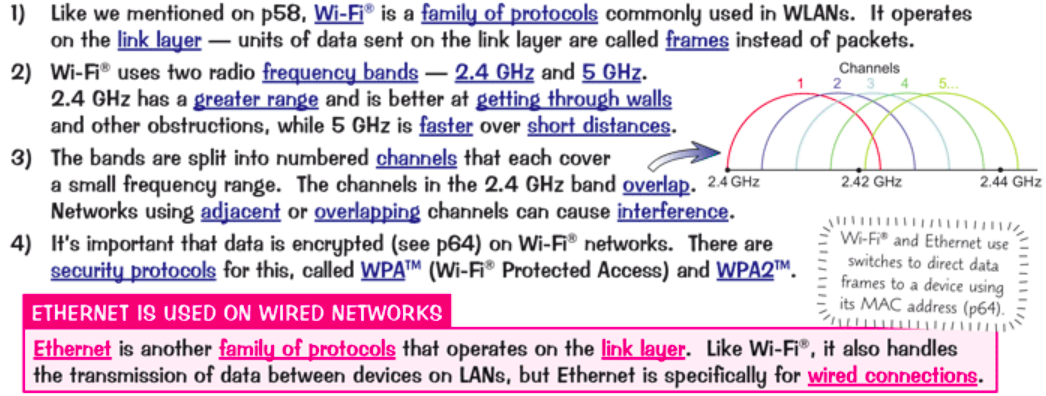
- 20Wi-fi is the Standard set of Protocols for Wireless LANs
- 21Network needs to be protected against Threats. Eg from hackers. Comply with data protection laws.Encryption is when data is translated into code which only someone with the correct key can access.
-Test in cipher text.
-Plain test= not been encrypted.
Is Essential for sending data over a network securely. - 22Anti-Malware software-Stop malware from damaging organisation's network. -Eg of A.M.S ~ Firewall- prevent unauthorised network.Automatic software updates used to fix any security holes in software~ outdated software can be easily exploited by hackers.
- 23User Access levels-Controls which parts of network different groups of users can access.MAC address filtering-way to make sure only people on network are trusted users. Checks unique identification (MAC address) 0f each device and lets trusted one access.
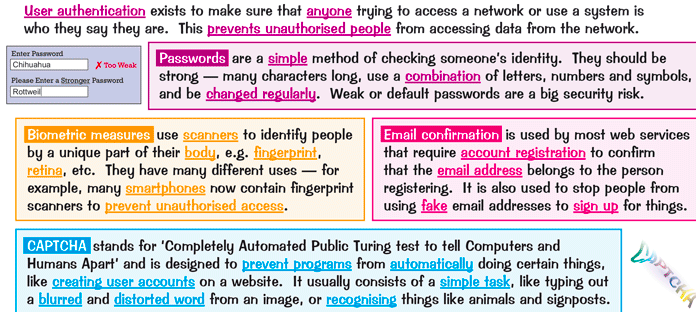
- 24Authentication confirms your identity
- 25Hypertext transfer protocol (HTTP) accessing & receiving web pages in form of HTML files on the Internet. HTTPS (secure protocol) encrypts the information so it cannot be hacked.POP- downloads entire message to local device & delete from server.
IMAP- will only download message header until message is opened & leave message on server. - 26Encryption terminology: Encryption:Process of converting plaintext into cipher text. Key:Sequence of n. used to encrypt or decrypt mathematical formula. Encryption algorithms: formula for encrypting the Plaintext.Encryption techniques:
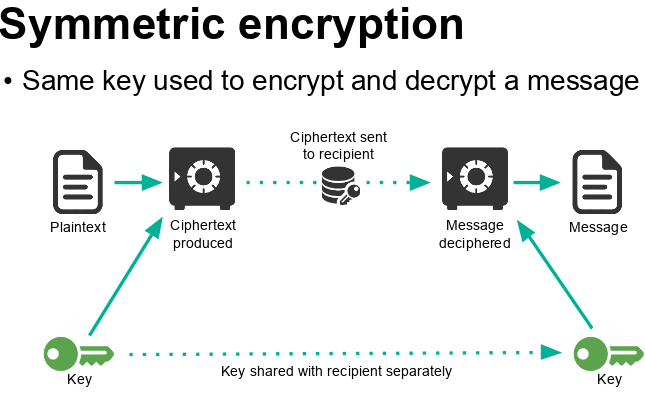
Private key (Symmetric encryption):
A single key is used to encrypt and decrypt a message & must be given to the recipient of your message to decrypt the data.
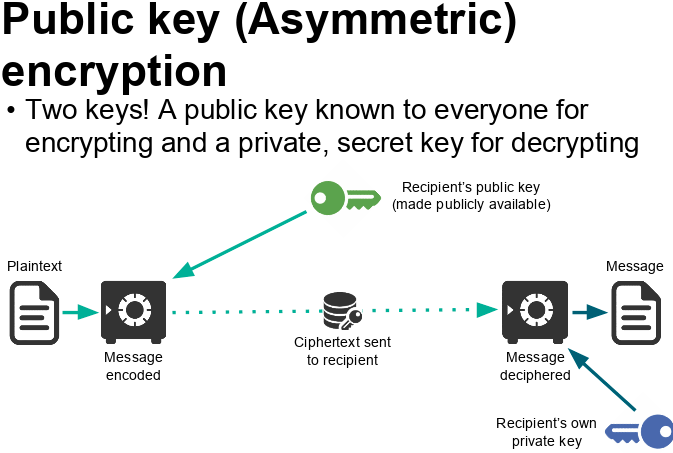
Public key (Asymmetric encryption):
Two keys are used - one to encrypt and the other to decrypt data.
This is more secure as it means that you never have to send or reveal your decryption key. - 27—
Information
- Description
- Flashcards on Untitled, created by Laiba A on 17/11/2018.
- Created by
- Laiba A
- Views
- 1
- Rating