
Flashcards
Access 2013
Cards in this deck (61)
- 14 Main Database ObjectsTables
Reports
Forms
Queries - 2True or False: Phone Numbers are added as number fieldsFalse
Non-calculated numbers are text fields - 3Name the four main tabsHome
Create
External Data
Database Tools - 4Access is used for these four data functionsStoring
Organizing
Retrieving
Reporting - 5What are the four main views in AccessDatasheet View
Design View
Pivot Tables
Pivot Charts - 6The two optional database objectsMacros
Modules - 7Tables are organized into.....Records
Fields - 8True or False Your data table fields should contain no spacesTrue Dat!
- 9What are the two main ways to create a table?Create > Table
Create > Table Design - 10What are the three main fields in Table Design?Field Name – remember, no spaces
Data Type – such as text, number
Description – optional, self-explanitory - 11What are three examples of Boolean data?Yes/No
True/False
On/Off - 12What is usually a good field for the primary key?Whatever field is auto-numbered.
- 13What is one thing to make sure of when using primary keys?No number gets reused
- 14Which shortcut button will open the Objects Pane?F11
- 15You can sort and filter tables. However, that is best done with this database object.A Query
- 16What is the best field to start with when designing a data table?The first field should be the ID#
This is good database design. - 17True or False It's good to enter a Notes field into your tables.True Dat!
- 18Which keyboard shortcut allows you to enter a check into a checkbox?Spacebar
- 19Which keyboard shortcut will open a Zoom Window for you to type your notes?Shift F2
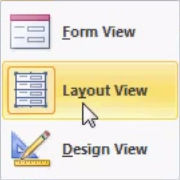
- 20What are the three Form Views?
- 21Name these four amigos....Datasheet View
Design View
Pivot Tables
Pivot Charts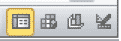
- 22Is it better to use the OLE or the Attachment field?The Attachment field is new since
Access 2007 and stores data files more efficiently than using other fields like the OLE Object field. - 23In which mode is it best to use a query?It is best to use a query in
design mode. - 24These database objects are like sorting and filtering that you can save.Queries
- 25What are the best commands to create a queary?Create > Query Wizard > Design Mode
- 26What are two ways to get a field into a query?1. Click and drag the fields from the table to the query sheet
2. Simply double-click to get the field to the query. - 27Which button do you click to run a query?Run!
- 28What actions would you take if you want to filter in a query?Drag that field into the query and type the Criteria that you want to filter by.
So, if it is by State you can type CA. - 29What do you select when you would like to make a Report?Choose the table or query that you want to use for your report; you will usually choose a table.
- 30What commands do you use to create a ReportCreate tab > Report
- 31What are the commands to create labels?Create tab > Labels
- 32When do you need to save in Access?Access saves records automatically.
The only time you have to save is where you make a change to the structure
of the database. - 33What keyboard shortcut can you use to designate a field and short text.?T
- 34How do you rearrange fields in a table?Click and drag
- 35Under which tab will you find relationships?Database Tools
- 36True or False You need to make sure all of the tables open before you create relationships.Not so much!
You need to make sure all of the tables are closed before you create relationships. - 37What are two ways that you can add tables to relationships map?Double-click the name of the table
or click and drag out into the
relationship map area - 38Why would you want to check Enforce Referential Integrity in the Edit Relationships box?Access won't allow you to make the relationship if the foreign keys don't match a record in the other tables.
In other words, it prevents orphan records. - 39What does checking Cascade Delete do?Cascade Delete will delete all related records when you delete the one part of the relation. For example, if you delete a customer, all their ordered will be deleted.
- 40What will checking Cascade Update do?Cascade Update will update the key field of the related records when you change the key on the one side.
- 41What is the most common kind of relationship that you will find in Access?One to many.
For instance one customer may have
many credit cards. - 42What does entering an input mask do?It ensures that text is entered a certain way like parentheses around
a phone number. - 43Where is input mask located?It is located in design view on the bottom half of the screen
- 44What does three little dots on the button mean?It means it is a build button it means you are going to build properties for it.
- 45What does the 9 indicate on an input mask?It indicates that it has to be a number but the number is optional.
- 46What does a 0 indicate an input mask?It indicates that it has to be a number and that the number is required.
- 47Which button would you click in the customize input mask wizard to create your own mask?[Edit List] button
- 48What would you do to have capital letters for each's state's name?You would use the >LL
- 49What does LL stand for?It stands for letters.
- 50How can you make your input easier if most of your customers are located in CA?You could set a default value?
- 51Where do you find the default value?Default value is found in design view table.
- 52What characters should go in front and in back of a default value?Quotation marks
- 53How would you rate the default value for CA?="CA"
- 54Where do you enter validation rules?Validation rules are entered at the bottom of the table in DesignView
- 55How would you write today's date or earlier and code?< = date ()
- 56Where could you enter the text that someone will see if they try to enter data that is not valid?You can enter it in the validation text in the field properties in DesignView
- 57What feel property will allow you to use a drop-down box to choose an answer?The Lookup field
- 58How many characters can you enter into a short text field?255 characters.
- 59What is the one field that keeps the database working properly?Primary Key field
- 60Queries: What symbol can you use for a wildcard in Criteria?*
- 61Queries: If you wanted to find someone who had a last name that started with H and it was four letters long, what would you type in the Criteria area?H???
Information
- Description
- Intermediate Access 2013 Flashcards on Access 2013, created by barbaradesign on 22/11/2014.
- Created by
- barbaradesign
- Views
- 11
- Rating