
Flashcards
Unit 2.6 - Data Representation
Cards in this deck (21)
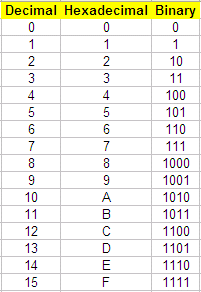
- 1Binary to DenaryAdd up all of the places where the 1's are
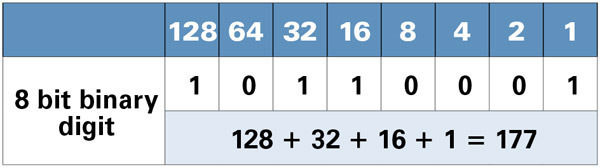
- 2Denary to BinarySee how many times the number goes into 128 and then how many times the remainder goes into each number. Odd numbers always end in a 1
- 3Binary to HexadecimalSplit in half into 2 nibbles and label the nibbles (from left to right) 8,4,2 and 1. Then add up the places where the 1's are. eg. 1010 would add up 8 and 2 which in Hex is A.
- 4Hexadecimal to BinaryTake the characters in the Hexadecimal and convert them into binary digits using 8,4,2,1
eg. A7 would be 1010 and 0111 so 10100111 - 5Denary to HexadecimalDivide the number by 16 then record the remainder
eg. 167/16 = 10(A) and the remainder is 7 so the answer is A7 - 6Hexadecimal to DenaryHex is Base 16 represented by
256, 16 and 1
eg. 4C would be
4 x 16 = 64 and
12(C)x 1 = 12
and 64 + 12 = 76 - 7Why use Hexadecimal?- Is shorter than binary
-Can be easily converted to and from binary as there is 1 hex digit per nibble
- Hex is less susceptible to error
-There's less for the programmer to remember - 8ASCII (American Standard Code for Information Interchange)-Allows the computer to produce characters
-Uses 7 bits of data - 9Extended ASCII-Uses 8 bits of data so can have more characters than ASCII
- 10UnicodeModern standard for representing characters in a computer; different variant that uses 2 bytes that give us 2^16 possibilities and can account for every language in the world
- 11Bitmap ImagesThe page is divided into an invisible grid and each pixel is assigned a colour and the quality of the images depends on the amount of pixels per square inch so takes up more room
- 12Vector ImagesRepresented using lines and shapes with specific properties such as line and fill colour; data about each shape is stored in binary.
Never gets blurred because it uses a set of mathematical instructions
-Draw a circle
-Radius 6 pixels
-Centre 10:10
- - 13Metadata(Data about data)
Describes structure of the data file
eg. type of file, data and time created, file size and geolocation - 14ResolutionThe level of detail in an image, measured in dots per inch (dpi)
/The number of pixels that are used - 15Sample Frequency-Number of audio samples captured every second
-Affects quality of a sound file - 16Sample Size/Bit Depth-Number of bits available for each sample
-Affects quality of an audio file - 17Bit RateNumber of bits used per second of audio
- 18Sample RateThe frequency at which the amplitude of sound is recorded
(measured in Hertz)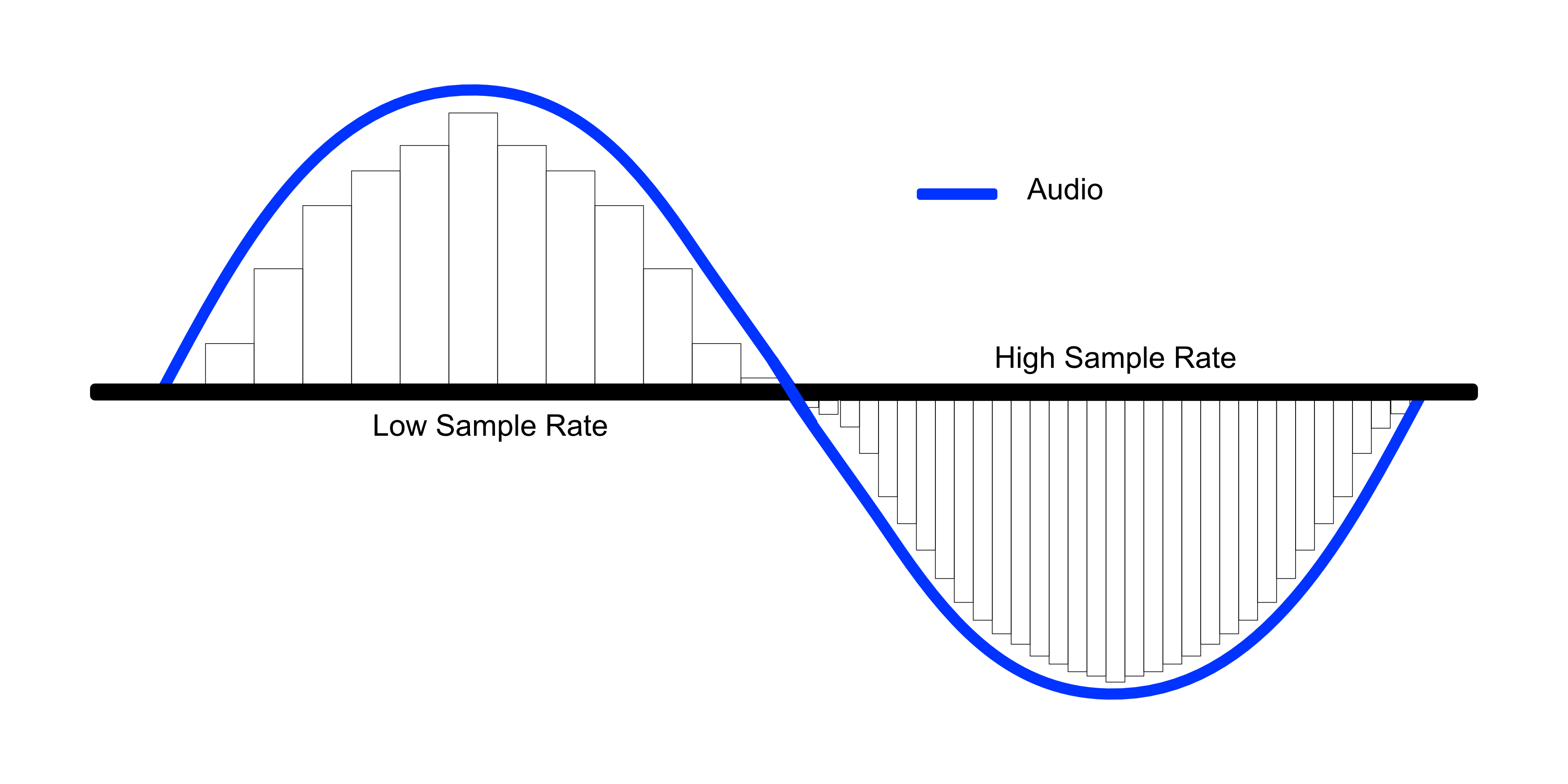
- 19CompressionThe re-encoding of data so that less bits are used to store it; usually done to increase speed of transmission:
Lossy - Loses some original data and can be used in video and audio data files but can be used to produce smaller data files.
(Cannot be used to text files because random characters will be removed)
Lossless- You do not lose any of the information and it's reversible so you can get the same quality back - 20Overflow (Error)When you cannot represent a number in the given amount of space eg. more bits are needed to represent a number
- 21Check DigitAn additional digit at the end of a string of numbers used to check for mistakes in transmission
eg. ISBNs are formed of 12 bits for the item number then the 13th digit is the check digit
Information
- Description
- Flashcards on Unit 2.6 - Data Representation, created by Karolina Rawdanowicz on 11/03/2019.
- Created by
- Karolina Rawdanowicz · Mar 2019
- Updated
- Mar 16, 2019
- Views
- 1
- Rating