
Flashcards
Digital technology, topic 1
Cards in this deck (15)
- 1Data - raw facts or figures that do not have meaning Example; 02041922 (could mean anything) Information - data that’s been processed, now has meaning Example; 2nd April 1922 (a date)Binary digit - a single digit in a binary number, and its either the digit 0 (zero) or the digit 1 (one).
> all data which a computer stores is made up of nothing but lots of bits.
> any group of bits together is called a binary number. A binary number is used as a code to represent some items of data we want to store. - 2Binary digit - a single digit in a binary number and is either the digit 0 (zero) or the digit 1 (one). > All the data a computer stores is made up of nothing but lots of bits. > a group of bits together is called a binary number. Binary number is used as a code to represent some item of data we want to store.Why do computers use binary?
ON - binary is used in all sorts of electronics. Eg- computers, calculators, digital tv decoder box, cell phone, burglar alarm, watch etc. Values are stored using binary in memory which basically is a bunch of electronic on/off switches
OFF - imagine if you had a bank of 8 switches. Each switch could represent 1 or 0 depending on wether it’s turned on or off. You think of a number and set the switches on or off to “store” the binary value of this number. If someone then looks at the switches they could “read” the number. - 3Inside a computer switches are implemented using transistors. The smallest memory configuration is the bit which can be implemented with one switch. If 8 switches are added together you get a byte. Modern computers have literally billions of transistors, which enable the computer to store lots of data as billions of binary digits.Data sizes -name have been given to binary numbers which contain a certain number of bits.
Example; four bits together are called a nibble
> the most important size of binary number is called a byte
Byte - a series of eight bits together.
> A byte is important because it is the smallest useful group of bits which can be used to store meaningful data.
Example; one byte can be used to store the codes for all the letters on a standard keyboard - 41024 bytes = 1 kilobyte 1024 kilobytes = 1 megabyte 1024 megabytes = 1 gigabyte 1024 gigabytes = 1 terabyteSmallest —> largest
bit
nibble
byte
kilobyte
megabyte
gigabyte
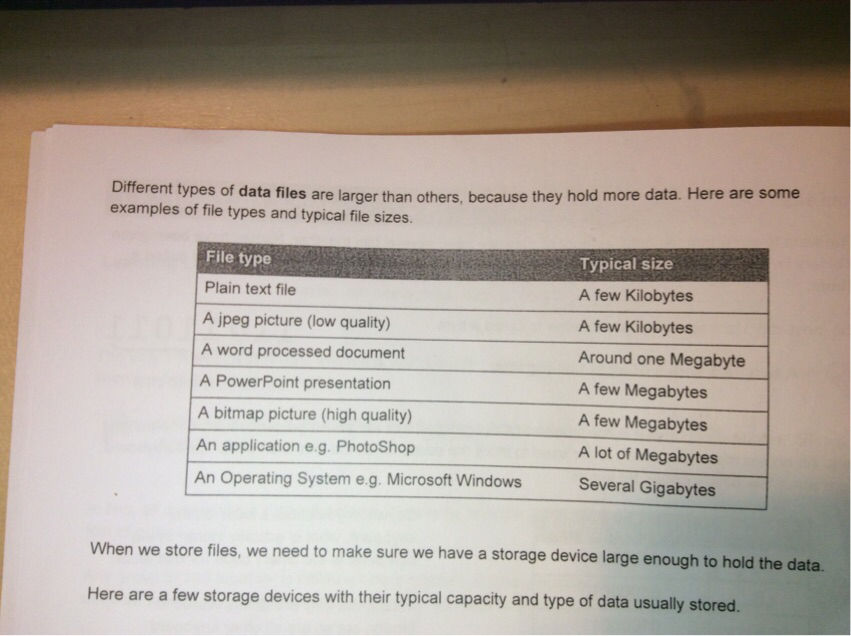
terabyte - 5When we store files we need to make sure we have a storage device large enough to hold the dataHere are a few storage devices with their typical capacity and type of data usually stored
- 6Data types - is a name given to the kind of data being stored > the basic data types are; string, character, integer, real, date/time, and Boolean Character :- single letter, digit, or symbol :- a, £, 8, +, =,: String :- series of characters together :- 12 Main Street, Dromore Integer :- positive or negative whole number :- 87,-34, 0 Real :- positive or negative decimal number :- 23.54, -45.0, 0.0 Date/time :- date/time in different formats :- 23/7/17, 23rd July Boolean :- data which only has 2 possible values :- 1/0, yes/no The meaning of data depends on its data typePixel - a single dot of an image, and is the smallest element that can be displayed
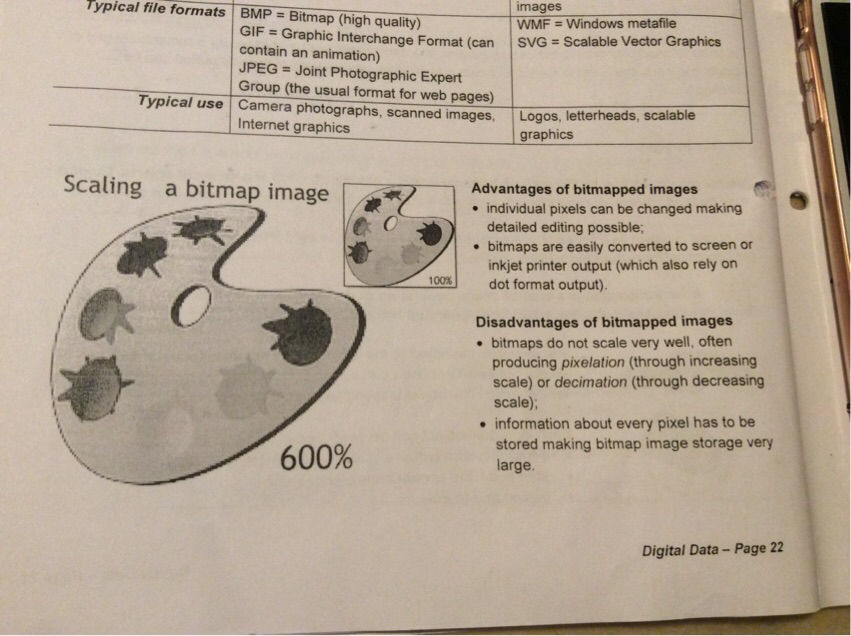
> if you are able to see individual pixels in an image we say it’s pixelated. This usually happens when you stretch or enlarge the image.
Colour depth - colour depth is the number of binary digits used to code the colour of a single pixel - 7Resolution is the name given to the clarity of text or graphics as they appear on a screen or printed on paper. On a computer screen there are 2 way of measuring the resolution; 1. By stating the total number of pixels horizontally and the total number of pixels vertically (e.g. 1024 x 768) 2. By stating the number of pixels in each inch of screen (e.g. 90ppi) Resolution - a measure of the quality of the image displayed and (on a screen) is calculated as the number of pixels per inch (ppi)Printer resolution
An image printed on a paper also has varying levels of quality, or resolution.
However, paper doesn’t have pixels.
Rather, the image is printed on paper as a series of dots of ink.
Therefore, we measure image resolution on paper as dots per inch (dpi). The more dots per inch there are, the higher the quality of the printed image will be. - 8Bitmap image - a type of image file where the graphic is stored as a grid of coloured pixels. When you save a bitmap image, you need to store: 1. The width and height of the image in pixels 2. The colour depth 3. A colour palette (list of colours used in the image) 4. The colour of each pixel in the imageVector graphics - a type of image consisting of mathematical objects such as lines,curves and polygons which are generated by computer software.
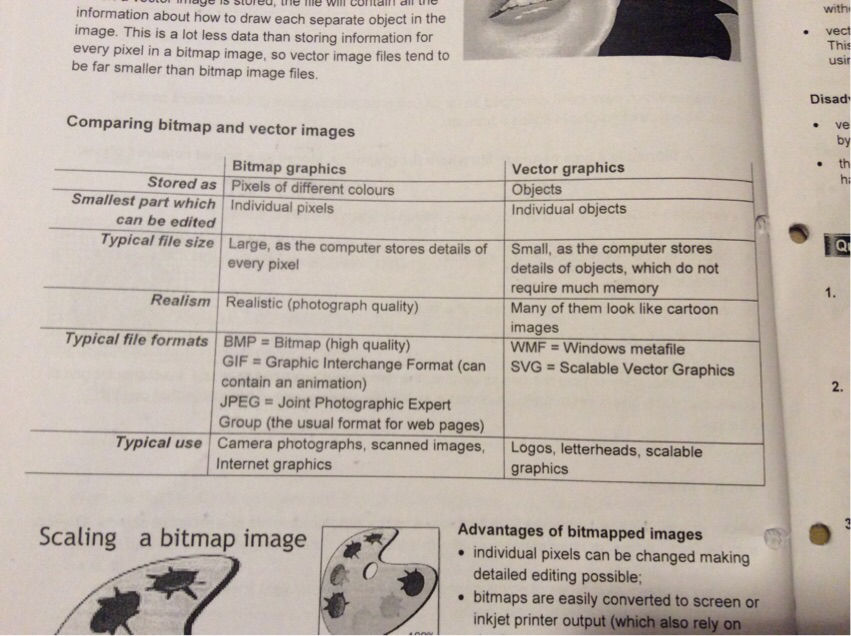
Vector images are very different from bitmap. A vector graphic consists of a series of objects. Objects may be line, curves, or other shapes, each with editable attributes such as colour, fill and outline. - 9Comparing vector and bitmap images <—Advantages and disadvantages of bit append images <—
- 10Advantages and disadvantages of vector images <—Streaming - video streaming is watching video over a network connection in real-time.
Buffering - a buffer is a temporary storage are for video data before it is displayed in the screen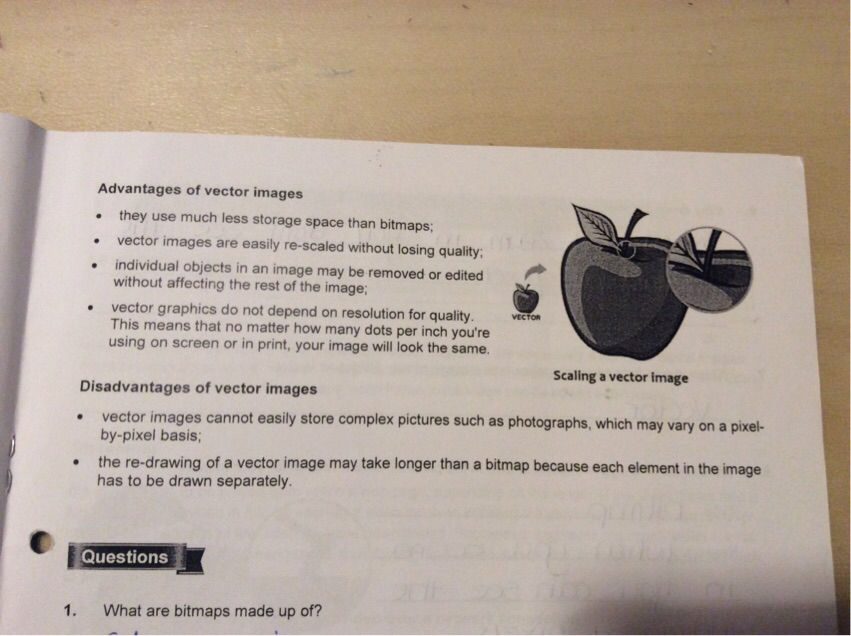
- 11Advantages and disadvantages of streaming <—Sound is heard when the vibrations in the air reach the human ear. To hear sound from a computer or another digital device, a computer speaker will vibrate a structure within the speakers in order to push sir vibrations towards an audience.
In order to record sound into a computer, these air vibrations are captured, usually using a microphone.
The sound waves that your mouth produces when you speak are analogue - the sound waves vary in a smooth way.
An analogue signal is one which has a value that varies smoothly.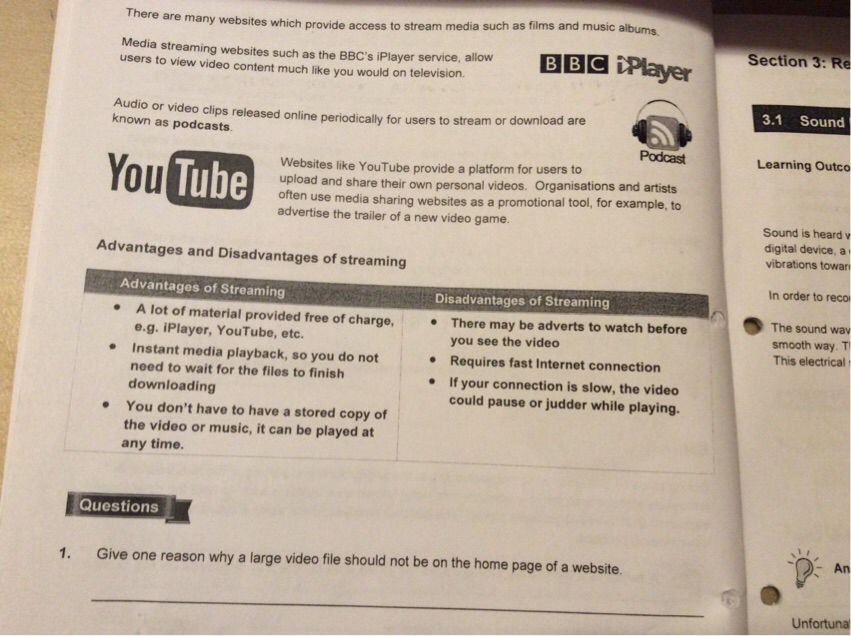
- 12Unfortunately the computer cannot process analogue signals. A computer can only work with digital signals which are binary 1’s and 0’s. The collected analogue signals need to turned into digital (binary) before the processing takes place This is done using a device called a ADC (analogue to digital converter)analogue to digital converter - ADC is a device which converts analogue signals into digital signals for processing by a computer.
Sample rate - is how many samples, or measurements, of sound are taken each second. - 13Enter text here...Bit depth - is the number of binary digits that is used to store a sample value
By increasing the bit depth, this can Increase the quality of the digital sound. This is because the samples taken can more precisely measure the exact value of A for every sample.
Bit rate - is the number of bits required to store 1 second of sound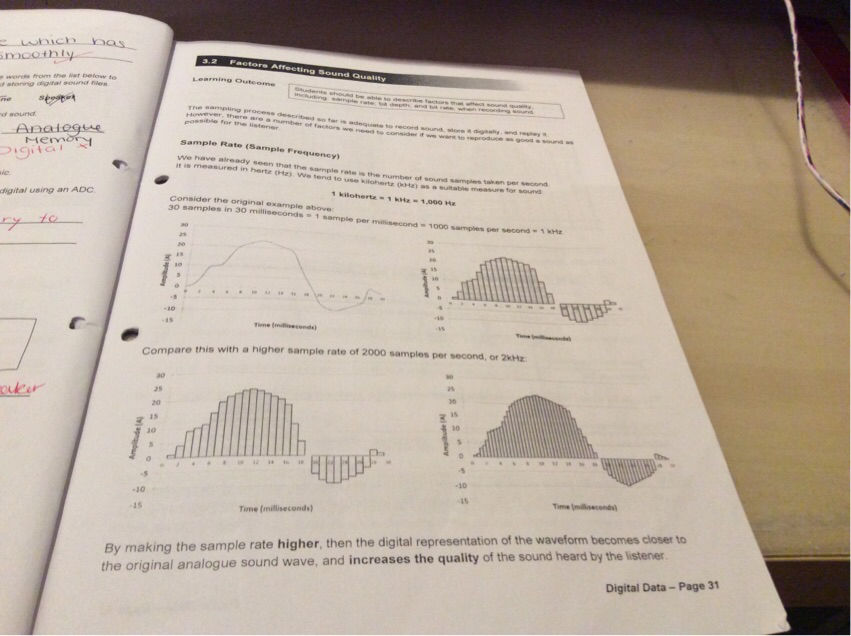
- 14The unit of measurements is bits per second (bps) or kilobits per second (kbps) Bit rate is a straightforward calculation; bit rate = bit depth x sample rate Since a high bit rate indicates that either the bit depth is high or the sample rate is high, a high but depth indicates a high quality sound as a lot of computer memory ends up being devoted to storing the original analogue wave as accurately as possible, either through very regular measurements of its amplitude (A) or through very accurate measurements of the precise value of A or indeed both simultaneouslyData compression - the method of making files smaller by reducing the number of bits (1’s and 0’s) used to store the information.
Compressing data has the following benefits:
1. It can save storage capacity
2. Speed file transfer time
3. Consume less network bandwidth
4. Decrease the costs of storage hardware - 15Lossless and lost compression - compressing data can be a lossless or lossy process - lossless compression enables the restoration of a file to its original state, without the loss of a single bit of data, when the file is uncompressed - lossy compression permanently eliminates bits of data that are redundant, unimportant or imperceptible.Reasons for compressing data
Information
- Description
- Flashcards on Digital technology. 1.1, created by Katie Serplus on 08/05/2019.
- Created by
- Katie Serplus
- Views
- 9
- Rating