
Flashcards
ICT Topic 1 - Networks
Cards in this deck (20)
- 16 Factors that influence the choice of a network.1 - Cost of a network
2 - Size of organisation
3 - How the system will be used
4 - Existing systems
5 - Performance required
6 - Security issues - 21. Costs assosiated with a network- Staffing Costs e.g. Network Manager
- Hardware Costs (cabling, file server, router etc.)
- Software costs (network operating system. network management software)
- Cost of third party (BT, Virgin etc.)
- Training Costs - 32. Size of organisation- Small organisation - Small LAN
Large Organisation (multinational etc.) - Large WAN
Distance effects communication media used and therefore cost;
- Short distance; wireless or cable.
- Large distance; Telecommunication and expensive satellite.
- Security may need to be enhanced for WAN's especially. - 43. How the network will be usedExample 1- retail store would have a LAN in every store, which is interconnected with a private WAN. Each store can preform local processing, and head office can access data.
Example 2 - Need access to wide range of applications, or store large number of files. File server will therefore need large disk drive.
Example 3 - Use batch processing, process lots of items. Batch processing uses a lot of processing power so best done overnight, or network may be slowed down in working hours. - 54. Existing Systems- Networks often extended - added into existing networks. Needs to be compatible with existing network.
needs to consider:
- Communications media used
- Geographical location
- Network Operating system used
- Training of staff (minimal, due to existing system)
advantage - cost kept down because existing system is used. - 65. Performance RequiredDifferent organisations have a different performance criteria.
Performance measured in 4 ways:
- Speed
- Reliability
- Costs
- Usability - 76. Security IssuesDependent on organisation:
e.g School or college preventing students from accessing certain sites.
e.g. Business to ensure secure payments, and to block outsiders accessing their systems and financial details of customers.
- Must prevent unauthorized access (data protection act)
Also need to take measures to prevent:
- Users copying copyrighted materials
- Sending offensive e-mails - 86. Security Issues Continued- Access to illicit material
- whether users are free to use unlimited words in search engine
- Blocking of downloading copyright material
- Problems when users connect wirelessly
- Restricted staff access to certain files
- The need to avoid viruses
- How hackers can be kept out - 9Network TypesThere are two network types:
1. Peer to Peer (P2P)
A small network where each computer has the same status, processing local on a single PC, resources are shared.
2. Client Server
Preferred choice of large networks. All computers are not the same status. Usually a more powerful computer is used as the central computer. - 10Advantages of a P2P- Cost saving - no server needed
- No network manager - all users take responsibility for the network
- Easy to set up (simplest)
- No reliance on server - no need to worry about it breaking down
- Operating costs lower- fewer set u and maintenance costs
- Peer responsibility - a user decided what resources other users can use on their computer. - 11Disadvantages of P2P- Poorer security as resources are shared
- Users need more IT knowledge - responsible for files on their computer
- Backups decentralized and have to be p-preformed on each individual PC. Users therefore responsible and might not carry out this task.
- Some computers may run slowly, especially the computer with the resources everyone wants to access.
- Difficult to find files as not held centrally
- Only suitable for small networks. (less than 15 networked computers) - 12Advantages of a client server- Security is better due to it being a centralized server
- Server is central backing store of all data
- Backup of data and software is centralized, backups taken by network manager therefore loss of data and software is unlikely
- Communication is centralized through the server. Whole network runs faster and access to files and programs is fast.
- Administration of network performed centrally so users don't have to worry about usernames and passwords etc. - 13Disadvantages of a client server- More expensive than P2P as servers are expensive
- Requires specialist knowledge to operate. (need a good network manager)
- All users reliant on server, network is unsuitable if the server breaks down until it can be repaired.
- Software is sophisticated and expensive, particularly network operating systems. For larger client server, network management software may be needed. - 14LAN Topologies-Star
-Ring
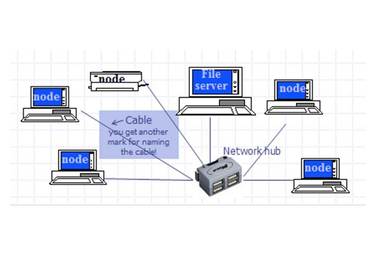
-Bus - 15Star Topology- Based around traditional centralised server.
-Includes hub, switch or router - 16Advantages of Star Topology- Easy to add / remove devices
- Fault-tolerant - failure of cable or node should not cause problems for rest of network
- Load-tolerant - Data transmission rates are consistent on each link as each node has its own path to the hub - 17Disadvantages of Star Network-Higher cost as it usually requires large amount of cable, making it a more expensive topology
-Dependence on the central hub, switch or router may be central point of failure - if the device at the center of the network fails, then the whole network will fail - 18Bus Topology (Ethernet)- The bus topology is based on a single shared cable, known as the backbone, to which nodes are connected
-Data can be sent in both directions to / from the server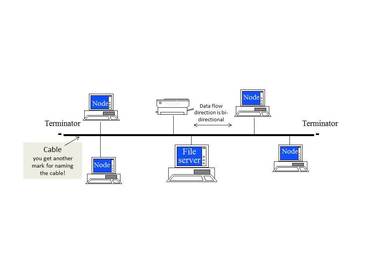
- 19Advantages of a bus topology- Easy to add / remove devices without disrupting network
- Failure of node / device should not cause problems for rest of network
- Cost-effective because of the small amount of cable needed
- Simple cable runs make it relatively easy to set up - 20Disadvantage of bus topology- Performance degrades under heavy loads (12 or more nodes)
- A break in the backbone cable can be difficult to isolate, and will have an affect on the whole network
Information
- Description
- Flashcards on ICT Topic 1 - Networks, created by jackpomfret on 14/01/2015.
- Created by
- jackpomfret · Jan 2015
- Updated
- Feb 19, 2016
- Views
- 2
- Rating