
Flashcards
CS 111
Cards in this deck (188)
- 1Input Integernum = int(input())
- 2Does print() function skip lines?Yes
- 3Is python case sensitive?Yes
- 4How does a computer program execute instructions?One line at a time.
- 5Basic instruction types:1)Input: A program gets data.
2)Process: A computer performs computation on that data
3)Output: A program puts that data somewhere - 6What is Computer Science?Computer Science is a study of Computation involving - programs, algorithms and processes. It enables the use of algorithms to manipulate, store, and communicate digital information.
- 7Pioneer's of CS? with year.1967 - Allen Newell, Alan Perlis, Herb Simon.
- 8Violating contract?In some jurisdictions, violating this
contractual provision can open you to
criminal liability under the Computer Fraud
and Abuse Act. - 9What is computational thinking?creating a sequence of instructions to solve a problem
- 10Algorithm?A sequence of instructions that solves a problem is called an algorithm.
- 11Python interpreterThe Python interpreter is a computer program that executes code written in the Python programming language
- 12interactive interpreterAn interactive interpreter is a program that allows the user to execute one line of code at a time.
- 13Code ? A line ?Code is a common word for the textual representation of a program (and hence programming is also called coding). A line is a row of text.
- 14Prompt?The interactive interpreter displays a prompt (">>>") that indicates the interpreter is ready to accept code.
- 15CodeThe text that represents a computer program.
- 16InterpreterA program that executes computer code.
- 17PromptInforms the programmer that the interpreter is ready to accept commands.
- 18LineA row of text.
- 19StatementA statement is a program instruction
- 20Expression?Expressions are code that return a value when evaluated
- 21AssignmentA new variable is created by performing an assignment using the = symbol, such as salary = wage * hours * weeks, which creates a new variable called salary.
- 22PrintThe print() function displays variables or expression values.
- 23Comment?'#' characters denote comments, which are optional but can be used to explain portions of code to a human reader.
- 24If you want to output " His salary is $ 90k" 90k is an inputprint("His salary is $", sal)
- 25assign string with inputx= input()
NOT - input(x) - 26purpose of variables?Stored values for later use. Variables are used to refer to values saved in memory by the interpreter.
- 27Interactive interpreter mostly used for?The interactive interpreter is generally used for small tasks or experimentation.
- 28subpoenaA subpoena is a written order to compel an individual to give testimony on a particular subject, often before a court, but sometimes in other proceedings (such as a Congressional inquiry). Failure to comply with such an order to appear may be punishable as contempt.
The rules controlling subpoenas in Federal matters are found in Rule 17 of the Federal Rules of Criminal Procedure and Rule 45 of the Federal Rules of Civil Procedure.
A subpoena can be more formally referred to as a subpoena ad testificandum, a subpoena to testify. - 294th Amendmentgovernment wants to search for your key
- 305th AmendmentThey know you have it
- 31define functiondef triple(x):
return 3*x - 32Dogstrings and comments3 double quotations and #
- 335th Amendment tradeoffAdequate enforcement of laws requires adequate
information about wrong doing.
n So: we need to balance the value of privacy against
the needs of law enforcement. - 345th Amendment 3 basics(1) “I am being asked to testify.”
q (2) “I am being compelled to do so.”
q (3) “The testimony could incriminate me.” - 35consolearea for experimenting python language
- 36power operator in python5**2 = 25
- 37BackdoorSecret way into a computer or software that was left behind by the software developers.
- 38what year US restricted the export of encryption technologies to weak encryptions? what year was it lifted?1990's and 2000.
- 39how many crypto wars?3 :
cold war to 2000(restriction of strong encryption)
post 9/11 to ? (FBI demands backdoor)
2019 to ? (Attorney General Barr's demands renewed backdoor)
NSA counters encryption activities - by 2010 NSA developed groundbreaking capabilities against encrypted internet traffic. - 40encode vs interpreterconvert (information or an instruction) into a particular form.
In computer science, an interpreter is a computer program that directly executes instructions written in a programming or scripting language, without requiring them previously to have been compiled into a machine language program. - 418 bit = ? byte1
- 421 kB = ? bytes 1 MB = ? bytes 1 GB = ? bytes 1 TB = ? bytes10^3
10^6
10^9
10^12 - 43Sept.2019 unit per $ rate$17.50 per TB
- 44What is a computerA device that executes a stored program
(sequence of instructions). - 453 components of a computer1) Memory - Primary: RAM memory Secondary: hard drive
2) CPU - Control–fetch next instruction, decode it, execute it
Arithmetic Logic Unit–perform simple operations on data
3)INPUT/OUTPUT - 46perceived speed today depends on?RAM
- 47Moore's lawGordon Moore, one of founders
of Intel, made claim that (essentially)
computer power doubles for the same
dollar every 18 months.
n This has held true for over 40 years.
q (Note: some think the end is finally near.) - 48NSF stands for?National Science Foundation
- 49adding 2 strings > "Lily" + "Bloom""LilyBloom"
- 50Data Types with examples1) String - "lalala"
2) Integer(whole no.) - 3, 4, 5, etc.
3) Decimal number (float) - 3.14159
4) Boolean (true/false) - true/false - 51Does string data always have quotation marks?Yes
- 52how to assign?=
- 53Text enclosed in quotes known as?Text enclosed in quotes is known as a string literal. Text in string literals may have letters, numbers, spaces, or symbols like @ or #.
- 54next line after consecutive print() statements called?Each print statement will output on a new line. A new output line starts after each print statement, called a newline. A print statement's default behavior is to automatically end with a newline.
- 55how to not skip a line?using print('Hello', end=' '), specifying end=' ', keeps the next print's output on the same line separated by a single space. Any space, tab, or newline is called whitespace.
- 56outputting stored variablesThe value of a variable can be printed out via: print(variable_name) (without quotes).
- 57Outputting multiple items with one statementseparate by commas
- 58Newline characters REMEMBER ---> \ not /Output can be moved to the next line by printing \n, known as a newline character. Ex: print ('1\n2\n3') prints "1" on the first line, "2" on the second line, and "3" on the third line of output. \n consists of two characters, \ and n, but together are considered by the Python interpreter as a single character.
- 59during input for strings vs integersfor string : input() no different from input("")
anything in between - input without quotations else quotations also printed
for numbers: int(input()) needs to be used - 60hourly_wage = int(input('Enter hourly wage: '))Enter hourly wage: xxxx
- 61Syntax errorsyntax error, is to violate a programming language's rules on how symbols can be combined to create a program.
- 62Runtime Errorruntime error, wherein a program's syntax is correct but the program attempts an impossible operation, such as dividing by zero or multiplying strings together (like 'Hello' * 'ABC').
A runtime error halts the execution of the program. Abrupt and unintended termination of a program is often called a crash of the program. - 63SyntaxErrorThe program contains invalid code that cannot be understood.
- 64IndentationErrorIndentationError The lines of the program are not properly indented.
- 65ValueErrorAn invalid value is used – can occur if giving letters to int().
- 66NameErrorThe program tries to use a variable that does not exist.
- 67Type ErrorAn operation uses incorrect types – can occur if adding an integer to a string.
- 68LogicErrorA logic error is often called a bug. No mistake in program but the logic behind it. e.g. want to find power of 2 of input - algorithm written as x*2 instead of x**2
- 69CS111 IDE?Anaconda-Navigator - which has several IDE including Spyder IDE
- 70IDE stands forCode development is usually done with an integrated development environment(IDE)
- 71Circuit infocircuits called processors were created to process (aka execute) a list of desired calculations, each calculation called an instruction.
- 72Memory?A memory is a circuit that can store 0s and 1s in each of a series of thousands of addressed locations,
- 73Sample processor instructionsAdd X, #num, Y-Adds data in memory location X to the number num, storing result in location Y
Sub X, #num, Y-Subtracts num from data in location X, storing result in location Y
Mul X, #num, Y-Multiplies data in location X by num, storing result in location Y
Div X, #num, Y-Divides data in location X by num, storing result in location Y
Jmp Z-Tells the processor that the next instruction to execute is in memory location Z - 74other names for programThe programmer-created sequence of instructions is called a program, application, or just app.
- 75programming back in ? - machine languageIn the 1940s, programmers originally wrote each instruction using 0s and 1s, such as "001 1100001 001001 1100010". Instructions represented as 0s and 1s are known as machine instructions, and a sequence of machine instructions together form an executable program (sometimes just called an executable).
- 76machine language to easier lang?programmers soon created programs called assemblers to automatically translate human readable instructions, such as "Mul 97, #9, 98", known as assembly language instructions, into machine instructions. The assembler program thus helped programmers write more complex programs.
- 77closer to human lang in ?In the 1960s and 1970s, programmers created high-level languages to support programming using formulas or algorithms, so a programmer could write a formula like F = (9 /5 ) * C + 32. Early high-level languages included FORTRAN (for "Formula Translator") or ALGOL (for "Algorithmic Language"), which were more closely related to how humans thought than were machine or assembly instructions.
- 78what and why compilers?To support high-level languages, programmers created compilers, which are programs that automatically translate high-level language programs into executable programs.
- 79another word for input/output devicesI/O devices are commonly called peripherals.
- 80non-volatile disksmaintain their contents even when powered off.
- 81RAMMemory: RAM (random-access memory) temporarily holds data read from storage and is designed such that any address can be accessed much faster than disk, in just a few clock ticks (see below) rather than hundreds of ticks. The "random access" term comes from being able to access any memory location quickly and in arbitrary order, without having to spin a disk to get a proper location under a head. RAM is costlier per bit than disk, due to RAM's higher speed. RAM chips typically appear on a printed circuit board along with a processor chip. RAM is volatile, losing its contents when powered off. Memory size is typically listed in bits, or in bytes where a byte is 8 bits. Common sizes involve megabytes (million bytes), gigabytes (billion bytes), or terabytes (trillion bytes).
- 82ProcessorProcessor: The processor runs the computer's programs, reading and executing instructions from memory, performing operations, and reading/writing data from/to memory. When powered on, the processor starts executing the program whose first instruction is (typically) at memory location 0. That program is commonly called the BIOS (basic input/output system), which sets up the computer's basic peripherals. The processor then begins executing a program called an operating system (OS). The operating system allows a user to run other programs and interfaces with the many other peripherals. Processors are also called CPUs (central processing unit) or microprocessors (a term introduced when processors began fitting on a single chip, the "micro" suggesting small). Because speed is so important, a processor may contain a small amount of RAM on its own chip, called cache memory, accessible in one clock tick rather than several, for maintaining a copy of the most-used instructions/data.
- 83ClockClock: A processor's instructions execute at a rate governed by the processor's clock, which ticks at a specific frequency. Processors have clocks that tick at rates such as 1 MHz (1 million ticks/second) for an inexpensive processor ($1) like those found in a microwave oven or washing machine, to 1 GHz (1 billion ticks/second) for costlier ($10-$100) processors like those found in mobile phones and desktop computers. Executing about 1 instruction per clock tick, processors thus execute millions or billions of instructions per second.
- 84switches now called? When were they installed on microchips and what were they called?After computers were first invented and occupied entire rooms, engineers created smaller switches called transistors, which in 1958 were integrated onto a single chip called an integrated circuit or IC.
- 85More on Moore's lawEngineers continued to find ways to make smaller transistors, leading to what is known as Moore's Law: The doubling of IC capacity roughly every 18 months, which continues today.1 By 1971, Intel produced the first single-IC processor named the 4004, called a microprocessor ("micro" suggesting small), having 2300 transistors. New more-powerful microprocessors appeared every few years, and by 2012, a single IC had several billion transistors containing multiple processors (each called a core).
- 86RAMVolatile storage with faster access usually located off processor chip.A common way to make a PC faster is to add more RAM. Moore's Law results in RAM being cheaper a few years after buying a PC, so adding RAM to a several-year-old PC can yield good speedups for little cost.
- 87OSManages programs and interfaces with peripherals.
- 88ScriptAs computing evolved throughout the 1960s and 1970s, programmers began creating scripting languages to execute programs without the need for compilation. A script is a program whose instructions are executed by another program called an interpreter. Interpreted execution is slower due to requiring multiple interpreter instructions to execute one script instruction, but has advantages including avoiding the compilation step during programming, and being able to run the same script on different processors as long as each processor has an interpreter installed.
- 89History of PythonIn the late 1980s, Guido van Rossum began creating a scripting language called Python and an accompanying interpreter. He derived Python from an existing language called ABC. The name Python came from Guido being a fan of the TV show Monty Python. The goals for the language included simplicity and readability, while providing as much power and flexibility as other scripting languages like Perl.
- 90open sourcePython is an open-source language, meaning the community of users participate in defining the language and creating new interpreters, and is supported by a large community of programmers.
- 91year of implementationPython was conceived in the late 1980s, and first implemented in the early 1990s.
- 92Python is a high-level language that excels at creating exceptionally fast-executing programsFALSE :Python excels at providing powerful programming paradigms such as object-oriented programming and dynamic typing. Python incurs additional overhead costs because the language is interpreted.
- 93what is a variable?In a program, a variable is a named item, such as x or num_people, used to hold a value
- 94AssignIn programming, = is an assignment of a left-side variable with a right-side value. = is NOT equality as in mathematics. Thus, x = 5 is read as "x is assigned with 5," and not as "x equals 5." When one sees x = 5, one might think of a value being put into a box.
- 95incrementingIncreasing a variable's value by 1, as in x = x + 1, is common and known as incrementing the variable.
- 96FunctionA function is a named series of statements.
A function definition consists of the new function's name and a block of statements. Ex: def print_pizza_area():. An indented block of statements follows the definition.
A function call is an invocation of the function's name, causing the function's statements to execute. - 97how to format functionThe def keyword is used to create new functions. Function only a sequence of statements, does not run until called.
def area():
--------------- radius= int(input()) - 98string*5?string*5 = o+o+o+o+o
oooooo - 99ObjectsThe Python interpreter is a program that runs on a computer, just like an Internet browser or a text editor. Instead of displaying a web page or creating a document, the purpose of the interpreter is to run Python programs. An object represents a value and is automatically created by the interpreter when executing a line of code. For example, executing x = 4 creates a new object to represent the value 4. A programmer does not explicitly create objects; instead, the interpreter creates and manipulates objects as needed to run the Python code. Objects are used to represent everything in a Python program, including integers, strings, functions, lists, etc. ---- once object is printed it is thrown away * in case of 2+2
- 100garbage collectionthe interpreter performs an addition of 2+2, resulting in a new object being created with a value of 4. Once 4 is printed the object is no longer needed, so the object is automatically deleted from memory and thrown away. Deleting unused objects is an automatic process called garbage collection that helps to keep the memory of the computer less utilized.
- 101Name bindingName binding is the process of associating names with interpreter objects. An object can have more than one name bound to it, and every name is always bound to exactly one object. Name binding occurs whenever an assignment statement is executed, as demonstrated below.
- 102Properties of objectsEach Python object has three defining properties: value, type, and identity.
Value: A value such as "20", "abcdef", or 55.
Type: The type of the object, such as integer or string.
Identity: A unique identifier that describes the object. - 103type()The type of an object determines the object's supported behavior. For example, integers can be added and multiplied, while strings can be appended with additional text or concatenated together. An object's type never changes once created. The built-in function type() prints the type of an object.
- 104MutabilityThe type of an object also determines the mutability of an object. Mutability indicates whether the object's value is allowed to be changed. Integers and strings are immutable; modifying their values with assignment statements results in new objects being created and the names bound to the new object.
- 105Identity of objectThe identity of an object is a unique numeric identifier, such as 1, 500, or 505534. Only one object at any time may have a particular identifier. The identity normally refers to the memory address where the object is stored. Python provides a built-in function id() that gives the value of an object's identity.
- 106literalA literal is a specific value in code like 2. fixed value in memory 0-inf.
- 107abutmentx*y written as xy (math)
- 108does python use ! for factorial?no
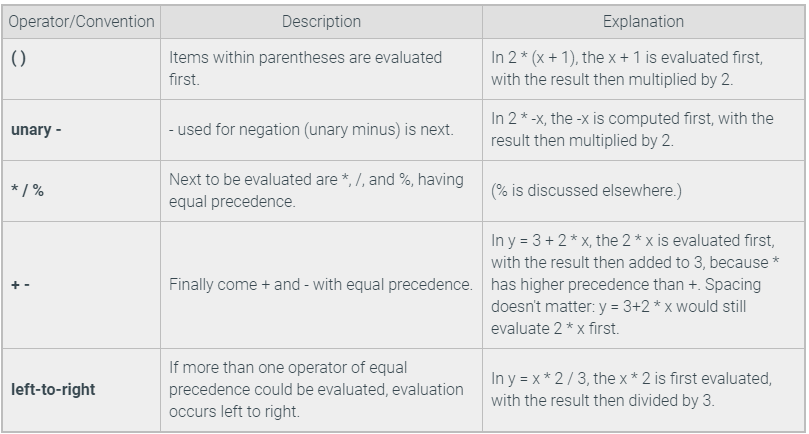
- 109precedence ruleAn expression evaluates to a value, which replaces the expression. Ex: If x is 5, then x + 1 evaluates to 6, and y = x + 1 assigns y with 6.
An expression is evaluated using the order of standard mathematics, and such order is known in programming as precedence rules, listed below. - 110Precedence rules convention
- 111math operation in programs[] & {} cant replace ()
- 112spaces around operatorA good practice is to include a single space around operators for readability, as in num_items + 2, rather than num_items+2. An exception is minus used as negative, as in: x_coordinate = -y_coordinate. Minus (-) used as negative is known as unary minus.
- 113Compound operatorsSpecial operators called compound operators provide a shorthand way to update a variable, such as age += 1 being shorthand for age = age + 1. Other compound operators include -=, *=, /=, and %=.
- 114No commas in literalsCommas are not allowed in an integer literal. So 1,333,555 is written as 1333555.
- 115String literalsA string is a sequence of characters, like the text MARY, that can be stored in a variable. A string literal is a string value specified in the source code of a program. A programmer creates a string literal by surrounding text with single or double quotes, such as 'MARY' or "MARY".
The string type is a special construct known as a sequence type: A type that specifies a collection of objects ordered from left to right. A string's characters are ordered from the string's first letter to the last. A character's position in a string is called the character's index, which starts at 0. Ex: In "Trish", T is at index 0, r at 1, etc. - 116String length and indexingA common operation is to find the length, or the number of characters, in a string. The len() built-in function can be used to find the length of a string (and any other sequence type).
- 117To find position of character in stringPrograms commonly access an individual character of a string. As a sequence type, every character in a string has an index, or position, starting at 0 from the leftmost character. For example, the 'A' in string 'ABC' is at index 0, 'B' is at index 1, and 'C' is at index 2. A programmer can access a character at a specific index by appending brackets [ ] containing the index:
Note that negative indices can be used to access characters starting from the rightmost character of the string, instead of the leftmost. - 118Assign my_var with the last character in my_str. Use a negative index.my_var = my_str[-1]
- 119changing string variablesWriting or altering individual characters of a string variable is not allowed. Strings are immutable objects, meaning that string values cannot change once created. Instead, an assignment statement must be used to update an entire string variable.
alphabet = 'abcdefghijklmnopqrstuvwxyz'
# Change to upper case
alphabet[0] = 'A' # Invalid: Cannot change character
alphabet[1] = 'B' # Invalid: Cannot change character
print('Alphabet:', alphabet) - 120string contenationA program can add new characters to the end of a string in a process known as string concatenation. The expression "New" + "York" concatenates the strings New and York to create a new string NewYork. Most sequence types support concatenation. String concatenation does not contradict the immutability of strings, because the result of concatenation is a new string; the original strings are not altered.
- 121rules for identifiersA programmer gives names to various items, such as variables (and also functions, described later). For example, x = 5 uses the name "x" to refer to the value 5. An identifier, also called a name, is a sequence of letters (a-z, A-Z), underscores (_), and digits (0–9), and must start with a letter or an underscore.
- 122Reserved wordsCertain words like "and" or "True" cannot be used as names. Reserved words, or keywords, are words that are part of the language, and thus, cannot be used as a programmer-defined name. Many language editors will automatically color a program's reserved words. A list of reserved words appears at the end of this section.
- 123reading guidesA good practice when naming variables is to use all lowercase letters and to place underscores between words. This lowercase and underscore convention for naming variables originates from the Python style guide, PEP 8. PEP 8 (PEP is an acronym for Python Enhancement Proposal) is a document that outlines the basics of how to write Python code neatly and consistently. Code is read more often than written, so having a consistent variable naming scheme helps to ensure that programmers can understand each other's code.
- 124reserved wordsFalse class finally is raise
None continue for lambda return
True def from nonlocal try
and del global not while
as elif if or with
assert else import pass yield
break except in print - 125dividingThe division operator / performs division and returns a floating-point number.
- 126// operationThe floored division operator // can be used to round down the result of a floating-point division to the closest whole number value. The resulting value is an integer type if both operands are integers; if either operand is a float, then a float is returned:
20 // 10 is 2. - 127Modulo %The basic arithmetic operators include not just +, -, *, /, but also %. The modulo operator (%) evaluates the remainder of the division of two integer operands. Ex: 23 % 10 is 3.
- 128String slicing basicsA programmer often needs to read more than one character at a time. Multiple consecutive characters can be read using slice notation. Slice notation has the form my_str[start:end], which creates a new string whose value mirrors the characters of my_str from indices start to end - 1. If my_str is 'Boggle', then my_str[0:3] yields string 'Bog'. Other sequence types like lists and tuples also support slice notation.
- 129negative slicingNegative numbers can be used to specify an index relative to the end of the string. Ex: If the variable my_str is 'Jane Doe!?', then my_str[0:-2] yields 'Jane Doe' because the -2 refers to the second-to-last character '!' (and the character at the end index is not included in the result string).
- 130can you assign new variables with slicing?yes --- my_str = "The cat jumped the brown cow"
animal = my_str[4:7]
print('The animal is a %s' % animal)
my_str = 'The fox jumped the brown llama'
print('The animal is still a', animal) # animal variable remains unchanged. - 131blank slicingA programmer often wants to read all characters that occur before or after some index in the string. Omitting a start index, such as in my_str[:end] yields the characters from indices 0 to end-1. Ex: my_str[:5] reads indices 0-4. Similarly, omitting the end index yields the characters from the start index to the end of the string. Ex: my_str[5:] yields all characters at and after index 5.
- 132more on slicingSpecifying a start index beyond the end of the string, or beyond the end index (like 3:2), yields an empty string. Ex: my_str[2:1] is ' '. Specifying an end index beyond the end of the string is equivalent to specifying the end of the string, so if a string's end is 5, then 1:7 or 1:99 are the same as 1:6.
- 133The slice strideSlice notation also provides for a third argument, known as the stride. The stride determines how much to increment the index after reading each element. For example, my_str[0:10:2] reads every other element between 0 and 10. The stride defaults to 1 if not specified.
- 134string objects replacementreplace(old, new) -- Returns a copy of the string with all occurrences of the substring old replaced by the string new. The old and new arguments may be string variables or string literals.
replace(old, new, count) -- Same as above, except only replaces the first count occurrences of old. - 135finding values in stringsSome methods are useful for finding the position of where a character or substring is located in a string:
find(x) -- Returns the position of the first occurrence of item x in the string, else returns -1. x may be a string variable or string literal. Recall that in a string the first position is number 0, not 1. If my_str is 'Boo Hoo!':
my_str.find('!') # Returns 7
my_str.find('Boo') # Returns 0
my_str.find('oo') # Returns 1 (first occurrence only)
find(x, start) -- Same as find(x), but begins the search at position start:
my_str.find('oo', 2) # Returns 5
find(x, start, end) -- Same as find(x, start), but stops the search at position end:
my_str.find('oo', 2, 4) # Returns -1 (not found)
rfind(x) -- Same as find(x) but searches the string in reverse, returning the last occurrence in the string.
Another useful function is count, which counts the number of times a substring occurs in the string:
count(x) -- Returns the number of times x occurs in the string.
my_str.count('oo') # Returns 2 - 136comparing stringsString objects may be compared using relational operators (<, <=, >, >=), equality operators (==, !=), membership operators (in, not in), and identity operators (is, is not).
Evaluation of relational and equality operator comparisons occurs by first comparing the corresponding characters at element 0, then at element 1, etc., stopping as soon as a determination can be made. For an equality (==) comparison, the two strings must have the same length and every corresponding character pair must be the same. For a relational comparison (<, >, etc.), the result will be the result of comparing the ASCII/Unicode values of the first differing character pair. - 137BooleanA Boolean refers to a value that is either True or False. Note that True and False are keywords in Python and must be capitalized. A programmer can assign a Boolean value by specifying True or False, or by evaluating an expression that yields a Boolean.
- 138membership in/not inOne common programming task involves determining whether a specific value can be found within a container, such as a list or dictionary. The in and not in operators, known as membership operators, yield True or False if the left operand matches the value of some element in the right operand, which is always a container.
- 139membership in substringsMembership operators can be used to check whether a string is a substring, or matching subset of characters, of a larger string. For example, 'abc' in '123abcd' returns True because the substring abc exists in the larger string.
- 140membershipMembership in a dictionary implies that a specific key exists in the dictionary. A common error is to assume that a membership operator checks the values of each dictionary key as well.
The in operator only checks the keys of a dict, not the values. - 141identity operatorsSometimes a programmer wants to determine whether two variables are the same object. The programmer can use the identity operator, is, to check whether two operands are bound to a single object. The inverse identity operator, is not, gives the negated value of 'is'. Thus, if x is y is True, then x is not y is False.
The id() function can be used to retrieve the identifier of any object. If x is y is True, then id(x) == id(y) is also True. - 142x = 500 + 500 # Create a new object with value 1000 y = 500 + 500 # Create a second object with value 1000 z = x # Bind z to the same object as x if z is x: print('z and x are bound to the same object,') if z is not y: print('but z and y are not.')z and x are bound to the same object,
but z and y are not. - 143my_str is not the third element in the list my_listmy_str is not my_list[2]
- 144Modular program developmentProgrammers commonly use functions to write programs modularly. Modular development is the process of dividing a program into separate modules that can be developed and tested separately and then integrated into a single program.
A programmer can use function stubs (described in depth elsewhere) to capture the high-level behavior of the required functions (or modules) before diving into details of each function, like planning a route for a road trip before starting to drive. - 145Avoid writing redundant codeA general guideline (especially for beginner programmers) is that a function's definition usually shouldn't have more than about 30 lines of code, although this guideline is not a strict rule. Use functions were repeated operations required.
- 146'jo' in 'Joseph' true or false?False
- 147checking valuesMethods to check a string value that returns a True or False Boolean value:
isalnum() -- Returns True if all characters in the string are lowercase or uppercase letters, or the numbers 0-9.
isdigit() -- Returns True if all characters are the numbers 0-9.
islower() -- Returns True if all characters are lowercase letters.
isupper() -- Return True if all cased characters are uppercase letters.
isspace() -- Return True if all characters are whitespace.
startswith(x) -- Return True if the string starts with x.
endswith(x) -- Return True if the string ends with x. - 148Create new stringcapitalize() -- Returns a copy of the string with the first character capitalized and the rest lowercased.
lower() -- Returns a copy of the string with all characters lowercased.
upper() -- Returns a copy of the string with all characters uppercased.
strip() -- Returns a copy of the string with leading and trailing whitespace removed.
title() -- Returns a copy of the string as a title, with first letters of words capitalized. - 149Branch basics(if)A branch is a program path taken only if an expression's value is true
Such a branch is commonly known as an If branch: A branch taken only if an expression is true. - 150if else-if elseCommonly a programmer wishes to take one of multiple (three or more) branches. An if-else can be extended to an if-elseif-else structure. Each branch's expression is checked in sequence; as soon as one branch's expression is found to be true, that branch is taken. If no expression is found true, execution will reach the else branch, which then executes.
- 151multi branch else-ifif expression1:
# Statements that execute when expression1 is true
# (first branch)
elif expression2:
# Statements that execute when expression1 is false and expression2 is true
# (second branch)
else:
# Statements that execute when expression1 is false and expression2 is false
# (third branch)
example
if num_sales == 0:
employee_bonus = 0
elif num_sales == 1:
employee_bonus = 2
elif num_sales == 2:
employee_bonus = 5
else:
employee_bonus = 10 - 152== ?The equality operator == evaluates to true if the left side and right side are equal. Ex: If num_years holds the value 10, then the expression num_years == 10 evaluates to true.
- 153Equality operatorsAn equality operator checks whether two operands' values are the same (==) or different (!=). Note that equality is ==, not just =.
An expression involving an equality operator evaluates to a Boolean value. A Boolean is a type that has just two values: True or False. - 154Is x =< y a valid expression?<= is the operator for less than or equal, not =<.
- 155Operator ChainPython supports operator chaining. For example, a < b < c determines whether b is greater-than a but less-than c. Chaining performs comparisons left to right, evaluating a < b first. If the result is true, then b < c is evaluated next. If the result of the first comparison a < b is false, then there is no need to continue evaluating the rest of the expression. Note that a is not compared to c.
- 156my_double == 3.25Does not result in a syntax error, but due to imprecision of floating-point representations, such comparisons may yield unexpected results. More later; for now, just don't compare floating-point types.
- 157Comparing typesThe types of the values being compared determines the meaning of a comparison. If both values are numbers, then the numbers are compared arithmetically (5 < 2 is False). Comparisons that make no sense, such as 1 < 'abc' result in a TypeError.
Comparison of values with the same type, like 5 < 2, or 'abc' >= 'ABCDEF', depend on the types being compared.
Numbers are arithmetically compared.
Strings are compared by converting each character to a number value (ASCII or Unicode), and then comparing each character in order. Most string comparisons use equality operators "==" or "!=", as in today == 'Friday'.
Lists and tuples are compared via an ordered comparison of every element in the sequence. Every element between the sequences must compare as equal for an equality operator to evaluate to True. Relational operators like < or > can also be used: The order is determined by the first mismatching elements in the sequences. For example, if x = [1,2] and y = [1,3], then evaluating x < y first evaluates 1 < 1, then 2 < 3, which produces a value of True.
Dictionaries are compared by sorting t - 158Common error for if-elseA common error is to use = rather than == in an if-else expression, as in: if numDogs = 9:. In such cases, the interpreter should generate a syntax error.
Another common error is to use invalid character sequences like =>, !<, or <>, which are not valid operators. - 159return?A function may return one value using a return statement.
- 160return noneA function can only return one item, not two or more (though a list with multiple elements could be returned). A function with no return statement, or a return statement with no following expression, returns the value None. None is a special keyword that indicates no value.
A return statement may appear at any point in a function, not just as the last statement. A function may also contain multiple return statements in different locations. - 161is y = square_root() correct?no, square_root requires one argument.
- 162y = 1 + print_val(9.0) valid expression?no, print_val() returns None, which cannot be added to 1.
- 163mathematical functionsA function is commonly defined to compute a mathematical operation involving several numerical parameters and returning a numerical result.
- 164Hierarchical function callsA function's statements may include function calls, known as hierarchical function calls or nested function calls. Code such as user_input = int(input()) consists of such a hierarchical function call, wherein the input() function is called and evaluates to a value that is then passed as an argument to the int() function.
- 165find larger number in 1 statement between 2 numbersfind_max(a, b)
- 166loop basicsA loop is a program construct that repeatedly executes the loop's statements (known as the loop body) while the loop's expression is true; when false, execution proceeds past the loop. Each time through a loop's statements is called an iteration.
- 167example of loopcount = 0
val = Get next input
While val is not 0
If val < 0
count = count + 1
val = Get next input - 168for - in loopfor variable in container:
# Loop body: Sub-statements to execute
# for each item in the container
# Statements to execute after the for loop is complete - 169list written as?['Bill', 'Nicole', 'John']
- 170loop to add to a stringmy_str = ''
for character in "Take me to the moon.":
my_str += character + '_'
print(my_str) - 171how to reverse stringsA for loop may also iterate backwards over a sequence, starting at the last element and ending with the first element, by using the reversed() function to reverse the order of the elements.
names = [ 'Biffle',
'Bowyer', 'Busch',
'Gordon','Patrick']
for name in names:
print(name, '|', end=' ')
print('\nPrinting in reverse:')
for name in reversed(names):
print(name, '|', end=' ') - 172how can you use reverse?only in -if-in- command as
for list in reversed(alpha):
string collection must be in list format - 173input as listsplit() method returns a list of strings after breaking the given string by the specified separator.
stock_prices = input().split()
for price in stock_prices:
print('$', price) - 174parameter and argumentA programmer can influence a function's behavior via an input.
A parameter is a function input specified in a function definition. Ex: A pizza area function might have diameter as an input.
An argument is a value provided to a function's parameter during a function call. Ex: A pizza area function might be called as print_pizza_area(12.0) or as print_pizza_area(16.0). - 175multiple parametersA function may have multiple parameters, which are separated by commas. Argument values are assigned to parameters by position: First argument to the first parameter, second to the second, etc.
A function definition with no parameters must still have the parentheses, as in: def print_something():. The call to such a function must include parentheses, and they must be empty, as in: print_something().
Figure 6.2.1: Function with multiple parameters.
def print_pizza_volume(pizza_diameter, pizza_height):
pi_val = 3.14159265
pizza_radius = pizza_diameter / 2.0
pizza_area = pi_val * pizza_radius * pizza_radius
pizza_volume = pizza_area * pizza_height
print('%.1f x %.1f inch pizza is %.3f inches cubed.' % (pizza_diameter,
pizza_height, pizza_volume))
print_pizza_volume(12.0, 0.3)
print_pizza_volume(12.0, 0.8)
print_pizza_volume(16.0, 0.8) - 176Is the following a valid function definition beginning? Type yes or no. def my_fct(userNum + 5):no , but can be used when calling
- 177Docstrings. A docstring is a string literal placed in the first line of a function body.
A docstring starts and ends with three consecutive quotation marks. Good practice is to keep the docstring of a simple function as a single line, including the quotes. Furthermore, there should be no blank lines before or after the docstring.
Multi-line docstrings can be used for more complicated functions to describe the function arguments. Multi-line docstrings should use consistent indentation for each line, separating the ending triple-quotes by a blank line. - 178example of dogstring usedef num_seats(airliner_type):
"""Determines number of seats on a plane"""
#Function body statements ...
def ticket_price(origin, destination, coach=True, first_class=False):
"""Calculates the price of a ticket between two airports.
Only one of coach or first_class must be True.
Arguments:
origin -- string representing code of origin airport
destination -- string representing code of destination airport
Optional keyword arguments:
coach -- Boolean. True if ticket cost priced for a coach class ticket (default True)
first_class -- Boolean. True if ticket cost priced for a first class ticket (default False)
"""
#Function body statements ... - 179the help() functionThe help() function can aid a programmer by providing them with all the documentation associated with an object. A statement such as help(ticket_price) would print out the docstring for the ticket_price() function, providing the programmer with information about how to call that function.
The help() function actually works with most of the built-in Python names, since the language creators were nice enough to provide docstrings for many items. Notice that the output of help depends on the object passed as an argument. If the argument is a function, then the docstring is printed. If you have studied classes or modules, note how help(str) prints out a description of the string str class methods, and how help(math) prints out all the contents of the math module. - 180functions can use other functions?yes
- 181kay data type legal issuesLegal analytics, and automated discovery involve
searches through zillions of pages of documents
n And automation is putting some lawyers out of work!
q Privacy in 2019 requires encryption
q Defense in depth against bad consequences of
data breaches in 2019 requires encryption
n And encryption works on strings
q Web search string based - 182Sometimes we want to get our hands on the last character of a stringOne way: first_justice[len(first_justice) – 1]
- 183problem solvingThe single most important skill for a computer scientist is problem solving. Problem solving means the ability to formulate problems, think creatively about solutions, and express a solution clearly and accurately. As it turns out, the process of learning to program is an excellent opportunity to practice problem solving skills.
- 184algorithmsAn algorithm is a step by step list of instructions that if followed exactly will solve the problem under consideration. must be clear and unambiguous and they must end.
- 185programsA program is a sequence of instructions that specifies how to perform a computation.
It is just step-by-step instructions that the computer can understand and execute. Programs often implement algorithms, but note that algorithms are typically less precise than programs and do not have to be written in a programming language. - 186formal languageFormal languages are languages that are designed by people for specific applications. For example, the notation that mathematicians use is a formal language that is particularly good at denoting relationships among numbers and symbols. Chemists use a formal language to represent the chemical structure of molecules
Formal languages tend to have strict rules about syntax. - 187natural languageNatural languages are the languages that people speak, such as English, Spanish, and French. They were not designed by people (although people try to impose some order on them); they evolved naturally.
- 188—
Information
- Description
- UIC syllabus based flashcards for CS111 - law themed
- Created by
- Aqsa Arif
- Views
- 15
- Rating