
Flashcards
INFS3222
Cards in this deck (113)
- 1Lecture 5 Domain Classes Problem DomainSpecific area (domain) of users' business need that is within the scope of new system.
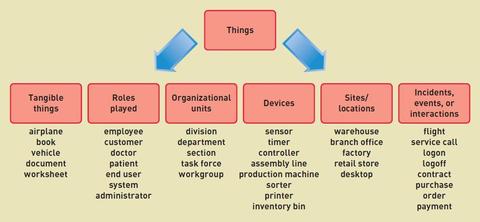
Things are those items users work with when accomplishing tasks.
Things are modeled as domain classes or data entities - 2Techniques for Problem domainBrainstorming Technique - use a checklist of all usual types of things found and brainstorm to identify domain classes of each type
Noun Technique - identify all of the nouns that come up when the system is described and determine if each is a domain class, an attribute or not important - 3Brainstorm image
- 4Noun Technique breakdownIdentify domain classes by finding, classifying and refining a list of nouns that come up in discussions or documents.
Popular technique, systematic
- Can end up with long lists
- Difficulty identifying synonyms - 5Domain Classes DetailsAttribute - Describes one piece of information about each instance of the class (customer has first name, last name, phone number)
Identifier or key - one attribute uniquely identifies an instance of the class. Required for data entities, optional for domain classes. Customer ID identifies customer
Compound attribute - two or more attributes combined into one structure to simplify the model (Address rather than including number, street, city, state, zip separately) - 6Class Object ValueClass is a type of thing.
Object is a specific instance of the class.
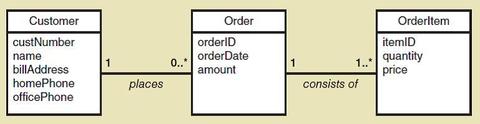
Each instance has its own values for an attribute - 7AssociationsAssociations have minimum and maximum constraints (minimum is zero, the association is optional, if minimum is at least one, association is mandatory)
- 8Types of AssociationsBinary - associations between exactly two different classes (course section includes students)
Unary Association (recursive) - associations between two instances of the same class (person married to person)
Ternary Association - three
N-ary association - (between n) - 9Domain Model Class Diagram Class Domain Class Class Diagram Domain Model Class DiagramClass - a category of classification used to describe a collection of objects
Domain class- classes that describe objects in the problem domain
Class Diagram - a UML diagram that shows classes with attributes and associations (plus methods if it models software classes)
Domain Model Class Diagram - A class diagram that only includes classes from the problem domain, not software classes (no methods) - 10Domain Class Notation- Domain Class has no method
- Class name capitalised
- Attribute names not capitalised but use camelback (custNumber) - 11A customer places zero or more orders An order is placed by exactly one customer An order consists of one or more order items An order item is part of exactly one order
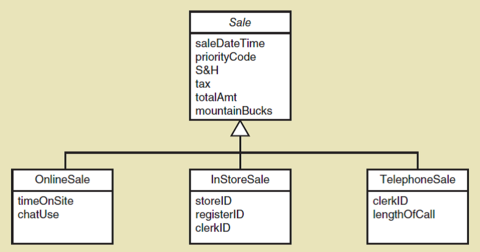
- 12Complex issues about classesGeneralization/specialization - hierarchical relationship where subordinate classes are special types of superior classes.
Super class - superior or more general class
Subclass - subordinate or more specialized class
Inheritance - that subclasses classes inherit characteristics of more general super classes - 13Super class and Subclass
- 14Whole part relationships Aggregation CompositionWhole-part relationship - relationsihp between classes where one class is part of a component or portion of another class
Aggregation - whole part relationship where the component part exists separately and can be removed and replaced (computer hard disk, car wheel)
Composition - a whole part relationship where the parts can no longer be removed (filled in diamond symbol) (fingers on hand) - 15Three types of relationships in class diagramsAssociation relationships
Whole part relationships
Generalization/Specialization Relationships - 16ERDEntity relationship diagrams, basically same as domain model class diagram
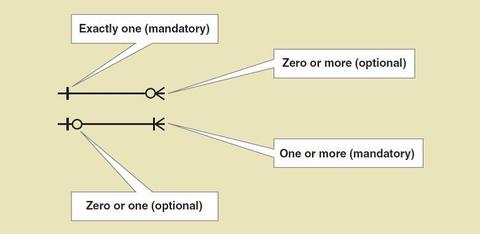
not good for showing generalization/specialization relationships and whole part relationships - 17Cardinality symbols ERD
- 18Primary KeyDenoted by - PK
One attribute that uniquely identifies an instance of the class. - 19Lecture 7 User and System Design Workflow of testing tasks

- 20Testing TasksStart - create test data - conduct tests - document errors and issues - fix errors - conduct test (either repeat or finish)
- 21Test TypesUnit testing - Core process 'Implementation' component that doesn't correctly its function when tested in isolation
Integration testing - Core Process 'Implementation' component that performs correctly in isolation but incorrectly when testing in combination with other components
Usability Testing - Implementation Software that works but fails one or more user requirements
System and stress testing - deployment - system or subsystem that doesn't correctly perform its function or fails to meet a nonfunctional requirement under normal operating conditions (order retrieval) - 22Other tests UAT User acceptance test Stub TestUAT - like usability test but for entire system
Stub - method or class developed for unit testing that simulates the behavior of a method that hasn't yet been written - 23Testing Concepts Test Case Test DataTest case - formal description of a starting state, one or more events which the software must respond and the expected response (defined on functional and non-functional requirements)
Test data - a set of starting states and events used to test a module, group of modules or entire system - 24Reasons for Project failureUndefined project management practices
Poor IT management and poor IT procedures
Inadequate executive support for the project
Inexperienced project managers
Unclear business needs and project objectives
Inadequate user involvement - 25Role of Project ManagerProject management - organizing and directing other people for planned result
Project manager - internally managing people and resources, externally conducting public relations - 26Project Manager responsibilitiesInternal - developing project schedule, recruiting and training, assigning work, project risk assessment, monitoring and controlling deliverables
External - report project status, working with client, identifying resource needs - 27Project StakeholdersClient - funds project
Oversight committee - clients and key managers who review progress
Users- person or group of people who will use the new system - 28Agile Project managementScope not well understood but needs to be controlled, schedule must be flexible, costs are difficult to estimate, higher risk aspects of project are completed first, quality assessed after each iteration
- 29Core Processes1. Identify problem and obtain approval (risk and feasibility analysis, quantify project approval factors)
2. Plan and monitor project
3. Discover and understand detail
4. Design system components
5. Build test and integrate system components
6. Complete system tests and deploy solution - 30IS development ProjectsRespond to opportunity
Resolve problem
Respond an external directive - 31System Vision DocumentProblem Description
System Capabilities
Business Benefits - 32Determine Project Risk and FeasibilityDetermine organizational risk and feasibility
evaluate technological risks and feasibility
assess the resource risks and feasibility
identify the schedule risks and feasibility - 33Review with Client and Obtain ApprovalExecutive committee reviews and approves
Board must review and approve large projects
Involved stakeholders need to know their role
IS department needs goals and objectives - 34Approval factorsEstimated time for completion
Estimated cost for development
Estimated cost for support - 35Core Process 2 Plan and MonitorPlan and Monitor - establish the project environment
schedule the work
staff and allocate resources
evaluate work processes
monitor progress and make corrections - 36Schedule the work WBSWork breakdown structure
estimate effort and identify dependencies
create schedule using a Gantt chart
For adaptive types of projects, the project manager must establish initial project schedule and keep adjusting - 37Project iteration schedule Detailed work schedulelist of iterations and use cases or user stories assigned to each iteration
within an iteration, the schedule that lists, organizes and describes the dependencies of the detailed work tasks - 38Staff and Allocate resourcesStaffing activity tasks consists of 5 tasks
1. developing a reosurce plan for the porject
2. identifying and requesting a specific technical staff
3. identifying and requesting specific user staff
4. organizing the project team into work groups
5. conducting preliminary training and team-building exercises - 39Lecture 8 Databases, Controls and Security Database SchemaOrganization of individual stored data items into higher level groups such as tables
associations among tables or classes
details of physical data store organization, including types, lengths, locations and indexing
access and content controls including allowable values for specific data items, value dependencies among multiple data items - 40Relational Databases(RDBMS) Relational database management system organizes data into tables (relations)
Key - an attribute or set of attributes, the values of which occur only once in all the rows of the table
Primary key - the key chosen by a database designer to represent relationships among rows in different tables
Foreign key - an attribute that duplicates the primary key of a different (or foreign) table - 41Designing relational databases1. create table for each class
2. choose primary key for each table
3. add foreign keys to represent one-to-many associations
4. create new tables to represent many-to-many associations
5. represent classification hierarchies
6. define referential integrity constraints
7. evaluate schema quality and make necessary improvements
8. choose appropriate data types
9. Incorporate integrity and security controls - 42Primary Key bold, Foreign key italics
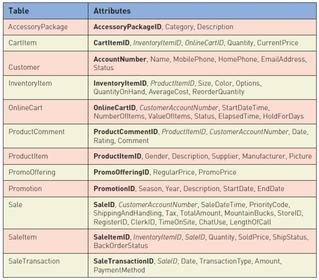
- 43Designing relational databases Referential integrity Referential integrity constraint NormalizationRefInteg - consistent state among foreign key and primary key values
Refnteg Con. - constraint stored in the schema that the DBMS uses to automatically enforce referential integrity - 44Database NormalizationFirst normal form (1NF) - restriction that all rows of a table must contain same number of columns (no repeating of groups of attributes)
Functional dependency - one-to-one association between the values of two attributes
Second normal form (2NF) restriction that a table is in 1NF and that each non-key attribute is functionally dependent on the entire primary key
Third normal form (3NF) - restriction that a table is in 2NF and that no non-key attribute is functionally dependent on any other non-key attribute - 45Database design timing and risksArchitecture - Decisions about DBMS - database servers, database distribution tightly integrated with other architecture decisions network design, web component services and security
Existing databases - most new upgraded systems must interact with existing databases, with their pre-existing constraints.
Domain model class diagram - database design can't proceed until related parts of the class diagram have been developed - 46Designing System ControlsControls - Mechanisms and procedures that are built into a system to safeguard the system and the information within it
Integrity control - a control that rejects invalid data inputs, prevents unauthorized data outputs and protects data and programs from tampering
Security controls - part of operating system and network (less application specific)
Overlap between integrity and security - 47Integrity Controls Value limit controlControl that checks numeric data input to ensure that the value is reasonable
- 48Input controlcontrol that prevents invalid or erroneous data
- 49Completeness controlensures all required data values describing an object or transaction are present
- 50Data validation controlcontrol that ensures that numeric fields that contain codes or identifiers are correct
- 51Field combination controlcontrol that reviews combinations of data inputs to ensure that the correct data are entered
- 52Access control- restricts which persons or programs can modify or add info
- 53Transaction loggingtechnique by which any update is logged with audit information like ID, data, time, input data and type of update
- 54Complex update controlA control that prevents errors that can occur when multiple programs try to update the same data at the same time
- 55Output controlControl that ensures that output arrives at the proper destination and is accurate, current and complete
- 56Redundancycontinuous access to data through redundant databases, servers and sites
- 57Prevent fraudOpportunity
Motivation - money
Rationalization - 58Prevent fraud controlSegregation of duties
Records and audit trails
monitoring
asset control and reconciliation
security - 59Access controlsPrivileged user - highest user
- 60Asymmetric key encryptionPublic key encryption uses public key for encryption and private key for decryption
- 61Digital certificateCertified by third party of company info
client sends request to connect to secure server, server sends signed digital certificate (containing server's public key), client sends encrypted secret session key, client and server communicate securely using the secret session key - 62Lecture 9Agile
- 63Three key principles of Agile MethodologiesAdaptive rather than predictive
Emphasize people rather than roles
Self-adaptive processes - 64When to use Agile MethodsUnpredictable or dynamic requirements
Responsible and motivated developers
Customers who understand the process and will get involved - 65eXtreme Programming- short incremental development cycles
- automated tests
- two-person programming teams
- coding and testing operate together
- advantages (communication between developers, high level of productivity, high quality code) - 66Iterative
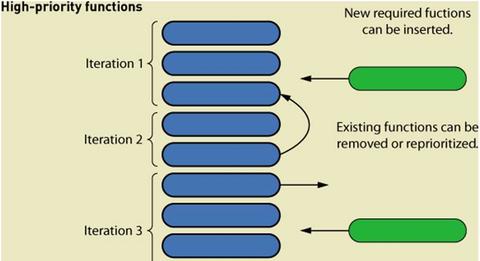
- 67AGILE project managementScope management
Time management
Cost management
Risk management
Quality management - 68Unified process DisciplinesLife cycle - iterations (inception, elaboration, construction, transition
UP - set of functionally related activities that combine to enable the development process
Business modelling, requirements, design, implementation, testing, deployment, configuration and change management, project management, environment - 69unified process diagram
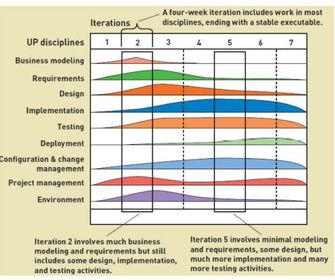
- 70UP philosophiesearly
use cases
model driven uses UML
iterative
defining an architecture
adaptable - 71eXtreme Programming (XP) core valuesCommunication
simplicity
feedback
courage - 72Communication Simplicity Feedback Courageright players, right time, right level communication
standard way of developing systems
frequent and meaningful
face harsh choices - 73XP practices Planning Testing Pair Programming Simple DesignsPlanning - making rough plan that is flexible
Testing - intensifies as process continues
Pair Programming - two programmers work together designing, coding and testing
Simple designs (model pars-ominousness) - 74XP practices Refactoring the code Owning the Code Collectively Continuous Integration On-Site CustomerRefactoring is the technique of improving code without changing it - simpler design
Owning code - everyone is responsible
Continuous integration - code which past unit test integrated into system daily or even more often
On-site customer - XP requires continual involvement with users - 75XP Practices System metaphor Small releases Forty hour week Coding standardssystem metaphor easily understood and well known (guide members to vision and help understand system)
Small releases - consistent with the entire philosophy of growing software, small and frequent releases provide upgraded solutions
Forty hour week - members shouldn't be burnt out
Coding standards - developers should follow standards for coding and documentation - 76XP
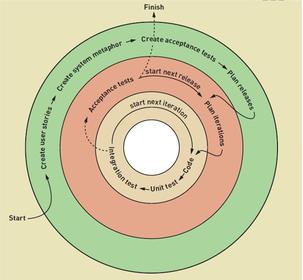
- 77Scrumcomplete control of team over organization and work processes. software developed incrementally and controls are imposed empirically
- 78Scrum organization Product backlog Product owner Scrum master Scrum teamProduct backlog - prioritized list of user requirements
product owner -client
scrum master -team leader
scrum team - 5-9 people
scrum team sets own goals, organizes self, makes decisions - 79Scrum practices Sprint Daily scrum Sprint final half-daytime controlled mini-project that implements a specific portion of a system (30 day time box with deliverable) scope isn't frozen
Daily - 15 mins max meeting
Sprint review - review and identify changes for following sprints - 80Lecture 10 Trends in Technology infrastructure New client computing devicesNew client computing devices
- 81Back end computingas more client computers try to access particular applications, workloads on servers become incredibly heavy,
- 82Internet and telephone communication- internet, telephone and TV are merging,
- 83Lecture 6 Major Components of DesignSecurity and controls design
Application design (computer programs)
User interface design (screens, reports and controls and inputs/outputs)
Database Design (specifies the structure of the database)
System interface design (how systems communicates with other systems)
Environment (network and hardware linking system - 84Two levels of designArchitectural - broad, overall structure - general or conceptual
Detailed design - low level, specific program details, use case, database, user and system interface, controls and security - 85DiagramsClass Diagrams
Use Case
System Sequence
Use Case (descriptions)
State machine
Activity - 86Core ProcessesIdentify problem and obtain approval
Plan and monitor project
Discover and understand details
Design system components
Build, test, and integrate system components
Complete system tests and deploy solution - 87Design activities for Design system components1. design the environment
2. design application architecture and software
3. Design user interfaces
4. Design the database
5. Design system controls and security - 88Design the environmentTechnology architecture
- 89Design the application architecture and softwareApplication architecture - partition system into subsystems - define software architecture (three layer or model-view-controller)
Detailed design of each use case - design class diagrams, sequence diagrams, state machine diagrams - 90Design the user interfacesDialog design begins with use case flow of activities, system sequenced diagram
Design adds in screen layout, look and feel, navigation, user experience - 91Design system interfacesSystem to system using XML
- 92Design the databaseStarting with domain model class diagram or ERD
choose database structure - usually relational database, could be ODBMS
Design architecture (distributed, etc.)
Design database schema (tables and columns in relational)
Design referential integrity constraints (foreign key references - 93Design security and system controls Internal DeploymentStand alone software systems
Internal network-based systems
Three-layer client server architecture - 94Three layer architectureView layer - format screens reports
Domain layer - implement business rules
Data layer - formulate queries - 95Design the environment (External deployment)Configuration for internet deployment
- Hosting alternatives (collocation, managed services, virtual servers, cloud computing) - 96Design for Remote, distributed environmentTwo interfaces to same web app for internal vs. external access - Back end, Front end UI to same web app (not as secure)
Virtual private network (VPN) - closed network with security and closed access built on top of a public network - 97User interfaces and System interfaces- inputs and outputs that directly involve a human user/actor (dialog goes on between actor and system
- System interface - the inputs and outputs that require minimal human intervention (inputs captured automatically, outputs directly to other systems, printed and distributed outputs - 98User centered design PrinciplesDesign techniques that embody the view that user interface is the system to the user
Focus early on user and their work
Evaluate designs to ensure usability
Use iterative development - 99Components of User InterfacePhysical aspects - desk, chair, light , keyboard
Perceptual aspects - colors, shapes, textures, fonts, windows, menus
Conceptual aspects - customers, partners, friends, inquiries - 100Metaphors for Human Compute InteractionDirect manipulation - metaphor in which objects on display are manipulated to look like physical objects
Desktop metaphor - metaphor in which the visual display is organised into distinct regions, with a large empty workspace in the middle and a collection of tools icons around the perimeter
Document metaphor - metaphor in which data is visually represented as paper pages forms
Dialog metaphor - metaphor in which user and computer accomplish a task by engaging in a conversation or dialog via text, voice, or tools such as labelled buttons - 101Direct ManipulationManipulating objects on a display that look like physical objects (pictures) or that represent them
Example: User drags a folder icon to an image of a recycle bin or trash can to delete a collection of files - 102DesktopOrganizing visual display into distinct regions, with a large empty workspace in the middle and a collection of tool icons around the perimeter
Example: at a computer start up a windows user sees a desktop with icons for a clock, calender - 103DocumentVisually representing the data in files as paper pages or forms. these pages can be linked together by references
Example: The user fills in a form field for a product he or she owns, and the manufacturer's website finds and displays the products manual as an adobe acrobat file, which contains a hyper linked table of contents and embedded links to related documents - 104DialogThe user and computer accomplishing a task by engaging in a conversation or dialog by using text, voice, or tools such as labelled buttons (user clicks a button labelled 'troubleshoot' because the printer isn't working. The computer prints questions on the display, and the user responds by typing answers or selecting responses from a list
- 105User Interface Design Concepts HCIHuman-Computer Interaction (HCI) - a field of study concerned with the efficiency and effectiveness of user interaction with computer systems, human-oriented input and output technology, and psychological aspects of user interfaces
- 106User Interface Design Concepts Visibility and AffordanceTo be usable, a control must be visible to the user and its appearance should suggest its functionality (media player controls, buttons, scroll bars)
- 107UID User interface design guidelinesDesign for consistency
provide shortcuts
provide feedback
dialogs should yield closure
error handling that provides guidance
easy reversal of actions
reduce short term memory load - 108Dialog designEach use case should be a natural flow of dialog between user and computer
- based on the flow of activities in use case description/system sequence diagram
- use natural language
- create storyboard
- review - 109Guidelines for Windows and FormsInterface layout and formatting - consistency, labels and headings, distribution and order, fonts and colors
Data entry - text box, list box, combo box, radio buttons, check boxes
Navigation and support controls - minimize, maximize, close, scroll bar, resize - 110Consistency Performance Consideration Picture, video, sound User with disabilitiesCascading Style Sheets (CSS) - web page encoding standards specify which parts of the page look the same or vary
Performance - network connection, info transmitted,
Picture - strong but compatibility issues
Disabilities - Assistive technologies - 111System outputs Detailed reports- contain specific information on business transaction
- 112System outputs Summary reports Exception reportsSummarize detail
Detail or summary information about transactions that fall outside predefined normal range - 113System outputs Executive reporthigh level
Information
- Description
- Flashcards on INFS3222, created by joel_clement34 on 23/06/2015.
- Created by
- joel_clement34 · Jun 2015
- Updated
- May 5, 2016
- Views
- 16
- Rating