
Flashcards
HTML Basics (GeeksForGeeks)
Cards in this deck (54)
- 1HTML stands forHyperText Markup Language
- 2What is HTML?is a markup language, not a programming language, meaning it annotates text to define how it is structured and displayed by web browsers.
- 3HTML easy meaningIs all about organizing and displaying information on a webpage. We can think of it as the bones or structure of a webpage.
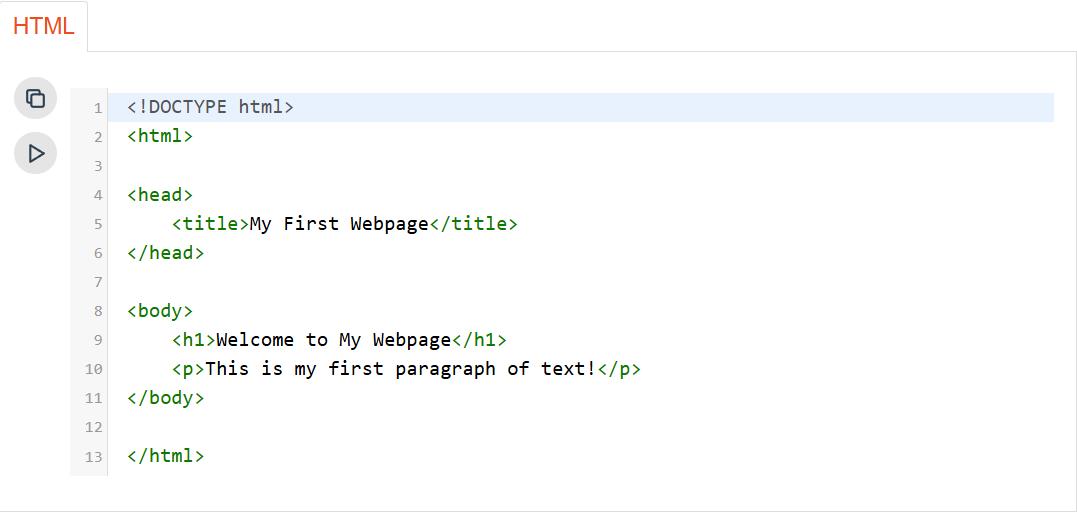
- 4BASIC HTML CODE PICTURE
- 55 common reasons to learn HTML:Build Websites
Customize Content
Understand how the web works
Employment Opportunities
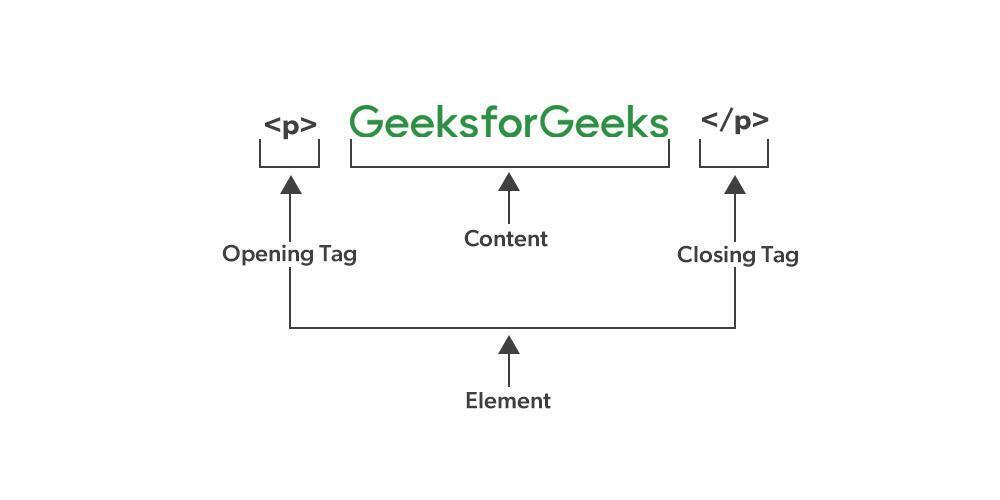
beginner-friendly - 6HTML Elementis the complete structure, including the opening tag, content (if any), and the closing tag (if applicable).
- 7HTML TagIs the actual keyword or name enclosed in angle brackets (< >) that tells the browser what kind of content to expect.
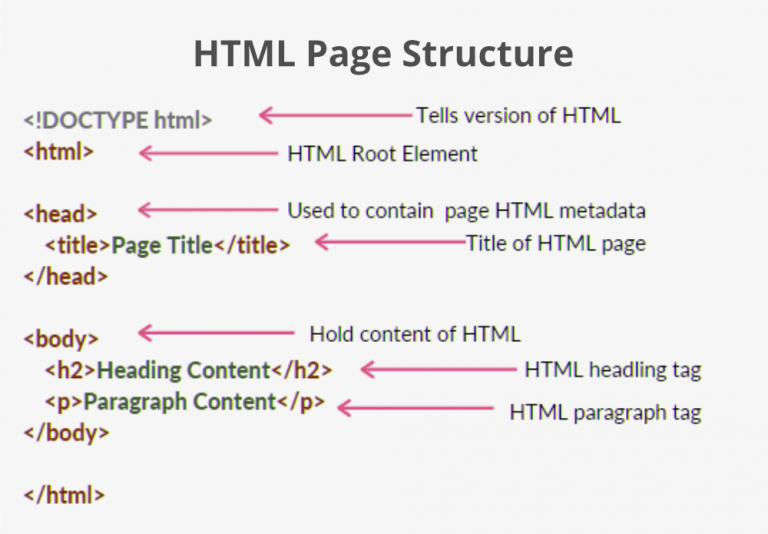
- 8—This is the document type declaration, not a tag. It declares that the document is an HTML5 document.
- 9—called the HTML root element. All other elements are contained within it.
- 10—contains the “behind the scenes” elements for a webpage. Elements within the head aren’t visible on the front end of a webpage.
- 11Typical elements inside the include:: Defines the title displayed on the browser tab.
<meta>: Provides information like the character set or viewport settings.
<link>: Links external stylesheets or resources.
<style>: Embeds internal CSS styles.
<script>: Embeds JavaScript for functionality. - 12—The title is what is displayed on the top of your browser when you visit a website and contains the title of the webpage that you are viewing.
- 13—is a second-level heading tag.
- 14—represents a paragraph of text.
- 15—used to enclose all the visible content of a webpage. In other words, the body content is what the browser will show on the front end.
- 16Label the HTML structures:
- 17What is the relation of Web Browsers to HTML programming?Unlike other programming languages, HTML does not show output on the compiler. Web browsers show the results of an HTML code.
- 18What to use to create an HTML documentHTML Text Editor
Save the text file using the “.html” or “.htm” extension. Once saved as an HTML document, the file can be opened as a webpage in the browser. - 19which is the latest and most advanced version of HTML?HTML5
- 202 types of HTML EditorsText-Based Editors and WYSIWYG (What You See Is What You Get) Editors
- 21Examples of Text Based Editors for HTML1. Notepad
2. GeeksforGeeks IDE
3. Brackets
4. Sublime Text Editor
5. Atom
6. Visual Studio Code - 22Examples of WYSIWYG Editors for HTMLAdobe Dreamweaver, etc.
- 23HTML Element vs HTML Tags
- 24HTML offers six heading tags, from to , each displaying the heading in a different font size.
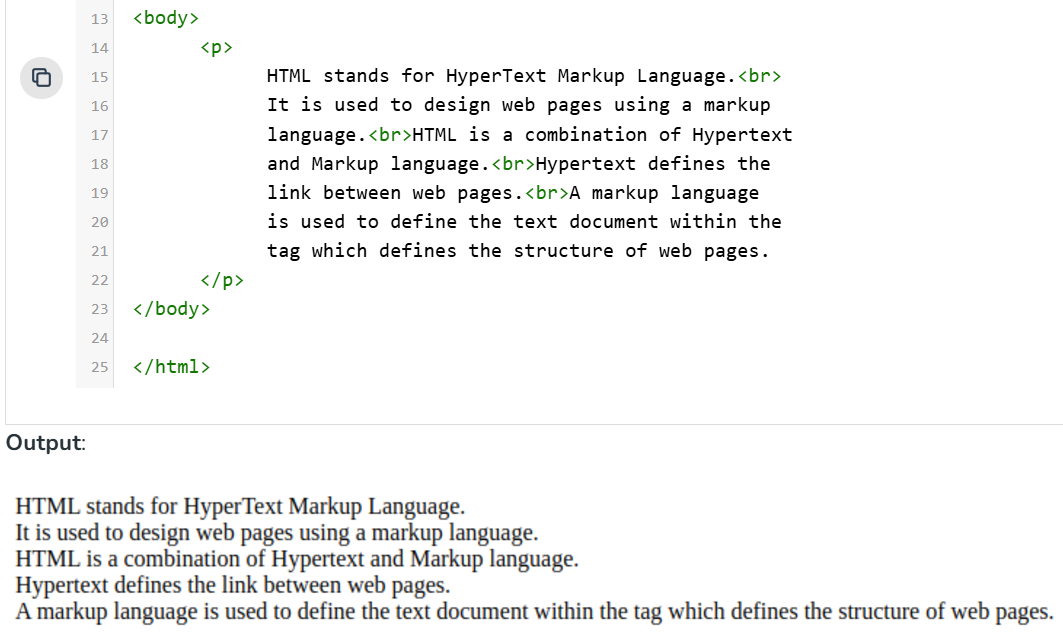
- 25used to insert a single line break and does not require a closing tag.
- 26HTML Horizontal Line ( tag) used to divide a page into sections by creating a horizontal line that spans from the left to the right side of the page. This is an empty tag and does not require a closing tag or any additional attributes.___________________________________
yeah - 27—is used to insert an image into a webpage.
- 28HTML Commentsare text in an HTML document that is not displayed by the browser. They allow you to leave notes and explanations directly in the code
- 29The single-line comment is given inside the ( ) tag.Syntax:
- 30It follows the syntax of a single-line comment by adding multiple lines in the comment.Multi Line Comment Syntax:
- 31The shortcut for adding the comment through the keyboard isCtrl + / in Windows
- 32HTML Elements without any content i.e., that do not print anything are calledEmpty elements such as
, , , - 33elements typically start on a new line and take up the full width available to them, regardless of their actual content width. This means they stack vertically and can contain other block-level elements as well as inline elements.BLOCK LEVEL ELEMENTS
- 34Block ElementA general-purpose container for other elements.
- 35Block element ,Ordered and unordered lists.
- 36Block EDefines a table.
- 37Block EUsed for HTML forms to collect user inputs.
- 38Block Elems , , , , ,Semantic elements that define areas of a webpage.
- 39elements do not start on a new line; they appear on the same line as adjacent content, as long as there is space. They only take up as much width as their content requires. ___________________ are typically used within block-level elements to add content or style.Inline Elements
- 40—A general-purpose inline container for phrasing content.
- 41Inline ElemCreates hyperlinks.
- 42Inline ElemEmbeds an image.
- 43Inline Elem ,Used for strong emphasis and bold text, respectively.
- 44Inline elem ,Used for emphasis and italic text, respectively.
- 45Inline ElemInserts a line break within text.
- 46Inline elemCreates interactive controls for forms.
- 47are special words used within the opening tag of an HTML element.HTML Attributes
- 48are used to configure and adjust the element’s behavior, appearance, or functionality in a variety of ways.HTML Attributes
- 49Example of an HTML Attribute:> Tag :
> Attribute : src
> Value of Attribute : "https:/----------.png"
> Purpose : The tag is used for embedding images in an HTML page. The src attribute within the tag specifies the path to the image file you wish to display. This attribute is crucial as it directs the browser to the image’s location on the internet or a local directory. - 50Components of an Attribute:1. attribute_name
2. attribute_value
Syntax:
content… - 51name of the attribute, which specifies what kind of additional information or property you are defining for the element. Common attribute names include href, src, class, id, etc.attribute_name
- 52The value is assigned to the attribute to define the specific setting or behavior. It is always placed in quotes.attribute_value
- 53eh katamad ilagay types ng HTML Attributeshttps://www.geeksforgeeks.org/html-attributes/?ref=next_article
- 54—
Information
- Description
- Flashcards on HTML Basics (GeeksForGeeks), created by Del Valle Caitlyn on 06/12/2024.
- Created by
- Del Valle Caitlyn
- Views
- 1
- Rating