
Mind map
101.3 Change runlevels / boot targets and shutdown or reboot system
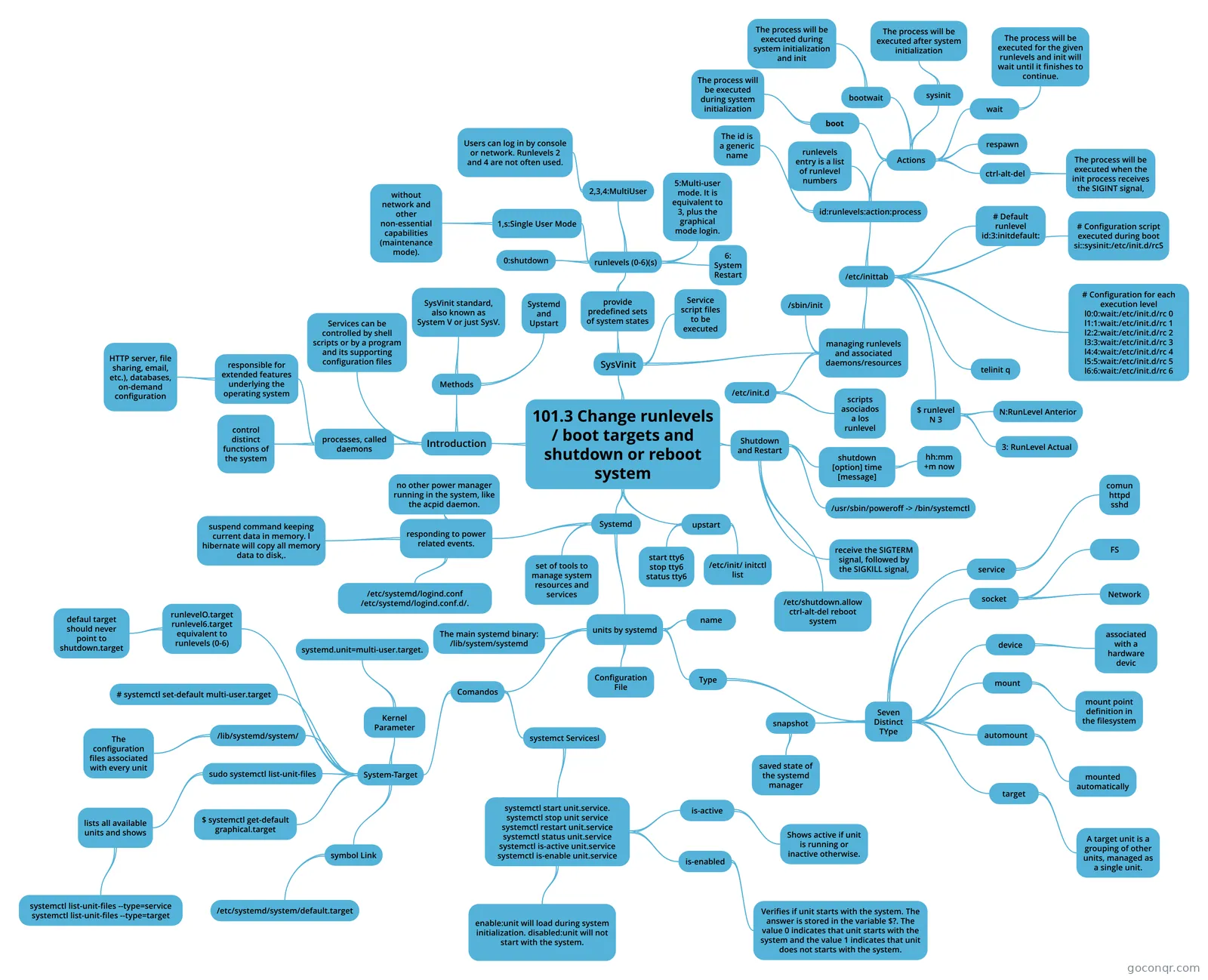
Mind map: Change Runlevels Boot Targets And Shutdown System
Map content
101.3 Change runlevels / boot targets and shutdown or reboot system
Introduction
- processes, called daemons
- control distinct functions of the system
- responsible for extended features underlying the operating system
- HTTP server, file sharing, email, etc.), databases, on-demand configuration
- Services can be controlled by shell scripts or by a program and its supporting configuration files
- Methods
- SysVinit standard, also known as System V or just SysV.
- Systemd and Upstart
- processes, called daemons
SysVinit
- provide predefined sets of system states
- runlevels (0-6)(s)
- 0:shutdown
- 1,s:Single User Mode
- without network and other non-essential capabilities (maintenance mode).
- 2,3,4:MultiUser
- Users can log in by console or network. Runlevels 2 and 4 are not often used.
- 5:Multi-user mode. It is equivalent to 3, plus the graphical mode login.
- 6: System Restart
- runlevels (0-6)(s)
- Service script files to be executed
- managing runlevels and associated daemons/resources
- /sbin/init
- /etc/inittab
- id:runlevels:action:process
- The id is a generic name
- runlevels entry is a list of runlevel numbers
- Actions
- boot
- The process will be executed during system initialization
- bootwait
- The process will be executed during system initialization and init
- sysinit
- The process will be executed after system initialization
- wait
- The process will be executed for the given runlevels and init will wait until it finishes to continue.
- respawn
- ctrl-alt-del
- The process will be executed when the init process receives the SIGINT signal,
- boot
- # Default runlevel id:3:initdefault:
- # Configuration script executed during boot si::sysinit:/etc/init.d/rcS
- # Configuration for each execution level l0:0:wait:/etc/init.d/rc 0 l1:1:wait:/etc/init.d/rc 1 l2:2:wait:/etc/init.d/rc 2 l3:3:wait:/etc/init.d/rc 3 l4:4:wait:/etc/init.d/rc 4 l5:5:wait:/etc/init.d/rc 5 l6:6:wait:/etc/init.d/rc 6
- telinit q
- $ runlevel N 3
- N:RunLevel Anterior
- 3: RunLevel Actual
- id:runlevels:action:process
- /etc/init.d
- scripts asociados a los runlevel
- provide predefined sets of system states
Systemd
- set of tools to manage system resources and services
- units by systemd
- Type
- Seven Distinct TYpe
- service
- comun httpd sshd
- socket
- FS
- Network
- device
- associated with a hardware devic
- mount
- mount point definition in the filesystem
- automount
- mounted automatically
- target
- A target unit is a grouping of other units, managed as a single unit.
- snapshot
- saved state of the systemd manager
- service
- Seven Distinct TYpe
- name
- Configuration File
- Comandos
- systemct Servicesl
- systemctl start unit.service. systemctl stop unit service systemctl restart unit.service systemctl status unit.service systemctl is-active unit.service systemctl is-enable unit.service
- enable:unit will load during system initialization. disabled:unit will not start with the system.
- is-active
- Shows active if unit is running or inactive otherwise.
- is-enabled
- Verifies if unit starts with the system. The answer is stored in the variable $?. The value 0 indicates that unit starts with the system and the value 1 indicates that unit does not starts with the system.
- systemctl start unit.service. systemctl stop unit service systemctl restart unit.service systemctl status unit.service systemctl is-active unit.service systemctl is-enable unit.service
- System-Target
- runlevelO.target runlevel6.target equivalent to runlevels (0-6)
- defaul target should never point to shutdown.target
- Kernel Parameter
- systemd.unit=multi-user.target.
- symbol Link
- /etc/systemd/system/default.target
- # systemctl set-default multi-user.target
- $ systemctl get-default graphical.target
- /lib/systemd/system/
- The configuration files associated with every unit
- sudo systemctl list-unit-files
- lists all available units and shows
- systemctl list-unit-files --type=service systemctl list-unit-files --type=target
- lists all available units and shows
- runlevelO.target runlevel6.target equivalent to runlevels (0-6)
- systemct Servicesl
- The main systemd binary: /lib/system/systemd
- Type
- responding to power related events.
- suspend command keeping current data in memory. l hibernate will copy all memory data to disk,.
- /etc/systemd/logind.conf /etc/systemd/logind.conf.d/.
- no other power manager running in the system, like the acpid daemon.
upstart
- /etc/init/ initctl list
- start tty6 stop tty6 status tty6
Shutdown and Restart
- receive the SIGTERM signal, followed by the SIGKILL signal,
- shutdown [option] time [message]
- hh:mm +m now
- /usr/sbin/poweroff -> /bin/systemctl
- /etc/shutdown.allow ctrl-alt-del reboot system
Information
- Description
- Change runlevels / boot targets and shutdown or re
- Created by
- Rolando Martinez
- Views
- 8
- Rating