
Mind map
Production Planning & Execution
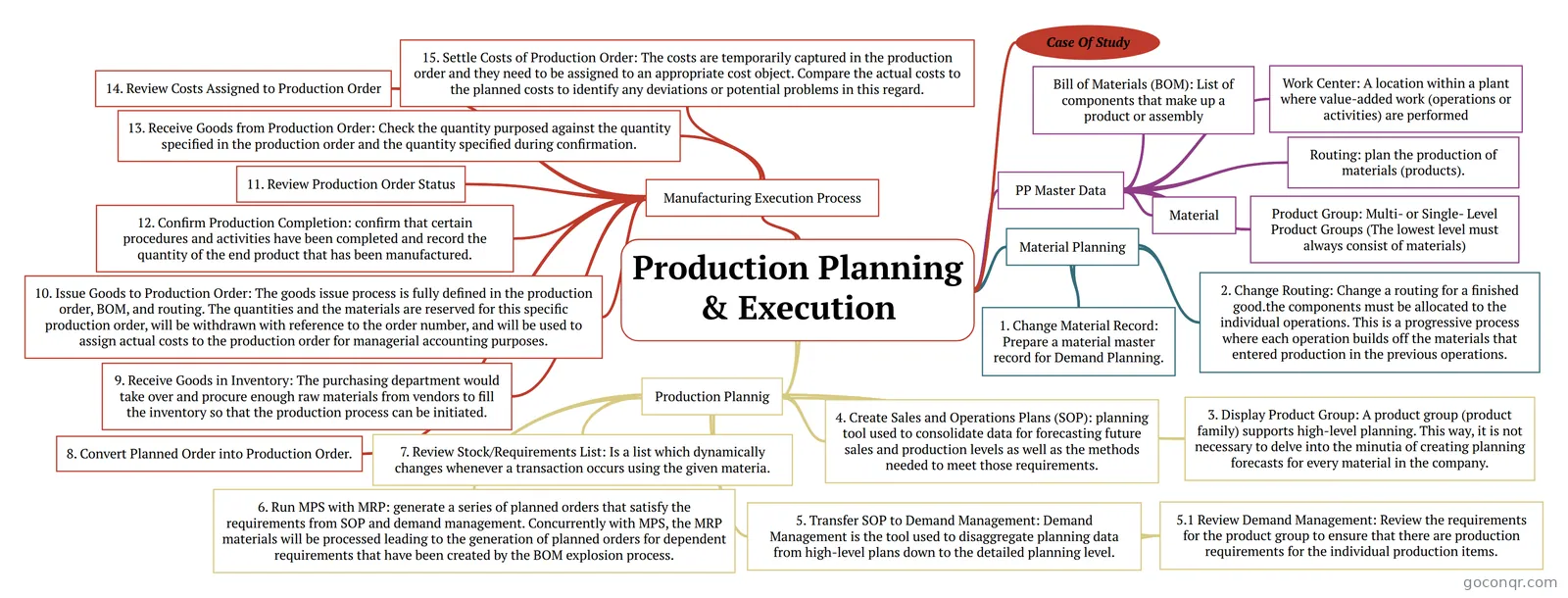
Mind map: Production planning & execution
Map content
Production Planning & Execution
Case Of Study
Material Planning
- 1. Change Material Record: Prepare a material master record for Demand Planning.
- 2. Change Routing: Change a routing for a finished good.the components must be allocated to the individual operations. This is a progressive process where each operation builds off the materials that entered production in the previous operations.
Production Plannig
- 3. Display Product Group: A product group (product family) supports high-level planning. This way, it is not necessary to delve into the minutia of creating planning forecasts for every material in the company.
- 4. Create Sales and Operations Plans (SOP): planning tool used to consolidate data for forecasting future sales and production levels as well as the methods needed to meet those requirements.
- 5. Transfer SOP to Demand Management: Demand Management is the tool used to disaggregate planning data from high-level plans down to the detailed planning level.
- 5.1 Review Demand Management: Review the requirements for the product group to ensure that there are production requirements for the individual production items.
- 6. Run MPS with MRP: generate a series of planned orders that satisfy the requirements from SOP and demand management. Concurrently with MPS, the MRP materials will be processed leading to the generation of planned orders for dependent requirements that have been created by the BOM explosion process.
- 7. Review Stock/Requirements List: Is a list which dynamically changes whenever a transaction occurs using the given materia.
Manufacturing Execution Process
- 8. Convert Planned Order into Production Order.
- 9. Receive Goods in Inventory: The purchasing department would take over and procure enough raw materials from vendors to fill the inventory so that the production process can be initiated.
- 10. Issue Goods to Production Order: The goods issue process is fully defined in the production order, BOM, and routing. The quantities and the materials are reserved for this specific production order, will be withdrawn with reference to the order number, and will be used to assign actual costs to the production order for managerial accounting purposes.
- 11. Review Production Order Status
- 12. Confirm Production Completion: confirm that certain procedures and activities have been completed and record the quantity of the end product that has been manufactured.
- 13. Receive Goods from Production Order: Check the quantity purposed against the quantity specified in the production order and the quantity specified during confirmation.
- 14. Review Costs Assigned to Production Order
- 15. Settle Costs of Production Order: The costs are temporarily captured in the production order and they need to be assigned to an appropriate cost object. Compare the actual costs to the planned costs to identify any deviations or potential problems in this regard.
PP Master Data
- Material
- Bill of Materials (BOM): List of components that make up a product or assembly
- Routing: plan the production of materials (products).
- Work Center: A location within a plant where value-added work (operations or activities) are performed
- Product Group: Multi- or Single- Level Product Groups (The lowest level must always consist of materials)
Information
- Description
- SD SAP Mind Map on Production Planning & Execution, created by Maria Jose Reyes on 13/06/2016.
- Created by
- Maria Jose Reyes
- Views
- 0
- Rating