
Mind map
Computer System
Map content
Computer System
- https://www.gcflearnfree.org/computerbasics/what-is-a-computer/1/
Software
- The programs and apps that run on a computer
- Microsoft Windows 10
- Apple iOS
- Android
- Microsoft Word
- Google Chrome
- Minecraft
Hardware
- https://www.gcflearnfree.org/computerbasics/inside-a-computer/1/
- The physical parts of a computer that can be touched
- Input devices
- https://www.bbc.co.uk/education/guides/zxb72hv/revision/1
- Hardware parts that are used to put new data into the computer
- Keyboard
- Mouse
- Scanner
- Webcam
- Microphone
- Output devices
- https://www.bbc.co.uk/education/guides/zxb72hv/revision/1
- Hardware parts that the computer uses to present data to the user
- Monitor
- Printer
- Speakers
- Headphones
- Storage devices
- https://www.bbc.co.uk/education/guides/zxb72hv/revision/1
- Hardware parts that hold data permanently, for future use
- Magnetic type
- Hard disk drive
- Solid state type
- USB Flash Drive
- Solid State Drive
- SD Card
- Optical type
- CD ROM
- DVD
- Audio CD
- Processing devices
- Hardware parts that are in charge of processing data
- CPU
- https://www.bbc.co.uk/education/guides/zws8d2p/revision/1
- Fetch, Decode, Execute cycle
- Repeats forever, as long as the computer is switched on. The CPU fetches one instruction from memory, decodes the instruction to understand what needs to be done, and executes (carries out) the instruction.
- Clock Speed
- Measures the number of FDE cycles carried out every second by the CPU
- 1 Hertz (1 Hz) = 1 cycle per second
- 1 Kilohertz (1 KHz) = 1'000 cycles per second
- 1 Megahertz (1 GMHz) = 1 million cycles per second
- 1 Gigahertz (1 GHz) = 1 billion cycles per second
- Measures the number of FDE cycles carried out every second by the CPU
- Central Processing Unit - The brain of the computer. Processes data and instructions. Data and instructions must be in memory for the CPU to use.
- Memory
- https://www.bbc.co.uk/education/guides/z7rk7ty/revision
- RAM
- Random Access Memory - Temporary memory. Holds the instructions and data that the CPU is using.
- RAM is volatile - the data is erased when the computer is switched off
- The CPU can read instructions and data from the RAM. The CPU can write new data on the RAM.
- ROM
- Read Only Memory - Holds the start-up instructions for the computer
- ROM is non-volatile - it keeps the data even when the computer is switched off
- The CPU can only read instructions and data from the ROM. The CPU cannot write anything on the ROM - ROM is Read Only Memory.
An electronic device that can input, process, output and store data
Data
- Everything that a computer can work with - this includes numbers, text, images, videos, sound, and instructions
- Binary
- Binary: https://www.bbc.co.uk/education/guides/z26rcdm/revision/1
- Computers can only work with numbers. These numbers must be written in binary, using only 0's and 1's. All data (numbers, text, images etc.) must become binary numbers when it is processed and stored in a computer.
- Bit = 1 single 0 or 1
- 1 Byte = 8 bits
- One text character
- 1 Kilobyte (1 KB) = 1'000 bytes
- A paragraph of text
- 1 Megabyte (1 MB) = 1'000 KB = 1 million bytes
- A medium/large image
- 1 Gigabyte (1 GB) = 1'000 MB = 1 billion bytes
- 300 MP3 songs, 40 minutes high-quality video
- 1 Terabyte (1 TB) = 1'000 GB = 1 trillion bytes
- The entire Encyclopaedia Britannica
- Numbers
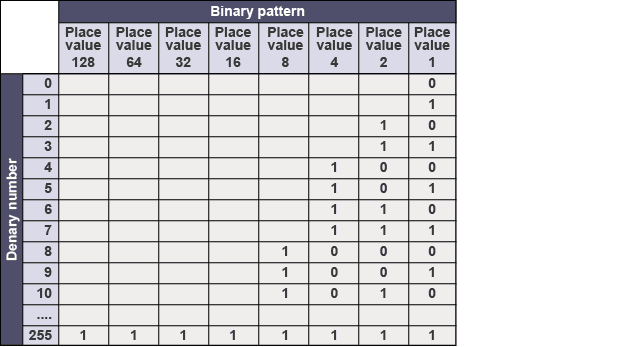
- Binary is a different way to represent numbers, using only 0's and 1's
- All numbers can be represented as a sequence of bits (0's and 1's)
- Each bit has a weight based on its position - this is called the place value
- Place values start with 1 for the first bit ON THE RIGHT, then double up for every bit we go to the left. From right to left, place values are 1, 2, 4, 8, 16, 32, 64, 128..
- Text
- ASCII
- American Standard Code for Information Interchange - A code to represent all characters as binary numbers
- ASCII code for 'A' is 01000001
- ASCII code for 'B' is 01000010
- ASCII code for '8' is 00111000 (not the same as the number eight
- ASCII table online
- https://www.rapidtables.com/code/text/ascii-table.html
- ASCII
Images and files in the map
Information
- Description
- An overview of computer systems
- Created by
- Armando Cotugno
- Views
- 191
- Tags
- Rating