
Mind map
Educational Technologies for teaching and learning
Map content
Educational Technologies for teaching and learning
ICT = Educational Technologies
- 21st Century Teaching
- Pedagogy
- Digital Pedagogies
- ICT Pedagogy
- 21st Century Teaching
Australian Curriculum
- Australian Professional Standards for Teachers - Graduate Level
- 1.1 - Physical, social and intellectual development and characteristics of students
- Demonstrate knowledge and understanding of physical, social and intellectual development and characteristics of students and how these may affect learning.
- 3.4 - Select and use resources
- Demonstrate knowledge of a range of resources, including ICT, that engage students in their learning
- 2.5 - Literacy and numeracy strategies
- Know and understand literacy and numeracy teaching strategies and their application in teaching areas.
- 2.6 - Information and Communication Technology (ICT)
- Implement teaching strategies for using ICT to expand curriculum learning opportunities for students.
- 7.4 - Engage with professional teaching networks and broader communities
- Understand the role of external professionals and community representatives in broadening teachers’ professional knowledge and practice.
- 4.5 - Use ICT safely, responsibly and ethically
- Demonstrate an understanding of the relevant issues and the strategies available to support the safe, responsible and ethical use of ICT in learning and teaching
- 6.2 - Engage in professional learning and improve practice
- Understand the relevant and appropriate sources of professional learning for teachers
- 1.6 - Strategies to support full participation of students with disability
- Demonstrate broad knowledge and understanding of legislative requirements and teaching strategies that support participation and learning of students with disability
- 1.1 - Physical, social and intellectual development and characteristics of students
- English
- Science
- The Arts
- Technology
- Mathematics
- Humanities and Social Sciences
- HPE
- Languages
- General capabilities
- Taught from F- 10 in all curriculum areas
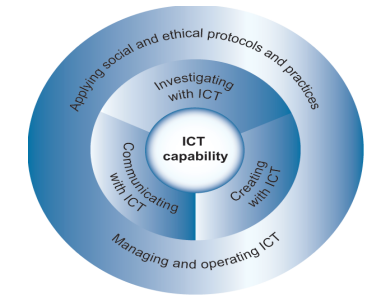
- ICT capability
- Communicating with ICT
- Investigating with ICT
- Applying social and ethical protocols and practices
- Managing and operating ICT
- Supports students to be effective users of technology
- Creating with ICT
- Managing and operating ICT
- Applying social and ethical protocols and practices
- Communicating with ICT
- Intercultural understanding
- Numeracy
- Ethical Behaviour
- Personal and social capability
- Literacy
- Critical and creative thinking
- Successful learner, confident and creative individual and active and informed citizen
- Australian Professional Standards for Teachers - Graduate Level
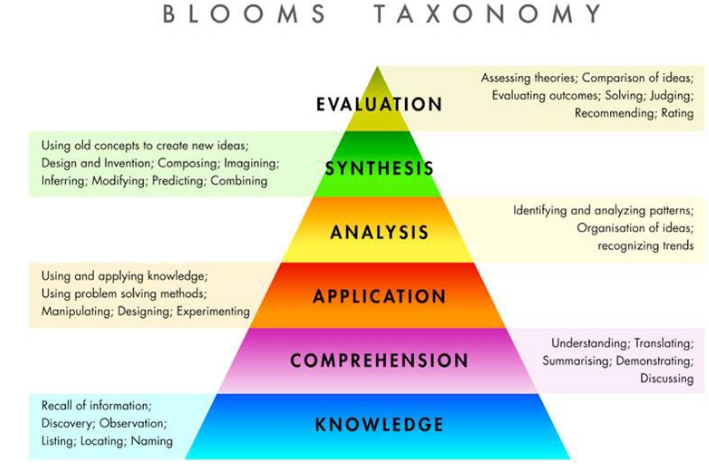
Blooms Taxonomy
- Blooms Digital Taxonomy
- Remembering
- recalling relevant knowledge from long term memory
- Understanding
- Lower Order Thinking Skills
- Making sense of what has been learnt
- Applying
- Use the gained knowledge in new ways
- Analysing
- Breaking concepts into parts and understand how each part is related to one another
- Evaluating
- Higher Order Thinking Skills
- Making judgements based on a set of guidelines
- Creating
- Putting information together in a innovative way
- Remembering
- 6 levels within Bloom's Taxonomy
- Blooms Digital Taxonomy
Technology
- Technology can be anything
- Low level
- High level
- Social Media Platforms
- Google Plus
- TeachersPayTeachers
- Technology in the Classroom
- Selected Ipad classes
- Year 6
- Year 4
- Year 5
- Selected Ipad classes
- Always place in the technology in the student's hand, no use being in the teacher's hand
- One device per 2 students
- use effectively
- About the C's
- Collaborative
- Critical thinkers
- Creative
- Communicate
- Adaptive
- Repursuing technology
- technology isn't normally designed for educational use that is used in the classroom
- Technology is just a tool, a means to an end, not the end itself
- The questions teachers ask will influence how students use technology
- narrow minded answers
- Big inquiry based questions
- can be great for engagement
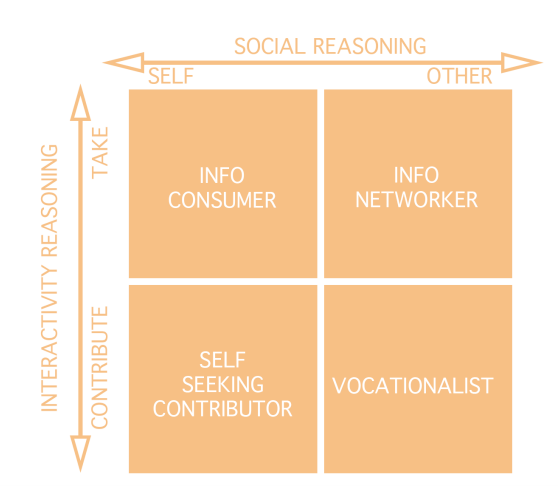
- four different ways people are online
- Negatives
- Internet problems
- access to technology
- Expensive
- low SES schools
- can be a distraction
- Technology can be anything
Learning
- Self-regulated learning
- peer learning
- Effort regulation
- Grit
- Growth Mindset to develop grit
- Significant factor = working really hard
- Grit
- metacognition
- critical thinking
- time management
- If you want learning to happen you need to place the thing where the learning occurs
- Teaching is a way to enable learning
- Teaching doesn't mean learning
- Always think about learning in regards to students
- Knowledge comes from the individual
- Unless children engage with content and information they can not make knowledge
- Teachers can not tell knowledge
- process of acquiring new or modifying existing knowledge, skills or values.
- Self-regulated learning
Learning Theories
- Behaviourist - Cognitivist
- Knowledge exists external to the child and could be transmitted and received
- Software: tutorial program - Mathletics
- Pedagogy: direct instruction
- content-specific
- Correct answers are rewarded and incorrect answers are remediated
- Often perpetuate miss-conceptions students have
- These do not teach students
- Constructivist - Constructionist
- Children construct reality from their perceptions construct their own knowledge
- Software that mediates learning: spreadsheets, content- free, Educreation/ ShowMe App
- Pedagogy: Projects, big questions, investigation
- content- free
- Software or environments that are blank / empty and can be applied to any content/ subject domain
- Students have to do something with this space
- The best way to reinforce knowledge of a topic is to teach it to someone else because it clarifies what you already know
- Behaviourist - Cognitivist
Professional Learning
- Teachers as pedagogical experts
- Teacher directed approach
- based on professional needs or interests.
- Social networking approach
- on-demand, 24/7 learning, in palm of the teacher’s hand
- actioning teacher’s content generation
- inquiry-based professional learning is grounded in teachers’ intentional investigation and reflection on one’s own practice
- You are responsible for your professional learning
- undertaken daily in the classroom
- discuss online
Professional development
- Needs to be redesigned
- Outside experts
- Come and tell the teachers what to do
- Does not transfer well into classroom
- Teachers need direct instruction on how to better improve their skills and master new strategies.
- Top down approach to developing teachers
- is done to the teachers
ICT Frameworks
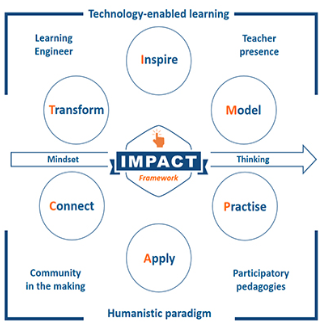
- IMPACT Framework
- C = Connect
- Global Connection
- Personalised Connection
- Social Connection
- DRIVE
- Learning Goals
- Collaboration
- Reflective Learning
- Extending communication and collaboration beyond the classroom
- Student to student
- Student to expert
- Student to community - nation -world
- T = Transform
- Transform Learners
- Create and Design
- 21st Century Technology
- Learning Goals
- Making Decisions
- Transparent criteria
- Creating a representation of new knowledge
- Students reflecting on what they know
- Build their knowledge by creating something
- M = Model
- Brain searches for visual information
- Graphics - organisers, symbols
- Flip the classroom
- Chunk information
- Learning Goals
- Associate
- Demonstrate
- Set Goals
- Explicit instruction, demonstrate concept
- A = Apply
- Problem solving
- Higher Order Thinking
- Meta-cognition
- Learning Goals
- Transfer
- Certainty-based learning
- Students take the concept / ideas / skills they have learnt and use them in a real context
- Look for relationship, compare/contrast, visible thinking
- I = Inspire
- Emotional connection to topic
- Motivate the students
- Grab their attention
- Activate prior knowledge
- Learning Goals
- Quality questions inspire curiosity
- Students predict what they will learn
- Motivate and emotionally connect learners to content and each other
- P = Practice
- Repeat
- Gradual release of responsibility
- Feedback
- Memory
- Learning Goals
- Spaced Learning
- Scaffolded
- Repeat, stepped process, drafting
- C = Connect
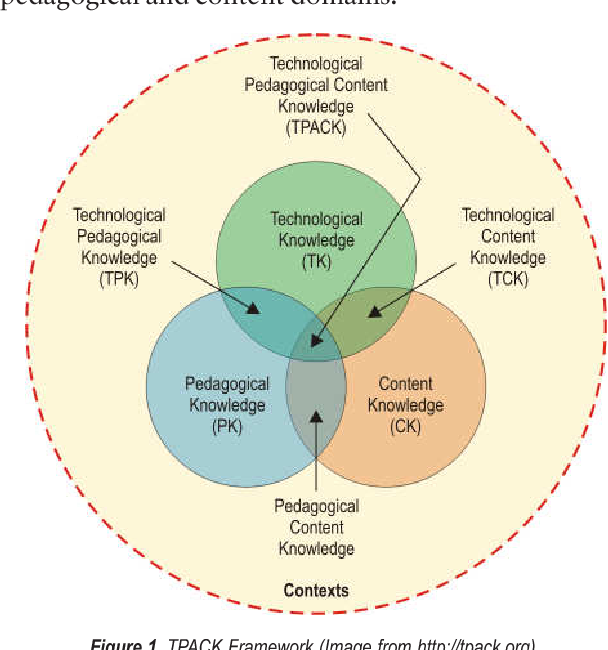
- TPACK Framework
- Technology
- TPK
- Technology should not drive pedagogy
- Tools, platform, software
- Its the PARTNER
- Teachers integrate it in to the content and pedagogy
- TPK
- Pedagogy
- TPK
- Strategies & Method
- Its the HOW
- TPK
- Content
- TCK
- Sweet Spot
- PCK
- Concepts & skills
- Its the WHAT
- TCK
- Surrounded by context
- Each stage shapes one another
- Technology used in ways which enhance student learning or student outcomes
- TPACK is driven by the teachers basic understanding of how the student learns
- Their beliefs
- Technology
- Observation framework
- Pedagogical practices
- Instructional
- Divides the learning activities into smaller unite with use of positive and negative feedback for corrections
- Very instructional
- Divides the learning activities into smaller unite with use of positive and negative feedback for corrections
- Relevatory
- Activities / knowledge in order for students to discover the concept
- Do an activity and come to an understanding
- Activities / knowledge in order for students to discover the concept
- Conjectual
- Enables students to manipulate ideas and hypotheses to develop knowledge
- Totally experimental
- Enables students to manipulate ideas and hypotheses to develop knowledge
- Instructional
- Pedagogical practices
- Approaches to using educational technology
- Epistemic Beliefs
- Dualistic View
- Right or wrong knowledge handed down by authority
- Multiplistic
- Multiple views but still believe the most knowledge is certain
- Relativistic
- Most knowledge as tentative and contextual and generated by the self
- Relativism
- Most knowledge as tentative and contextual and generated by the self
- Four different levels of knowing
- Dualistic View
- Pedagogical practices
- Teacher centred
- Student centred
- Mixed balance
- Primarily student centred
- Primarily teacher centred
- Supplement
- Means - same same
- Low end
- Means - same same
- Enrich
- Augment
- Means -adding to existing practice
- Augment
- Transform
- Leverage
- Means - change practice
- Leverage
- Epistemic Beliefs
- IMPACT Framework
Technology for Inclusive classroom
- Assistive Technology
- For all students
- General areas
- Access
- technologies to enable students to engage with the curriculum
- Supportive
- technologies to improve efficiency within learning episodes
- Curriculum
- applications to enhance learning in a specific curriculum focus
- Framework
- applications to cater to learning needs
- Access
- Access hardware for curriculum engagement
- Alternative keyboards
- Mouse alternatives
- Switch systems
- Interactive systems
- Virtual Reality
- Screen magnification and enhancement
- OCR and screen reading
- Braille devices
- Transformation hardware
- Communication devices
- Transforming Content
- Written content may need to be transformed before student can effectively engage with the text
- Three Step Process
- Create digital copy
- Recognize content (OCR)
- Place digital content to an appropriate digital format for the student
- Recognize content (OCR)
- Create digital copy
- Examples of transformation tools
- • Print to speech: Prizmo • Handwriting recognition: Pen to Print • Print to speech pens: C-Pen • Print to speech wearables: OrCam • Environment recognition: Seeing AI • Speech input: iPad Dictation tool • Read modes and text-to-speech • Immersive readers: MS Office • OS support • Screen recorders • eBooks and eBook Readers: Freda • Digital manipulatives • Maths support: Efofex • Notetaking options: AudioNote • Curriculum response: Explain Everything • 3D Printers • Organisation support: Inspiration • Multimodal delivery of content: Communicate: In Print • Screen magnification/ enhancement, screen reader: Fusion 2018 • Sound amplification systems • FM Systems/HA sound support • Communication apps: Proloquo2Go iPad OS (Sept 2019) Mouse input
- The types of technology that we can use to enhance our capacity as teachers to be able to engage the students more effectively with their curriculum
- Get a clear understand about what the students real capabilities are - very important
- Challenges to learn
- Students may challenge engaging with content in the format in which it is delivered
- reduces the capacity of teachers to obtain a clear indication of student academic understanding and application
- often leads to poor comprehension, frustration, disengagement with learning tasks and behaviour problems.
- they often take longer to interact with the curriculum, make more errors, need to concentrate harder and get fatigued more quickly.
- Special Provisions
- • Special provisions do not involve compensating for what the student does not know or cannot do.
- Involves the application of relevant syllabus criteria and standards against which achievement is judged
- The school is required to maintain the intent and rigour of the syllabus or study area specification and any other requirements or components that are inherent or essential to the course of study
- Assessment criteria and standards are not modified to suit particular students
- Access Arrangements and Reasonable Adjustments
- Examples
- • Signing instead of speaking • Computer simulation instead of lab work • Specialised equipment (e.g. keyboard, rather than handwriting) • Digital reader to communicate a text where reading is not the skill being assessed • Assistance with the interpretation and comprehension of assessment items not designed to assess those language skills Additional time to complete tasks
- Making modifications for students so they can complete task
- Examples
- Assistive Technology
Cyber bullying Dolly
Ever changing world
- 65% percent of jobs don't even exist yet for children entering school today
Images and files in the map
Information
- Description
- Mind Map on Educational Technologies for teaching and learning, created by Eliza manning on 10/07/2019.
- Created by
- Eliza manning
- Views
- 7
- Rating