
Mind map
Cell Referencing (topic 10)
Map content
Cell Referencing (topic 10)
When a formula is copied by ‘filling down’ the cell references in cells are adjusted as you drag the pointer down the page.
Relative cell references
- If a formula is copied by filling down, the cell references are adjusted as you drag the replication pointer down the page. This is because it uses the relative address of the cells based on their position in the worksheet.
- when a cell is used in a formula and is copied to a new cell reference, the cell references (cell address) changes to take account of the formula’s new position
Absolute cell referencing
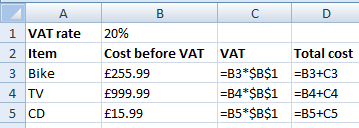
- Some we need to use part of a formula that does not change. For example is VAT was recorded in B2 as 20% then the B2 part of the formula must not change because the rate will be 20% for everything. All the other cell ranges will change. When the formula is copied down, the relative address changes but the absolute doesn’t.
- $ character in front of the letter and number that are required to stay the same.
Images and files in the map
Information
- Description
- Mind Map on Cell Referencing (topic 10), created by walkc200 on 13/02/2015.
- Created by
- walkc200
- Views
- 0
- Rating