
Mind map
Different types of computer
Map content
Different types of computer
MAINFRAME COMPUTERS
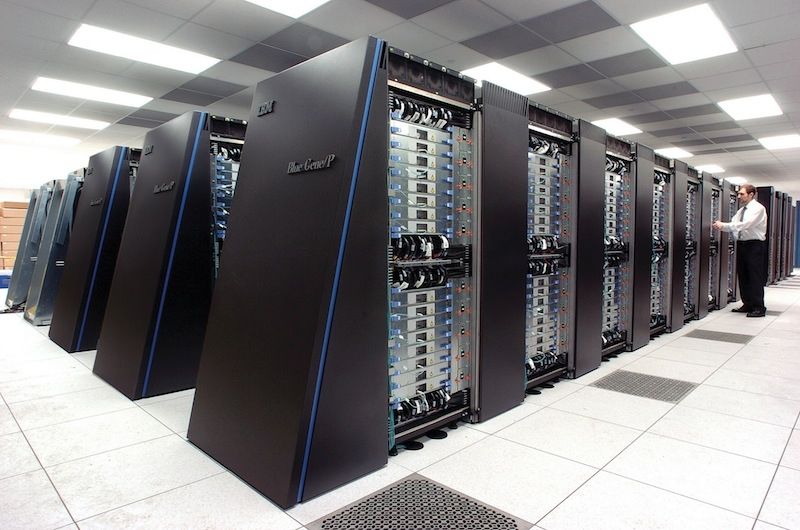
- Mainframes are very large and powerful computers, used to control multiple networks often over different countries. Large companies make use of mainframes as they have parallel processors, or multiple processors that run at the same time, which decrease the time it takes to complete a task since more tasks can be done at once.
- ADVANTAGES
- Can process a lot of data ex. from scientific experiments//Data is processed quickly//TIME SLICES (a portion of the computing power a terminal/computer gets from a mainframe) allow for hundreds of computers to run of one mainframe.
- DISADVANTAGES
- Needs to be places in a room with lots of cooling as the CPUs produce a lot of heat//Very expensive to purchase and run//Needs a lot of space to be stored in//System analysts need to be employed to maintain the computer
- USES
- For processing large amounts of data//For processing transactions for large companies like banks, airlines, government departments, etc//For processing data needed to produce weather forecasts, earthquake & tsunami warnings, etc
- ADVANTAGES
- Mainframes are very large and powerful computers, used to control multiple networks often over different countries. Large companies make use of mainframes as they have parallel processors, or multiple processors that run at the same time, which decrease the time it takes to complete a task since more tasks can be done at once.
PCS (PERSONAL COMPUTERS)
- The most commonly found computer system, suitable for small offices, homes and small schools. PCs in offices and schools are usually connected together with wires or wirelessly, to form networks
- ADVANTAGES
- Keyboard and mouse is separate so it can be moved to the user's liking, reducing the risk of RSI//Relatively cheap to buy and repair//Full sized keyboards are easier to use than smaller ones//Hardware like the mouse, keyboard and monitor and speakers can be easily upgraded.
- DISADVANTAGES
- They are not portable as they are usually large and have a lot of separate parts to carry//Most hardware on a PC is connected by wires, making it a hassle to disconnect them all when you want to move//Work cannot easily be transferred from office to home as it has to be saved online or onto a removable storage device first.
- ADVANTAGES
- The most commonly found computer system, suitable for small offices, homes and small schools. PCs in offices and schools are usually connected together with wires or wirelessly, to form networks
LAPTOPS
- Laptops are essentially smaller, portable versions of PCs. They are suitable for anyone who lives a busy life reliant on a computer as it can be carried from home to work/school easily. Laptops use LCD screens which reduces power usage and are very light as well.
- ADVANTAGES
- They are much smaller and lighter than a PC, making it portable//An inbuilt battery allows the user to be able to use it without a charger to the mains//Can be used on your lap when there is no flat surface to place it on//Contains an inbuilt keyboard, touch pad and speakers so no external hardware is essential//You can easily connect a laptop to any multimedia devices such as headphones and projectors.//Files do not need to be transferred from work and home which saves time//Contains an inbuilt wireless adapter which allows it to access a network without physically connecting it to the network with wires
- DISADVANTAGES
- The base of the laptop can get hot, making it uncomfortable//Because it is much smaller than a PC, it is easily stolen//The battery life is limited//Smaller keyboards are harder to use than full sized ones//Since the keyboard and touch pad are inbuilt and cannot be moved, users are more prone to RSI//The touch pad is harder to use than a mouse//It is hard to upgrade hardware as the laptop needs to be taken apart first
- ADVANTAGES
- Laptops are essentially smaller, portable versions of PCs. They are suitable for anyone who lives a busy life reliant on a computer as it can be carried from home to work/school easily. Laptops use LCD screens which reduces power usage and are very light as well.
PDAs (Personal Digital Assistant)
- PDAs are basically small versions of computers that can fit inside your pocket. PDAs are used to keep track of meetings, birthdays as well as contact details and addresess of peopel
- ADVANTAGES
- PDAS are small so they are portable//THey are often combined with other functions ex. smartphones are now PDAs and phones in one device//Easy to use while standing
- DISADVANTAGES
- Have smaller memory than a laptop//They are small so easily stolen/lost//Since PDAs are small, the keyboards can be hard to use
- ADVANTAGES
- PDAs are basically small versions of computers that can fit inside your pocket. PDAs are used to keep track of meetings, birthdays as well as contact details and addresess of peopel
Images and files in the map
Information
- Description
- Mind Map on Different types of computer, created by Christopher Carr on 10/05/2015.
- Created by
- Christopher Carr
- Views
- 0
- Rating