
Mind map
Data Representation
Map content
Data Representation
Binary & Hex
- All data on a computer is stored in binary
- Bit
- Nibble= 4 bits/ half a byte
- Byte = 8 bits
- kilobyte = 1024 bytes
- megabyte = 1024 kilobytes
- gigabyte = 1024 megabytes
- terabyte = 1024 gigabytes
- gigabyte = 1024 megabytes
- megabyte = 1024 kilobytes
- kilobyte = 1024 bytes
- Byte = 8 bits
- Nibble= 4 bits/ half a byte
- base system = 128, 64, 32, 16, 8, 4, 2, 1
- binary / denary:
- 10011001 = 128 + 0 + 0 + 16 + 8 + 0+ 0 +1
- 45 = 101101
- binary / hex
- 10110010 = 8 + 2 + 1 = 11 = B
- 2 = 2
- B2
- 2F = 00101111
- 2 = 2
- 0, 1, 2, 3, 4, 5, 6, 7, 8, 9, A, B, C, D, E, F
- 10110010 = 8 + 2 + 1 = 11 = B
- 10011001 = 128 + 0 + 0 + 16 + 8 + 0+ 0 +1
- binary / denary:
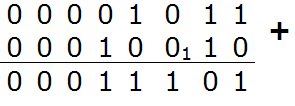
- Overflow = When you try to store a number that is too big and a bit will be deleted. (9 bit number into 8 bit). it will be stored incorrectly.
- Binary codes are used to represent characters, numbers and symbols because computer can only process in binary
Characters
- The number of bits allows more characters to be stored because ...
- Ascii
- ASCII is used for storing and displaying text, simple formatting and a few other control characters.
- However, it can only store 128.
- Unicode
- Unicode has succeded ASCII as it can store a much wider range of characters (65,536)
- The number of bits defines the limit of how many characters can be represented within any scheme
- Languages with characters less than 128 bits use ASCII and over 128 use Unicode
- A single letter of the alphabet requires 7 bits but is stored as an 8 bit bite
- For a computer there is no 'A' key or 'M' key. To recognize which letter has been requested via the keyboard a signal is sent when a key is pressed to the computer that effectivley says 'The third key on the middle row has been pressed'. This 'signal' is a binary number. the character set then converts the binary number into a written language character.
- There is a difference between a charcter set and a font style. Its is the character set that maps a binary code to the letter A. Whatever font you have selected will then be displayed in a certain way.
Images
- Bit planes
- A bit plane of a digital discrete signal is a set of bits corresponding to a given bit position in each of the binary numbers representing the signal
- Colour depth
- The more depth, the wider the colour range
- Number of bits used to represent a colour
- The greater the colour depth, the better the colour resolutiom
- A gamut is the range of colors that a color device can display or print
- Metadata
- 'Data about data' - metadata describes the structure of the data file
- Usually located right at the start of the file
- Eg. when a media player open the file it looks for the metadata which describes the format of the file e.g. the file type, how many horizontal pixels are there, how many vertical pixels and the colour depth of the file.
- Usually located right at the start of the file
- 'Data about data' - metadata describes the structure of the data file
- Digitising an image
- The more pixels on the screen, the higher the resolution and the better the quality of the picture will be
- The higher the image resolution, the more memory is needed to store the graphic
- Image files can be either
- Bitmaps
- Bitmap images are organised as a grid of coloured squares called pixels (short for 'picture elements').
- Each colour of an image is stored as a binary number.
- When zooming in or enlarging a bitmap image, the pixels are stretched and made into larger blocks.
- This is why bitmap images appear as poor quality when enlarged too much.
- In black-and-white images, each pixel is either black or white. You need a binary value for each different colour. As each pixel is either black or white, black and white images can be encoded with a value of 0 for white and 1 for black.
- Vectors
- A vector image uses scalable shapes such as straight lines and curves, using coordinates and geometry to precisely define the parts of the image.
- Vector graphics can be scaled without losing resolution. They can be enlarged or reduced in size - but the file size will stay almost exactly the same.
- It is more efficient than bitmaps at storing large areas of the same colour because it does not need to store every pixel as a bitmap does.
- Bitmaps
- When a monitor or a printer displays a vector image it is rasterised - converted into a grid of pixels. Regardless of the file type, an image will always be outputted onto a screen or printed in pixels.
- Bit planes
Sound
- Sound is stored in digital format by...
- Sampling
- Sampling = a method of converting an analogue sound into a digital file containing binary numbers.
- The idea of 'sampling' is to take a regular measurment of the sound wave at a specific instance in time.
- Samples measure the amplitude of the signal at an instance in time.
- The sampling rate is how often a file is sampled.
- The more samples taken, the better the quality.
- The higher the sampling rate, the bigger the file size.
Images and files in the map
Information
- Description
- GCSE Computing Mind Map on Data Representation, created by Louise Whitton on 20/10/2015.
- Created by
- Louise Whitton
- Views
- 4
- Rating