
Mind map
2.1.6 Networks
Map content
2.1.6 Networks
The Internet
- Definition - The internet is a collection of inter-connected computer networks
- Internets Growth
- In 1969, there were 4 networks connected to the Internet
- By 1989, there were 100,000 networks connected to the Internet
- By 2012, 2.1 billion people were Internet users
- By 2020, it is predicted that more than 50 billion ‘things’ will be connected to the Internet
- By 2012, 2.1 billion people were Internet users
- By 1989, there were 100,000 networks connected to the Internet
- In 1969, there were 4 networks connected to the Internet
- Connecting to the Internet
- PC > Router > Modem > ISP > Internet
- Modem stands for Modulator / Demodulator. It is needed to convert the digital signal from the computer to an analogue signal used by telephone lines. A second modem at the receiving end converts the signal back to digital
- A router is a hardware device that allows you to connect several computers and other devices to a single Internet connection, in a home network Many routers incorporate a wireless Access Point (AP), allowing you to easily create a wireless network
- HTTP and HTTPS
- HTTP stands for Hypertext Transfer Protocol and it is used for accessing and receiving web pages in the form of HTML files on the Internet
- HTTPS stands for Hypertext Transfer Protocol Secure and it encrypts the information so that it cannot be hacked
- The protocol requests the web server to upload the requested web page to the user’s browser for viewing
- HTTP stands for Hypertext Transfer Protocol and it is used for accessing and receiving web pages in the form of HTML files on the Internet
Device Communication
- Protocols
- There is a set of rules about how messages are formatted and transmitted, All transmissions, worldwide, must follow the rules in order for the transmission to be successful
- The set of rules is called a protocol
- There is a set of rules about how messages are formatted and transmitted, All transmissions, worldwide, must follow the rules in order for the transmission to be successful
- TCP and IP Protocol
- TCP (Transmission Control Protocol) Breaks up messages sent over the Internet into small chunks called packets Reassembles the packets at the other end Detects errors Resends lost messages.
- IP (Internet Protocol) Routes the individual packets
- Packet Switching
- Suppose you want to send a file of 3Mb across the Internet, The file is broken up into data “packets” of 512 bytes
- Each packet is given a header containing: The IP (Internet Protocol) address it is going to, The IP address it has come from, the sequence number of the packet and the number of packets in the whole communication
- The packets will be rearranged into the correct order then the recipient computer will acknowledge receipt of packets but any packets not acknowledged will be automatically resent by the sending computer
- Protocols
Addresses
- Every computer and other device connected to the Internet is assigned an IP address e.g. 81.101.137.12 The IP address is derived from the geographical area and the ISP and as such can change depending on where you are
- When you request a web page, each router along the way uses the MAC address of the next router to send the data packet on the next leg of its journey
- Every networked device also has a unique MAC (Media Access Control) Address assigned to its Network Interface Card Unlike IP addresses, MAC addresses are fixed
- A PC on a network has 2 IP addresses – public and private.
- The public IP belongs to the router on your LAN and the private address is accessible only within the LAN
- Once a message arrives at the router of your LAN, it will use the private IP address to identify which machine requested information from Google, for example
- The public IP belongs to the router on your LAN and the private address is accessible only within the LAN
- Every computer and other device connected to the Internet is assigned an IP address e.g. 81.101.137.12 The IP address is derived from the geographical area and the ISP and as such can change depending on where you are
DNS
- DNS stands for Domain name system
- DNS technology allows you to type a name such as google.co.uk into your web browser then it translates the web address google.co.uk into an IP address e.g. www.google.co.uk = 74.125.131.94
- DNS stands for Domain name system
WAN and LANs
- The Internet is a Wide Area Network (WAN). Any network in which the computers communicate using resources supplied by a “third party carrier” such as British Telecom is a WAN. A WAN uses cables, telephone lines, satellites and radio waves to connect and a WAN is spread over a wide geographical area
- LAN stands for Local Area Network A LAN operates on a single site such as a school or small business, All the devices on the network are connected by cables or by wireless – no third party carrier such as BT is involved.
- Networking Advantages: Sharing Resources such as printers saves money, You can access your files from any computer in the network and Data is easy to backup as it is stored centrally on the server
- Networking Disadvantages: Purchasing networking hardware is expensive, Managing large networks is complicated and Viruses affect every computer if it infiltrates the network
Network Topology
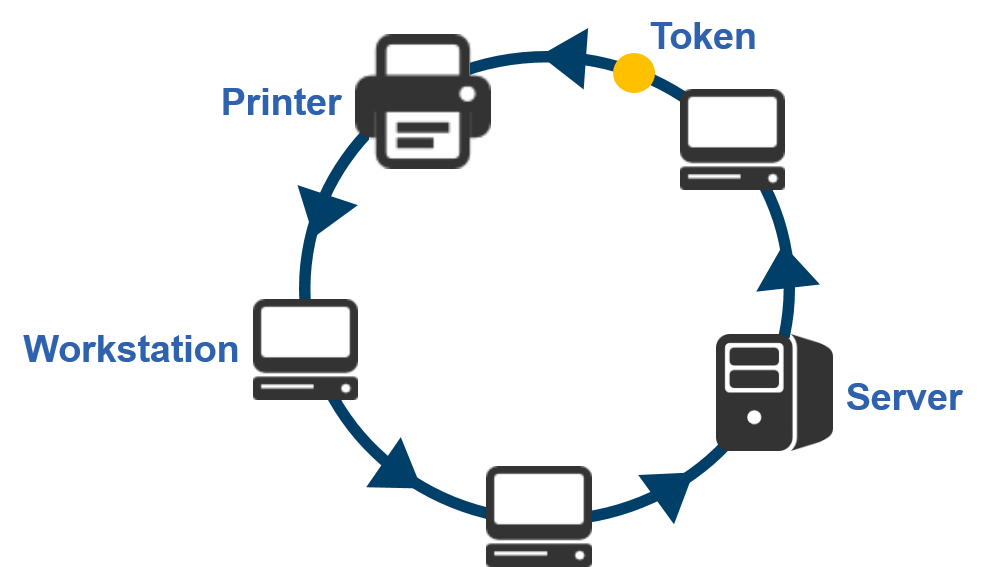
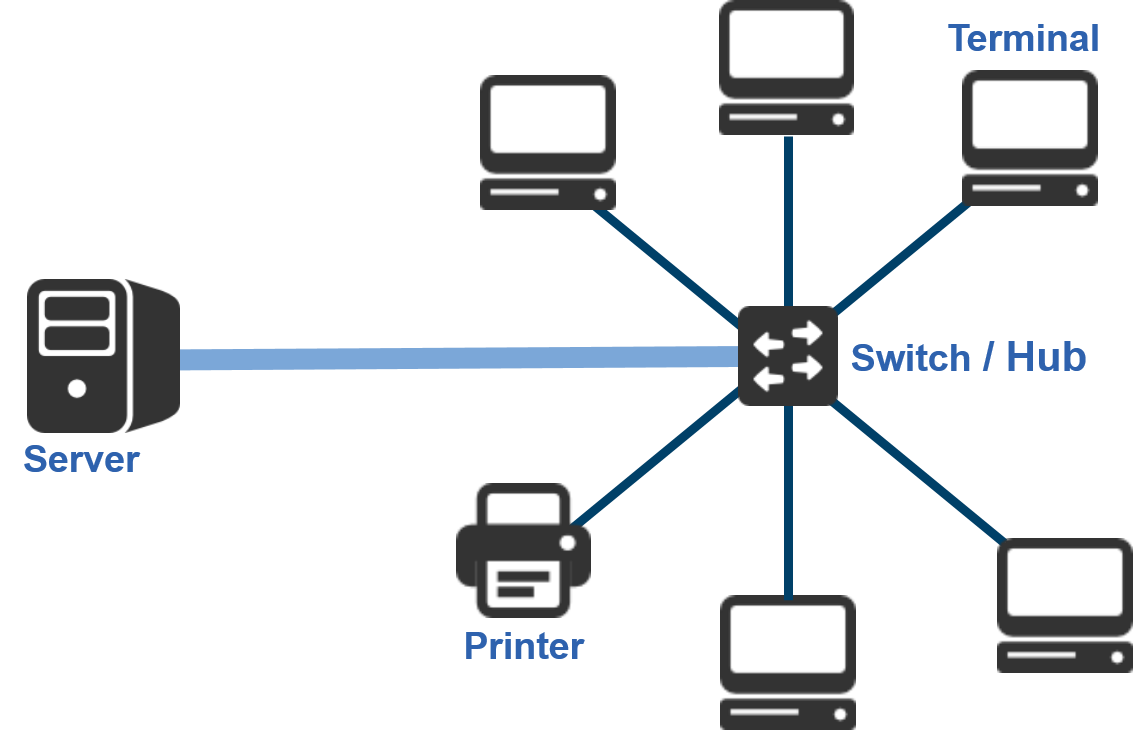
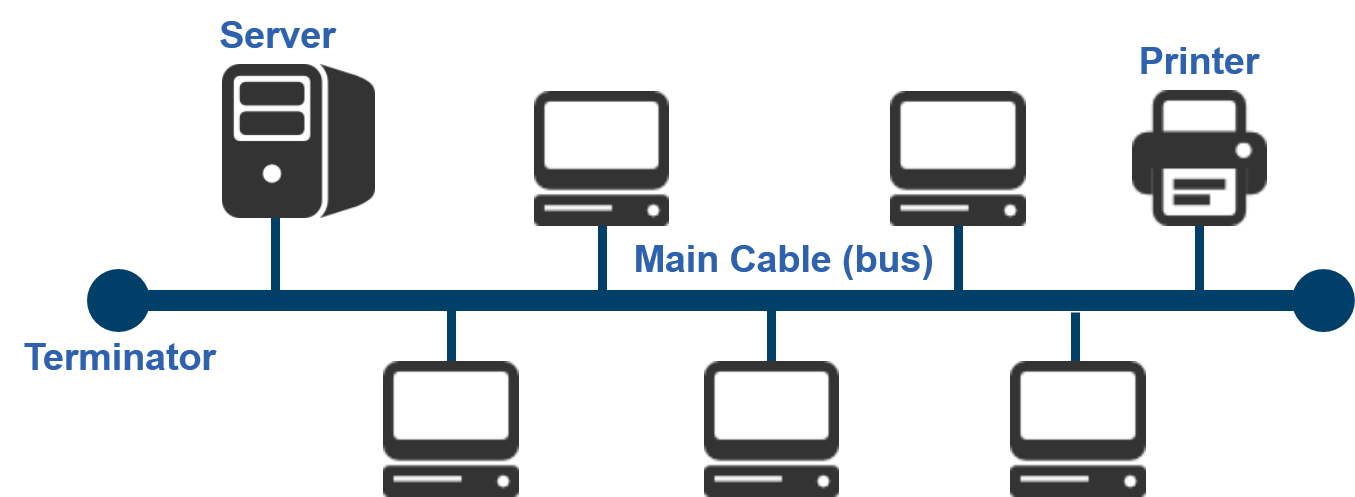
- LANs can be set up in various ways: Bus, Star and Ring are the main 3.
- Bus Network
- Advantages: It is the cheapest and easiest to install, as it uses only a relatively short length of cable and New nodes can easily be added without disrupting the rest of the network
- Disadvantages: If the bus fails the whole network fails and As more workstations are added, performance degrades as all data travels along the same bus
- Advantages: It is the cheapest and easiest to install, as it uses only a relatively short length of cable and New nodes can easily be added without disrupting the rest of the network
- Ring Network
- Advantages: Data is transferred quickly as it flows in one direction only – no data collisions, Not affected by heavy traffic and More workstations can be added without degrading performance
- Disadvantages: If any of the cable fails the whole network fails, Workstations may be able to see data that is not for them so there is a privacy/security issue and If there are any problems on the network, they can be difficult to identify
- Advantages: Data is transferred quickly as it flows in one direction only – no data collisions, Not affected by heavy traffic and More workstations can be added without degrading performance
- Star Network
- Advantages: Fast data transfer as there are no data collisions and If one cable fails the other workstations are not affected
- Disadvantages: Expensive to install as lots of cabling is required as well as the central hub or switch and If the central device fails the whole network goes down
- Advantages: Fast data transfer as there are no data collisions and If one cable fails the other workstations are not affected
- Bus Network
- LANs can be set up in various ways: Bus, Star and Ring are the main 3.
Servers
- The server is a powerful computer which provides services required by any of the clients in the network
- Client computers are those which people use to log on to and use the services provided by the server
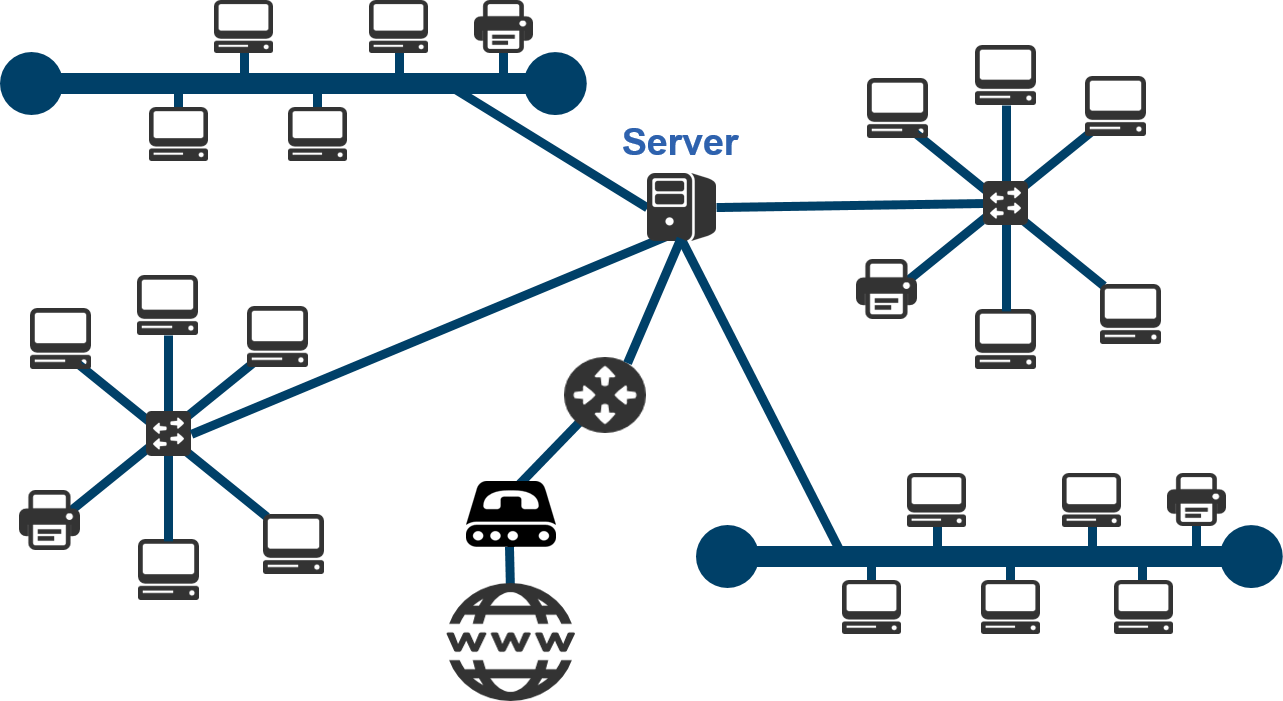
- Servers on LANs and WANs
- One or more servers may be part of a local area network
- A server may also be part of a wide area network for example Google has massive servers in several different countries
- The Role of the Server
- Servers do the following: A file server holds all the data files and databases and manages backups, A print server may organise printing on different printers, An email server may receive emails, detect and block spam, distribute emails to users and A web server may host the school’s external website
- The server waits for requests from the clients It may need to pass the request (e.g. for a web page) to another server – in which case, it becomes the “client”
- The Role of the Client
- The client sends requests to the server then waits for a reply Receives the reply
- The Hand Shaking Process
- This is the process by which two devices initiate communication. One device sends a message to another indicating it wants to communicate. If two devices try to transmit simultaneously, both wait a random time and then try again The “handshaking” negotiation then takes place to establish what protocol to use Computer A: “I am ready to receive data” then Computer B: “I am ready to send data” Finally Computer A: “OK, send it!”
- Types of Server
- Servers are often dedicated computers, meaning each one performs no other tasks beside its server tasks However, on a multiprocessing operating system, a single computer can perform the tasks of several servers
- Advantages of Having a Server
- All data can be backed up centrally rather than on each individual computer Security is better because data is held in one location rather than all over the organisation Users can log in from any computer on the network and access their data
Images and files in the map
Information
- Description
- Mind Map on 2.1.6 Networks, created by Jake Youd on 21/11/2016.
- Created by
- Jake Youd
- Views
- 5
- Rating