
Mind map
Computing Principles
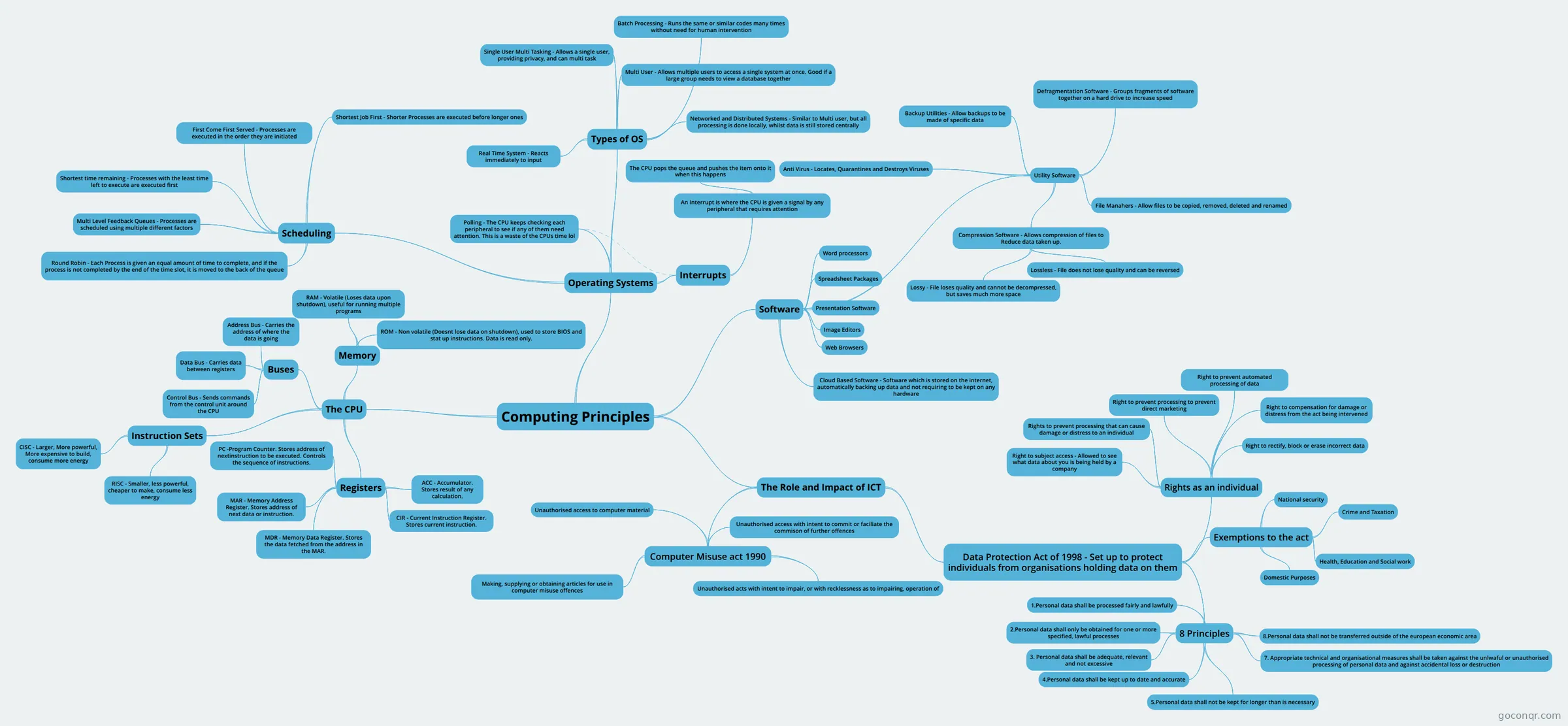
Mind map: Computing Principles
Map content
Computing Principles
The CPU
- Registers
- CIR - Current Instruction Register. Stores current instruction.
- MAR - Memory Address Register. Stores address of next data or instruction.
- MDR - Memory Data Register. Stores the data fetched from the address in the MAR.
- ACC - Accumulator. Stores result of any calculation.
- PC -Program Counter. Stores address of nextinstruction to be executed. Controls the sequence of instructions.
- Buses
- Control Bus - Sends commands from the control unit around the CPU
- Data Bus - Carries data between registers
- Address Bus - Carries the address of where the data is going
- Memory
- RAM - Volatile (Loses data upon shutdown), useful for running multiple programs
- ROM - Non volatile (Doesnt lose data on shutdown), used to store BIOS and stat up instructions. Data is read only.
- Instruction Sets
- RISC - Smaller, less powerful, cheaper to make, consume less energy
- CISC - Larger, More powerful, More expensive to build, consume more energy
- Registers
Operating Systems
- Types of OS
- Real Time System - Reacts immediately to input
- Single User Multi Tasking - Allows a single user, providing privacy, and can multi task
- Batch Processing - Runs the same or similar codes many times without need for human intervention
- Multi User - Allows multiple users to access a single system at once. Good if a large group needs to view a database together
- Networked and Distributed Systems - Similar to Multi user, but all processing is done locally, whilst data is still stored centrally
- Scheduling
- First Come First Served - Processes are executed in the order they are initiated
- Shortest Job First - Shorter Processes are executed before longer ones
- Shortest time remaining - Processes with the least time left to execute are executed first
- Multi Level Feedback Queues - Processes are scheduled using multiple different factors
- Round Robin - Each Process is given an equal amount of time to complete, and if the process is not completed by the end of the time slot, it is moved to the back of the queue
- Interrupts
- An Interrupt is where the CPU is given a signal by any peripheral that requires attention
- The CPU pops the queue and pushes the item onto it when this happens
- An Interrupt is where the CPU is given a signal by any peripheral that requires attention
- Polling - The CPU keeps checking each peripheral to see if any of them need attention. This is a waste of the CPUs time lol
- Types of OS
Software
- Word processors
- Spreadsheet Packages
- Presentation Software
- Image Editors
- Web Browsers
- Cloud Based Software - Software which is stored on the internet, automatically backing up data and not requiring to be kept on any hardware
- Utility Software
- Anti Virus - Locates, Quarantines and Destroys Viruses
- Defragmentation Software - Groups fragments of software together on a hard drive to increase speed
- File Manahers - Allow files to be copied, removed, deleted and renamed
- Backup Utilities - Allow backups to be made of specific data
- Compression Software - Allows compression of files to Reduce data taken up.
- Lossy - File loses quality and cannot be decompressed, but saves much more space
- Lossless - File does not lose quality and can be reversed
The Role and Impact of ICT
- Data Protection Act of 1998 - Set up to protect individuals from organisations holding data on them
- Rights as an individual
- Right to subject access - Allowed to see what data about you is being held by a company
- Rights to prevent processing that can cause damage or distress to an individual
- Right to prevent processing to prevent direct marketing
- Right to prevent automated processing of data
- Right to compensation for damage or distress from the act being intervened
- Right to rectify, block or erase incorrect data
- Exemptions to the act
- National security
- Crime and Taxation
- Health, Education and Social work
- Domestic Purposes
- 8 Principles
- 1.Personal data shall be processed fairly and lawfully
- 2.Personal data shall only be obtained for one or more specified, lawful processes
- 3. Personal data shall be adequate, relevant and not excessive
- 4.Personal data shall be kept up to date and accurate
- 5.Personal data shall not be kept for longer than is necessary
- 7. Appropriate technical and organisational measures shall be taken against the unlwaful or unauthorised processing of personal data and against accidental loss or destruction
- 8.Personal data shall not be transferred outside of the european economic area
- Rights as an individual
- Computer Misuse act 1990
- Unauthorised access to computer material
- Unauthorised access with intent to commit or faciliate the commison of further offences
- Unauthorised acts with intent to impair, or with recklessness as to impairing, operation of
- Making, supplying or obtaining articles for use in computer misuse offences
- Data Protection Act of 1998 - Set up to protect individuals from organisations holding data on them
Information
- Description
- Brad dont
- Created by
- Jamie Hall
- Views
- 13
- Rating
More on Computer Hardware and Software