
Notes
WEB ARCHITECTURE & INFORMATION ARCHITECTURE
Content of the notes (1)
Page 1
Web Architecture
You access the web possibly hundreds of times a day from your desktop, notebook, tablet and smartphone, but have you ever stopped to consider what the web actually is? What is its physical form? The web is a collection of computers that serve as routers, servers and clients all following a set of rules called a protocol to transfer data over networks provided by telecom companies like Sprint, Verizon and AT&T. The protocol for the web is HTTP for hypertext transfer protocol. This video provides an overview of how the web works.
Information Architecture
A web designer is responsible for arranging website content into logically organized pages and menus referred to as the information architecture. Wikipedia provides this definition:
Information architecture (IA) is the structural design of shared information environments; the art and science of organizing and labeling websites, intranets, online communities and software to support usability and findability; and an emerging community of practice focused on bringing principles of design and architecture to the digital landscape.
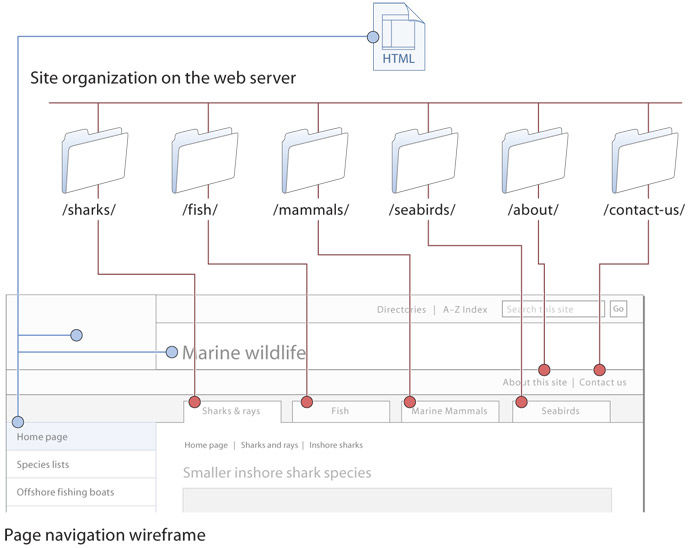
In the previous Designers Lounge, you learned that developing an information architecture is the 2nd step of the Web Development process. An information architecture is viewed by visitors to a website as a collection of pages organized into logical categories through menus, tabs and navigation bars. From a Web architecture view, the website content is a collection of files distributed into logical categories using folders and subfolders - also called directories. In this manner the information architecture of a website is mirrored in the file and folder architecture. The Web Style Guide provides more thorough coverage of this topic and this useful example.
Using the cascade in CSS
Many users of Cascading Style Sheets know how to change the look of standard html components but don’t pay much attention to the powerful cascade features of css. css is an extendable system, in which a related set of css instructions spread across multiple css files can cascade from very general style and layout instructions shared by all of your pages to extremely specific styles that only a handful of pages in your site may share. The css cascade has two major elements:
1. CSS cascade hierarchy
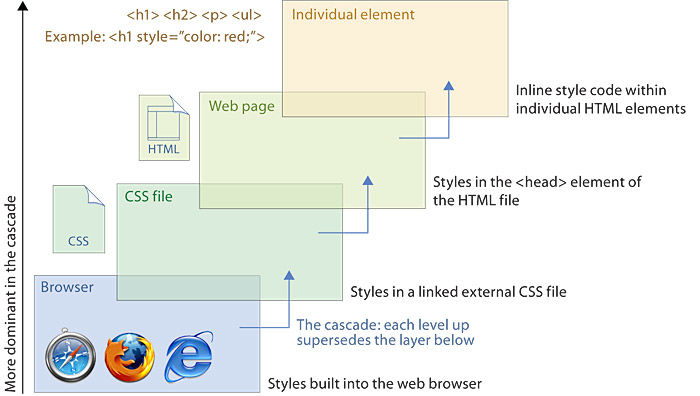
css has multiple hierarchical levels that cascade in importance and priority, from general css code shared by all pages, to code that is contained in a particular page file, to code that is embedded in specific html tags. General page code overrides shared site code, and css code embedded in html tags overrides general page code. This hierarchical cascade of css priorities allows you to set very general styles for your whole site while also permitting you to override the styles where needed with specific section or page styles
Shared CSS across many pages
Multiple css files can work together across a site. This concept of multiple css files working together in a modular way is the heart of the cascade system of pages that all share code via links to master css files that control styles throughout the site. This system has obvious advantages: if all your pages share the same master css file, you can change the style of any component in the master css file, and every page of your site will show the new style. For example, if you tweak the typographic style of your <h1> headings in the master file, every <h1> heading throughout the site will change to reflect the new look.
In a complex site, page designers often link groups of css files to style a site. Packaging multiple css files can have many practical advantages. In a complex site css code can run to hundreds of lines, and it’s often more practical to subdivide such elements as the basic page layout css from the master site typography styles. It’s easy to link to css files and let the master css layout and typography styles control all the pages in your site.
CSS “skin” files for specific graphic treatments
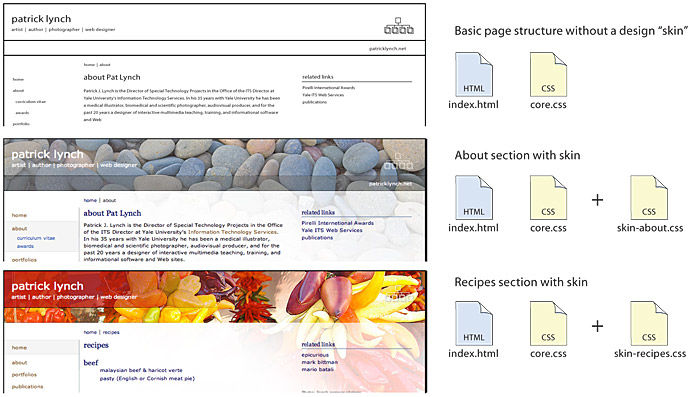
You may not want every page or section of your site to look the same. If so, you can add a third “skin” css file that provides specific graphics, colors, and header treatments for all pages in a site section that share the same visual design. Each css file in the multifile cascade adds information, moving from sitewide general layout and typographic styles to visual styles that may be specific to a few pages
Media style sheets
Another advantage of css is the ability to provide context-appropriate designs using media style sheets. Support for media style sheets is not all that it could be, but there is sufficient support for screen, print, and, to a lesser degree, handheld devices. With media style sheets, it’s possible to adapt a layout, for example, to hide navigation elements when printed or to minimize menu options when viewed on the small screen of a cell phone.
Semantic structure for HTML content containers
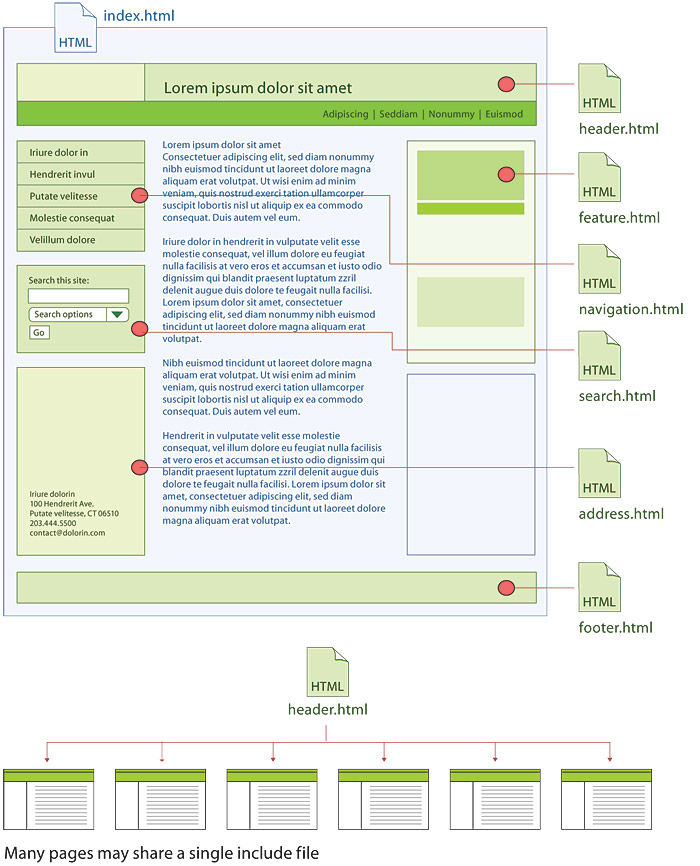
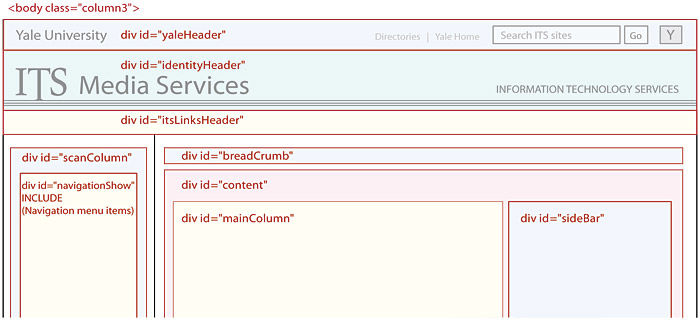
As you plan the page wireframe templates for your site, consider the advantages of careful semantic html and css within the individual html files. Well-designed, standards-based web pages consist of many subdivisions that not only lay out functional regions of the page (header, footer, scan column, navigation, search box) but also provide unique name “ids” for all standard page template elements. The content portions of web pages are subdivided by divisions (<div>…</div>) and spans (<span>…</span>) that label functional areas of the page, providing a “wrapper” around specific page elements or types of content. Divisions and spans should always be named carefully, and major repeating page elements should each have a unique id.
These named divisions and spans are crucial for three reasons:
Uniquely named page elements give you complete programmatic and style sheet control. You can’t address a page element with css or JavaScript unless it has a name.
Uniquely named page divisions allow you to apply css visual styles more easily and powerfully to particular page areas or blocks of content.
Uniquely named page areas will give you many more options in the future, as new web content display devices and types of style sheets are developed. Someday you may want to convert your site to a new content management system. If all your pages and content are contained in consistent, systematically named page divisions, transforming your site will be much easier.
As you develop page wireframes and basic navigation, build in the power and convenience of careful semantic naming of your page regions and major page elements. It’s easy to do in the beginning of a project and very hard or impossible to do later.
Information
- Description
- Note on WEB ARCHITECTURE & INFORMATION ARCHITECTURE, created by osborn hodges on 03/09/2017.
- Created by
- osborn hodges
- Views
- 0
- Rating