
Notes
Java Niotes
Content of the notes (3)
Page 1
Page 2
JAVA:
Features of Java:
Simple: Java is easy to learn. It does not include concepts of pointers and operator overloading that were available in C++.
Object Oriented: You can model everything into an object which has data and behavior. Java has incorporated various object-oriented concepts such as Abstraction, Encapsulation, Polymorphism, and inheritance.
Platform independence: Java is write-once, run-anywhere language. Once you compile java code, you can run it on any machine. For example: If you compile your code on Windows OS, you can easily run the same bytecode in linux.
Portable: Java byte can be portable to any platform and can be executed on any platform.
Multi-threading: Java has provided multithreading feature which will help you to execute various task in parallel. It has introduced executor framework which is more robust and easy to use.
High performance: Java can not be as fast as C and C++ as it is interpreted language but it has provided various features such as Just in time compiler to increase performance.
-----------------------------------------------
Sample program:
class HelloWorld {
public static void main(String[] args) {
System.out.println("Hello, World!");
}
}
class HelloWorld: As java is object oriented programming, every java application should have class defi
public static void main(String[] args):
Object: An entity that has state and behavior may be termed as Object.
For example: Employee has state with name, age and department, and behavior such as working on the assignment.
Class: A class is a blueprint/template that defines state and behavior of objects.
public class Employee {
String name;
String age;
public void workOnAssignment()
{
system.out.println("sample program")
}
public static void main(String[] args){
Employee employee1=new Employee();
}
-> when we run the above class, it creates an object employee1 , then first runs the constructor,
which is default in this case, and values name , age are set to default.
-> Objects are stored in heap memory.
--------------------------------------
dataTypes : boolean, char, byte, short, int, long, float, double
Data types in java refer to type of data that can be stored in variable.
int age = 10;
Type conversions:
Java:
double a = 10.0;
(int) a;
Scala:
a = 10.0
a.toInt
python:
a= 10
int(a)
---------------------------------------
Variables in java:
Local Variables -> local variables are variables that are defined inside a method, they need to initiliazed always.
Instance Variables -> They are class variables and neet not be initiliazed.
Static variables-> They are class variables and once initiliazed, remians static.
---------------------------------------
Access modifiers in java:
The access modifiers in java define accessibility (scope) of variable, method, constructor or class.
There are 4 types of access modifiers in java.
Public -> If you put class/variable as public that means that class is available everywhere across all packages.
Private -> variables/methods are accessable with in the class.
Protected -> variables/methods are accessable with in the package and can be inherited outside package
Default -> variables/methods are accessable onlywith in the package.
-----------------------------------------
this keyword:
This keyword in java is used to refer current object or an instance of class. it can be used to call overloaded constructor but it should be first line of constructor.
package com;
public class ThisKeywordDemo {
int age ;
String name;
ThisKeywordDemo(){ System.out.println("Calling default constructor");}
ThisKeywordDemo(int age, String name){
this();
this.age = age;
this.name = name;
System.out.println("Calling parametrized constructor");}
public String getName(){return this.name;}
public int getAge(){return this.age;}
public void setAge(int age){this.age = age;}
public void setName(String name){this.name = name;}
public void printMethod(){
System.out.println("Age " + age);
System.out.println("name " + name);
}
public static void main(String[] args){
ThisKeywordDemo t = new ThisKeywordDemo();
System.out.println(t.getAge());
ThisKeywordDemo t1 = new ThisKeywordDemo(10,"tinku");
String nam = t1.getName();
t1.setAge(20);
System.out.println(t1.getAge());
}
}
-----------------------------------------------------------------------
Super keyword:
Super Keyword in java is used to refer to object of the immediate superclass.
Super keyword is used in the context of inheritance.
Super keyword in java can be used at three level: Variable level, Constructor level, Method level
public class SuperClassDemo {
int age;
String name;
SuperClassDemo(){System.out.println("calling default parent constructor");}
SuperClassDemo(int age){
System.out.println("calling parametrized parent constructor");
this.age =age;
}
void printMethod(){System.out.println("Age of super class" + age);}
}
public class SuperClassMain extends SuperClassDemo {
SuperClassMain(){
super();
};
SuperClassMain(int age){
super(10);
System.out.println("calling default parent constructor");
this.age =age;
}
void printMethod() {
super.printMethod();
System.out.println("name "+ super.name);
}
public static void main(String[] args){
SuperClassMain s = new SuperClassMain();
s.printMethod();
}
}
----------------------------------------------------------------------------
Control Statements:
-------------
Java:
For Loop:
for (initialization; condition; increment/decrement) {
//block of statements
}
Scala:
for (i <- 0 until 5){}
python:
for i in 1 to 5:
{maintain indentation}
public class ForLoopDemo {
public static void main(String[] args) {
ForLoopDemo f1 = new ForLoopDemo();
String checkString = "MAYAM";
boolean palindrom = f1.checkPalindrome(checkString);
if (palindrom) System.out.println("checkString is palindrom");
else System.out.println("checkString is not palindrome");
}
public boolean checkPalindrome(String inputSt){
for (int i =0, j = inputSt.length()-1; i < (inputSt.length()/2); i++,j--){
if (inputSt.charAt(i) != inputSt.charAt(j)) return false;
}
return true;
}
}
example 2:
public class ForLoopDemo {
public static void main(String[] args) {
ForLoopDemo f1 = new ForLoopDemo();
int[] arr = {33,55,66,77,88,12};
System.out.println(f1.findArrayElement(arr, 4));
}
public String findArrayElement(int[] input_array, int input){
for(int i =0; i < input_array.length; i++){
if (input_array[i] == input) return "present";}
return "Not present";
}
}
-------------
While loop:
While loop is used to execute some statements repeatedly until condition returns false.
If number of iterations are not known beforehand, while loop is recommended.
Example:
public class WhileLoopMain {
public static void main(String[] args) {
WhileLoopMain bse=new WhileLoopMain();
int arr[] ={32,45,53,65,43,23};
System.out.println(bse.findElementInArr(arr, 53));
}
public String findElementInArr(int arr[],int elementTobeFound)
{
int i=0;
while(i {
if(arr[i]==elementTobeFound)
{
System.out.println(elementTobeFound+" is present in the array ");
return "PRESENT";
}
i++;
}
return "NOT PRESENT";
}
}
----------------
Do While:
In Do while loop, loop body is executed at least once because condition is checked after loop body.
public class DoWhileLoopMain {
public static void main(String[] args) {
int i=1;
do {
System.out.print(" "+i);
i++;
}while(i<11);
}
}
--------------
Switch case:
It is alternative to if else if ladder. It is used to execute statements based on some conditions.
Java:
switch(expression) {
case value_1 :
// Statements
break; // optional
case value_2 :
// Statements
break; // optional
// Default is executed when expression does not match with any of above conditions.
default : // Optional
// Statements
}
}
Scala:
val value = 5
value match {
case 1 => {}
case 2 => {}
case _ => {}
}
------------------
Continue Statement :
continue statement is one of the different control statements which we use very often.If continue statement is found in loop, it will continue the current iteration and will not execute statements following continue statement. It is generally used to skip current iteration on the basis of some condition.
public class ContinueStatementExample {
public static void main(String[] args) {
int arr[] ={1,2,3,4,5,6,7,8,9,10};
for (int i = 0; i < arr.length; i++) {
if(arr[i]%2==0)
{
continue;
}
System.out.print(" "+arr[i]);
}
}
}
----
public class LabelledContinueStatementDemo {
public static void main(String[] args){
int[][] my_array = {{1,0,0},{0,1,2},{0,2,3,}};
Outer: for (int i=0; i < my_array.length;i++){
for (int j=0; j< my_array[i].length;j++){
if (my_array[i][0] == 1) {
System.out.println("Skipping the array item" + my_array[i]);
continue ;
}
else System.out.println(my_array[i][j]);
}
}
}
}
--------------------
Break statement:
Break statement is one of the different control statements which we use very often.
If break statement is found in loop, it will exit the loop and execute the statement following the loop.
public class BreakStatementExample {
public static void main(String[] args) {
BreakStatementExample bse=new BreakStatementExample();
int arr[] ={32,45,53,65,43,23};
bse.findElementInArr(arr, 53);
}
public void findElementInArr(int arr[],int elementTobeFound)
{
for (int i = 0; i < arr.length; i++) {
if(arr[i]==elementTobeFound)
{
System.out.println(elementTobeFound+" is present in the array ");
break; // break statement is encounter, control will exit current loop now
}
}
System.out.println("Executing statments following the loop");
}
}
-------------------------------------------------------------------------------------
Constructor
Constructor in java is block of code which allows you to create instance of the object. It does not have return type.
It has two main points
Constructor name should be same as class
Constructor should not have any return type else it will be same as method.
if you create parameterized constructor in class, JVM won’t provide default constructor to you. If you do not write any constructor then only JVM will provide you default constructor.
----------------------------------------------------------------------------------------
Copy Constructor : it is a constructor which takes paramter as an object of the class.it is used to duplicate or clone objects.
---------------------------------------------
Abstraction : Abstraction is a concept of showing essential details and hiding implementation details.
Abstract class(0 to 100% abstraction)
Interface (100% abstraction)
abstract public class AbstractClassDemo {
int input;
public abstract int calculateArea(int area);
public void printMethod(){
System.out.println("non Abstarct method");
}
}
public class AbstractMainClassDemo extends AbstractClassDemo {
public static void main(String[] args){
AbstractMainClassDemo a1 = new AbstractMainClassDemo();
System.out.println(a1.calculateArea(4));
System.out.println("input" + a1.input);
a1.printMethod();
}
public int calculateArea(int area){
return area * area;
}
}
----------------------------------
we have seen abstract class in java which provides partial abstraction. Interface is one of the core part of java and is used to achieve full abstraction.
interface InterfaceName
{
void method1();
int method2();
}
Abstract class & interface : A class can only inherit one class, because if a class wants to inherit two or more classes,
and if they have same methods, then the child class doesnot know which method to inherit.
Thats where we can use Interface, since interface only has method definition and no implementation, if the same method is in
two interfaces, the child class can inherit any of them because they have no implementation.
Another way can be class2 extending class1 and then class3 extending class 2, so that if both class 2 and 1.
A interface can extend another interface, whereas class needs to implement a interface.
--------------------------------------
Polymorphism: Polymorphism means one name many forms. In Java, polymorphism can be achieved by method overloading
and method overriding.
Runtime Polymorphism:
Runtime Polymorphism is nothing but method overriding in java.If subclass is having same method as base class then it is known as method overriding Or in another word, If subclass provides specific implementation to any method which is present in its one of parents classes then it is known as method overriding.
public class Shape {
public void draw()
{
System.out.println("Drawing Shape");
}
public static void main(String[] args) {
Shape s=new Rectangle();
s.draw();
s=new Circle();
s.draw();
}
}
class Rectangle extends Shape
{
public void draw()
{
System.out.println("Drawing Rectangle");
}
}
class Circle extends Shape
{
public void draw()
{
System.out.println("Drawing Circle");
}
}
-------------------------------------------------------------------------
Encapsulation : It is process of binding data and methods in to a single unti called class.
Encapsulation can be achieved by using access modifier such as public, private, protected or default,
so your class will be safe from unauthorized access by others and will be simple to maintain.
We can create fully encapsulated class by
Making variables private
Providing getters and setters methods for the accessing the variables.
Advantages of Encapsulation in java:
It provides control over data. For example: If You want to check if age of employee is greater than 18 in setter method(setAge(int age)). You can easily do it in setter method without breaking any code.
Increase reusability.
Makes class easy to use for other clients.
It helps the developer to write code more flexible and maintainable by binding them into a single unit and use appropriate access modifier to access the code as per need.
Difference between abstraction and encapsulation in java:
Encapsulation means data hiding using getter and setters. Abstraction means hiding implementation details using abstract class and interface.
Abstraction is more of design level concept and Encapsulation is more of implementation level concept.
--------------------------------------------------------------------------
Collections:
HashMap in java is most common Collection which we use nowadays. It stores entry in key-value pair.
HashMap implements Map interface which maps key to value.
It is not synchronized and is not thread safe.
Duplicate keys are not allowed
One null key and multiple null values are allowed
Java Map : HashMap myMap = new HashMap();
scala Map : val myMap = Map("x" -> "x1", "y" -> "y1")
python Map is dictionary => val myDict = { "x" : "x1", "y" : "y1"}
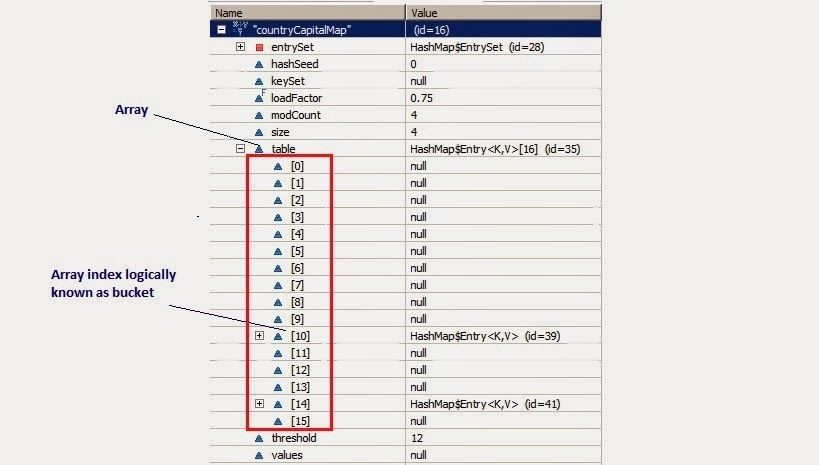
Whenever we try to put any key value pair in hashmap, Entry class object is instantiated for key value and that object will be stored in above mentioned Entry[](table). Now you must be wondering, where will above created Enrty object get stored(exact position in table). The answer is, hash code is calculated for a key by calling Hascode() method. This hashcode is used to calculate index for above Entry[] table.
Now, If you see at array index 10 in above diagram, It has an Entry object named HashMap$Entry.
We have put 4 key-values in hashmap but it seems to have only 2!!!!This is because if two objects have same hashcode, they will be stored at same index. Now question arises how? It stores objects in a form of LinkedList(logically).
Key points to Remeber:
HashMap has a inner class called Entry which stores key-value pairs.
Above Entry object is stored in Entry[ ](Array) called table
An index of table is logically known as bucket and it stores first element of linkedlist
Key object’s hashcode() is used to find bucket of that Entry object.
If two key object ‘s have same hashcode , they will go in same bucket of table array.
Key object ‘s equals() method is used to ensure uniqueness of key object.
Value object ‘s equals() and hashcode() method is not used at all
http://3.bp.blogspot.com/-T4TsTlhwaXU/Uwjj9ypm69I/AAAAAAAACsY/J4-a6rxZLLE/s1600/HashMapStructure1.bmp
------------
Array -> continous collection of objects String[] arr = Array("a","b","c")
list -> discrete collection of Objects
Array elements are ordered and indexed and allocated a memory space in single location.
List is discrete and it elements are stored in different location each storing the memory index of next element.
Page 3
Information
- Description
- Note on Java Niotes, created by Abhinav Kamal on 14/02/2019.
- Created by
- Abhinav Kamal
- Views
- 0
- Rating