
Mapa mental
Inputs
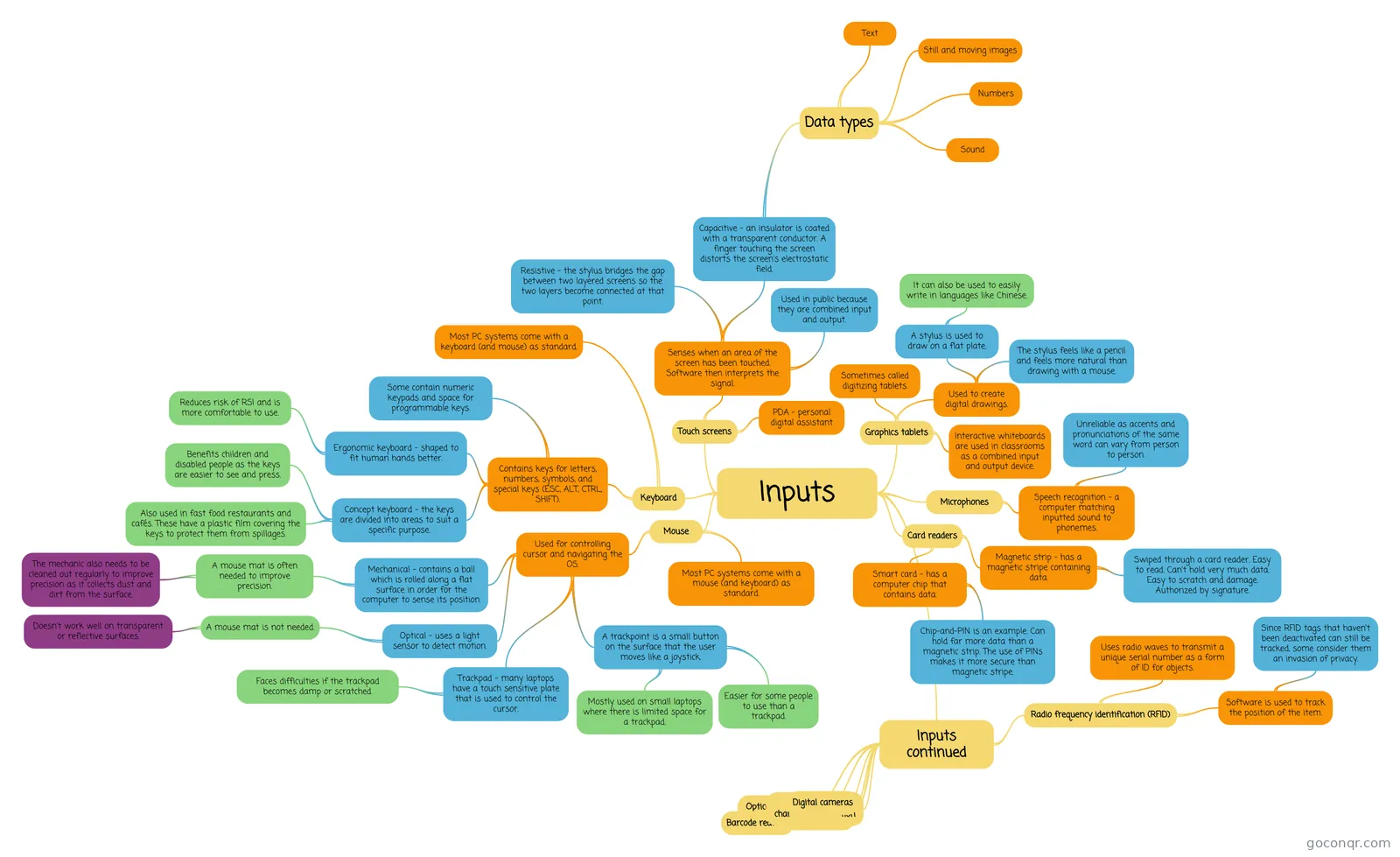
Mind map: input devices
Conteúdo do mapa
Inputs
Keyboard
- Contains keys for letters, numbers, symbols, and special keys (ESC, ALT, CTRL, SHIFT).
- Some contain numeric keypads and space for programmable keys.
- Ergonomic keyboard - shaped to fit human hands better.
- Reduces risk of RSI and is more comfortable to use.
- Concept keyboard - the keys are divided into areas to suit a specific purpose.
- Benefits children and disabled people as the keys are easier to see and press.
- Also used in fast food restaurants and cafés. These have a plastic film covering the keys to protect them from spillages.
- Most PC systems come with a keyboard (and mouse) as standard.
- Contains keys for letters, numbers, symbols, and special keys (ESC, ALT, CTRL, SHIFT).
Mouse
- Used for controlling cursor and navigating the OS.
- Mechanical - contains a ball which is rolled along a flat surface in order for the computer to sense its position.
- A mouse mat is often needed to improve precision.
- The mechanic also needs to be cleaned out regularly to improve precision as it collects dust and dirt from the surface.
- A mouse mat is often needed to improve precision.
- Optical - uses a light sensor to detect motion.
- A mouse mat is not needed.
- Doesn't work well on transparent or reflective surfaces.
- A mouse mat is not needed.
- Trackpad - many laptops have a touch sensitive plate that is used to control the cursor.
- Faces difficulties if the trackpad becomes damp or scratched.
- A trackpoint is a small button on the surface that the user moves like a joystick.
- Mostly used on small laptops where there is limited space for a trackpad.
- Easier for some people to use than a trackpad.
- Mechanical - contains a ball which is rolled along a flat surface in order for the computer to sense its position.
- Most PC systems come with a mouse (and keyboard) as standard.
- Used for controlling cursor and navigating the OS.
Touch screens
- Senses when an area of the screen has been touched. Software then interprets the signal.
- Resistive - the stylus bridges the gap between two layered screens so the two layers become connected at that point.
- Capacitive - an insulator is coated with a transparent conductor. A finger touching the screen distorts the screen's electrostatic field.
- Data types
- Text
- Still and moving images
- Numbers
- Sound
- Data types
- Used in public because they are combined input and output.
- PDA - personal digital assistant
- Senses when an area of the screen has been touched. Software then interprets the signal.
Graphics tablets
- Sometimes called digitizing tablets.
- Used to create digital drawings.
- A stylus is used to draw on a flat plate.
- It can also be used to easily write in languages like Chinese.
- The stylus feels like a pencil and feels more natural than drawing with a mouse.
- A stylus is used to draw on a flat plate.
- Interactive whiteboards are used in classrooms as a combined input and output device.
Microphones
- Speech recognition - a computer matching inputted sound to phonemes.
- Unreliable as accents and pronunciations of the same word can vary from person to person.
- Speech recognition - a computer matching inputted sound to phonemes.
Card readers
- Magnetic strip - has a magnetic stripe containing data.
- Swiped through a card reader. Easy to read. Can't hold very much data. Easy to scratch and damage. Authorized by signature.
- Smart card - has a computer chip that contains data.
- Chip-and-PIN is an example. Can hold far more data than a magnetic strip. The use of PINs makes it more secure than magnetic stripe.
- Magnetic strip - has a magnetic stripe containing data.
Inputs continued
- Scanners
- Optical mark recognition
- Optical character recognition
- Barcode readers
- Magnetic ink character recognition
- Webcams
- Digital cameras
- Radio frequency identification (RFID)
- Uses radio waves to transmit a unique serial number as a form of ID for objects.
- Software is used to track the position of the item.
- Since RFID tags that haven't been deactivated can still be tracked, some consider them an invasion of privacy.