Keep documents and material somewhere you can easily access it. Paper is,
for the most part, now out of fashion, so we recommend you use a
flash drive or create a block of online notes that way you can access and share content more easily.Organise files into different categories such as calendar
lesson plan, class information and student presentations.As your needs
increase, you can create new folders and topics ad hoc.
Establish a pattern to plan student lessons and update it when necessary. For example, if you create a lesson plan using GoConqr Notes ,
you can review it, add or remove information (including videos and
images) make it private or share it with your colleagues whenever
necessary.Lay out subjects for students to be as organized as
possible. Write down the important information (work, notes, test
dates). Always write the title of the subject, which class is taking
that subject, the date and, if possible a short summary of the
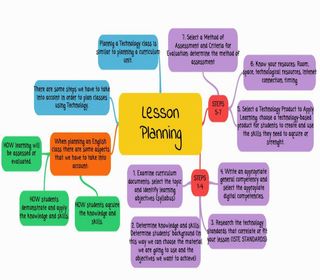
lesson. Information should be clear and succinct. You can create this plan using a Mind Map or note and use the "Play Mode" function to display the contents and then simply share that Mind Map with students.
You can create a Study Group to
communicate with students outside of the classroom, share content, and
send messages. Often the question can come from another class, in this
case a Study Group is the solution for interaction and sharing ideas.As a teacher you can share class material with your students and keep track of different classes.
Divide activities into tasks such as: Lesson Plan, Activities for
correction and Activities to share. Creating lists gives you more
control over everything and helps to prioritize activities.Create an organized work schedule with these tips:(i)
Determine the number of hours students have for each activity during
the day and week. Be realistic and seek to balance your routine
activities including leisure and rest time. (ii) Choose the best time, (day or night) and set the start time and end. (iii) Re-use the weekly cycle as to avoid repetition of work.
Teachers have it tough. Not only do they have to impart a world of information and keep their students engaged and interested for long enough to properly absorb it all, but they must also lead by example. And that means being organised.In this slide set we'll quickly show you how you can use GoConqr to clearly plan, organise and effectively communicate lessons. We've also included some resources to give you further ideas to improve your lesson planning.