
Putting Project-Based Learning into Practice
Slides in this set (5)
-
- https://www.youtube.com/watch?v=LMCZvGesRz8 (Embed)
- Caption: Project Based Learning Explained
- In a typical Problem-Based Learning process, the teacher presents an open case to the class. A good example would be:
- A woman with type AB blood gives birth to a child with blood type O. Six years later she gives birth to a second type-O child.
- This case appears to contradict Mendelian inheritance, which the
- students will be obliged to thoroughly review, but it also demands that
- they examine of meiosis, gametogenesis, fertilization, and early
- development in order to propose some credible explanatory mechanisms.
-
- The next step involves a brainstorm process that includes the
- whole classroom. In that process, students will come up with facts
- (what they know), ideas (related thoughts and hypotheses), learning
- issues (what they need to know more about) and actions (what they need
- to do).
- Here is where GoConqr comes into play as its mind mapping tool
- is the perfect resource to structure this brainstorming process in a
- coherent and visually compelling way.
- Benefits of Using Online Mind Maps for E-Learning
- Creativity
-
- Next, students should break up in small groups of 4 or 5 in order to do
- some research and move towards a common solution.
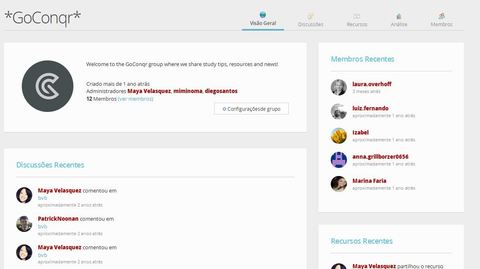
- GoConqr can easily
- facilitate this kind of collaboration through its Study Groups option,
- which offers a number of functions that foster collaborative learning,
- such as discussion threads, polls, group analytics and resource sharing.
- Caption: GoConqr Group Dashboard
-
- Finally, a project-based learning process finishes with a group
- presentation in which students must sum up their learning.
- GoConqr’s Slides are perfect for this. The Slide maker tool offers a great variety of pre-designed templates
- that allow for the inclusion of media elements to support their
- findings such as videos, images, mind maps, flashcards, notes and
- quizzes.
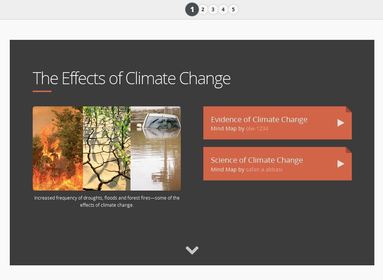
- Caption: Example of GoConqr Slides
-
- In a case study carried out by the Georgia Institute of Technology, most issues related
- to project-based learning boil down to student freedom. Students’ rates
- of progression may seem slow.
- Some students might even struggle to stay
- on-target. In addition, teachers unfamiliar with PBL might lose
- confidence and feel they are no longer in charge of students’ learning.
- In order to tackle these common problems,
- teachers must monitor the progress of each study group so they can
- intervene if and when necessary.
- That intervention can take several forms. For instance, they could
- start a discussion thread or drop hints by sharing study resources. In
- the previous example, the teacher could share a deck of
- flashcards about meiosis so students realise they have to increase their
- focus on that area.
Information
- Description
- Putting Project-Based Learning into Practice with GoConqr
- Created by
- miminoma
- Views
- 387
- Tags
- Rating