
Karteikarten
Planning process group & Schedule Processes in it
Karten in diesem Stapel (136)
- 1planning process groupgroup of processes to define the scope total effort, establish and refine the objectives and developing the plan to reach those goals. the project plan components and project documents are created in this process group.
Depending on the project nature, these components and documents might need to be reviewed and updated regularly. The same might be needed when a great change occurs. - 2Ch 6: project schedule management (Knowledge area)Includes the required processes to manage the project's timely completion
- 3project schedule management main conceptsThe project schedule provides a detailed plan to represent how and when the project will deliver the products, services, and results defined in the scope. It works as a tool to communicate, manage stakeholders' expectations and as a base for performance reports.
- 4project schedule management how to create a scheduleThe project team defines a method to create the schedule, such as critical path or agile. After that, the activities, foreseen dates, durations, resources, dependencies, and restrictions are inputted in a scheduling tool to create the project schedule. The detailed project schedule should remain as flexible as possible so it can be adjusted and adapted as more knowledge is acquired by increasing the risks comprehension and value-added activities.
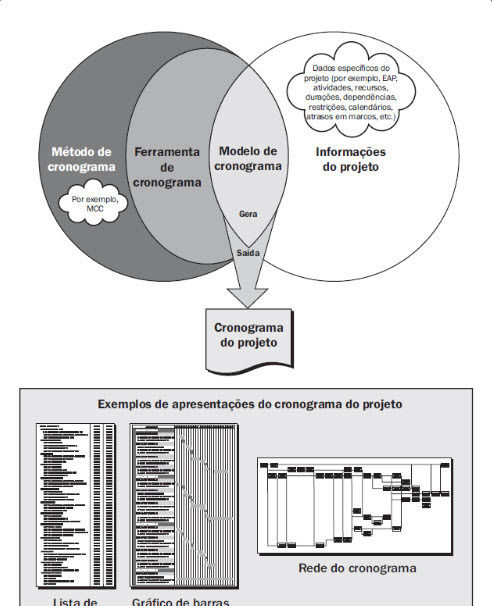
- 5Example of how the schedule development methodology, scheduling tools, and project schedule management outputs interact to create the project schedule model
- 6Adaptative planningThe detailed project schedule should remain as flexible as possible so it can be adjusted and adapted as more knowledge is acquired by increasing the risks comprehension and value-added activities.
- 7Emerging practices and tendencies in project schedule management-iterative scheduling with a backlog list
- on demand schedule - 8Emerging practices and tendencies in project schedule management: Iterative scheduling with a backlogBased on adaptative life cycles, this is a practice in which the plan is constructed in
successive waves. The requirements are defined as users' stories and a characteristic is developed within a defined timeframe. - 9Iterative scheduling with a backlog - When to useWhen the aim is to provide incremental value to the client or when various teams can work simultaneously in different features without dependencies
- 10Iterative scheduling with a backlog - BenefitsIt makes changes easier throughout the life-cycle development
- 11Emerging practices and tendencies in project schedule management: on demand scheduleNormally used in a Kanban system, it's based on the restrictions theory and in Lean pull systems to equalize the team's yield. To create the schedule, work is extracted from a list of pending items that must be immediately tackled as soon as resources become available.
- 12on demand schedule - when to useUsed frequently in operations or maintenance environments, where the activities can be grouped and delivered by size and scope.
- 13Tailoring considerations to the project schedule management processes application- life-cycle approach: which life cycle approach enables a more detailed schedule?
- resources availability: what is the relationship between resources available and productivity?
- project dimension: how project complexity will impact the desired level of control?
- technology support: the technology used to develop, register and store schedule info is accessible? - 14Considerations for Adaptative/Agile environmentsThe PM role doesn't change in this kind of environment. However, the PM must be familiar with these kinds of practices (on demand and iterative with a backlog list) to successfully apply them
- 15Process: 6.1 - Plan schedule management Knowledge area: schedule managementThe process to establish policies, procedures, and documents to plan, develop, manage, execute and control the project schedule
- 16Plan schedule management benefitsIt provides guidance and instructions on how the project schedule will be managed throughout the project. It's a process done once or more time in pre-defined points in the project. The project
particularities define which components of the project management plan are applicable. - 17Plan the schedule managment inputs- Project Charter
- Project management plan (scope management plan and development approach)
- EEFs
-OPAs - 18Plan the schedule management Tools and Techniques- specialized opinion
- data analysis (alternative analysis)
- meetings - 19Plan the schedule management Tools and Techniques: Data analysis (alternative analysis)Used to determine which scheduling methodology should be used or how to combine several methods in the project. It can also be used to determine the level of detail required to monitor, review and update the schedule. It's important to have a balance between the level of detail to manage the project and the amount of time required to keep it up to date in each project.
- 20Plan the schedule management outputsThe schedule management plan
- 21Plan the schedule management output: The schedule management planIt's a project management plan component. It can be formal or informal, detailed or generalized, based on the project needs and it includes appropriate controlling limits.
- 22What the schedule management plan describes-Tool and methodology used to create the schedule
- iteration duration (when in an adaptive life-cycle)
- the estimated duration accuracy level
- measurement unit
- how to maintain the schedule
- controlling limits
- performance measurement rules
- format of the reports - 23What the schedule management plan describes: iteration durationwhen in an adaptive life-cycle, the iterations have a defined duration that establishes for how long the team will continuously work towards a goal. It helps minimize scope distortions and helps critical items prioritization.
- 24What the schedule management plan describes: the estimated duration accuracy levelIt specifies acceptable margins to estimate realistic activities duration, which can include an amount for contingencies.
- 25What the schedule management plan describes: controlling limitsspecifies the variation limits in the schedule performance to allow a certain level of variation before any action needs to be taken. Usually, they are % over the baseline.
- 26What the schedule management plan describes: performance measurement rules or EVA (earned value analysis) rulesIt can specify rules to:
- 100% completion
- EVA techniques to be employed
- schedule performance measurement techniques used to evaluate the baseline variance magnitude - 27Process: 6.2 - Define activities Knowledge area: schedule managementIt's the process to identify and document the specific actions that must be performed in order to produce the project deliverables
- 28Define activities benefitsTo divide the work packages into activities in order to estimate, program, execute, monitor and control project work. This process is performed throughout the project (it's not a one-time process).
- 29Define activities inputs- Project management plan (schedule management plan and scope baseline)
- EEFs
-OPAs - 30Remember: scope baselineWBS + deliverables + restrictions + assumptions
- 31Define activities tools and techniques- specialized opinion
- decomposition
- successively waves planning
- meetings - 32Define activities tools and techniques: decompositionThe technique used in the Create WBS process to divide the project scope and deliverables into smaller and easier to manage pieces. The resulting activities represent the necessary effort to complete a work package.
- 33Define activities tools and techniques: successively waves planningIterative planning technique in which the short term work in planned in details but the long term work is planned at a high level when using an agile or predictive approach. So, the work can be defined in different levels of detail depending on where in the project life-cycle you are. Note that when using this kind of approach and techniques, the list of activities will be updated constantly throughout the project.
- 34Define activities Outputs- List of activities
- Activities attributes
- Milestones list
- Change requests
- Updates in the project management plan - 35Define activities Outputs: List of activitiesIt includes an ID for the activity and a description of the scope of the work of each one of them, in order to ensure that each team member knows what should be done.
- 36Define activities Outputs: Activities attributesIt's a set of multiple activities components, such as activity ID, WBS ID, activity name, activity description - initially.
As more knowledge is acquired, it can include: preceding and succeeding activities, logical relationships, restrictions, assumptions, type of effort, where it should be done - 37MilestonesA milestone is a significant point or event in the project. They have ZERO duration since they are a significative event. Milestones can be mandatory or not. They are mandatory when required by a contract, for example, or optional when they are based in historical information.
- 38Define activities Outputs: Milestones ListThe milestone list identifies all the milestones and whether if it is mandatory or not.
- 39Define activities Outputs: Change requestsAfter the baseline was defined, the progressive elaboration (successively waves planning) of deliverables into activities may reveal additional work that wasn't part of the project initial baseline.
- 40Define activities Outputs: Project plan updatesWhen having a change request, the components that might be impacted and will need updates schedule and costs baselines.
- 41Process 6.3: Sequence activities Knowledge area: schedule managementThe process to identify and document the relationship between the project activities.
- 42Why sequence activities?To convert the tasks from a list into a diagram, working as a first step to publish the schedule baseline.
- 43Sequence activities benefitsto define the logical sequence in the work in order to obtain the highest level of efficiency in opposition to the restrictions. It's performed throughout the project.
- 44Sequence activities inputs- Project management plan (schedule management plan and scope baseline)
- project documents (activities attributes, assumptions log and milestones list) - 45Sequence Activities Tools and Techniques- Activity-on-node (médodo do diagrama de precedência MDP)
- Dependency integration and determination
- Lead and Lag time
- PMIS (project management information system) - 46Sequencing appropriatelyall activities, except for the first and last one, should be connected to at least one preceding and one succeeding task, with an appropriate relationship in order to create a realistic project schedule. Among the T&T used to create a realistic schedule we might have to use lead or lag time to make it even more realistic.
- 47The foundation of the project scheduleThe strength of the project schedule is based on the definition of the activities, deliverables, estimation of effort and durations, organizations and sequence of the work efforts. To support that, it is important for the project team to create a work breakdown structure that is arranged in a structured and sequenced manner
- 48Dependencies between tasksDependencies depict the relationship of the preceding tasks to the succeeding tasks. Tasks can have multiple preceding and succeeding tasks.
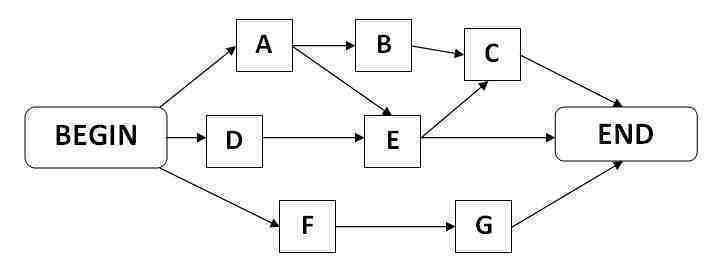
- 49Sequence Activities Tools and Techniques: Activity-on-node (médodo do diagrama de precedência MDP)Precedence diagramming method which uses boxes to denote schedule activities. These various boxes or “nodes” are connected from beginning to end with arrows to depict a logical progression of the dependencies between the activities in the schedule. Each node is coded with a letter or number correlated to an activity in the project schedule. An activity-on-node diagram can be used to provide a visual representation of the network logic of an entire project schedule.
- 50Activity-on-node (médodo do diagrama de precedência MDP) example
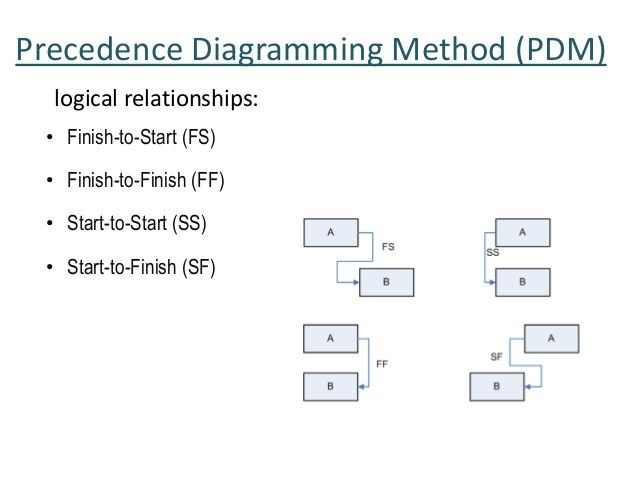
- 51Activity-on-node types of dependencies/logical relations- Finish to Start (FTS)
- Finish to Finish (FTF)
- Start to Start (STS)
-Start to Finish (STF) - 52Activity-on-node types of dependencies/logical relations: Finish to Start (FTS)the initiation of work on a succeeding schedule work activity is entirely dependent on the formal conclusion of work on a particular activity that directly precedes it
- 53Activity-on-node types of dependencies/logical relations: Finish to Finish (FTF)Logical Relationship in which a Successor Activity cannot finish until a Predecessor Activity has finished.
the Finish of a Successor Activity is Dependent on Finish of the Predecessor Activity.
Most Project Management Authors treat the above definition of FF Relationship as standard. However, some Scheduling Software treats FF Relationship slightly differently. They treat FF Relationship as “Must Finish Together” Relationship. So, if one of the activities Starts other is Automatically Started. - 54Activity-on-node types of dependencies/logical relations: Start to Start (STS)a logical relationship that states that for one activity to begin, another must also be underway.
- 55Activity-on-node types of dependencies/logical relations: Start to Finish (STF)a successor task cannot finish until the predecessor task has started
- 56Logical relationships examples: FTS: you must pour the milk into the mug before warming it FTF: writing a document before editing it. STS: initiation of one project depends upon when another project is begun. STF: the implementation of a new system must start before the old one can be turned off.
- 57Important to know about logical relationshipsTwo activities may have two different logical relationships at the same time, although it's not recommended. So a choice should be made about the relationship that best fit the project needs. Isn't recommended, also, to have closed cycles in logical relationships.
- 58Most x Least used types of logical relations in project managementMost: Finish to start
Least: Star to Finish
Tasks can have multiple preceding and succeeding tasks. - 59Sequence Activities Tools and Techniques: Dependency integration and determinationDependencies depict the relationship of the preceding tasks to the succeeding tasks and can be characterized by four attributes:
- mandatory
- discretionary
- internal
- external. - 60Dependencies attributes: Mandatory (Hard logic)Mandatory dependency refers to a relationship that is inherent in the nature of work. This means that the tasks are contractually required therefore no other tasks should be implemented until the needs of the mandatory tasks are satisfied.
It is often utilized when project activities have physical or contractual limitations. The project team has the freedom to determine which dependencies are mandatory and this must not be confused with schedule restrictions. - 61Dependencies attributes: discretionary (Soft Logic)Dependencies established based on best practices when there are other possible sequences but one is more desirable. These kinds of dependencies reflect how project teams anticipate the work to be completed. This type of dependency allows the project team to optimize the flow of the work through the project life cycle. Simply put, activities can happen at the same time as another group of activities. Project managers utilize this dependency to create a “float” on the schedule.
- 62Dependencies attributes: externalThe external dependency is defined as the relationship between project activities and non-project activities. Such dependency involves things that are beyond the control of the project team but should be reflected in the project schedule.
- 63Dependencies attributes: internalPrecedence relationship between project tasks under the control of the project team.
- 64Sequence Activities Tools and Techniques: Lead and Lag timeThe former is referred to as the acceleration of the successor activity. This means that the second task can commence in parallel with the first task. Lead compresses the combined duration of the two running activities. The latter, on the other hand, is the delay of the successor activity and it is the time that needs to pass before the next task can commence. This means that one task should be completed first before the other begins. The time in between is considered the lag.
That meaning:
When the first activity is still active and the second activity is being commenced,
this is called lead which is basically the overlap between the two activities.
Lag time, on the other hand, is when there is a delay period that occurs before starting the second activity
(provided that the first activity is already completed). - 65Sequence Activities Tools and Techniques: How to use Lead and Lag timeThe project management team define the dependencies which might require a lead or lag time, aiming to precisely define the logical relationship between them but their use mustn't replace the schedule logic. Besides that, the estimated durations don't include lead nor lag times. The activities and the assumptions related to them must be well defined and documented.
- 66lead timeLead is the acceleration of a successor activity. In other words, the second activity can begin (and be conducted in parallel) as the first activity.
Lead is only found activities with finish-to-start relationships: A must finish before B can start.
In order to leverage a lead, which will compress the total combined duration of both activities, the dependency must be discretionary, meaning that there is no physical limitation on completing A before B begins. - 67Lag timeLag is the delay of a successor activity and represents a time that must pass before the second activity can begin. There are no resources associated with a lag.
Lag may be found in activities with all relationship types: finish-to-start, start-to-start, finish-to-finish, and start-to-finish. - 68Sequence Activities Outputs- project schedule network diagram
- project documents updates (activities attributes, activities list, assumptions log, milestones list - 69Sequence Activities Outputs: project schedule network diagramThe project schedule network diagram typically refers to a particular input/output mechanism that represents a particular schematic display of any and all logical relationships that may exist between the existing project schedule activities. The project schedule network diagram is always laid in a left to right display to properly reflect the chronology of all project work.
- 70Path convergenceWhen several activities converge into one like its predecessors. That meaning: when an activity has several predecessors. It's a high-risk type of activity since it can be multiple affected.
- 71Path divergenceWhen an activity has several successors. It's a high-risk type of activity since it can affect multiple activities.
- 72Process 6.4: Estimate activity durations Knowledge area: schedule managementThe process to estimate the number of work periods required to complete an activity with the estimated resources. It's elaborated progressively and considers the quality and availability of input data.
The inputs to estimate duration are originated by the person/group in the project team who most familiar to with the job/activity nature. - 73Estimate activity durations benefitsTo provide the required amount of time to complete each activity and it's performed throughout the project.
- 74Estimate activity durations inputs- Project management plan (schedule management plan and scope baseline)
- Project documents (activitites atributes, list of activities, assumptions log, lessons' learned log, milestone list, project team designation (RACI matrix), resource breakdown structure (RBS), resource calendar, - 75Influencing factor to estimate activity duration- project scope
- type of resource skills and abilities
- the estimated amount of resources
- resource calendar
- schedule restrictions
- type of effort
- network diagram technique used - 76The calculation to estimate the durationamount of effort required vs. the number of available resources. In many cases, the number and proficiency of the resources might impact the duration but this isn't a linear relation.
Sometimes, the intrinsic nature of the job will require a predetermined time to be concluded, independently of the number of resources available (ex: you can't give birth to a child faster by putting 2 mothers together). - 77Other influencing duration factors- the Law of Diminishing Returns
- # of resources
_ technology enhancements
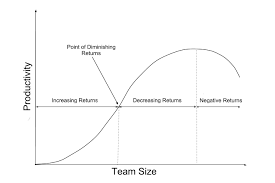
- team motivation - 78influencing duration factors: the Law of Diminishing ReturnsIncrease in process productivity is not directly proportional to the increase of people in the team. That happens because there is a limited number of ways to increase work parallelism (sometimes there is not a way to divide the tasks that are being held in more tasks), and because each additional worker may actually harm the team’s organization.
- 79the Law of Diminishing Returns in words and image When a new person enters the team, the following results may be noticed: The team may actually need more capacity and, therefore, the throughput will increase a lot and the return on the investment will be fast reached — increasing returns. The team can still absorb an extra person, but the throughput gained with the addition is low, resulting on long term returns — decreasing returns. The team is saturated and the new teammate makes everyone compete for tasks and invest extra time to coordinate the activities, which causes a decrease in the team’s throughput — negative returns.
- 80influencing duration factors: team motivationThe PM must be aware of the student syndrome and Parkinson law, when people procrastinate to do work and when they prolong it until it fills all the time estimated to complete it, respectively.
- 81Estimate activity durations tools and techniques- specialized opinion
- Analogous Estimation
- Parametric Estimation
- PERT Method (estimativa de 3 pontos)
- Bottom-up estimation
- data analysis
- decision making
- meetings - 82Estimate activity durations tools and techniques: Analogous EstimationDuration is estimated based on historical data from similar activities/projects. It's used to estimate project duration when the information about it is limited. Compared to other techniques, it's less time consuming but, also, less precise.
- 83Estimate activity durations tools and techniques: Parametric EstimationAn algorithm is used to calculate duration based on historical data. Duration is estimated by multiplying the amount of work x budgeted effort to perform the work. This technique provided a high level of precision and can be used in combination with other techniques.
- 84Estimate activity durations tools and techniques: PERT MethodCalculates the approximate duration, considering the risk and uncertainty around the estimate.
-Most Likely (ML): duration based on a realistic estimate, given the resources available, their productivity, availability to start the work, etc
- Optimistic (O): duration based on the best case scenario
- Pessimistic (P): duration based on the worst case scenario
The expected duration can be calculated by using data from the 3 scenarios - 85PERT Method formulaExpected duration = (ML+O+P)/3
- 86Estimate activity durations tools and techniques: Bottom-up estimationThe sum of the estimates in the lower level of the WBS.
- 87Estimate activity durations tools and techniques: Data analysis- Alternative analysis
- contingency reserve analysis: can be a % of the estimated duration or a fixed number of working periods and can be applied to tasks individually or aggregated. When risks are mitigated or more knowledge is acquired, the contingencies can be used, reduced or eliminated. The contingency should be documented in the schedule documents. - 88Estimate activity durations outputs- durations estimates
- estimations basis
- updates in the project documents - 89Estimate activity durations outputs: duration estimatesQuantitative evaluation of the number of work periods required to complete a task, not including any wait time. It can include, though, a range for the results. ex:: 2w +- 2d -> that means the activity can take from 8 to 10 days (if you consider a business week)
- 90Estimate activity durations outputs: estimations basisadditional details about the basis supporting the estimates. It should include:
- assumptions made when estimating
- estimates ranges
- level of confidence in the final estimate
- risks influencing the estimates
- restrictions - 91Estimate activity durations outputs: updates in the project documents- activities attributes (because the duration becomes an activity attribute)
- assumptions log
- lessons learned - 92Process 6.5: Develop schedule Knowledge area: schedule managementit's the process to analyze the sequence of activities, durations, resource requirements, and restrictions to create the schedule model in which the project will be executed, monitored and controlled.
- 93Develop schedule benefitsTo create a schedule with planned start and due dates for each project activity. It's an iterative process since it's defined upon the best info available at the time.
- 94Key steps to define schedule- Milestones definition
- identification of the activities in sequence
- estimate duration
- review of the schedule based on resources schedules and other demands. - 95Develop schedule inputs- project management plan (schedule management plan and scope baseline)
- activities attributes
- activities log
- assumptions log
- estimate basis
- duration estimates
- lessons learned
- milestones log
- project schedule network diagram
- resource allocation
- resource requirements
- risks log
- agreements
- EFFs
- OPAs - 96Develop schedule tools and techniques- project schedule network analysis
- critical path
- resource optimization
- data analysis
- lag and lead time
- schedule compression
- PMIS (project management information system)
- Agile planning - 97Develop schedule tools and techniques: project schedule network analysisIt implies many other techniques such as the critical path, resource optimization and etc. It includes the evaluation to add schedule reserves to reduce the probability of schedule deviation when several paths converge or diverge from a single point and the review of the activities in the critical path to check if they are high risk or high lead time. It's an iterative process, employed until a feasible version of the schedule is created and used to set the baseline.
- 98Develop schedule tools and techniques: Critical pathIt's used to estimate the minimum project duration and to determine the flexibility among the paths in the schedule. It calculates the earliest start and finishing dates possible for all tasks in order to identify the longest path in the schedule, which will represent the earliest finish possible for the project. It is commonly used in conjunction with the program evaluation and review technique (PERT). The critical path usually has minimum or no total float.
- 99Total float (or just float)is the amount of time an activity can be delayed without delaying the project completion date. On a critical path, the total float is zero.
Total float is often known as the slack. - 100How to calculate the total floatLate Start date – Early Start date or
Late Finish date – Early Finish date - 101free floatFree float is the amount of time an activity can be delayed without delaying the Early Start of its successor activity.
- 102How to calculate the free floatEarly Start of next Activity – Early Finish of current Activity.
if two activities are converging to a single activity, only one of these two activities may have a free float. - 103Important about the critical path techniqueThe resulting early start and finish dates aren't the project schedule per se but an indication of the time frame in which the activities can be executed.
- 104Develop schedule tools and techniques: Critical path usesThis technique is used to calculate the critical path and the amount of free float or flexibility within the paths in the project schedule model
- 105Combining the develop schedule critical path technique with the estimate duration PERT techniqueCritical paths can have a positive, negative or non-total float if implemented with the PERT sequencing technique, depending on the restrictions applied to it.
- 106Develop schedule tools and techniques: resource optimization2 techniques that are used to adjust the implementation and completion dates of project activities to adjust the planned resource used and the resource availability: Resource leveling and Resource smoothing:
- 107resource optimization techniques: Resource levelingAdjusts the start to finish dates based on the constraints of the resources. It has a goal of balancing the demand for the resources using whatever supplies available. It is used when required resources are available at certain limited times and quantities or when over-allocated. It is also used when the resource is assigned to two or more activities during the same period or if the resource usage needs to be kept at a constant level. Resource leveling often causes changes on the critical path.
The available float is used to level the resources, thus the change on the critical path. - 108How to level resourcesIdentify the most critical tasks in the WBS and allocate the best resources for that work. By starting with the most important tasks first, the chance for successful project management is more likely. Later, check to see how many hours are available per team member for work then determine how many hours have been allocated to each person. If the number of hours allocated is above what is available they are over-allocated. If the opposite is true then there is under-allocation.
Tasks should then be adjusted so that the number of required work hours are equivalent to the number of hours available. Once this has been accomplished the critical project resources have been leveled. Next, do the same with the non-critical tasks.
During project management, it is important to closely monitor resource utilization as tasks are completed. It might be necessary to make adjustments in allocations so that the project continues to run efficiently. - 109resource optimization techniques: Resource smoothing:Used to adjust the activities of the schedule model. It ensures that the requirements for the allocated resource on the project do not go beyond or exceed the pre-defined resource limits. Thus, the project’s critical path remains the same thus the completion date may not be delayed.
- 110Resource smoothing applicationIt is used when the time constraint takes important priority in project planning. The objective of this project management tool is to complete the work or activity within the required date and, at the same time, avoiding peaks and troughs or the resource demand.
- 111How to smooth resourcesA smooth resource profile is usually achieved by delaying some tasks or works. This will reduce the flexibility of the schedule when it comes to dealing with delays but it is very cost effective in managing and using the resources.
- 112Differences between Resource leveling and smoothingWhen resource smoothing, the critical path isn't changed and the due date can't be delayed. That means: activities can only be delayed within their own total and free float. Smoothing doesn't mean leveling the resources, so they might not be configured in an optimal way.
- 113Develop schedule tools and techniques: data analysisWhat-if scenario analysis and simulation
- 114data analysis technique: What-if scenario analysisIt's a modeling technique that evaluates different scenarios to predict their effects – both positive and negative – on the project objectives.
- 115How to use the what-if scenario analysisTo compute the different scenarios, a schedule network analysis is often carried out. The outcome of the what-if scenario analysis is used to determine the feasibility of the schedule under unexpected and adverse situations. It also allows project managers to prepare contingency plans in order to overcome the impacts of unexpected situations.
- 116data analysis technique: simulationIt's an analytical mathematical tool of project management that explores the impact of variances on deliverables or outcomes during a given project. A computer model assists project management by anticipating variables and estimating risk. The simulation usually provides the risk as an expression of probability. Simulation of variances allows compensatory movements in project management to defray costs or durations in estimated completion of the deliverables.
- 117Simulation terms: VarianceIt constitutes a wide variety of unforeseen and unexpected events that may delay or impact the timeliness of deliverables
- 118Simulation applicabilityusually conducted at the lowest tier of a project to assess the overall effect of a variable on the entire project as a whole. Project simulations can be used proactively to define common areas of great potential risk and incorporate appropriate checks and balances into the project management plan to mitigate those risks. They are usually computational analysis that is dependent upon repeated and random variables in order to obtain results. They are used in project management when it is generally not feasible to rely on concrete data to generate a result.
- 119Most common simulation technique: Monte CarloA technique that generates large volumes of probable performance outcomes based on the probability distribution of the schedule and cost of individual activities. The outcome of the simulation is used to create the probability for the entire project.
- 120How the Monte Carlo Simulation Technique is usedthe duration of the activities is simulated to take random values with the help of a random number generator. For every simulation, a set of project completion time, as well as the probability of completion, is then calculated and stored as output. Once the simulations are done, the result will yield numerous project completion times and completion probability values. The values will then be plotted in a Histogram with an S-curve to determine the probability of the whole project.
- 121Develop schedule tools and techniques: schedule compressionTechnique used to create output faster without changing the actual scope of a project in order to meet the schedule restrictions.
- 122Schedule compression applicabilityWhen there is a tangible benefit to significantly shortening the project timeline. For example:
- A competitor is preparing to release a similar product or concept and your company wants to be first on the market
- Anticipated changes in the economic landscape, political climate or environmental conditions are likely to derail the project unless it is completed ASAP;
- A client is offering an additional monetary incentive for a rush job
- Several subsequent, related projects planned which are dependent on the timely completion of the current project
- Your organization is aware of the opportunity to bid on a new, highly lucrative project in the near future but doesn’t have enough resources to handle two projects simultaneously - 123schedule compression techniques: crashingParticular variety of project schedule compression which is performed for the purposes of decreasing total period of time (also known as the total project schedule duration). Crashing is something which can be utilized to attempt to get the most value out of a project assignment. Essentially, it boils down to an attempt to get the most productivity out of the least time and expense
- 124Crashing Goalto determine the perfect balance between shortening the schedule and keeping costs low. Sometimes the tradeoff is simply too costly and the idea of schedule compression must be abandoned entirely.
- 125Important to consider when crashingProject managers should tread cautiously when the push for earlier completion date is not coming from the same people who have the authority to approve increases in cost.
- 126How to crashThis involves weighing the additional costs associated with doing a rush job with the benefits of meeting the newly proposed deadline. Usually, it involves minimizing the schedule activity durations while, at the same time, increasing the assignment of resources on schedule activities.
- 127schedule compression techniques: fast trackingThis approach involves completing multiple phases of a project simultaneously instead of in sequence. Just like parallel processing increases the speed of computing, having several teams working on various work packages at the same time can cut schedule times significantly.
- 128fast-tracking applicabilityTechnique that is often implemented in crisis and/or crunch times so to speak as it involves in taking a specific schedule activity and/or work breakdown event that has been previously scheduled and/or is underway and expediting it in some way or another.
- 129Risks of fast-trackingGreater chance of errors when schedule activities are started without the detailed information that would have been available if the team had followed the original project timeline. Mistakes that require work to be redone can end up increasing the time to completion and may negate the whole purpose of the schedule compression effort. The risk management plan should be fully reviewed before fast-tracking is attempted.
- 130Differences between crashing and fast-trackingCrashing is a more costly approach while Fast-tracking is a higher risk approach.
- 131Develop schedule tools and techniques: PMIS (Project Management Information System)Software to create the schedule, allowing faster creation of the schedule model.
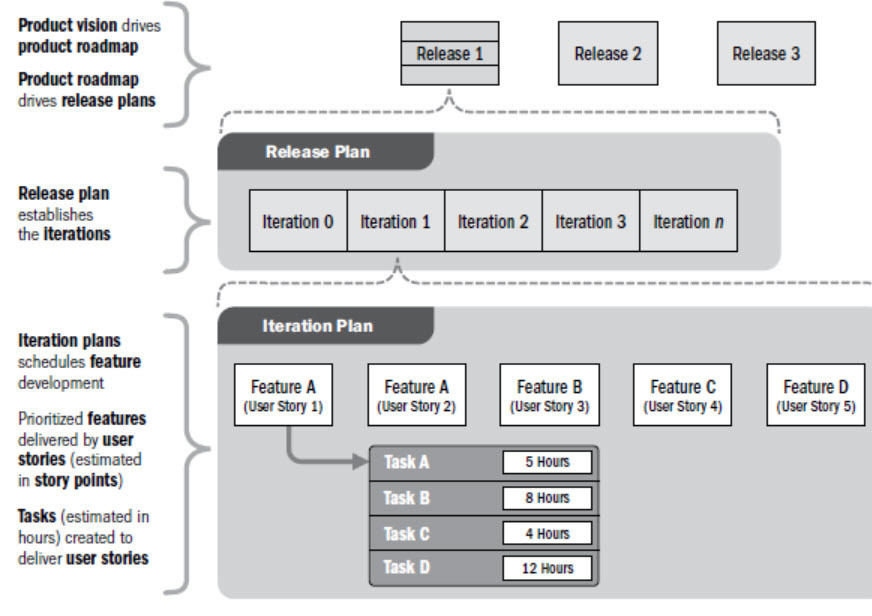
- 132Develop schedule tools and techniques: Agile release planningAgile release planning provides a high-level summary timeline of the release schedule (typically 3 to 6 months) based on the product roadmap and the product vision for the product’s evolution. Agile release planning also determines the number of iterations or sprints in the release and allows the product owner and team to decide how much needs to be developed and how long it will take to have a releasable product based on business goals, dependencies, and impediments. Since features represent value to the customer, the timeline provides a more easily understood project schedule as it defines which feature will be available at the end of each iteration, which is exactly the depth of information the customer is looking for.
- 133Tips to make release planning effective- Do as little planning as is necessary.
- Start release planning when you realize you need it, even if it’s near the end of the release effort.
- Plan using stickies on the walls. - If you must transcribe them into an online tool, do that later, after the meeting.
- Don’t forget that each scrum team only commits to results for the next sprint. Everything else is merely an attempt to understand what could or should happen.
- Release planning is not about committing to a list of features to be released on a certain date.
- Include vendors and other third parties who are relevant and involved in your release planning meeting.
- Revisit the release plan after each sprint and update it.
- Don’t give in to the urge to publish a release plan as a separate document
- There’s no prescribed time box for release planning because it will vary with the size of the team and the expected length of the release effort. - 134Agile release planning example
- 135Develop schedule Outputs- schedule baseline
- project schedule
- gantt chart
- Milestones gantt chart
- network diagrams
- schedule data
- project calendar
- change requests
- updates to the project management plan (schedule plan and costs baseline)
- updates to project management documents (activities attributes, assumptions log, duration estimates, lessons learned, resource requirements, risks log) - 136Develop schedule Outputs: schedule baselinethe approved version of the schedule model which can only be changed through formal change control procedures and it's used to compare the plan with the actual results.
Informationen
- Beschreibung
- key point and concepts about the planning process group from pmbok 6th ed
- Erstellt von
- kelly nascimento
- Aufrufe
- 5
- Tags
- Verlauf
-
- Erstellt von kelly nascimento · 22 Mai 2019
- Kopiert von kelly nascimento · 2 Jun 2019
- Bewertung