
Mindmap
TECHNOLOGY
Inhalt der Mindmap
TECHNOLOGY
IMPACT
- MODEL
- Organisation of information to be used as visual information and use graphic organisers. I do, we do, you do.
- Explain Everything, Showme
- Organisation of information to be used as visual information and use graphic organisers. I do, we do, you do.
- CONNECT
- A connection with gloabally to collaborate through a social and personal connection. Connecting to experts, mentors and other learners
- Inanimate Alice, Scratch, Edmodo
- A connection with gloabally to collaborate through a social and personal connection. Connecting to experts, mentors and other learners
- PRACTISE
- Use of memory and feedback. Engaging students in practise activities to gain knowledge and receive immediate feedback.
- Audacity, GarageBand
- Use of memory and feedback. Engaging students in practise activities to gain knowledge and receive immediate feedback.
- INSPIRE
- Emotional connection to a topic to motivate students. This is to grab their attention and activate prior knowledge
- YouTube, Google Images, memes
- Emotional connection to a topic to motivate students. This is to grab their attention and activate prior knowledge
- TRANSFORM
- Transforming information into bigger ideas by transforming learners using 21st century technology. Encouraging students to explore options.
- Mind Mapping, Scratch
- Transforming information into bigger ideas by transforming learners using 21st century technology. Encouraging students to explore options.
- APPLY
- Applying problem solving and higher order thinking in small groups to evaluate, decide and organise.
- Twine, PowerPoint
- Applying problem solving and higher order thinking in small groups to evaluate, decide and organise.
- MODEL
EPISTEMIC BELIEFS
- DUALISTIC
- Instructional, teacher-centred, right or wrong- knowledge is handed down
- RELATIVISM
- Conjectural, uncertain knowledge, based on accumulated evidence, student-centred
- RELATIVISTIC
- Tentative and contextual, generated by self
- MULTIPLISTIC (MULTIPLE VIEWS)
- Revelatory, teacher-centred, mix-balanced, student-centred
- DUALISTIC
HISTORY
- 20 or so years ago: only had one technology class with a technology teacher. Technology was never integrated into the classroom
EDUCATIONAL TECHNOLOGIES
- INTERACT
- Twitter, Padlet, Inanimate Alice, LMS (Learning Management System)
- CONNECT
- Partner classes, forums, chats discussion boards, social media, Prezi, YouTube, Vimeo
- TRANSFORM
- Creating new knowledge from information students already know (Example: Sctratch game creator)
- INTERACT
TECHNOLOGY FOR INCLUSIVE EDUCATION
- ASSISTIVE TECHNOLOGY
- ACCESS: enable students to engage with the curriculum
- SUPPORTIVE: technologies to improve efficiency within learning episodes
- CURRICULUM: applications to enhance learning in a specific curriculum focus
- FRAMEWORK: applications to cater to learning needs
- STUDENT CHALLENGES
- May be challenging given the format the content is delivered
- Access arrangements and adjustments
- Example: signing instead of speaking
- Example: Computer stimulation instead of lab work
- Specialised equipment (Example: keyboard, mouse, switch systems, virtual reality.
- Students with vision processing challenges
- Difficult to read texts
- Websites using images. Increase comprehension and usabilities for most audiences
- Leads to frustration, poor comprehension, disengagement with learning tasks and behaviour problems
- Results: takes longer to interact with the curriculum, makes more errors, need to concentrate harder, get fatigued more quickly
- ASSISTIVE TECHNOLOGY
PEDAGOGIES FOR ICT
- TEACHER-DIRECTED
- Example: Google
- STUDENT-DIRECTED
- Choose to enquire and analyse. Example: Blog, audio story
- PEDAGOGICAL PRACTICES WITH ICT
- Instructional, revelatory, conjectural
- TEACHER-DIRECTED
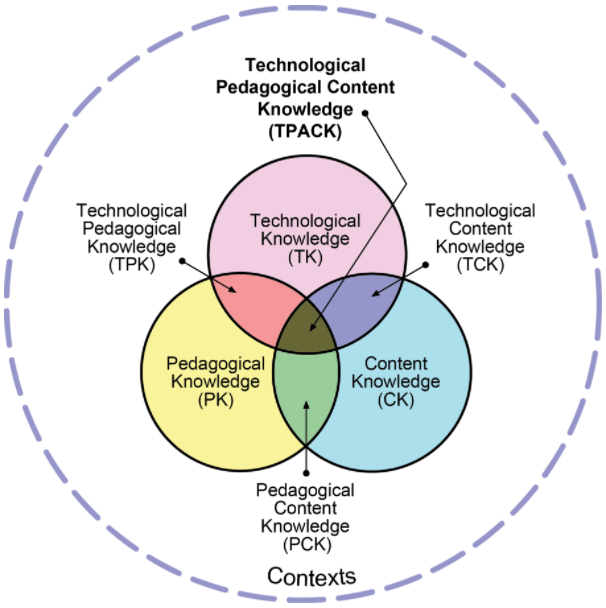
TPACK
- PCK
- Lee Schulman: Represent subject, understood misconceptions, curricular content
- Intersection of pedagogy and content, combining content, pedagogy and technology
- TPACK: Technological Pedagogical and Content Knowledge
- Using the right technology tool at the right time. Theory > Pedagogy > Choice of ICT tool
- "Too Cool for School" - P.Mishra and M.Koehler
- Using the right technology tool at the right time. Theory > Pedagogy > Choice of ICT tool
- Making learning easier by incorporating technology, knowing the right technology to use and repurpose it, techniques that use technology in effective ways, using students prior knowledge on new knowledge to strengthen old knowledge
- Incorporating technology to compliment or enrich the current curriculum. Peggy. A et al (2012) Teacher Beliefs and technology Integration Practices: A Critical Relationship
- Requires creativity and innovation from the teacher to redesign a technology (thats purpose wasn't designed for educational purposes) to become education. P.Mishra and M.Koehler (2009) Too Cool for School? No way!
- Theories
- Constructivist: children construct their own knowledge
- Behaviourist: knowledge that exists external to the child
- PCK
THEORIES
- Behaviourist
- Direct instruction, knowledge is subjective, instructional approach
- Constructivist
- Choose a technology, project-based learning
- Behaviourist
SELF-REGULATED LEARNING
- TIME MANAGEMENT
- Multi-dimensional approach to maximising productivity through organisation, effort and prioritisation
- Key Skills: Structured routine, organisation, persistence, goal setting
- EFFORT REGULATION
- commonly referred to as "grit." Managing own efforts and maintaining even when it is difficult or boring. Is important when working towards short and long term goals
- Key Skills: self-control, self-efficiency, self-regulation, engagement
- CRITICAL THINKING
- Higher-level thinking skill where the person assesses information and decide how to respond
- Key skills: reflection, analysis, evaluation, understanding, judgement
- PEER LEARNING
- Key Skills: collaboration, communication, team work, leadership
- Process of peers learning from each other. Benefit from problem solving and explaining information together
- METACOGNITION
- Key skills: motivation, planning, self-regulation
- Thinking about thinking processes. Process of planning, monitoring, evaluating, assessing, understanding efforts and methods
- TIME MANAGEMENT
APPROACHES TO ICT
- SOLE
- SUPPLEMENT
- The curriculum for productivity outcomes such as using ICT to create better learning outcomes
- ENRICH
- The existing curriculum where ICT is used to teach content and produce higher order thinking skills
- TRANSFORM
- To transform and repurpose the use of ICT in pedagogical practices
- Ertmer et al. Prestridge, 2012; Prestridge & De Aldama, 2016
- Collaborate, Computate, Curate, Create. Prestridge, S, Finger, G (2017) Using Information and Communicative Technologies (Chapter 15) p. 18
PEDAGOGY
- CONTENT-FREE SOFTWARE
- Best to reinforce knowledge is to teach to someone else. Constructivist view of learning. Example: mind map, Paint
- CONTENT SPECIFIC
- Includes competitive elements. Examples: computer programs such as Mathletics
- Problem: Doesn't teach the process of the answer (such as a mathematic question)
- CONTENT-FREE SOFTWARE
LEARNING
- Behaviour-Cognitivist
- Knowledge that exists exernal to the child and can be transmitted and received. Software that mediates learning. Projects, big questions, investigations. Example: spreadsheets, content free, ShowMe App
- Teacher-Centred
- Information is received directly and is instructional
- Teacher Professional Learning
- Is self-directed on professional needs or interests. Active participation on social media, contributing culture
- Behaviour-Cognitivist
CYBERBULLYING
- "Do it for Dolly" news article
- Investigate, Communicate, Create. Technology incorporated: researching on websites, using SurveyMonkey and creating a video on PowToon.
- Incorporating technology into a purpose (cyberbullying campaign). Choosing which technology to use and repurposing it.
OUTCOMES
- NEGATIVE: Cyberbullying can occur and cause harm. Be used wrongly by people.
- POSITIVE: Allows ICT to be re-purposed into educational opportunities. Allows communication between people.
Bilder und Dateien der Mindmap
Informationen
- Beschreibung
- Mindmap am TECHNOLOGY, erstellt von Sophie Bell am 25/09/2019.
- Erstellt von
- Sophie Bell
- Aufrufe
- 0
- Bewertung