
Notizen
Unit 1
Inhalt der Notizen (32)
Seite 1
1.1 Computer hardware
Computer component - Items which together form a computer system
Input devices - Devices that allow the user, which may be another computer or a measuring device, to give instruction or provide data to the computer system
Output devices - Devices that enable the computer system to provide information, data or instructions to another user, which may be computer or human
Modem - Were one of the first technologies to enable computer to communicate via a telephone line
Network interface card - A card that enables computers to communicate with other computers in a network
Terminal adapter - Allows the computer to link into an integrated services digital network (ISDN)
Wireless router - Converts an internet signal into a wireless signal, which the computers and other devices in the network can use to communicate with each other and the router
Wireless network cards - The means by which the computer and other devices are able to receive and send wireless communication
Hub - Allows multiple computers to communicate over a network
Seite 2
1.2 Computer components
Central processing unit (CPU) - Manages all the hardware activities required to receive instruction and data, action them using the input data and outputs the results
Control unit - Ensures that the instructions required to operate the computer are retrieved and interpreted in the correct sequence
ALU - Here the computer undertakes the mathematical or logical operations required to complete the instruction
Motherboard - This is the main printed circuit of a personal computer. Components such as the CPU are directly connected to it via sockets; others such as hard drives or network cards use expansions slots or ports
Computer storage - A simple way of thinking of how data and instructions are stored in a computer is to split them into two different categories: primary storage and secondary storage
Register - This is small, fast and is used chiefly by the CPU
Random access memory (RAM) - Form of computer data storage that stores data and machine code currently being used
Read only memory (ROM) - Type of non - volatile memory used in computers and other electronic devices
Flash drive - A USB flash drive is a data storage device that includes flash memory with an integrated USB interface
Cloud storage - Model of data storage in which the digital data is stored in logical pods
Solid state drive - Uses integrated circuit assemblies as memory to store data persistently
Optical hard drive - Uses laser light or electromagnetic waves within or near the visible light spectrum as part of the process of reading or writing data to or from optical discs
Universal serial bus - USB ports enable the computer to connect with standalone devices such as printers, cameras, broadband modems and mobile devices
Firewire - Similar to USB in architecture, but conforms to the IEEE 1394 standard so allows different elements to communicate without being linked through a computer network
Serial advanced technology attachment - This allows devices such as optical and other hard drives to link to a computer
Network port - The physical ports are those which connect computers to modems, routers or local area networks
Ethernet port - Used for cable - based networks. Most computers have at least one such port which is linked directly to the computers network card
Seite 3
1.3 Types of computer system
Desktop systems/servers - Desktops allow the user to carry out a range of activities, including documents creations, game playing and communication facilities for personal or business purposes
Tablet/hybrid - A laptop or tablet can be used in a variety of locations
Smartphones - Can run applications, send and receive emails as well as act as a GPS system
Embedded system - Embedded computer systems are everywhere. For example, cars have computers which monitor emissions from the engine and adjust the engine settings as required
Mainframe and quantum computers - Huge machines designed to solve scientific and engineering problems that require complex calculations or the manipulation , collection and storage of large amounts of data
Seite 4
1.4 Connectivity
Twisted pair - A pair of insulated wires are twisted together
Shielded twisted pair - Combines shielding and cancellation and wire twisting. Each twisted pair is encased in metallic jacket and four pairs of wires are wrapped in another metallic braid jacket
Fibre cables - Optical fibres provide the fastest data delivery by cable. Each fibre is no thicker than a human hair: the thinner the fibre, the better the signal
Seite 5
1.5 Communications hardware
Network hub - The central connection point for all devices in the network
Switch - A device that receives packets, processes them and forwards them onto the specific device
Router - Forwards packets between networks and it needs to be linked to at least two networks
Hybrid network hub - Includes internet access, wireless and wired LANs. They have a fixed number of ethernet ports for wired devices and also broadcast a wi-fi signal
Seite 6
1.6 Hardware troubleshooting
Event viewer - When an error occurs on a computer, the event viewer is updated with information about it
Self test programs - These may be provided by the hardware manufacturer such as: POST, ping tests, ipconfig/ifconfig and Nslookup
Seite 7
1.7 Units of measurement
Nibble - 4 bits
Byte - 8 bits
Kilobyte (KB) - 1000 bytes
Megabyte (MB) - 1000 kilobytes
Gigabyte (GB) - 1000 megabytes
Terabyte (TB) - 1000 gigabytes
Seite 8
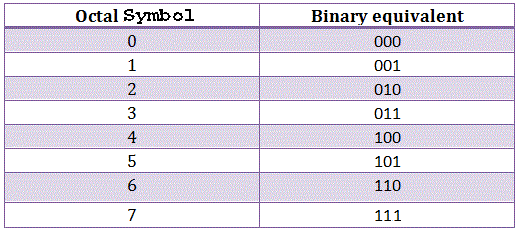
1.8 Number systems
Seite 9
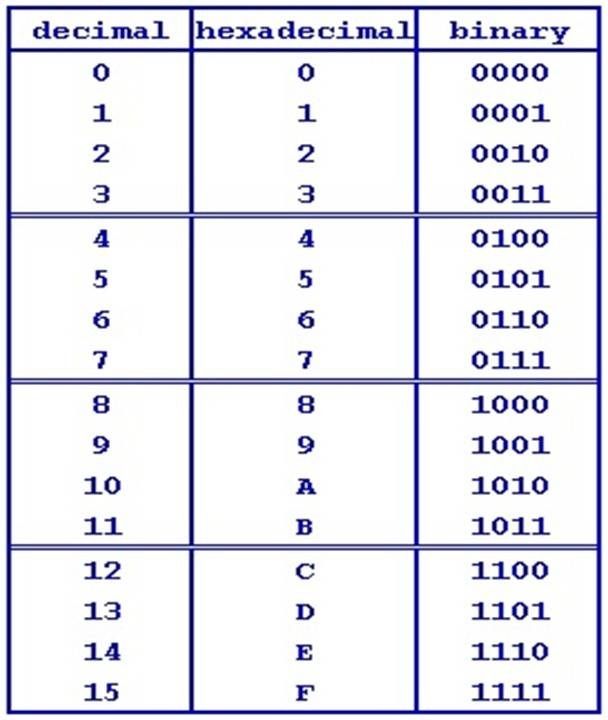
1.9 Number conversions
Seite 10
2.1 Types of software
Open source - This means that the source code, produced by the programmer, is made available to anyone who wishes to debug, improve or modify it
Closed source - This is closely guarded and can be protected by intellectual property rights and copyright, with the full force of the law being brought down upon those who flout the restrictions
Off the shelf- Not designed or made to order but taken from existing stock or supplies
Shareware - You can try shareware for a period of time, often 30-60 days, before you have to purchase the product
Freeware - Distributed free of charge, although there may be restrictions on upgrades or no warranty
Embedded software - This is a piece of software which may be embedded in a PC or devices we do not consider to be computers
Seite 11
2.2 Applications software
Productivity software - This is designed to enable you to carry out your task or role accurately, effectively and efficiently
Development tools - These are software tools which help those who are creating new software for other purposes
Business software - This refers to software which supports one or more business activities
Seite 12
2.3 Utility software
Computers can suffer from viruses, loss of memory or slowness at some point. Utility programs are small pieces of software that can help the computer perform more efficiently or effectively
Seite 13
2.4 Operating systems, 2.5 Functions and 2.6 Benefits and limitations
Operating systems can:
Control the time each task is allowed in the processor
Interrupt when a more urgent task takes priority
Ensure data is stored properly and the location recorded
Retrieve data from storage
Monitor input and output
Seite 14
2.7 Communication methods
Email, instant messaging, text messaging and SMS - These are written commmunicatinos, although the introduction of emoticons recognises that some pictorial information is also communication
Voice over internet protocol (VoIP) - This method can apply to digital telephone systems, video - conferencing and teleconferencing
Personal assistants - Personal assistants, such as Siri or Cortana, are software applications that recognise and act on voice commands
Seite 15
2.8 Software troubleshooting
Common faults
System freeze
Frozen blue screen
Software error or bug
Updates
Unusual behaviour
Software failing to load
Troubleshooting tools
Network monitors examine the traffic between computers
Virus scanners check whether malware is being ran in the background and slowing down the system
Seite 16
3.1 Types of servers
File - A file server is useful for businesses individuals who need to hold and manage large numbers of files
Print - Print servers manage the printing of documents
Application - Application servers are designed to install, operate and monitor the applications shared by other devices on the network
Database - Some application servers may have a specialised role as database servers, which manage databases with multiple users
Web - A web server can also refer to hardware or the web server software
Mail - A mail server or a mail transfer agent (MTA) is software or a device which acts as an electronic post office
Hypervisor - This is software written for a particular processor which manages different operating systems or copes of the same operating system on a single computer or computer system
Seite 17
3.2 Virtualisation
Virtualisation - To create a simulated or virtual network, computer or server using software
Block level - Allows a storage area network or SAN to use numerous storage arrays across the network as if they were a single array
File level - Allows network attached storage and removes the link between the data items and their physical locations on a particular file server
Seite 18
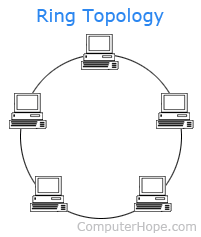
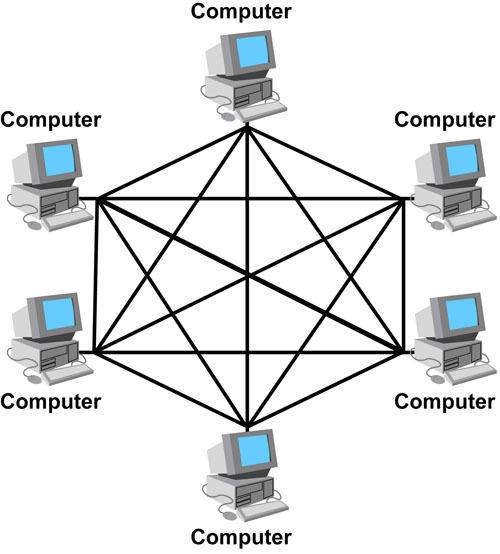
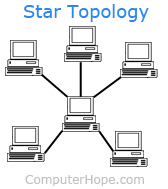
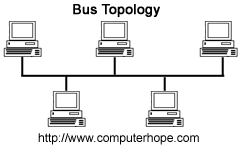
3.3 Networking characteristics
Seite 19
3.4 Connectivity methods
LAN - A local area network is a computer network that interconnects computers within a limited area
WAN - A wide area network is a telecommunication network or computer network that extends over a large geographical distance
Seite 20
3.5 Business systems
Management information system - Refers to the software and hardware used by managers to obtain the necessary information for accurate decision making and monitoring the effectiveness of decisions
Customers relations management - A process that tracks how the business interacts with current and potential customers
Standard operating procedures - Detailed step by step guides to how function should be carried out within an organisation to ensure that they are carried out accurately and in the same way each time
Help desk - When a user of a large, complex or widely spread system has a technical problem, it is useful to have a knowledgeable person ready to solve it
Seite 21
4.1 Communication skills
Interpersonal skills - Face to face communication involves more than just talking. You must also provide a positive image of yourself, your colleagues and your organisation
Verbal communication - This needs to be effective and appropriate for the situation. You must know when to use technical or specialist terms and when to provide simple explanations in easily understood English
Closed question - Where the answer will be one word or a very short factual answer
Open question - Where there is no obvious answer or where opinions are required
Barriers to communication:
Noise
Language
Physical
Seite 22
4.2 Communication technology
Presentation software - Can include text, graphics, video and audio images and is used to tell a story or used to support someone presenting information
Word processing - Used for the production, editing, printing and storing of text on a computer
Email - The distribution of electronic messages from one computer user to another via a network
Web - A system of internet servers that support specially formatted documents often connected via hyperlinks
Blog - A regularly updated web page run by an individual or small group taking the form of a personal journal which is accessible to the public
Vlog or video log - A form of blog which includes video clips
Instant messaging - A communication service which enables a person to communicate privately with another individual in real time over the internet
Seite 23
4.3 Personal attributes
Personal attributes - These are the qualities individuals have which enhance their technical skills and make them useful employees
Seite 24
4.4 Ready for work
Dress code - Some organisations have dress codes that require a uniform or a dark suit, while others may be happy if everyone arrives in t-shirts and jeans
Presentation - Clean clothes and good personal hygiene help to give a professional impression
Attitude - Someone with a "can do attitude" is positive about their ability to achieve success, even in things are not going well\
Seite 25
4.5 Job roles
From chief information officer to trainee help desk operator, all roles require certain attributes and skills
Seite 26
4.6 Professional bodies and 4.7 Industry certification
Advantages
Building a network with like-minded professionals
Identifying career opportunities as many advertise job opportunities
Continuous professional development opportunities through seminars, special interest groups, journals and qualifications
Disadvantages
Cost - Fees can be several hundred pounds
Time - Attending meetings and events for general or specialist group or local branch meetings
Does not guarantee that you will have a better job or earn more money
Seite 27
5.1 Ethical issues
Whistle blowing - Is usually when an employee discloses that some form of serious unlawful practice is taking place within their place of work
Disability/gender/sexuality discrimination - Behaving ethically can be underwritten by law, for example, the Equality Act (2010) ensures equality of treatment for all people, irrespective of colour, race, disability or gender
Use of information - The Data Protection Act (1998) ensures that personal data is used responsibly
Codes of practice - There are many codes of practice within the workplace to provide ethical guidance
Seite 28
5.2 Operational issues
Security of information - Failure to protect information from less corruption, illegal duplication, or being stolen, manipulated or hacked can provoke poor publicity, which can result in loss of business, bankruptcy or even fines and court cases
Health and safety - Failure to protect employees and clients or visitors can reflect badly on the organisation if reported in the press
Disaster recovery planning - Organisations take note of all the issues that could risk their assets, employees and existence. They will produce a plan to either reduce the risk to the lowest possible level or provide alternative facilities or locations
Organisational policies - Organisations have policies to establish the rules for acceptable behaviour and guidelines for best practice in certain work related situations
Change drivers - These are things which must change, such as new legislation or new entrants into the market
Scale of change - This reflects the needs of the business, such as replacing a slow network with a faster optical fibre system
Seite 29
5.3 Threats
Phishing - Misleading individuals or organisations into parting with their confidential and personal data to commit fraud
Hacking - Looking at files or locations to which they do not have right of access; creating, modifying or deleting files without permission; or defacing web pages
Trojan - Piece of code which, when certain conditions are met, will carry out an action which will be detrimental to the system
Interception - When the data packets on the internet are intercepted by a third party and copied, edited or transferred to a new location
Eavesdropping - Can refer to interception, but is particularly listening to communication traffic not intended for the reader or listener
Data theft - Illegally removing copies of personal or company data from information system
Social engineering - The manipulation of individuals to trick them into giving sensitive information
Seite 30
5.4 Physical security
Locks and keypads - For preventing access to computer rooms or storage facilities or to prevent access to hard drives
Biometric readers - Are electronic devices to determine a person's identity
Radio frequency identification - Uses radio waves or electromagnetic waves to identify and track individuals, animals and items of importance
Tokens - Small hardware devices such as a smart card, which allow a person access to a network
Privacy screens - To prevent the content being seen or read by anyone not sitting in front of the screen
Shredding - Cutting up documents and optical discs into sufficiently small pieces that it is impossible to reconstruct them
Seite 31
5.5 Digital security
Anti-virus and anti-spyware - Are both programs that protect the computer systems from other programs which are maliciously downloaded
Usernames and passwords - Allow access or give permission for the user to access particular software such as financial system
Firewalls - Used to prevent unauthorised access to or from a network. They can be implemented via hardware, software or both
Permissions - Rules that determine who can access an object and what they can do with it
Encryption - When data is encoded so that it cannot be understood by people who are not authorised to see it
Seite 32
5.6 Safe disposal of data and computer equipment
Legislation - A range of legislation covers the disposal of data and computer equipment
Overwriting data - When data is sent to the disc and then overwrites it
Electromagnetic wipe - Involves the use of a degausser which has a very strong permanent magnetic or an electromagnetic coil
Physical destruction - Physically destroying hardware containing data by shredding can be effective
Informationen
- Beschreibung
- Notiz am Unit 1, erstellt von Oskar Pokrywinski am 21/12/2017.
- Erstellt von
- Oskar Pokrywinski
- Aufrufe
- 1
- Bewertung