
Flashcards
BTEC UNIT 1
Cards in this deck (146)
- 1ADVANTAGES OF ONLINE SOFTWARE 1BACK UP AND RESTORE
Having a back-up online means a copy of your files are stored on web servers, so you can restore the files if there's a problem.
AUTOMATIC UPDATES
Getting an upgrade used to mean getting a new CD. But online software is updated automatically. - 2ADVANTAGES OF ONLINE SOFTWARE 2AUTOMATIC UPDATES
Getting an upgrade used to mean getting a new CD. But online software is updated automatically.
PAY MONTHLY
You don't need to pay the full price for a software product on a CD. Instead, you can 'pay monthly' so the software is more affordable. - 3ADVANTAGES OF ONLINE SOFTWARE 3SAVE ON HARDWARE
A business doesn't need to buy it's own servers because the software and files will be stored online.. This saves the business money. - 4DISADVANTAGES OF ONLINE SOFTWARERELIABILITY
If your online software is unavailable, you can't access your files.
SECURITY
Your online service could be at risk from hackers wanting to access files. - 5ADVANTAGES OF STANDALONE SOFTWAREAs it is installed onto the hard drive, it can be used when there is no internet access.
It runs faster than online software with a poor internet connection. - 6DISADVANTAGES OF STANDALONE SOFTWAREYou can't access it anywhere.
More expensive.
You have to update it yourself. - 7BACKUP AND RESTOREIf you are backing up a file it is important to make sure that you can RESTORE these files if the original copy is deleted or corrupted.
- 8ADVANTAGES OF COLLABORATIVE WORKINGStaff can collaborate online, even if they're in different places or countries.
You only need one version of the document which everyone can edit. - 9DISADVANTAGES OF COLLABORATIVE WORKINGTimezone differences.
Several people trying to edit the same thing at the same time. - 10VERSION CONTROL (COLLABORATIVE WORKING)When lots of people can edit a document, its vital to show which is the latest version.
- 11LEVEL OF ACCESS (COLLABORATIVE WORKING)Staff can access areas depending on their roles.
Students and teachers see different parts of network. - 12FILE PERMISSION (COLLABORATIVE WORKING)READ: view only
READ / WRITE: view and edit
FULL CONTROL: also delete - 13ONLINE COMMUNITIES OR NETWORK OF FRIENDSThe often exist in a VIRTUAL WORLD. Some communities need users to be involved at the same time.
Online communities and network of friends are very similar but not the same. - 14VIRTUAL WORLDUnreal world which is created by the computer and does not exits in the real world.
- 15NETIQUETTENetiquette is a set of rules for users online.
- 16BLOGA web log or online journal that's meant to be updated often.
- 17MICROBLOGA website or app where short messages are exchanged.
- 18CHATROOMA place on the web where many users online at the same time can communicate.
- 19WIKISites where authorised users can log on to or edit comment.
- 20PODCASTAudio or video files that are usually published in installments.
- 21CHATAn exchange of messages, often typed, between users at the same time.
- 22PROFILEIs a user's online presence, such as on online media. People decide what to show and how much is true.
- 23AVATARAn avatar is an image to represent you.
- 24VoIPVoice over internet protocol.
VoIP is a method of real-time communication over the internet. Audio and video data is transmitted between computers. - 25ADVANTAGES OF VoIPNo additional costs.
Able to connect anywhere.
Reduces travel cost.
Better for collaboration since it can also show documents on-screen. - 26DISADVANTAGES OF VoIPRelies on internet connection.
Date exchanged online is at risk of security threats.
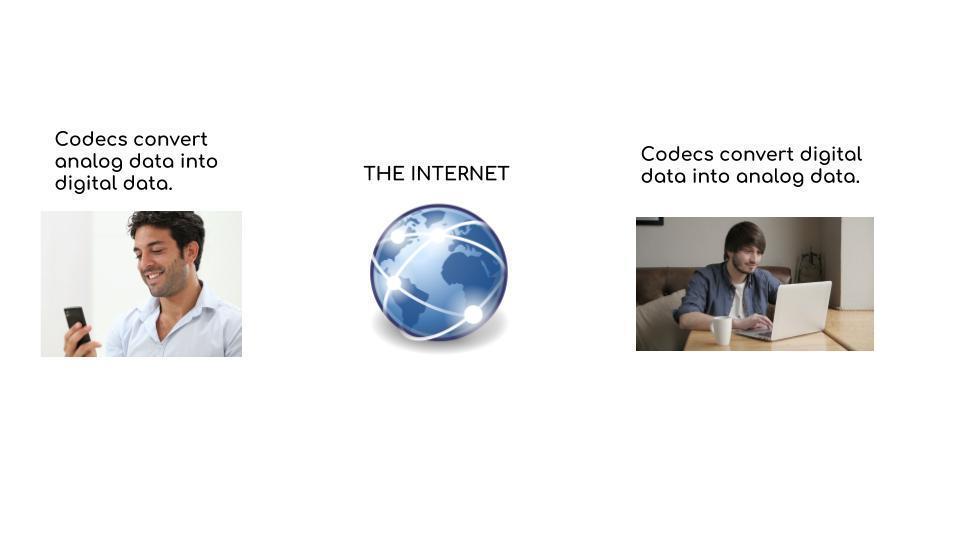
Voice quality can be affected since the audio is being converted to digital and then transmitted over the internet. - 27EQUIPMENT REQUIREDDEVICE
MICROPHONE
SPEAKERS
CAMERA - 28SERVERRuns special software to serve other computers.
Different types include; file, print, web and email serves. - 29CLIENTA computer/device that uses services provided by a server.
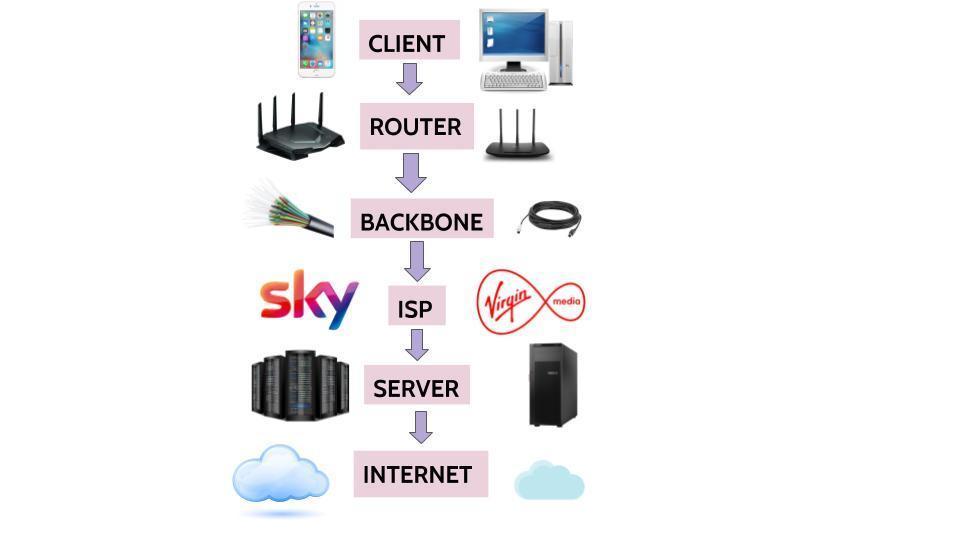
The computer you use to access the internet is a client. - 30ROUTERSDevices that route (direct) data traffic through a network.
They are intelligent and will try to find the best routes. - 31CONNECTION METHODDial up: A wired connection via modem and phone lines.
Broadband: A wired connection via a broadband supplier.
Wireless: Connects without using cables. - 32BACKBONEA big cable (often fibre optic) that connects a large number of devices in the core of the internet.
- 33ISPINTERNET SERVER PROVIDERS
Allows connection to the internet.
IT would be too expensive to connect to the internet so ISP provides an easy way for connection.
May provide connection for one client or a network of clients.
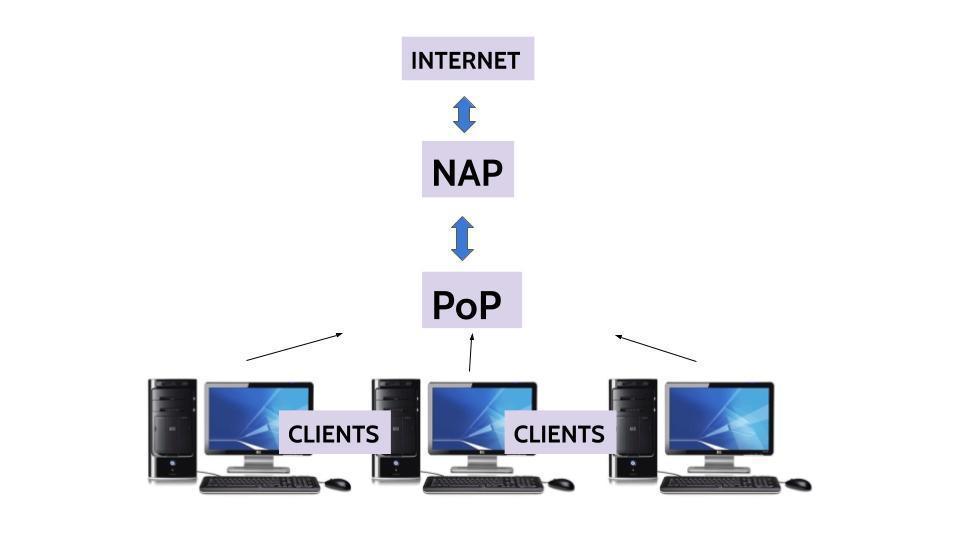
They can also supply additional services for a fee. - 34POINT OF PRESENCEPoP
Is an access point to the internet.
An ISP may have several PoPs to allow good access to the internet. - 35NETWORK ACCESS POINTNAP
Is where networks interconnect, such as your home network onto the internet. - 36DIAGRAM
- 37DIAGRAM
- 38DIAL UP CONNECTIONS ADVANTAGESCan use existing telephone wires.
Gives connection where broadband is not available. - 39DIAL UP CONNECTIONS DISADVANTAGESOlder technology can give poor connection.
Usually slower than other methods.
Conversion between digital and analogue can cause errors. - 40BROADBAND ADVANTAGESBetter reception and speed than dial up.
- 41BROADBAND DISADVANTAGESWired, has to be used on stationary computer.
Broadband is not available in many rural areas. - 42WIRELESS ADVANTAGESNot fixed to a stationary computer.
Can be used whenever wireless internet is available. - 43WIRELESS DISADVANTAGESNeeds to have wireless internet available.
Can be less secure than wired.
Tends to be slower than wired. - 44BANDWIDTHHow much space there is to carry digital data as 1s and 0s.
Measured in bits per second. - 45BANDWIDTH DIAGRAM
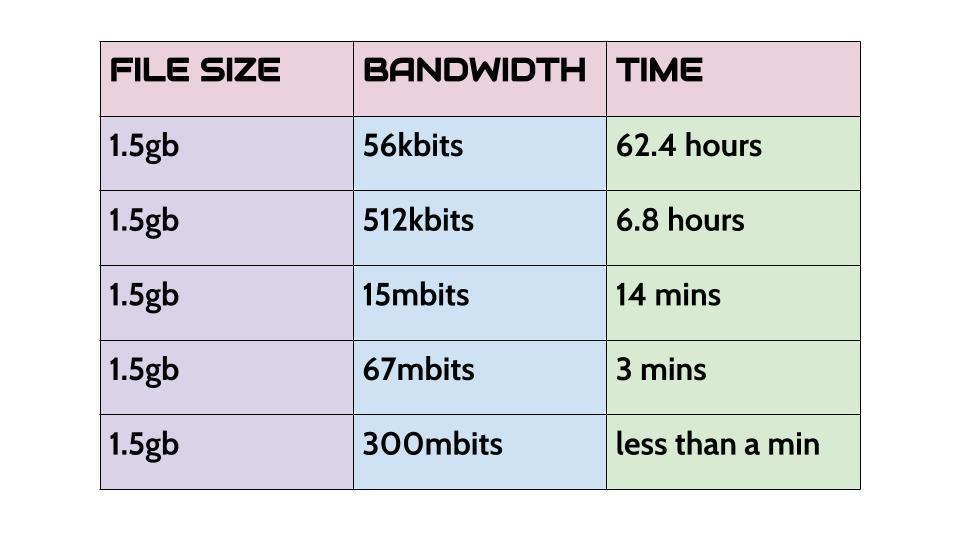
- 46PROTOCOL (IN RELATION TO THE INTERNET)Protocols are rules that allow computer systems to connect with different systems to transfer data.
- 47INTERNET PROTOCOL (IP)Handling the routing of packets.
Addressing, sending and receiving packets over the internet. - 48TRANSMISSION CONTROL PROTOCOL (TCP)Breaking data into packets.
Assembling the packets again when they arrive. - 49FILE TRANSFER PROTOCOL (FTP)Allows files to be transferred between two computers or devices.
- 50DIAGRAM 4
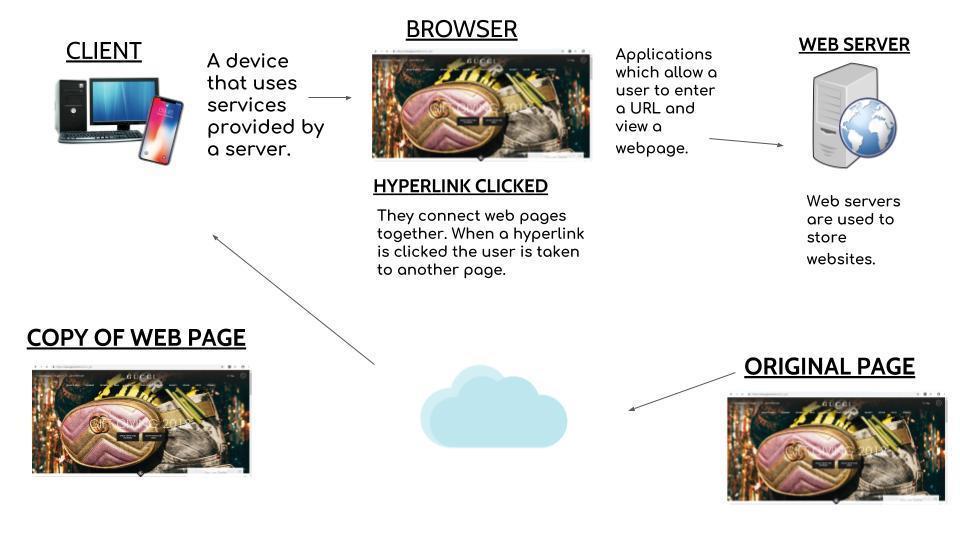
- 51PARTS OF AN URL DIAGRAM
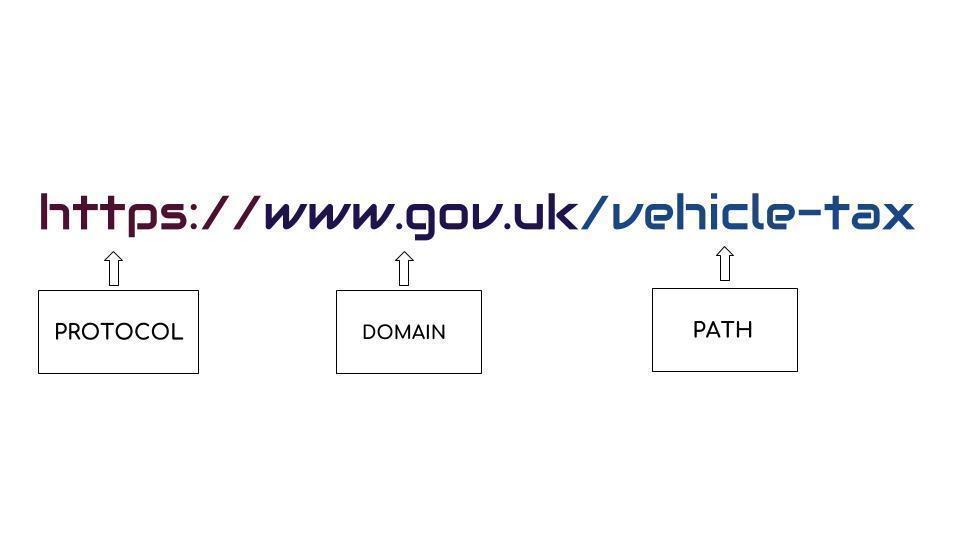
- 52HTTPHYPER TEXT TRANSFER PROTOCOL
A set of rules that handles what we do on the web. - 53HTTPSHYPER TEXT TRANSFER PROTOCOL SECURE
The s means secure, the website is safe and avoids hackers. - 54FTPFILE TRANSFER PROTOCOL
It is used to transfer files to web servers. - 55ONLINE SERVICES 1COMMUNICATION
That means moving data in the form of pictures, audios and videos.
REAL TIME INFORMATION
They are constantly updated for people to get the latest information
COMMERCE
These services involve money.
GOVERNMENT
These involve 'official' public services. - 56ONLINE SERVICES 2JH
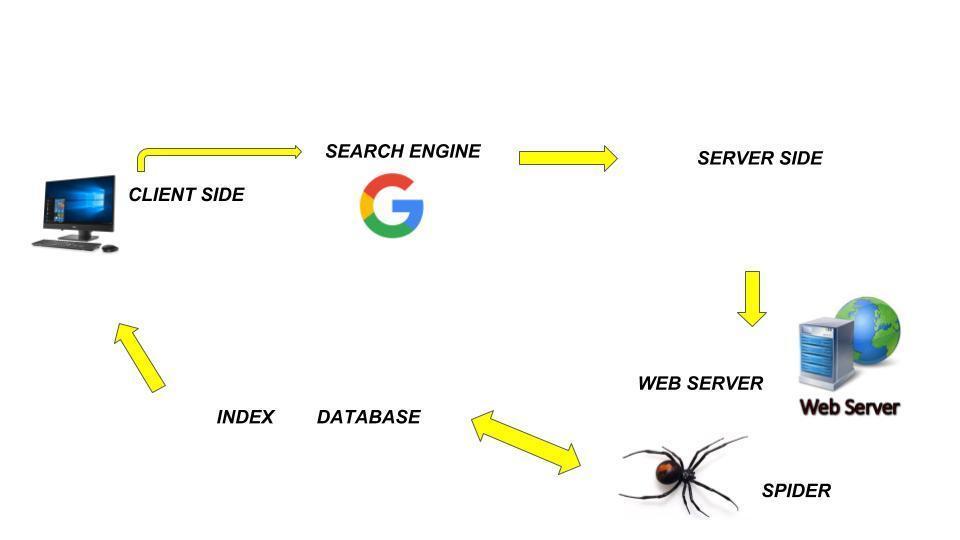
- 57CLIENT SIDEAny user typing keywords into a search engine.
- 58SEARCH ENGINEThey display results after entering keywords.
- 59SERVER SIDEWhere database is searched to find relevant information.
- 60SPIDERThey keep updating the results and information and navigate through all we pages to find the best matched results.
- 61INDEXA list where all web pages can be found on the database.
- 62DATABASEStore of web pages.
- 63SPONSORED LINK RESULTSThese web sites pay to have their link come up in first results.
- 64ADVERTSAdverts pop up related to the topic you have searched.
- 65POPULARITYWeb pages can be more popular than others depending on how many people view the page.
- 66DIAGRAM 6
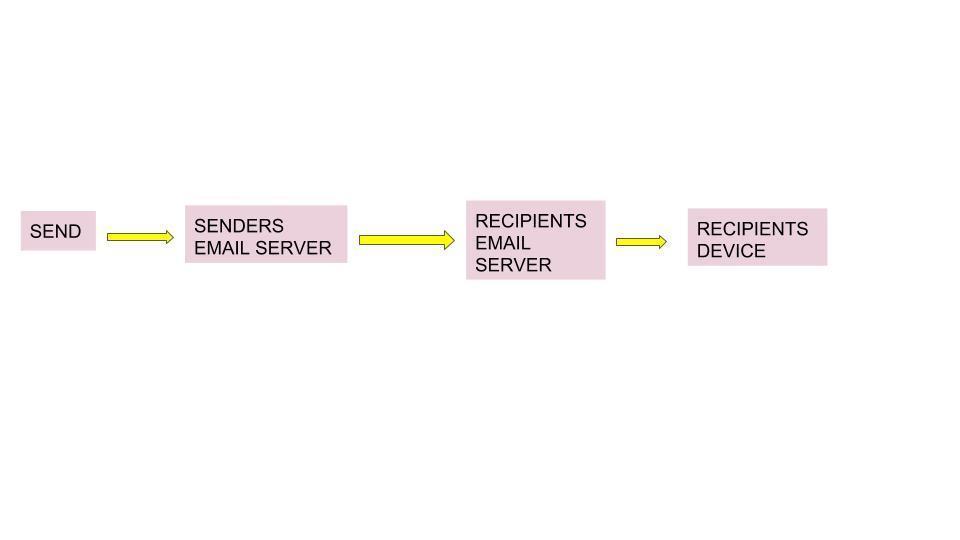
- 67STORE AND FORWARDProcess stored on servers and then
- 68ADDRESS BOOK/CONTACT GROUPWhere your contacts are stored. When made a group of contacts you can send the same email to everyone within the contact group.
- 69CCCARBON COPY
Recipients can see who else the email is sent to. - 70BCCBLIND CARBON COPY
Recipients can't see who else the email is sent to. - 71BENEFITS OF USING EMAILATTACHMENTS
You can attach files.
COPY
You can copy and send to multiple people.
CONTACTS
Stores contacts.
DELIVERY SPEED
They arrive in seconds unlike like original mail.
WEB MAIL
You can access email anywhere. - 72DRAWBACKS OF USING EMAILSPAM
PHISHING
Fake emails designed to trick people.
VIRUSES (FROM ATTACHMENTS)
Can harm your computer.
DELAYED REPLY
Email isn't real time.
NO ACCESS
Not everyone has email or not everyone may be logged on. - 73SMTPSIMPLE MAIL TRANSFER PROTOCOL
It pushes outgoing email to a server. If theres a problem sending, SMTP will keep trying until its sent. - 74POP 3POST OFFICE PROTOCOL 3
Once you download/receive emails they are no longer stored on the email. - 75IMAPINSTANT MESSAGE ACCESS PROTOCOL
Receiving emails that are stored on the servers. - 76DIAGRAM 7
- 77WEB MAILAll your messages stay on the server.
Can access email on many devices.
Email is backed-up.
You must have network connection.
Slow service. - 78EMAIL CLIENTEmails download to client machine.
Can access them even if not online.
Client software has more features.
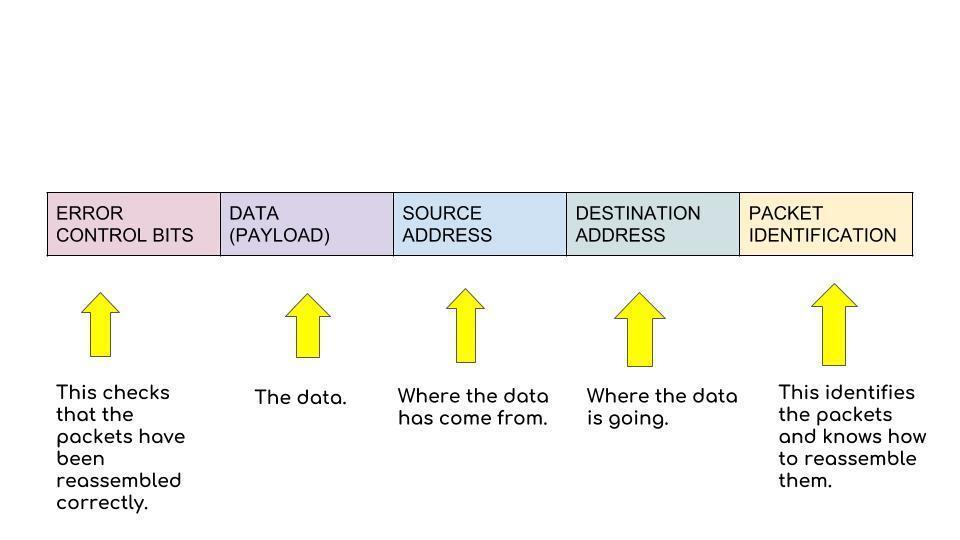
Emails lost if computer crashes. - 79PACKET OF DATA DIAGRAM
- 80DIAGRAM
- 81PACKET SWITCHINGXGND
- 82ADVANTAGES OF PACKET SWITCHINGPackets chose different routes so traffic low is efficient.
Big files can still be sent but don't clog the network.
Packets give security benefits. - 83DISADVANTAGES OF PACKET SWITCHINGIf one or more packets are lost or corrupted during transmission, the whole file will not be received correctly.
- 84SIMPLEXSignals go one way at a time.
TV remote - TV - 85HALF DUPLEXSignals go in both directions but not simultaneously.
walkie talkie - walkie talkie - 86DUPLEXSignals can go in both directions at the same time.
phone - phone - 87SERIAL TRANSMISSIONBits of data are transferred one at a time over a wire.
- 88PARALLEL TRANSMISSIONBits of data are transferred simultaneously- a whole byte can be transferred at the same time.
- 89BENEFIT OF SERIAL TRANSMISSIONGood over large distances.
- 90BENEFIT OF PARALLEL TRANSMISSIONFaster because more bits transferred per second.
- 91LIMITATION OF SERIAL TRANSMISSIONComplex because data has to be broken into individual bits.
- 92LIMITATION OF PARALLEL TRANSMISSIONOnly for shorter distances, eg 5 meters.
- 93INFRAREDUses infrared light to transmit data via lights, very high frequency light.
Can only communicate with one device at a time and cant be blocked.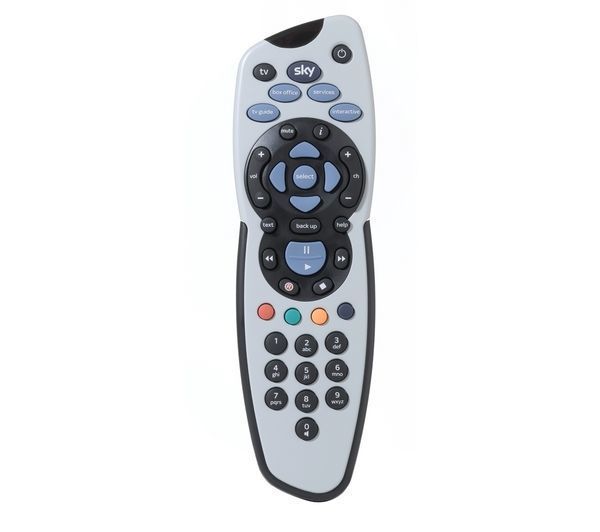
- 94INFRARED ADVANTAGES/DISADVANTAGESADVANTAGES
Its reliable.
DISADVANTAGES
Short range.
Devices must be in line of sight.
Can suffer from interference. - 95BLUETOOTH- MICROWAVEUses waves with short wavelengths to transmit data.
- 96BLUETOOTH-MICROWAVE ADVANTAGES/DISADVANTAGESADVANTAGES
Good for medium distances.
DISADVANTAGES
Can suffer from interference from other devices eg a microwave oven thats near to a computer device. - 97SATELLITEUses satellites in space to relay data between points on earth eg GPS.
Can reach anywhere as long as theres a receiver. - 98SATELLITE ADVANTAGES/DISADVANTAGESADVANTAGES
Good for very long distances.
DISADVANTAGES
Very expensive. - 99UTP/STPUnshielded twisted pair (UTP) is cable made up of pairs of copper wires twisted together. STP is the same with shielding. Shielded cable has a protective layer around the copper wires (under the plastic coating) to protect the data from interference.
- 100UTP/STP ADVANTAGESInterference is lessened due to the twisting.
Cheaper than other methods.
Reliable. - 101UTP/STP DISADVANTAGESSlow.
Low capacity.
Used over short distances.
Susceptible to noise, which means the data can be interfered with if near another digital device or signal. - 102COAXIALSolid copper wire with thick shielding.
ADVANTAGES
Reliable.
DISADVANTAGES
Slow.
Low capacity.
Used over short distances.
Thick and physically inflexible.
Susceptible to noise. - 103FIBRE OPTICGlass or plastic cables which use light to transmit data.
ADVANTAGES
Fast.
Used over long distances.
Little interference.
DISADVANTAGES
Expensive.
Complex to install (needs a specialist). - 104NETWORK INTERFERENCE CARD (NIC)Its the hardware for receiving wireless signals.
Its built into modern devices eg tablets and phones.
The NIC connects to a NAP. - 105NETWORK ACCESS POINT (NAP)Lots of places offer NAPs, such as cafes and libraries.
- 106HTML (HYPERTEXT MARKUP LANGUAGE)HTML is made up of tags, mostly in pairs . Pairs of tags are called HTML elements. The open tag is written between < >.
Most tags also have a close tag which includes a forward slash. text .
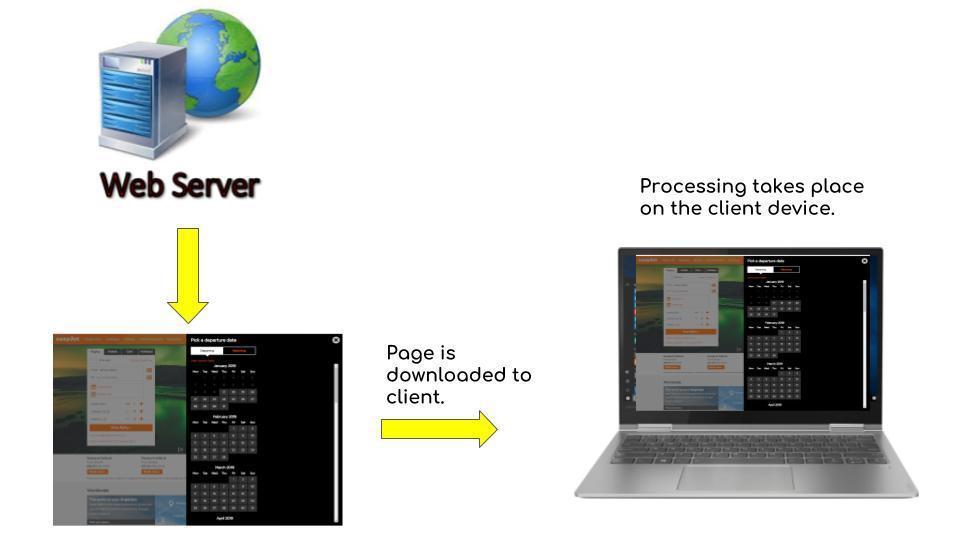
http://www.thuto.org/ubh/web/html/tags1.htm - 107CLIENT SIDE PROCESSING
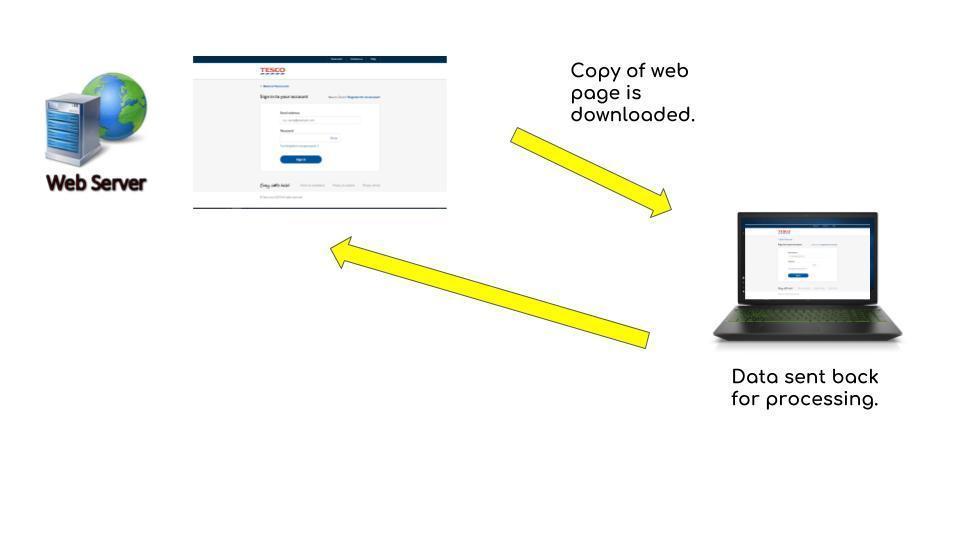
- 108SERVER SIDE PROCESSING
- 109CLIENT SIDE PROCESSINGClient side is viewing web pages on your client device.
- 110CLIENT SIDE PROCESSING ADVANTAGESSPEED- Processing is faster on the client because data does not have to travel back to the server across the internet.
SECURITY- Data cannot be intercepted on the client in the same way it can be when data is transmitted back to the server across the internet. - 111CLIENT SIDE PROCESSING DISADVANTAGESBROWSER SPECIFIC- Different browsers process client scripts in different ways, therefor a web developer cannot be sure how their website will appear on a screen on the client side.
COMPUTER SPEED- The web developer is relying on the speed of the client computer to deliver the interactive features, so if that is slow then the processing will be slow. - 112SERVER SIDE PROCESSINGServer side means processing data at the 'back end' on the web server.
Its done using server-scripts and server-side languages. - 113SERVER SIDE PROCESSING ADVANTAGESSERVERS ARE POWERFUL COMPUTERS- A web server is likely to be way more powerful than a client computer, so it can process data faster.
NO BROWSER INVOLVED- Serves dont used browsers so there are none of the difficulties you get on the client with different brands.
EFFICIENT- Everything is done on the server, so no need to wait for downloads. - 114SERVER SIDE PROCESSING DISADVANTAGESSECURITY- When data is sent back from the client, it has to travel across the internet where there is more risk of security threats.
OVERLOADING- If a lot of users are asking the web server to process data, it could overload the server and cause it to crash. - 115EXAMPLE OF CLIENT SIDE EXAMPLE OF SERVER SIDEWidgets eg interactive calendar.
Web forms. - 116TYPES OF RELATIONSHIPS DATABASE
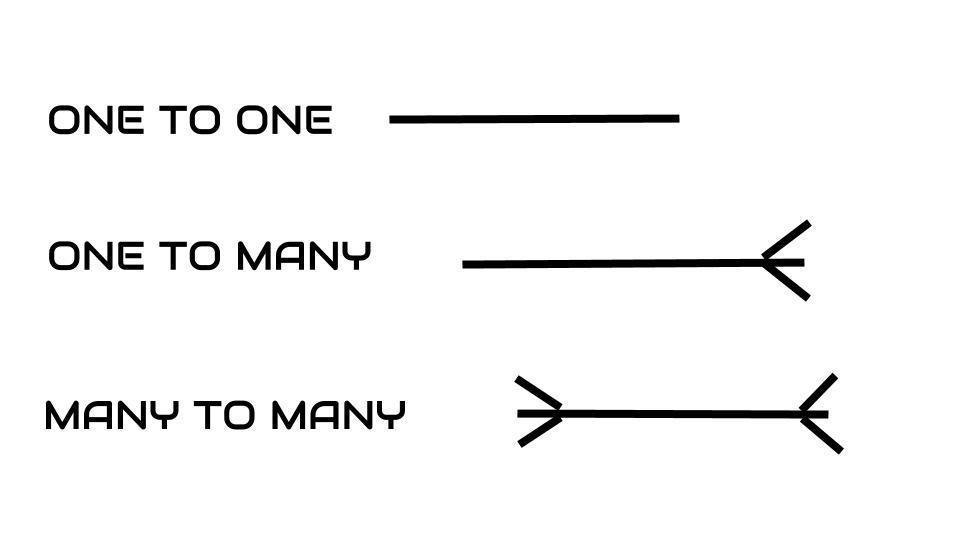
- 117DATABASEDatabase is an organised collection of data.
- 118TABLEA table stores a set of data eg students in a school.
- 119FIELDFields are the columns in a table eg forename, surname, etc.
- 120RECORDA record is a row that stores data about a single item eg students details.
- 121PRIMARY KEYA special field with a unique identifier eg student ID.
- 122FOREIGN KEYIts purpose is to link to the supplier table.
- 123RELATIONSHIPMost databases need more than one table to store all the data. So the tables need to be related to create a rational database.
- 124TEXT DATABASE TYPEAny kind of characters including letters and numbers.
- 125NUMERIC DATABASE TYPENumerical values.
- 126DATA/TIME DATABASE TYPEDates and times eg appointments.
- 127BOOLEAN DATABASE TYPEOne of two values such as YES/NO or TRUE/FALSE.
- 128THREATS OF DATA
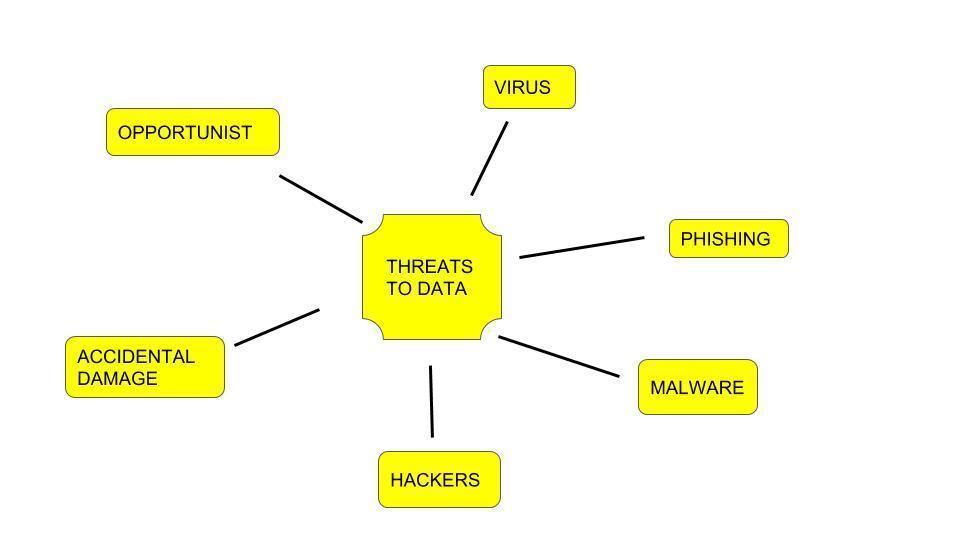
- 129HOW TO PROTECT DATA
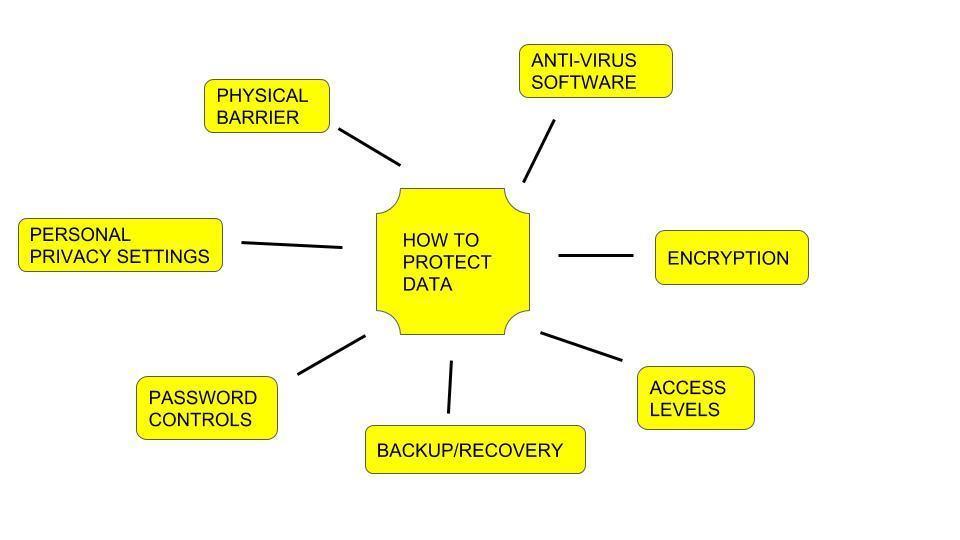
- 130OPPORTUNISTDATA PROTECTION:
PHYSICAL BARRIERS - 131VIRUSDATA PROTECTION:
ANTI-VIRUS SOFTWARE - 132MALWAREDATA PROTECTION:
ANTI-VIRUS SOFTWARE
FIREWALL
BACK UP/RECOVERY - 133PHISHINGDATA PROTECTION:
BACK UP/RECOVERY
PERSONAL PRIVACY SETTINGS - 134ACCIDENTAL DAMAGEDATA PROTECTION:
BACK UP/RECOVERY
ACCESS LEVELS - 135HACKERSDATA PROTECTION:
PERSONAL PRIVACY SETTINGS
ENCRYPTION
PASSWORD CONTROL OF ACCESS
PHYSICAL BARRIER - 136DATA PROTECTION ACT 1998Provides 8 principals that govern the way data about individuals is stored and used.
- 137DATA PROTECTION ACT 1990Introduced to protect from hackers and malicious use of viruses.
- 138DATA PROTECTION ACT 1988Protects creators of original works.
- 139DATA PROTECTION ACT 2000Provides individual the right to see information stored about them.
- 140TECHNOLOGY USED FOR MONITORING MOVEMENTSCCTV
GPS DEVICES
AIRPORT PASSENGER LISTS - 141TECHNOLOGY USED FOR MONITORING COMMUNICATIONSMONITORING EMAIL
MONITORING WEBSITES VISITED
LOGGING KEYWORDS TYPED INTO SEARCH ENGINES - 142USE OF AN URLDirects you to a webpage.
- 143PAY PER CLICK ADVERTISING DISADVANTAGESVague use of keywords means that although people click to find out what is advertising there are no sales (from the click as the website may not be what they are looking for).
Competition for keywords which could mean that the company is at the bottom of the search page rankings (leading to viewers not bothering to look at it).
The consuming to monitor traffic which delays the refinement of keywords to ensure customers visit and purchase goods. - 144FIREWALLSIt monitors all data arriving from the internet so that it can block anything it considers harmful like viruses or spam.
Monitors individual ports so that it allows or blocks data transmission through that port.
Checks IP packet data which are compared against a database (of threats).
A program that filters information coming through the internet to the computers so that any incoming packets flagged by the filters are blocked. - 145DISCUSS THE FACTORS THAT A COMPANY SHOULD CONSIDER BEFORE CHOOSING A BROADBAND CONNECTION.There are many factors that the company should discuss:
The first factor is the cost. A broadband connection would be beneficial costly as it is cheaper than fibre optic, however, broadband runs slower than fibre optic.
The second factor the company should consider before getting a broadband connection is the different types of broadband available. They would have to research on the internet or by phoning the providers directly.
Another factor the company would have to consider is the broadband speed. What the company will be using the internet for and how many people will be sharing one internet connection.
An additional factor they would have to consider is the capacity. - 146—
Information
- Description
- Flashcards on BTEC UNIT 1, created by Katie Griffiths on 27/11/2018.
- Created by
- Katie Griffiths
- Views
- 2
- Rating