
Flowchart
Trust Creation Flowchart
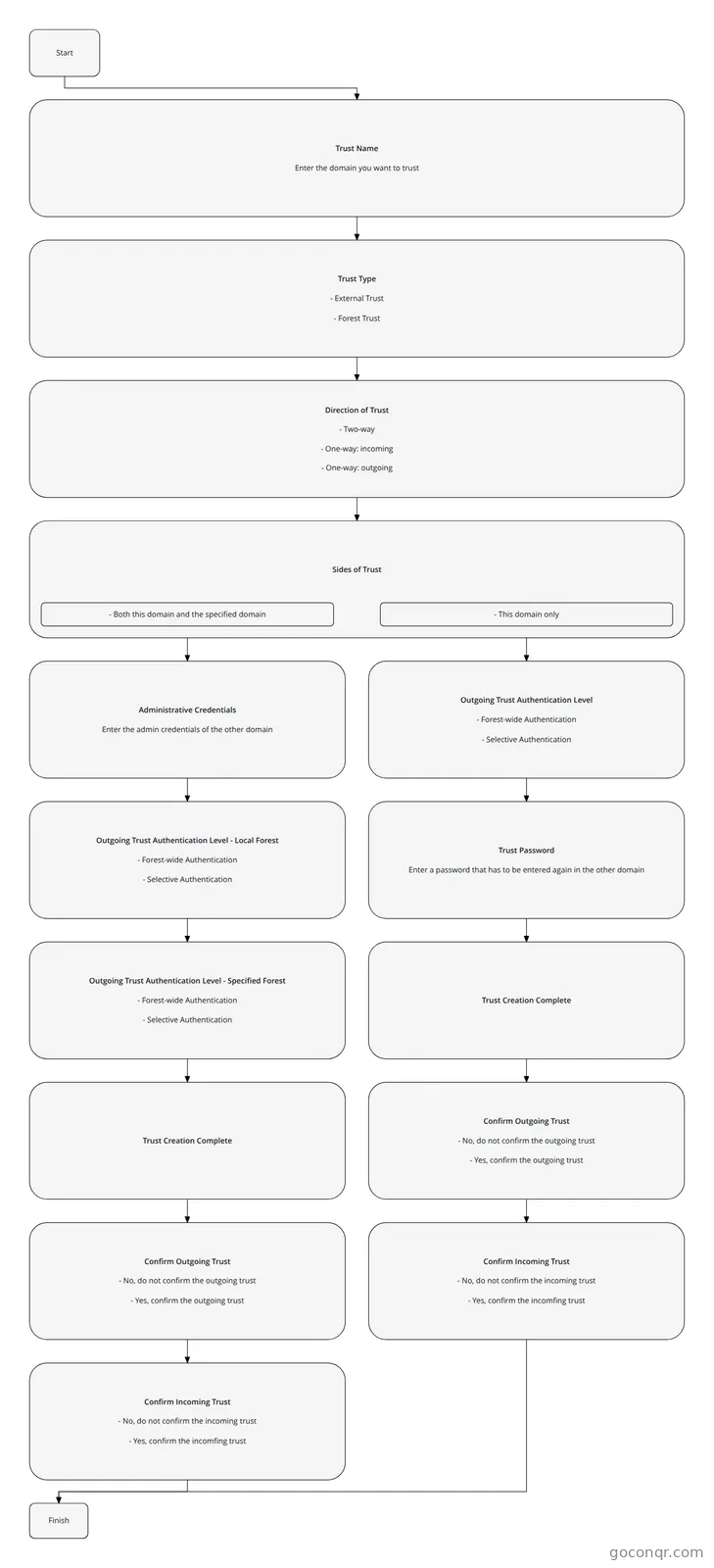
Flowchart: Trust Creation Flowchart
Flowchart content
Start
Trust Name
Enter the domain you want to trust
Trust Type
- External Trust
- Forest Trust
Direction of Trust
- Two-way
- One-way: incoming
- One-way: outgoing
Sides of Trust
Administrative Credentials
Enter the admin credentials of the other domain
Trust Password
Enter a password that has to be entered again in the other domain
- This domain only
- Both this domain and the specified domain
Outgoing Trust Authentication Level - Local Forest
- Forest-wide Authentication
- Selective Authentication
Outgoing Trust Authentication Level
- Forest-wide Authentication
- Selective Authentication
Outgoing Trust Authentication Level - Specified Forest
- Forest-wide Authentication
- Selective Authentication
Trust Creation Complete
Confirm Outgoing Trust
- No, do not confirm the outgoing trust
- Yes, confirm the outgoing trust
Confirm Incoming Trust
- No, do not confirm the incoming trust
- Yes, confirm the incomfing trust
Finish
Trust Creation Complete
Confirm Outgoing Trust
- No, do not confirm the outgoing trust
- Yes, confirm the outgoing trust
Confirm Incoming Trust
- No, do not confirm the incoming trust
- Yes, confirm the incomfing trust
Information
- Description
- Flowchart on Trust Creation Flowchart, created by Rick Schoenman on 04/09/2022.
- Created by
- Rick Schoenman
- Views
- 3
- Rating