
Mind map
User Interface Design
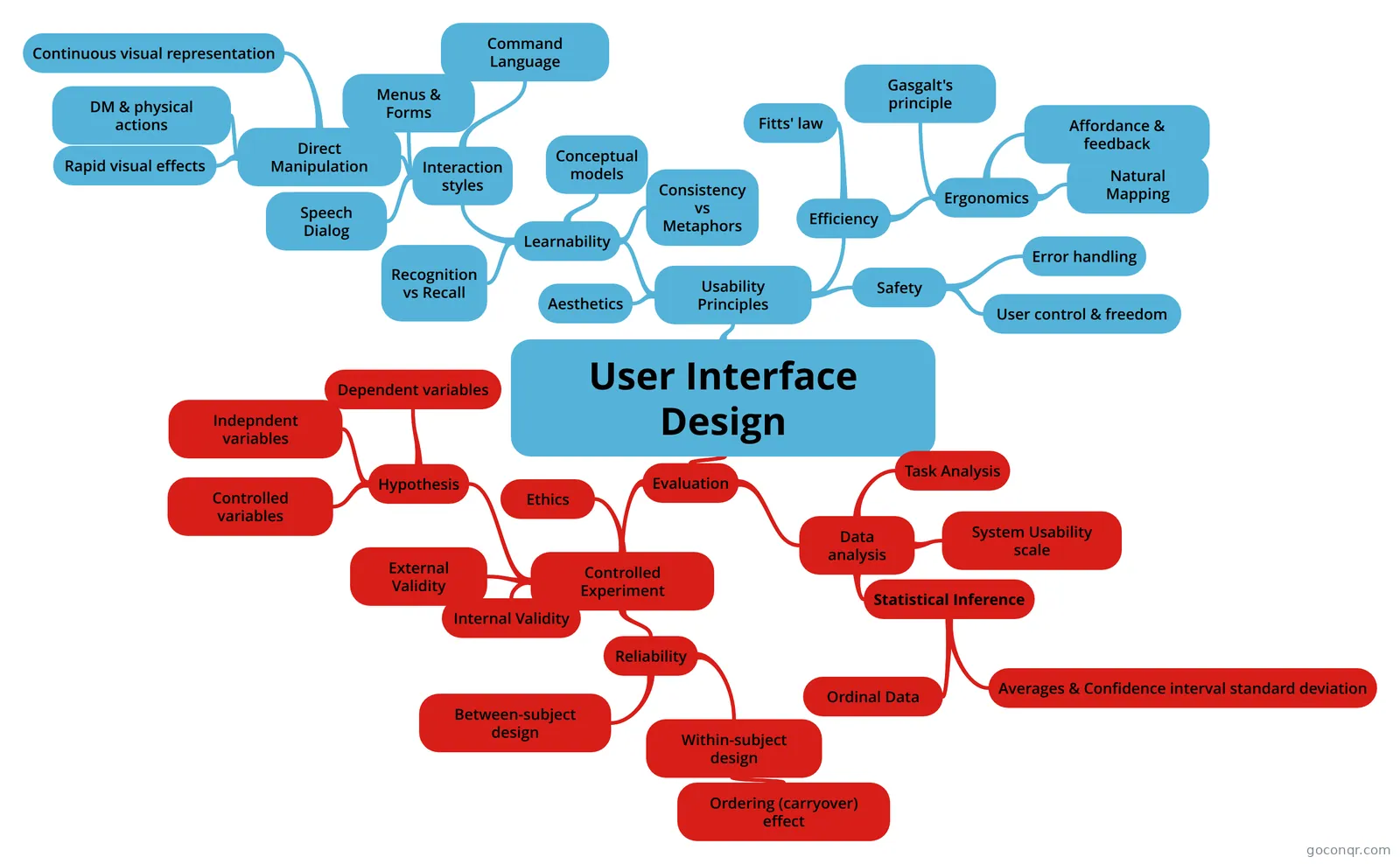
Mind map: User interface design
Map content
User Interface Design
Usability Principles
- These principles can vary in importance; e.g. a novice might value learnability in an interface whereas someone in mission critical applications would value safety.
- Learnability
- is it easy to learn?
- Recognition vs Recall
- Recognition: remembering with the help of a visible cue(knowledge in the world). Recall: remembering with no help (knowledge in the head)
- Interaction styles
- Command Language
- Uses knowledge in head 1 - Implemented in earliest applications, rarely used. 2 - Used for advanced programming (i.e. google's query operators) 3 - Syntax should be driven by the task analysis.
- Menus & Forms
- (Recognition, more learnable) 1 - Traditional websites 2 - Graphical UI, menu bars, dialog boxes
- Direct Manipulation
- User interacts with visual representation of data objects. It has 3 principles (Sneiderman). (Description)
- This depends less on linguistic skills, knowledge in the head because its more 'natural' in a sense as it exploits perceptual and motor skills. It uses metaphors and affordances often. It also uses natural mapping and feedback. Hardest to program.
- Continuous visual representation
- A continuous visual representation icon, graphical object and text (not displayed on demand)
- DM & physical actions
- Physical actions or labeled button presses, clicking, dragging are used for the user to interact with the system. Pushing the virtual objects around directly as if they were real objects.
- Rapid visual effects
- Effects: rapid, incremental, reversible, immediately visible: 1 - You can undo your operation 2 - You can see each incrememntal change i.e. scroll, move - Error messages rarely occur (i.e. no 'you scrolled to far')
- Speech Dialog
- (knowledge in the head) User speaks in natural language and system responds. Users have to learn what functions to call though and it heavily relies on knowledge in the head.
- Command Language
- Conceptual models
- A model of a system describes how the system works. In UID, there are System models, Interface models and a User models. (System model)
- System model/implementation model is how the system actually works. (Interface model)
- Interface model is the model that the system presents to the user.. It should be simple, appropriate, well communicated and hiding the system model. (conceptual model)
- And the user model (or conceptual model) is how the user thinks the system works. It's not always right.
- Consistency vs Metaphors
- Similar things should look and act similarly, and different things should look and do differently. Consistency allows the user to transfer their existing knowledge easily to a new UI. (Next: types of consistency)
- 1 - Internal consistency: is when a product is consistent within itself. - External consistency: how the product is consistent with other applications on the same platform,e.g. how consistent it is with another application that might often be ran concurrently with this specific application. - Metaphorical consistency: When an UID can be metaphorically compared to something in the real world (not a UID) that the user can transfer knowledge of how to use it to the UID. (Metaphors)
- Metaphors bring real world into the interface. They are highly learn-able if appropriate.Advantages 1 - Hooks into user's existing mental model easily 2 - Conveys a lot of knowledge about the interface 3 - users can guess. (Rules & dangers for metaphors)
- Basic Rule: 1 - Use it if you have one 2 - Don't stretch for one if you don't Dangers: 1 - Often hard for designers to find 2 - May be deceptive 3 - May be constraining
- Efficiency
- once learned, is it fast to use?
- Ergonomics
- comfort, fatigue; designing and arranging things people use so that people and things interact most efficiently and safely
- Affordance & feedback
- Can be learnt from experience; it is the difference between the nonverbal message and what the label says. The view displays affordance for manipulations, such as selection handles, scrollbar thumps, etc. This is important for UID. Actual ability without any perceived ability is undesirable. (Types of affordance)
- Perceived affordance: What an object seems to be able to do. Actual affordance: the object affording to do what it indicated to do. (Feedback)
- Feedback: How the system changes visibly when you perform an action. Low-level: Object itself changes or takes notice of input, high-level: model state changes
- Gasgalt's principle
- Explains that our eyes create a whole from parts. So similar things should be grouped together even when explicitly not declared so. Proximity is important, similar things should be near each other.
- Natural Mapping
- Consistency of layout. Physical arrangement of controls should match arrangement of functions when possible. E.g. A hob and its burners or whatever. Another example is a remote controller having the volume up button on top of the volume down button. The functionality of the buttons match the actions they do in this case. A third example can be when using a web browser, the back button should be behind the forward button when navigating through history.
- Fitts' law
- Fitts's law specifies how fast you can move your hand to a target of a certain size at a certain distance away.
- Implementing fitts's law:1 - Targets at screen edge are easy to hit (essentially, the edge of the screen acts like a target. 2 - Make important/frequent targets' size bigger and closer to the cursor. 3 - Avoid steering & cascading menus.
- Safety
- are errors few and recoverable?
- Error handling
- Confirmation ('Are you sure?') dialogs are not a good idea. It might slow down users that are sure, and most will just press Ok without thinking or reading the dialog. (How to handle errors)
- Help should be goal orientated. There should be a searchbox which the user can use to 1 - When multiple files are being manipulated, Yes| Yes to All | No | No to all | cancel dialogs are best. 2 - Reversibility is sick (UNDO). 3 - Errors should be polite with suggestions, reasons and constructive solutions that are precise, restate user's input and speak the user's language.
- User control & freedom
- 1 - Dangerous commands that are hard to recover from shouldn't be placed next to commonly used ones in-case of accidental delete instead of saving for example. 2 - there should be an easy way to go back or go to the default view/home.
- Aesthetics
- satisfaction, happiness, pleasure
Evaluation
- Format evaluation in iteration design: - Find problems for next iteration - Qualitative observations (a list of usability problems)
- Controlled Experiment
- Quantitative observations (time, error rate, satisfaction). Opposite to Format evaluation which is designing a system prototype, showing it to the user and then finding a list of qualitative usability problems for the next iteration of design.
- Ethics
- Preparing for the user test is important. Things to consider are: Time, Comfort, Information consent, Privacy, Control.
- Time: Don't waste it. Rehearse; simplify and work out bugs of test materials. Practice role and focus on eliminating wasted time.
- Information: Unless biasing, Briefly explain purpose of study and inform about audiotaping, videotaping and other observers. Answer any questions beforehand.
- Comfort: Re-assure the participant.
- Privacy: Test results should be completely confidential.
- Control: the users should be able to stop the experiment or take breaks anytime they like.
- Hypothesis
- Start with a testable hypothesis. i.e. DesignX is better than DesignY, in terms of:...(quantifiable)
- Dependent variables
- Are the values we will measure and manipulate, i.e Quality, time, learnability, safety etc.(The ones you record)
- Indepndent variables
- Are the values that will be measured. I.e. Devices, interfaces, features and functions.(the ones you will change and manipulate to test your hypothesis)
- These should be the only influence to the results of the experiment i.e. dependent variable(s)
- Controlled variables
- Failure to isolate controlled variables can lead to compromised internal validity. These include the lightning, equipment used, room used etc. These should be as similar as possible
- External Validity
- Generalizitation to the world outside the experiment. Can these results apply to the intended user target?
- Overcoming external validity: - Recruit truly representative participants whenever you can 1. Self-reported expertise in some domain 2. Frequency of use 3. Amount of experience with something relevant 4. Demographics 5. Activities
- Internal Validity
- The results should be caused only by the independent variables. Conduct all user tests in/with: - Same room - Same lighting - Same computer - Same mouse & keyboard - Same tasks - Same training
- Reliability
- Reliability is making sure that the results stay consistent (or as similar as possible) if the experiment is carried out again.
- Between-subject design
- Between subjects: is when you split the users into 2 groups. One group of users carry out one of the tasks, then the other group carry out the other task. This can cause manyproblems (reliability), differences may be due to the innate differences between users(Prevention next page)
- (Prevention) - Recruit truly representative participants whenever you can! - Use within subjects instead.
- Within-subject design
- Each user carries out all the tasks. It can suffer reliability as the ordering effect (carryover effect) might influence the results.
- Ordering (carryover) effect
- Means that the participation in one task could affect the performance in another task. To overcome this tasks could be swapped around and done in different orders.
- Data analysis
- Task Analysis
- The process of learning about ordinary users by observing them in action to understand in detail how they perform their tasks and achieve their intended goals.
- Statistical Inference
- How to estimate the data or test the hypothesis concerning the user. The process of deducing properties of an underlying distribution by analysis of data. They infer properties about a population: testing hypothesis, deriving estimation etc.
- Two methods for testing an example picture quality:
- 1. Rating which one participants found had a higher quality
- 2. Each participant is asked to rate "which one he/she thought the quality was higher"
- The process of deducing properties of an underlying distribution by analysis of data. They infer properties about a population: testing hypothesis, deriving estimation etc.
- Ordinal Data
- Less data, only the order of the ranking is meaningful.
- This is the result of asking which is better A or B when collecting data to analyse about an interface.
- Averages & Confidence interval standard deviation
- Average: the central/typical number in a set of data.
- Confidence interval: The percentage likelihood of the occurrence of specific variables within a parameter from a large pool of data. They are based on a sample data and give a range of plausible values for a parameter i.e. 95% likely hood people rate this 8.
- A interval variable is a measurement where the difference between two values is meaningful. The difference between a temperature of 100 degrees and 90 degrees is the same difference as between 90 degrees and 80 degrees.
- This can be obtained by asking users to rate both UIDs instead of asking to select which one is better.
- System Usability scale
- A quick reliable tool for measuring usability consisting of 10 item questionnaires with 5 responses for each question.
- Task Analysis
Information
- Description
- Mind Map on User Interface Design, created by Mohamed Moalin on 14/01/2015.
- Created by
- Mohamed Moalin
- Views
- 67
- Tags
- Rating