
Mind map
ICT
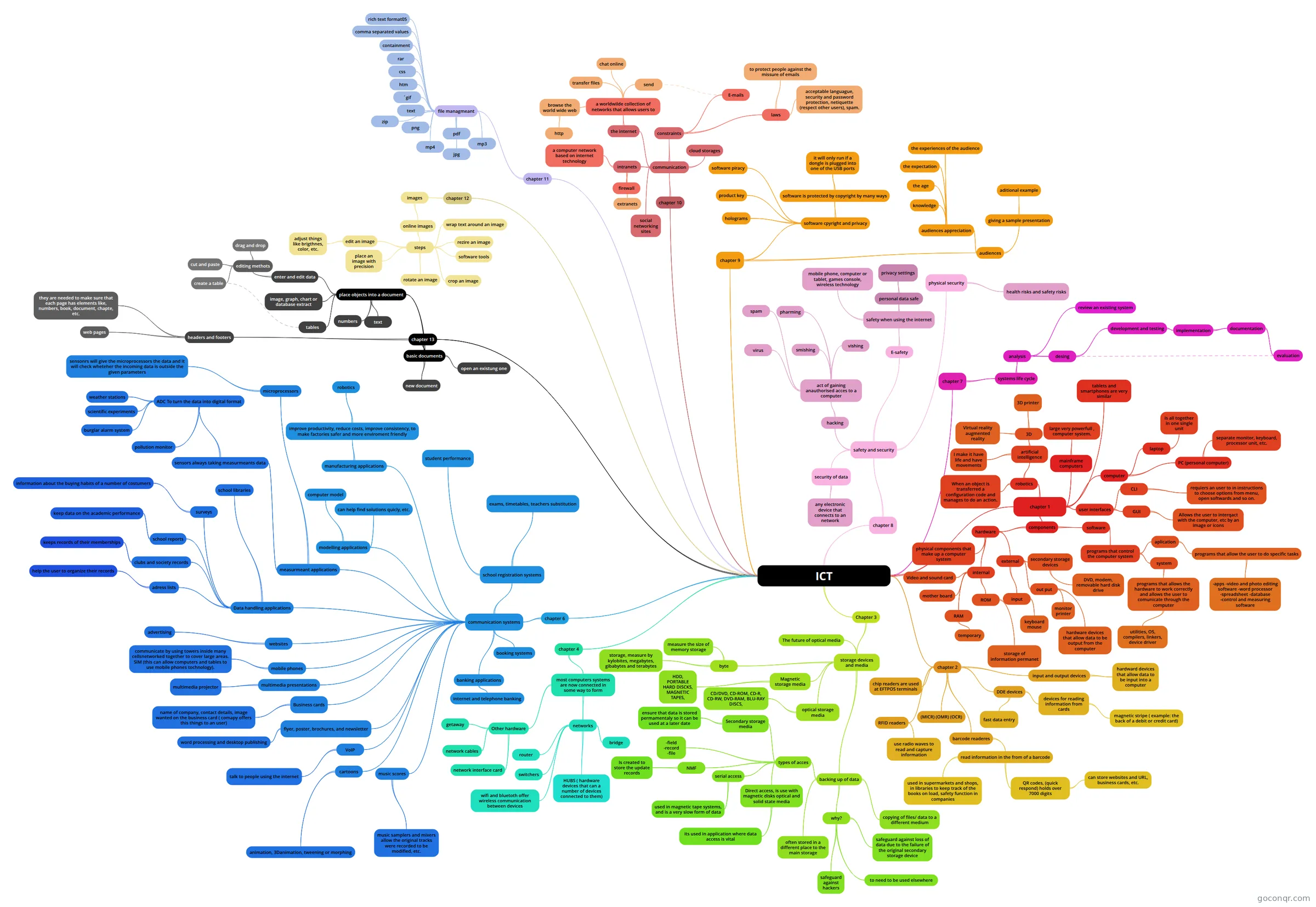
Mind map: ICT chapters
Map content
ICT
chapter 1
- components
- software
- programs that control the computer system
- aplication
- programs that allow the user to do specific tasks
- -apps -video and photo editing software -word processor -spreadsheet -database -control and measuring software
- programs that allow the user to do specific tasks
- system
- programs that allows the hardware to work correctly and allows the user to comunicate through the computer
- utilities, OS, compilers, linkers, device driver
- programs that allows the hardware to work correctly and allows the user to comunicate through the computer
- aplication
- programs that control the computer system
- hardware
- physical components that make up a computer system
- internal
- mother board
- RAM
- temporary
- ROM
- storage of information permanet
- Video and sound card
- external
- input
- keyboard mouse
- out put
- monitor printer
- hardware devices that allow data to be output from the computer
- secondary storage devices
- DVD, modem, removable hard disk drive
- input
- software
- user interfaces
- CLI
- requiers an user to in instructions to choose options from menu, open softwards and so on.
- GUI
- Allows the user to interqact with the computer, etc by an image or icons
- CLI
- computer
- PC (personal computer)
- separate monitor, keyboard, processor unit, etc.
- laptop
- is all together in one single unit
- PC (personal computer)
- mainframe computers
- large very powerfull , computer system.
- tablets and smartphones are very similar
- robotics
- artificial intelligence
- 3D
- 3D printer
- Virtual reality augmented reality
- I make it have life and have movements
- 3D
- When an object is transferred a configuration code and manages to do an action.
- artificial intelligence
- components
chapter 10
- communication
- constraints
- E-mails
- laws
- to protect people against the missure of emails
- acceptable languague, security and password protection, netiquette (respect other users), spam.
- the internet
- a worldwilde collection of networks that allows users to
- send
- chat online
- transfer files
- browse the world wide web
- http
- a worldwilde collection of networks that allows users to
- intranets
- a computer network based on internet technology
- firewall
- extranets
- cloud storages
- social networking sites
- constraints
- communication
chapter 2
- input and output devices
- hardward devices that allow data to be input into a computer
- DDE devices
- devices for reading information from cards
- magnetic stripe ( example: the back of a debit or credit card)
- fast data entry
- devices for reading information from cards
- chip readers are used at EFTPOS terminals
- RFID readers
- use radio waves to read and capture information
- (MICR) (OMR) (OCR)
- barcode readeres
- read information in the from of a barcode
- used in supermarkets and shops, in libraries to keep track of the books on load, safety function in companies
- QR codes, (quick respond) holds over 7000 digits
- can store websites and URL, business cards, etc.
- read information in the from of a barcode
- input and output devices
Chapter 3
- storage devices and media
- backing up of data
- copying of files/ data to a different medium
- often stored in a different place to the main storage
- why?
- safeguard against loss of data due to the failure of the original secondary storage device
- safeguard against hackers
- to need to be used elsewhere
- types of acces
- -field -record -file
- serial access
- used in magnetic tape systems, and is a very slow form of data
- NMF
- Is created to store the update records
- Direct access, is use with magnetic disks optical and solid state media
- its used in application where data access is vital
- Secondary storage media
- ensure that data is stored permamentaly so it can be used at a later date
- byte
- measure the size of memory storage
- storage, measure by kylobites, megabytes, gibabytes and terabytes
- Magnetic storage media
- HDD, PORTABLE HARD DISCKS, MAGNETIC TAPES,
- optical storage media
- CD/DVD, CD-ROM, CD-R, CD-RW, DVD-RAM, BLU-RAY DISCS,
- The future of optical media
- backing up of data
- storage devices and media
chapter 6
- communication systems
- flyer, poster, brochures, and newsletter
- word processing and desktop publishing
- websites
- advertising
- multimedia presentations
- multimedia projector
- music scores
- music samplers and mixers allow the original tracks were recorded to be modified, etc.
- cartoons
- animation, 3Danimation, tweening or morphing
- mobile phones
- communicate by using towers inside many cellsnetworked together to cover large areas. SIM (this can allow computers and tables to use mobile phones tochnology).
- VoIP
- talk to people using the internet
- Business cards
- name of company, contact details, image wanted on the business card ( comapy offers this things to an user)
- Data handling applications
- clubs and society records
- keeps records of their memberships
- adress lists
- help the user to organize their records
- school libraries
- school reports
- keep data on the academic performance
- surveys
- information about the buying habits of a number of costumers
- clubs and society records
- measurmeant applications
- sensors always taking measurmeants data
- ADC To turn the data into digital format
- burglar alarm system
- pollution monitor
- scientific experiments
- weather stations
- ADC To turn the data into digital format
- microprocessors
- sensonrs will give the microprocessors the data and it will check wheteher the incoming data is outside the given parameters
- sensors always taking measurmeants data
- modelling applications
- computer model
- can help find solutions quicly, etc.
- manufacturing applications
- improve productivity, reduce costs, improve consistency, to make factories safer and more enviroment friendly
- robotics
- improve productivity, reduce costs, improve consistency, to make factories safer and more enviroment friendly
- school registration systems
- student performance
- exams, timetables, teachers substitution
- booking systems
- banking applications
- internet and telephone banking
- flyer, poster, brochures, and newsletter
- communication systems
chapter 8
- safety and security
- physical security
- health risks and safety risks
- E-safety
- safety when using the internet
- personal data safe
- privacy settings
- mobile phone, computer or tablet, games console, wireless technology
- personal data safe
- safety when using the internet
- security of data
- any electronic device that connects to an network
- hacking
- act of gaining anauthorised acces to a computer
- vishing
- smishing
- pharming
- virus
- spam
- act of gaining anauthorised acces to a computer
- physical security
- safety and security
chapter 9
- audiences
- audiences appreciation
- the age
- the experiences of the audience
- the expectation
- knowledge
- giving a sample presentation
- aditional example
- audiences appreciation
- software cpyright and privacy
- software is protected by copyright by many ways
- it will only run if a dongle is plugged into one of the USB ports
- software piracy
- product key
- holograms
- software is protected by copyright by many ways
- audiences
chapter 4
- most computers systems are now connected in some way to form
- networks
- HUBS ( hardware devices that can a number of devices connected to them)
- router
- switchers
- bridge
- wifi and bluetoth offer wireless communication between devices
- Other hardware
- getaway
- network interface card
- network cables
- networks
- most computers systems are now connected in some way to form
chapter 7
- systems life cycle
- analysis
- review an existing system
- desing
- development and testing
- implementation
- documentation
- evaluation
- documentation
- implementation
- development and testing
- analysis
- systems life cycle
chapter 12
- images
- online images
- steps
- software tools
- edit an image
- adjust things like brigthnes, color, etc.
- rezire an image
- wrap text around an image
- place an image with precision
- rotate an image
- crop an image
- steps
- online images
- images
chapter 11
- file managmeant
- comma separated values
- text
- rich text format05
- ´gif
- jpg
- png
- mp4
- containment
- mp3
- css
- htm
- rar
- zip
- file managmeant
chapter 13
- basic documents
- new document
- open an existung one
- place objects into a document
- text
- tables
- image, graph, chart or database extract
- enter and edit data
- editing methots
- cut and paste
- drag and drop
- create a table
- editing methots
- numbers
- headers and footers
- web pages
- they are needed to make sure that each page has elements like, numbers, book, document, chapte, etc.
- basic documents
Information
- Description
- Mind Map on ICT, created by valen conte on 09/03/2021.
- Created by
- valen conte
- Views
- 1
- Rating
More on Computer Hardware and Software