
Mind map
GUI: Graphical User Interface
Map content
GUI: Graphical User Interface
def: the interaction channel between the user and the system
- It can be standalone (running on your computer), JAVA Swing
- Web (runs in a browser), HTML, CSS, JS. For example, Facebook
- Mobile (runs in your cellphone), IOS, Android
- Web (runs in a browser), HTML, CSS, JS. For example, Facebook
- Key Factor!! Usability
- Gestalt Principles: intuitive, clear, friendly
- The user passes actions to the interaction channel, and the GUI responds to the user with outputs
- There are both active and inactive panels
- Inactive: for the user to view, no interaction (ex. picture)
- Active: a panel that the user can interact with
- There are both active and inactive panels
- It can be standalone (running on your computer), JAVA Swing
Graphical Elements
- Buttons, Labels, Images...
Containers
- The Frame
- Main container for all the graphical elements of our app
- Key: Minimize, Close, Move, Maximize...
- JFrame Class:
- setSize(width, height): sets the frame's width and height
- setResizable(boolean): sets if the user can modify the frame's size
- setDefaultCloseOperation(EXIT_ON_CLOSE): the app will end execution (destroy memory) when clicking the exit button of the frame
- setVisible(boolean): sets the frame and it's components visible to the user
- add(GUI component): adds GUI element or container to the Frame
- JFrame Class:
- Key: Minimize, Close, Move, Maximize...
- Main container for all the graphical elements of our app
- The Panels
- Used to contain and divide GUI elements within the Frame
- Group GUI elements based on purpose to make accessibility easier
- Used to contain and divide GUI elements within the Frame
- The Frame
Layouts (Graphical Distributors)
- Each container needs a specific layout to organize its elements
- BorderLayout
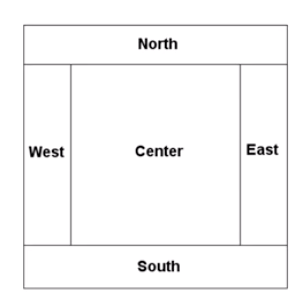
- Organizes based on compass rose, space for five elements
- Syntax: setLayout(new BoarderLayout());
- add(GUI component, BorderLayout.NORTH);
- Organizes based on compass rose, space for five elements
- GridLayout
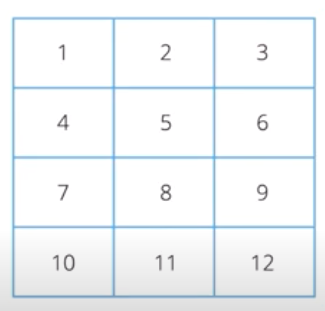
- Organizes like a matrix
- Syntax: setLayout(newGridLayout(rows, columns));
- add(GUI component);
- Organizes like a matrix
- BorderLayout
- Each container needs a specific layout to organize its elements
Message Management
- Error messages, Warning Messages, Informational Messages
Data Input
- To get information from the user...
- String x = JOptionPane.showInputDialog(this, "Message")
- To get information from the user...
Images and files in the map
Information
- Description
- Mind Map on GUI: Graphical User Interface, created by Marissa Farmer on 25/07/2021.
- Created by
- Marissa Farmer
- Views
- 0
- Rating