
Mind map
THE COMPUTER

Map content
THE COMPUTER
- Is a machine that processes information. A computer has 2 main partes: software and hardware
SOFTWARE
- Is everything that we cannot see or touch. For example: word, writer... We only see it throught the monitor that displays it for us.
- SOFTWARE COMPONENTS
- The main software components are the programs and the data
- PROGRAMS
- The programs help us carry out different tasks, one example it's if you drawing with a programa (for example paint, draw...) In order for a program to work, it needs information, the computer can only use the information if it is received in a specific manner, in the form of data
- DATA
- Some examples of data it's word, longitude and a temperature value. A drawing programs needs certain types of data: coordinates which indicate where to begin a line, the type of line to draw, the color of line, etc
HARDWARE
- All the physical components on the computer. Any part of the computer that we can see and touch is hardware
- HARDWARE COMPONENTS
- The hardware components are the case or tower and the peripherals.
- CASE OR TOWER
- Coloquially also called CPU and in the case/tower there are all the components that form the core of the computer. The most important component inside in the tower are the microprocessor.
- PERIPHERALS
- Make it possible for the computer to communicate with the outside. Some of the most common peripherals are keyboard, mouse, monitor, printer, scanner and the speakers.
- INPUT PERIPHERALS
- Make it possible to enter information into the computer, this is the most common input peripherals: ·Keyboard: allows us to enter information into the computer manually. ·Mouse: the mouse makes it possible to interact with a computer with more different things. ·Webcam: captures images that are entered into the computer. ·Scanner: it's used to digitalize and input into the computer text and images that are printed on paper. ·Game controller: is designed to easily give order to game programs. ·Microphone: captures sound and converts it into an electrical signal, microphones make it possible to communicate with other people with the computer. ·Barcode scanner: are used in stores and supermarkets to read the product's quickly and determine their price. ·Graphics tablet: is used to directly draw into the computer.
- OUTPUT PERIPHERALS
- Are the peripherals that allow the computer to send its information to the outside. The most common it's: ·Monitor: visualli communicate the informtion it has processed. ·Printer: transfers information onto paper, there are many types but the most common used are inkjet printers. ·Speakers: convert the electrical signals that come from the computer into sound. ·Plotter: print out large-size plans and images.
- INPUT/OUTPUT PERIPHERALS
- Make it possible to enter information into the computer and obtain information. The most common input and output peripheral are: ·Hard drive: purpose is to store the data and instructions that the computer needs to operate and to supply this information when it's necessary. The first PCs didn't have a hard drive. ·CD and DVD reader/writer: it also reads the information they contain, this is used to make backup copies or record data, music, photos and video. ·USB memory: used to record information and transfer it to other computers ·Modem: connect a computer to the Internet via a telephone line or fiber-optic line. ·Touch screen: this peripheral make it possible to enter information into the computer by directly touching it.
TYPES OF COMPUTER
- There are 3 types of computer: personal computers, mainframes and supercomputers
- PERSONAL COMPUTERS
- Inside to personal computers group, there are 4 types different to personal computers: 1. Desktop computer 2.Laptop 3.Tablet 4.Smartphone
- MAINFRAMES
- The mainframes are medium-size computers with large storage capacity and processing data at high speed. The most common example is the use of mainframes in banks, when we get money from an ATM, for example, it contacts the headquarters of the bank through the telephone line.
- SUPERCOMPUTERS
- The supercomputers have a processing capacity of very large information. They consist of any smaller machines connected together, occupying the space of a large room.
ELEMENTS OF A COMPUTER
- The most important are the motherboard, microprocessor, RAM, power supply, hard disc and DVD drive and expansion cards.
- MOTHERBOARD
- It's a rigid plastic sheet with an engraved circuit on the surface. The motherboard has 2 functions: 1.Support: some of the computer's components are secured or welded to the motherboard, which provides them with physical support. 2.Facilite communication between the computer's various components. All the information processed by computer goes through the motherboard.
- MICROPROCESSOR
- Is an integrated chip or circuit that acts as the computer's brain. It contains hundreds of millions of transistors which make it possible to handle large volumes of information and perform mathematical calculations very quickly. -The microprocessor is responsable for receiving all the information from the input peripherals, processing it and sending results to the output peripherals. -The microprocessor chip is covered by a ceramic capsule protecting it and is waht we see externally. -The microprocessor s located on the motherboard in a socket designed especially for it, which makes replacement easy if the need arises.
- RAM
- (Random Access Memory) when a program is opened it takes up space in the RAM memory, it's very important that the computer has enough RAM, if it doesn't, it will not be able to open all the programs it needs at one time or it will operate very slowly. The RAM memory is located on the motherboard in a socket call the memory slot (the computers typically have free memory slots in case more RAM is needed)
- POWER SUPPLY
- The computers require direct current to operate, neverthless the current that is generated in the power plants and which reaches consumers is alternating current (there are 2 types of power: direct current and alternating current) Thus in order for an electronic device to operate with socket's current, the alternating current that the socket is providing must be converted into direct current. The second function of the power supply is to reduce the voltage receuved from the electrical power system. Extrernally power supply is a metal box with several cables with connectors.
- HARD DISC AND DVD
- HARD DRIVE
- The hard drive also stores programs and the operating system. All the data that is stored on the hard drive is stored permanently, it is not lost when the computer it turned off. It's sometimes divided into various parts, called partitions, the partitions are useful to install different operating systems on the same computer or in separate compartments have different data or programs. -LOCATION OF THE HARD DRIVE: The hard drive is located to the inside of the computer, connected to the motherboard.
- -EXTERNAL HARD DRIVES: The external hard drives they don't replace the internal disk, but are used for backup or transporting files that take up a lot of memory, they are connected by a cable that is inserted into one of the USB ports on the computer -THE INSIDE OF A HARD DRIVE: It's a metal box that contains several stacked aluminium disks, the disks spin at very high speeds thanks to an electric motor, there is a magnetic film on the surface of these disks
- -THE CAPACITY OF HARD DRIVES: In computers the information circulates or is stored in the form of zeros and ones. The 1 indicates that the current must flow and the 0 indicates that the current shouldn't circulate. The smallest unit of information in computing is the bit (corresponds to one of these either 0 or 1) And the most common unit are the kilobyte (kB), the megabyte (MB), the gigabyte (GB) and the terabyte (TB) This is the equivalences: 1 kB = 1024 bytes 1 MB = 1024 kB 1 GB = 1024 MB 1 TB = 1024 GB
- DVD
- The DVD it's a plastic disc (make with polycarbonate) having recorded information on this surface. The most widely optical discs are the CD (Compact Disc) and DVD (Digital Versatile Disc) The difference is: the CD are older and smaller capacity, and the DVD are more modern and have more capacity.
- -TYPES OF CD AND DVD: There are 3 types of CD and DVD according to the capabilities: -Read only: it comes recorded with programs or audiovisual content from the factory, they are the CD-ROM and DVD-ROM used to sell programs, audio CDs and DVD video (ROM meaning Read Only Memory) -Recordable: You can find 3 trypes in stores: CD-R, DVD-R and DVD+R. The R end meaning Recordable, and the sign " - " or " + " corresponds to 2 technologies from different manufacturers. -Rewritable (RW): you can record and erase many times, and in the shops you can find: CD-RW, DVD-RW and DVD+RW
- -HOW IS THE INFORMATION STORED ON AN OPTICAL DISC? The CD and DVD use light of a laser beam to read data that are recorded on the disc, this is why the are called "optical memories" -HOW AN OPTICAL DISC IS READ? If the light falls on a flat area, it's a reflected and hits a photodiode (a light sensor) when it receives the light, the photodiode allows electric current to pass through. If the laser beam falls on a hole, it's dispersed and doesn't reach the photodiode. Every time there is a change in current, for example, when current begins to flow or when cut, it's interpreted as a 1, the space between two 1 is filled with 0, the list of zeros and ones resulting is the information to be processed by the computer
- -HOW IS AN OPTICAL DISC RECORDED? Music CDs and movide DVDs are made with a process called plastic injection, a metal mold (constructed in form of a disc) contains the recorded information (holes) on one side. But in the home and office recorders, a writable disk is used that contains a layer of heal-sensitive ink (this ink is transparent, but it turns opaque when it is heated) -CAPACITY OF OPTICAL DISKS: The most used optical disk have a 700MB in the case of CD and 4,7 GB in the case of DVD. But there also dual-layer DVDs that store 8.5GB (they have 2 data layers and they can store more information than the original DVD) The Blu-ray can store much more information (25GB)
- HARD DRIVE
- EXPANSION CARDS AND PORTS
- PORTS
- The ports are electrical connections that make it possible for the microprocessor to communicate with the peripherals. For desktop computers, the ports are usually located in the back. Most ports are integrated into the motherboard, but sometimes this ports it's on expansion cards which are connected to the motherboard. The most common types of ports it's: ·USB port: this is the most used today, it's very versatile, it connects printers, keyboards, mouses,cameras... etc ·PS2 port: connect keyboards and mouse, it's being replaced by the USB port. ·VGA port: connect the monitor or video projector (only transmits video), it's being replaced by other ports, especially the HDMI port. ·HDMI port: send video and audio HD signals with a single cable, it's used to connect the monitor, video projector or a TV screen. ·Sound ports: connect speakers, headphones, microphones and external audio systems. ·Network port or Ethernet port: connect a computer to a network, either a local network or Internet.
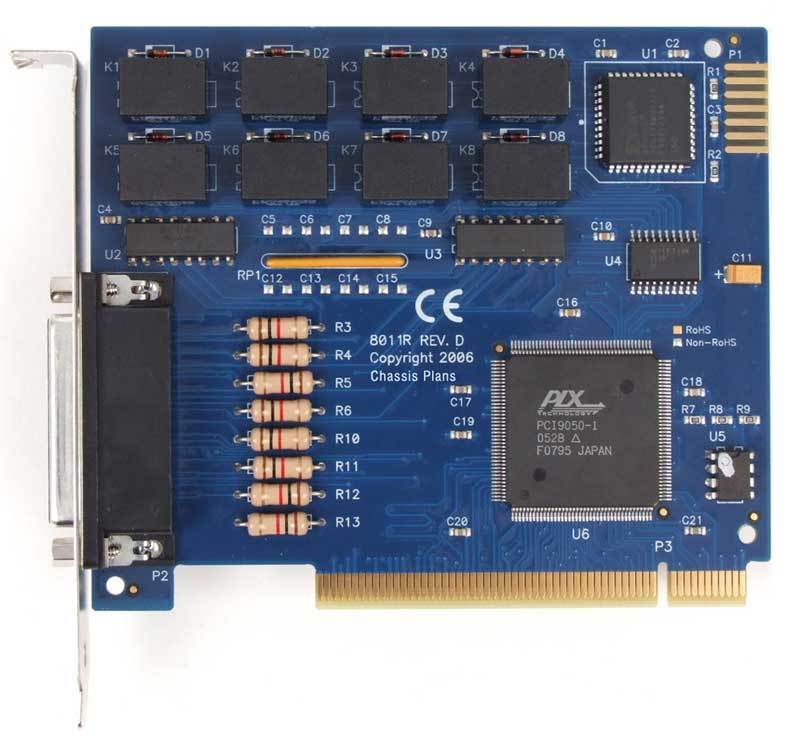
- EXPANSION CARDS
- Are printed circuits, similar to the motherboard but smaller and less complex, they are inserted into the motherboard in special slots called expansion slots. The most common expansion cards it's: ·Video card or graphics card:This card converts the graphics information generated by the computer into a signal that the monitor, video projector or television screen can interpret and create images with this information. The video card usually has several ports so we can insert different types of connectors.·Sound card: transforms the digital sound generated by a computer into an analog signal (the analog signal go to speakers or headphones in order to be converted un the sound) But it also performs the reverse, it transforms the analog sound into digital sound that can be processed by the computer.·Network or Ethernet card: this card connect a computer to local area computer network, such as an office or computer classrom of a school. the network card, also used to connect a computer with ADSL router in order to obtain an Internet connection ·USB port expansion card: This card increases the number of USB ports on the computer
- PORTS
Images and files in the map




Information
- Description
- 4º de ESO Tecnología Mind Map on THE COMPUTER, created by CLAUDIA FERNÁNDEZ ESCOBAR on 20/09/2022.
- Created by
- CLAUDIA FERNÁNDEZ ESCOBAR
- Views
- 0
- Tags
- Rating
More on Computer Hardware and Software