
Mind map
Word Image Options
Map content
Word Image Options
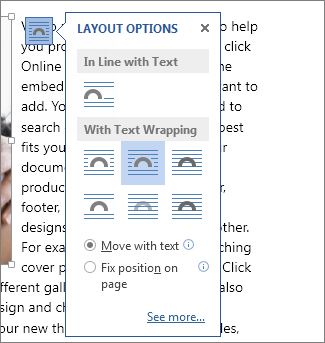
In Line with text
- If you pick this option, the image will be seen as sort of a large single character
- It's the top option
Wrapped
- Types
- Tight ( Middle, )
- Square ( Top Right)
- Through ( Left)
- Top and Bottom ( Bottom Right )
- The text would be around the image, the optuions are just where you want the writing to be aroudn the image. It is anchored to a specific paragraph. The image can be moved and the writing would automatically wrap around the text
- Types
Outside
- Infront
- This would pull the image forward, over the text, you can not see the text through the image
- Behind
- This pushes the image back behind the image, meaning that you can see the text on top of the image
- Infront