
Mind map
Entity Relationship Model
Map content
Entity Relationship Model
Uses entity relationship model to represent business scenario as a collection of entities and relationships described by the business
A tool that describes the data in a database in terms of entities , attributes and relationships
Entity: Person , Place or thing in the business context that has its data collected. Can also be referred to as Entity class, entity type
- Can be physically existing (Item, Customer) or an conceptual thing (Course)
- Instance of an entity: refers to one specific occurrence of the entity.
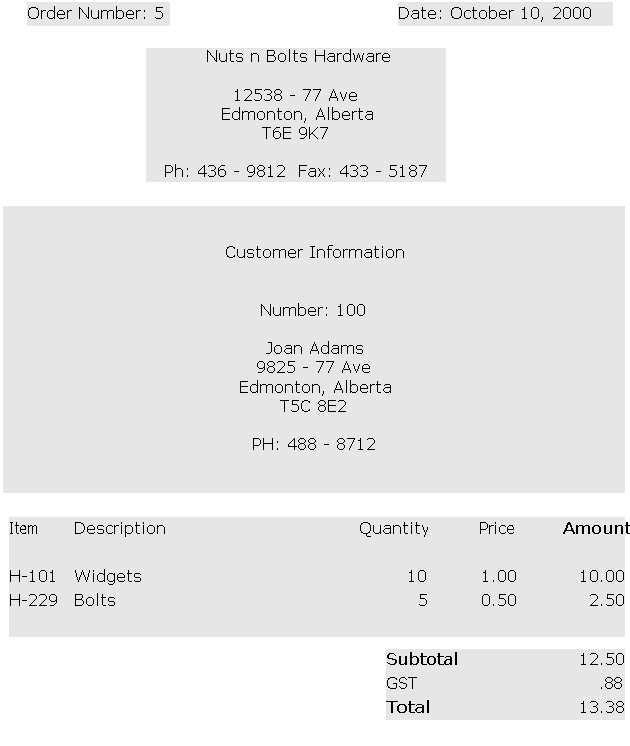
- For example: an entity is a Customer where as customer Joan Adams is ONE instance of it. Another example would be Item and its instance would be Asus STRIX GTX 1080
Attributes
- Data that describes an entity.
- For example: Customer has the following attributes: Customer # , First Name, Last Name, Address, Phone Number
- Keep in mind that all of the attributes together describe one instance of an entity. That is , they describe one specific customer
- For example: Customer has the following attributes: Customer # , First Name, Last Name, Address, Phone Number
- Synonyms include element, property and field
- Types of Attributes
- Consists of two types of attributes: Atomic and Composite
- Atomic: has a value that is in its simplest form. Cannot be further broken down
- Example includes: Customer number. You cannot further break this value down
- ****Atomic attributes add flexibility to your system
- Composite: has a value that can be further decomposed into two or more atomic attributes
- Example includes: Address. You can further break this down into Postal code, Province, Country, City , Address -- All of which are atomic attributes
- In most cases, you would have to refer to the business rules to determine if you want to have Atomic or Composite attributes
- Example: Consider the "Address" attribute. For a national company all addresses have the same format. Therefore, address is stored in its atomic form. For an international company addresses vary in format (Americans use a five digit zip code while Canadians use a six digit postal code). In this situation address would be stored in its composite form as a single attribute.
- Atomic: has a value that is in its simplest form. Cannot be further broken down
- Consists of two types of attributes: Atomic and Composite
- Can be stored or derived
- Stored:Has its attribute value physically stored in the database.
- Example: Order number would be a stored attribute. For a Order entity, its number would be stored as you cannot calculate it.
- Pros: Less resources are required to run the database and less instructions are executed by the DBMS. Cons include more storage media space is required
- Derived: Can have its attribute value calculated based on other data that is stored in the database
- For example: Amount is an example of a derived attribute which would be calculated as Quantity X Price
- Pros: You save storage space on the storage media. Cons you require more resources to execute the application &/or DBMS needs to execute more instructions
- Stored:Has its attribute value physically stored in the database.
- Values an attribute can assume: This is in the sense that the values assumed MUST MAKE BUSINESS SENSE for the BUSINESS SITUATION!
- Example: Referring to the Customer Orders example. the Customer Number attribute MUST be greater than 0.
- An attributes legitimate set of values are defined in terms of its 1) Data type and 2) Domain of the attribute
- Data type: Integers, Decimals , Fractions , Negatives ...etc
- In this case of Customer Numbers it would be Integer values as you cannot have half a customer or a decimal point value
- The Domain refers to the set of values that an attribute can assume
- In this case of Customer numbers it would be a Value greater than Zero
- Null is a special value that an attribute can assume . This value is used if (1) We dont know the value (2) The value does not apply in this instance but does in most instances
- 1) Value is Unknown-- Suppose we register a new customer and it turns out they did not provide us with a Postal Code. For now the Null value would be the place holder until a different date where we input the value
- 2) Value does not apply in that particular case-- Suppose we want to fill out the employees information and whether they are single or married. In this case if we have a field for spouse name, the single employees would have a null value under spouse name
- Data type: Integers, Decimals , Fractions , Negatives ...etc
- Primary Key: used by the DBMS to identify each unique instance of an item entity. It can be one attribute or a group of attributes (called Composite key)
- For example , Item number uniquely identifies the Item description, the quantity ,and its price
- Technical Key: Assigned by the Database designer to arbitrarily make an attribute for its sole purpose to be a primary key. For example, when customers walk into a store, they do not get assigned a number automatically, that is done so the DBMS can identify a specific customer knowing its ID
- Concatenated/Composite Primary key: Exists when two or more attributes act as a primary key for a specific entity. That is, Two or more keys are needed to identify specific values in the table
- Data that describes an entity.
Relationships
- Represents a business association between two entities and are based on the business rules of the organization
- All relationships are bi-directional and can be interpeted from the point of view of each entity
Images and files in the map
Information
- Description
- DMIT1508-DatabaseFundaementals Mind Map on Entity Relationship Model, created by Shahmeran Gilani on 18/09/2016.
- Created by
- Shahmeran Gilani
- Views
- 0
- Rating