
Mind map
Network Hardware_PK
Map content
Network Hardware_PK
Network Interface Card
- Every device (node) on the network will require a Network Interface of some kind. This can be in the form of a dedicated card or an electronic chip integrated into the motherboard. The purpose of a network interface card (NIC) is to provide a connection to the network (either wired or wireless). The NIC converts data from the nodes into a format that is compatible with the network. This format is called the 'network protocol' - a set of standard rules that all connected devices must follow. Every NIC has a unique address hard-wired or 'burned' into it i.e. configured in in the hardware. This is called its Media Access Control or MAC address.
Hub
- A hub is a hardware device that allows nodes (computers) to be linked together and exchange data. Every node on a wired network is connected to the hub by a cable. Each node will be connected to a single 'port' (like a socket for a plug) on the hub. So if you purchase an '8-port hub', you will be able to connect up to eight nodes together.
- Data collisions A network cable can only have one data packet in it at any instant. So if two or more computers want to place a data packet on to the network at exactly the same time, then a 'data collision' will take place. If this happens, the collided data is marked as unusable and the two computers are forced to send their data packets again, at slightly different times. This is fine for a network with only a few computers. You will not notice the small delay caused by data collisions.
Switch
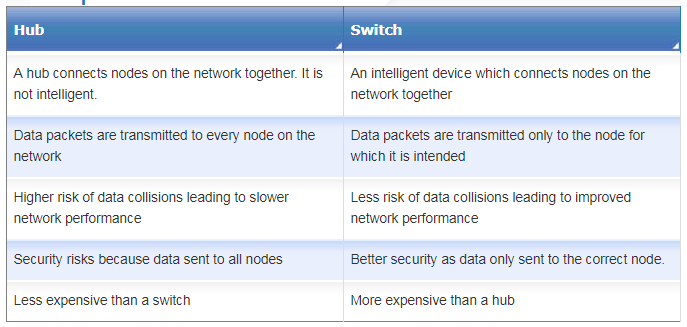
- Add screenshot of hub vs switch table in here
- Although hubs provide an inexpensive solution for small LANs, the two issues highlighted on the previous page means that it is often worth considering another, more expensive, alternative i.e. a switch. A switch is similar to a hub in that that allows computers to be linked together and exchange data, but unlike a hub, it does not broadcast every data packet to every device which means there is improved security. Switches also reduce the impact of data collisions and so help speed up the running of the network.
Router
- A router is a device that transfers data packets, by the most efficient route, from one network to another i.e. between networks. When a data packet arrives, the router does the following:- Reads the data packet's destination address Looks up all the paths it has available to get to that address Checks on how busy each path is at the moment Sends the packet along the least congested (fastest) path Other tasks the router can perform: Exchange protocol information across networks Filter traffic - helps prevent unauthorised intrusion by malware You are probably familiar with a home router, such as the one shown below. This connects a home network to the largest network of all - the internet.
Cables
- Transmission Media Ethernet cables An ethernet cable is made up of a set of four 'twisted pair' copper wires enclosed in a plastic sleeve with a standard network plug on the end. Data is carried through the cables by means of electrical signals. Cat 5 cable Fibre optic cable For truly high bandwidth connections, then fibre optic cable is used. Fibre optic cables are made up of many glass fibres held together inside a sheath. They use light signals to transport the data, often over a long distance. Fibre-optic cables can be used to connect two or more local area networks, for example, two buildings on an university campus. Also, the main data routes for the internet (known as the 'backbone') use fibre-optic cables to carry data. The downside of this technology is that fibre optic cable is a lot more expensive than Ethernet cable.
WAP
- If you want to connect Wi-Fi devices to a wired network, you need a wireless access point (WAP). Wireless technolgy makes it easy for people to access a network and transmit data without being physically connected i.e. with wires. It gives people freedom of movement wherever the Wi-Fi signal is available. Extra nodes can easily be added enabling more people to use the network. And unlike a wired network, no building work is required to add those extra nodes i.e. no holes need to be drilled in walls for cables. WAPs are very commonly found in public areas such as airports,
Images and files in the map
Information
- Description
- Mind Map on Network Hardware_PK, created by Alfie Goatcher on 17/01/2018.
- Created by
- Alfie Goatcher
- Views
- 0
- History
-
- Created by Paul Kluge · Jan 17, 2018
- Copied by Alfie Goatcher · Jan 17, 2018
- Rating