
Notes
Untitled
Content of the notes (1)
Page 1
🡺 HOW MANY TYPES OF WEB APPLICATIONS WE HAVE?
A webpage is an electronic page developed on HTML.
A web page is a group of elements.
Collection of WebPages or web documents is called web application (website).
🡺STATIC WEB APPS:
The static web app directly delivers the content to the end user’s browser without fetching any data from the server. Most static web apps are known to be simple and effortless to develop across the web.
HTML, CSS, and JavaScript are used to develop most static web applications.
You can also add GIFs, animations, videos in static web apps.
🡺DYNAMIC WEB APPS:
A web application that generates the data in real-time based on the user’s request and server response, is known as a dynamic web application.
Eg: Facebook
🡺SINGLE PAGE APPS:
A single-page application runs entirely within a browser and doesn’t require page reloading.
Eg: Gmail
🡺E-COMMERCE APPS:
A web application that helps users electronically buy or sell goods over the internet is called an e-commerce web app.
Eg: Amazon
🡺CMS APPS
A content management system (CMS) allows website owners to create, edit, and publish content, including images, text, and video, without involving a technical team. You can modify content through an admin panel without any knowledge of programming language.
Ex: Webflow, Wordpress
🡺PORTAL WEB APPS:
A portal web application is a website that provides access to many different pages and links.
Portal web applications are often used for online shopping, news sites, blogs, and search engines.
A portal web application's main idea is to browse through different content without leaving the site.
Eg: telangana.gov.in
🡺Server
A server is a computer or system that provides resources, data, services, or programs to other machines, known as clients, over a network.
🡺Client
A client is a device that connects to and uses the resources of a remote computer, or server.
Clients may use a desktop or a laptop or a tablet or a mobile phone or a TV or a car etc.
The device which is used by the user is called a “Client”.
Http(s) 🡺Secured transfer protocol to exchange hypertext documents with the help of SSL (cipher text).
🡺(Cipher text is encrypted text. Plaintext is what you have before encryption, and cipher text is the encrypted result.)
🡺 HTML
✔ hypertext markup language
✔ “Hypertext” means the text that can be transferred from internet server to internet client.
✔HTML is not a programming language, but rather a markup language.
✔ "Markup" means which syntax will be in the form of tags or you simply "markup" a text document with tags that tell a Web browser how
to structure it to display.
✔ “Language” is an interface between web developer and web browser
✔HTML is used to design "static web pages", means HTML is used to create elements (such as headings, paragraphs, icons, menus,
logos, images, textboxes, button etc) in the web pages.
static webpage means, that pages always showing same information.
✔ HTML is “client side tech”. That means the html code executes on the client browser but not in server.
✔ HTML is used in all real time web sites today; html is the only language available in world for designing Web pages.
✔ The HTML file extension either "filename.html" or "filename.htm"
✔ HTML is an interpreter-based language. Browser interprets HTML code.
interpreter
html code 🡸===============🡺 machine code
(English) (Binary code)
🡺 Tag:
✔ A tag is a keyword, enclosed within "<" and ">" in HTML language.
✔ It is special kind of text placed between left angular brace and right angular brace(<tag_name>).
✔ Tag is predefined program, program is instructions / command to browser.
✔ Tag is used to display some specific output in the web page.
✔ Browser was not identified the tag; it shows blank page or it prints as text.
✔ tags also represented as elements.
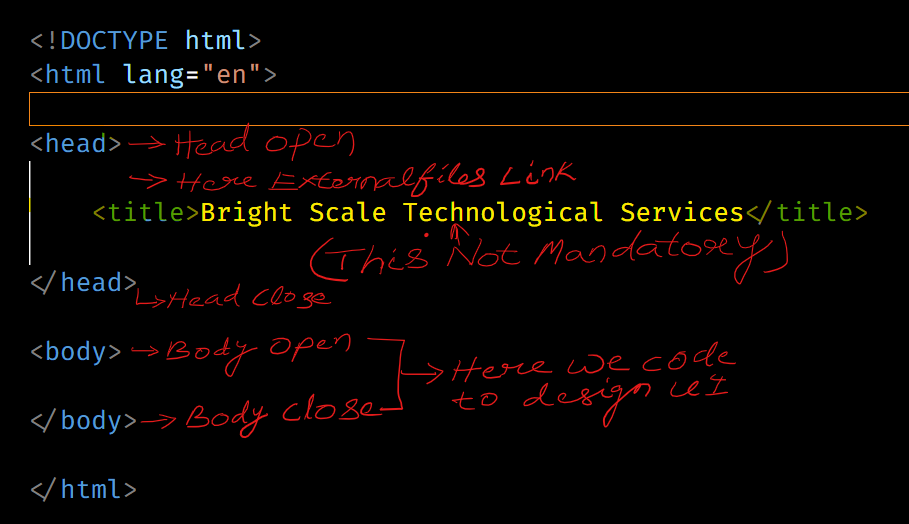
🡺 Structure of HTML
Information
- Description
- Note on Untitled, created by AWESH AHAMAD KHAN on 12/07/2023.
- Created by
- AWESH AHAMAD KHAN
- Views
- 0
- Rating