
Notes
Infrastructure as a Service (IaaS)
Content of the notes (8)
Page 1
Infrastructure as a Service (IaaS)
In my previous set of notes, we talked about PaaS and how the user manages:
Applications
Data
However, with IaaS the user manages a lot more:
Applications
Data
Runtime
Middleware
O/S
This leaves the vendor to manage:
Virtualisation
Servers
Storage
Networking
As previously discussed, PaaS is aimed at the general developer who wants to get up and running quickly and focus on their code rather than the platform. IaaS, on the other hand, is in the DevOps world. You design the infrastructure from the network and OS up:
Operating System
Configuration
Patching
Platform Libraries
Connectivity
Security, VPNs...
Page 2
Understanding the Cloud Virtualisation
Virtualisation has been around for quite a while. In the 1970s, IBM pioneered hardware-level virtualisation and they key benefit back then, as it still is now, was to run multiple operating systems on the one physical machine. Nowadays, virtualisation of servers helps prevent under-utilisation of traditional on-premises compute and datacentre resources. This also allows for rapid testing and development of specific server images. It supports business continuity by encapsulating entire systems into single image files through a Virtual Hard Disk (VHD). They can then be restored anywhere (i.e. to the cloud).
A formal definition of a virtual machine would be:
"A virtual machine (VM) is an operating system OS or application environment that is installed on software which imitates dedicated hardware. The end user has the same experience on a virtual machine as they would have on dedicated hardware."
This could include a Windows VM inside OS X or a Linux VM inside Windows.
Page 3
Virtualisation Performance - Hardware Acceleration
Hardware acceleration features for VM's are now ubiquitous. Providing performance enhancements by allow direct access to some hardware features, even when running on top of a host OS.
There are new technologies being implemented to encourage hardware acceleration. For example, Intel's Virtualisation (VT-x) is built into its new x86 CPUs. It provides specific x86 CPU hardware instructions to manage VM's which improves performance. Without this, all VM management is done purely through software which is slower.
Another example is Intel's Graphics Virtualisation Technology (GV-T) has been recently introduced as Intel Iris Pro. It allows the on-die GPU to be dedicated to one or more VM's. The physical machine can also have a discrete GPU.
Virtualisation phone emulators for Windows, Android and iOS are good examples of CPU hardware acceleration. Without it they would be painfully slow and it also allows developers to get realistic 'like-for-like' performance that nearly mirrors physical device performance.
Page 4
Virtualisation Approaches
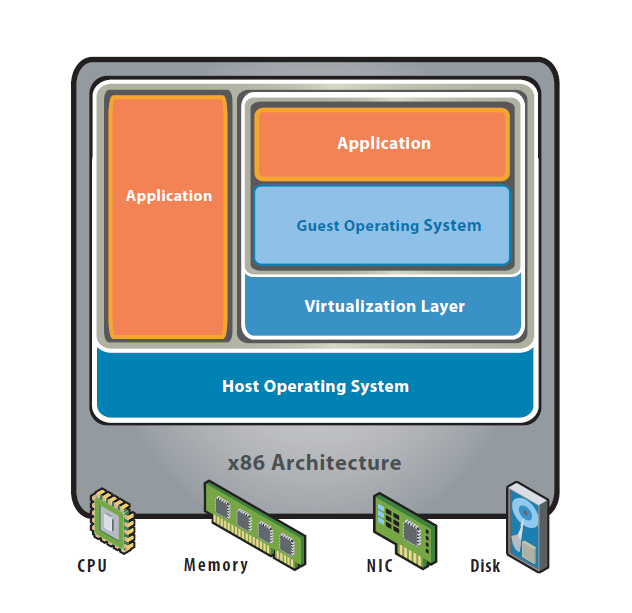
There are two main approaches to virtualisation in x86 systems. Hosted architecture and Hypervisor (bare-metal) architecture. Hosted architecture has better compatibility across different types of hardware, it installed on top of the host OS. Meanwhile, Hypervisor has greater scalability, reliability, and performance, it is installed directly over the hardware and part hardware device drivers.
Hosted is generally directed at the individual end-user and usually comprised of low cost or 'free' software i.e. Virtual Box, VMware Player. Hypervisor is the approach used by cloud vendors for their Cloud OS's.
Page 5
Hosted Architecture
Hosted architecture is run 'on top' of the host OS as a guest OS. The guest OS is abstracted away using VM software such as Virtual Box or VMware Workstation. Types of approaches you will use to install personal or small group installation of Windows on a Mac and vice versa. This does not have direct access to the physical hardware of the computer. Access to hardware features varies greatly between VM software vendors, and may depend on CPU hardware virtualisation features. For example, a virtual serial or USB port (from host OS) may not be available.
Page 6
Hypervisor (Bare-Metal) Architecture
The virtualisation software (Hypervisor) is installed on the bare-metal physical machine first (Server Blade), before any guest OS. It sits on top of hardware device drivers with direct access to hardware resources. Each guest OS runs as a process and scales with great performance. This is used in the cloud extensively as the majority of the cloud is virtualised.

Page 7
Cloud Operating System
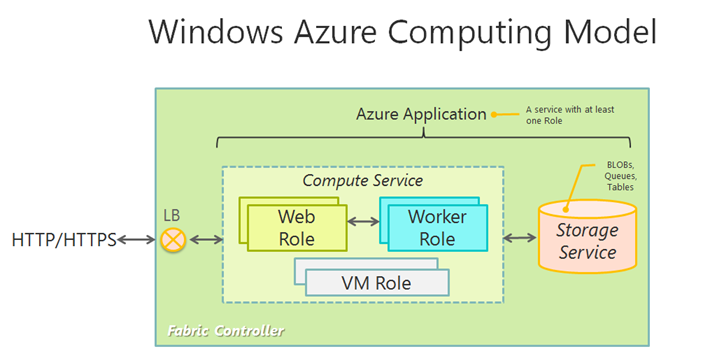
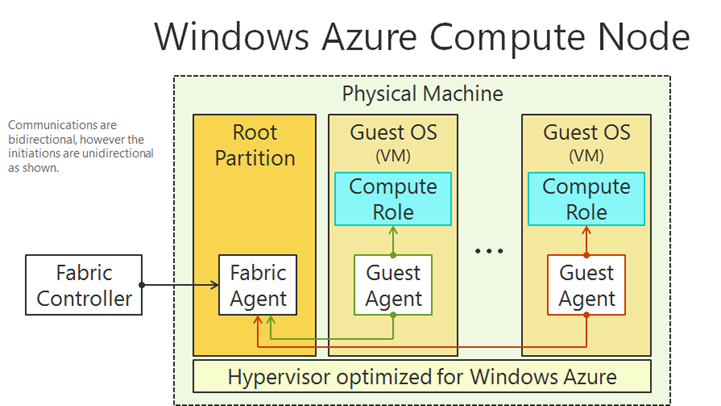
It is important to note that the Azure cloud platform is not running on a cluster of virtualised Microsoft Server/Linux OS machines. It, instead, has its own OS called the Fabric Controller (FC) which is essentially a Cloud OS. Fabric is an abstraction of resources (PaaS services, VM's, etc.) that are dynamically created on demand via a Hypervisor. The Hypervisor is then an agent/service of the FC.
All cloud compute, data, and networking resources are managed by the FC. This is because the FC hides the complexities of the cloud configuration and deployments from the user. For example, when you upload packaged web service files or deploy VM's, they will just deploy and deploy automatically. All cloud providers will have their own version of a cloud OS.
Page 8
IaaS Virtualisation
Generally, IaaS virtualisation is of the native hypervisor (bare-metal) type in cloud server virtualisation, for scalability and performance. IaaS allows organisations to deploy their fully bespoke infrastructure to reflect their resource requirements and this can also facilitate hybrid cloud deployments with IaaS resources mapped onto on-premises resources:
For example, data storage mirroring, swappable VM's
Virtual Networks connecting different company sites
Authentication from outside the company network
IaaS is the DevOps toolkit and can be managed through GUI portals or power command prompt tools such as Azure's Powershell or Amazon's AWS Command Line Interface.
Information
- Description
- This set of notes will give an overview of Infrastructure as a Service (IaaS). Virtualisation and how it's applied. Cloud OS's and IaaS Virtual Machines. Finally, Virtual Machines Management via Scripting.
- Created by
- Liam-Beckwith · May 2016
- Updated
- Nov 22, 2016
- Views
- 206
- Tags
- Rating