
Flashcards
Week 9
Cards in this deck (42)
- 1treeA common case is called a tree
Every node is a record with two or more pointers - 2binary treeA particularly important case is called binary tree
– Binary means that has two pointers in each node, left and right
– So, each node has three fields in the record (a value and two pointers)
– Each pointer can either contain nil, or point to another node - 3Binary Tree RecordNode : record
value ; the actual data in the node
left ; left subtree is a pointer to a Node
right ; right subtree is a pointer to a Node - 4Applications of treesparser
jump tables
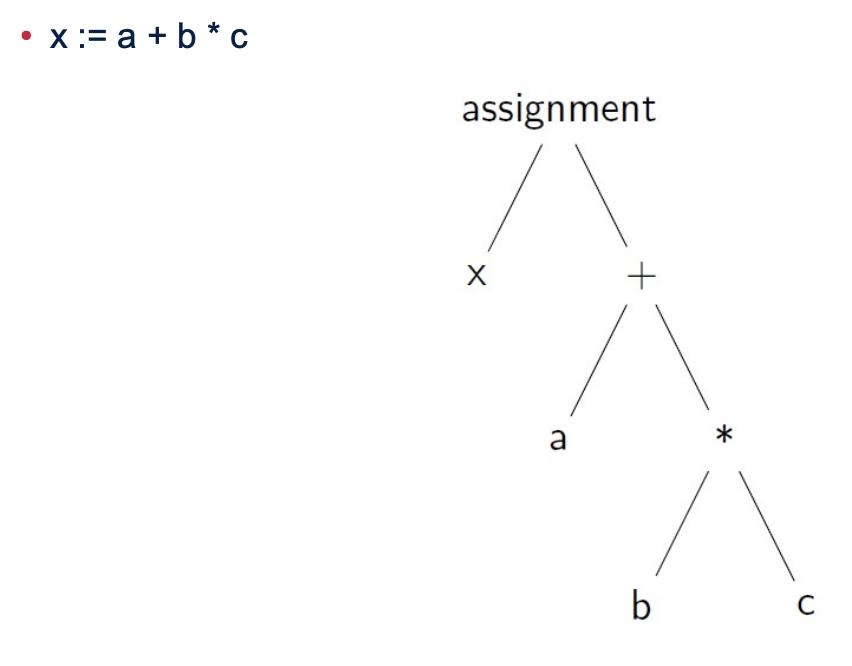
binary search tree - 5Parser
- 6jump tables• In complicated applications, trees normally have different types of node, e.g.
– operations with 1 operand
– operations with 2 operands
– control constructs with a boolean expression and two statements, etc
• So there are several different types of record
• Each record has a code in the first word
– The value of the code determines how many more words there are in the
record, and what they mean
• When a program has a pointer to a node, it needs to examine the code and
take different actions depending on what the code is
– This is done with a jump table! - 7Binary search tree• At every level: if a node contains x, then
– Every node in the left subtree is less than x
– Every node in the right subtree is greater than x - 8Algorithmic Complexity• Complexity is concerned with how the execution time grows as the size of
the input grows
• It is expressed as a function of the input size n
• Normally we don't care about the exact function, and just need an estimate.
For this we use O-notation - 9Algorithm is more important than small optimisation• It's much more important to use a suitable algorithm
– On small data it doesn't make much difference
– On large (realistic) data, a better algorithm makes a huge difference - 10Complexity for search Ordered listsOn average, you need to look through half of the data to find out whether
a value x is present
– If the lists were not ordered, you would need to look through all of the
data to determine whether x is present
– So the ordered list makes the search about twice as fast
– But in either case, this is O(n), so if you double the data size, the
average time is doubled - 11Complexity for search Binary search tree– The number of comparisons needed is roughly the height of the tree
– If the tree is balanced, the time complexity is O(log n) - 12A common pitfall Algorithmic Complexity• When you're writing a program, it's natural to test it with small data
• Even if the algorithm has bad complexity, the testing may be fast
• But then, when you run the program on real data, the execution time is
intolerable - 13Why are ordered lists useful• This is one way to arrange a database: think of the elements as people’s
names, or matriculation numbers
• Sometimes you want to process all the data in a specified order
• If the data is ordered, it's faster to find a particular item
– On average you only have to check half of the items
• An ordered list can be used to represent a set - 14Reading a program before writing• You should read and understand the program before modifying it
– Reading a program is an important skill you will need throughout your
career
– The program is filled with examples so it is excellent revision material
– You need to understand a program before you'll be able to make
changes to it - 15Debugging has two phases– Diagnosis: finding out what went wrong and why
– Correction: fixing the error - 16Reading and testing a program• A good way to understand a section of assembly language instructions is to
step through it, one instruction at a time
– Check that the instruction did what you expected it to do
– Check that the instruction is consistent with its comment
– Try to relate the instruction with the bigger picture: what is it doing in the
context of the program? - 17Coverage– You don't need to step through a set of instructions a huge number of
times
– If there's a loop, step through two or three iterations
– If possible, arrange test data so the loop will terminate after just a few
iterations
– But try to step through as much of the program as possible
– This is called coverage: try to cover all of the program with your testing - 18BreakpointsFind the address of an instruction where you want to start single
stepping
– Enter this address as a breakpoint
– Click Run to execute the program at full speed; when it reaches the
breakpoint it will stop
– Then you can single step to examine what the instructions are doing - 19Control constructsControl constructs determine the order of execution of statements
- 20Interrupts• An interrupt is just an automatic jump
– Typically goes to the operating system (most of the times)
– But can also go to an error handler in the program
• But it is not the result of a jump instruction
– It happens automatically in several cases (next slide)
• The program that was running never jumped to the OS
– The processor stops executing its instructions, and starts the OS instead - 21What causes an interrupt• An error in a user program
• A trap: an instruction generates the interrupt
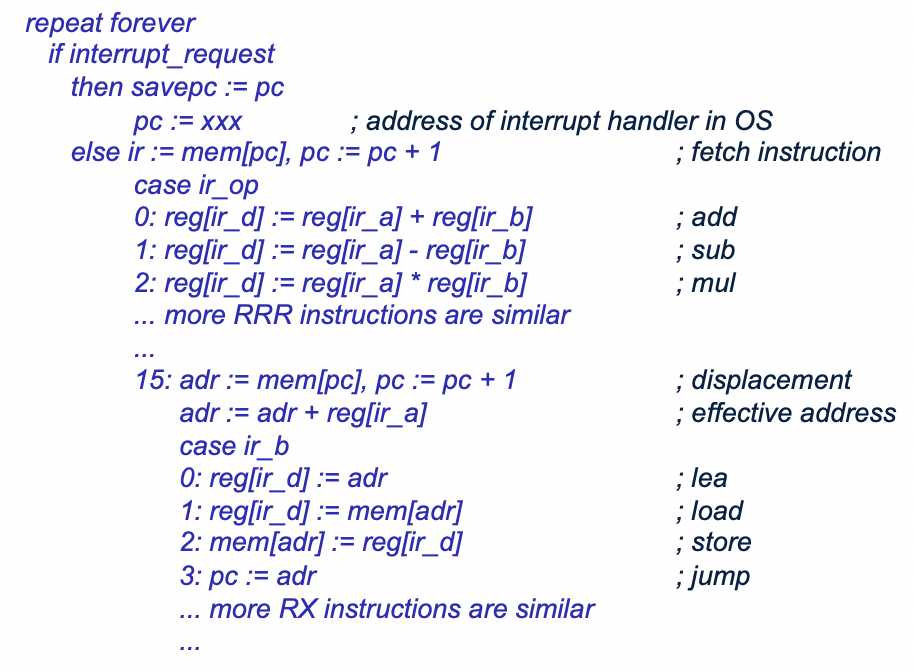
• An external event: generated by I/O - 22The computer is a digital circuit Without interrupts, it repeats forever– Fetch the instruction at the address in the pc register
– Execute the instruction - 23The computer is a digital circuit With interrupts, it repeats forever– Check to see if there is an interrupt request
– If there is, savepc := pc, pc := address of code in operating system
– Fetch the instruction at the address in the pc register
– Execute the instruction - 24Saving state• Remember, an interrupt is a jump to the OS
• This requires setting the address of the OS in the pc register
• But if we simply assign a value to pc, the computer has forgotten where the
interrupted program was
• Therefore the hardware must “save the state”: savepc := pc
– This includes all the registers (pc, ir, register file, etc)
• The OS has a special instruction that enables it to get the value of savepc
• The state is restored before the program resumes - 25How interrupts are used• Trap generates an interrupt, and is used to request a service from the OS
• Interrupts can be used to catch errors in a program
• Interrupts are used to implement concurrent processes
• They can be used to provide quick service to an Input/Output device - 26Catching errorsIt's better to detect the error and do something about it
– This makes the software robust (it works even if something goes wrong)
• If the program keeps going, it's likely to produce wrong results and it won't tell - 27Explicit error checking• Every time you do an add (or other arithmetic instruction), that bit is set to 0
if it was ok, and 1 if there was overflow
• You can check for this with a conditional jump, and then take appropriate
action
• You have to put in the conditional jump after every arithmetic instruction
• This makes the program considerably longer
• It's also inefficient: those conditional jumps take time
• It is fragile: if you forget the jumpovdl even once in a big program, that
program can malfunction - 28Catching errors interrupts• The circuit checks for overflow (or other error) after every arithmetic operation
– If the error occurred, the circuit performs an interrupt
• The OS then decides what to do
– The user program can tell the OS in advance “in case of overflow, don’t kill
me, but jump to this address: TooBig” (there is a trap code for this request)
– In some programming languages, this is called “setting an exception
handler” or “catching exceptions”
• There is a special control register with a bit that specifies whether overflow
should trigger an interrupt - 29Why are interrupts better than explicit checking?• Interrupts guarantee that every operation is checked
• It is faster: the circuit can do this checking with essentially zero overhead
– Explicit jump instructions can generate a significant cost
• It is easier: the programmer doesn't have to worry about it
• The program is shorter: don't need a jump after every arithmetic instruction - 30concurrent processes• One of the central features provided by an OS is concurrent processes
– Think of a program as just text, something static
– A process is a running program where actions happen dynamically: it
has variables, the variables change over time, Input/Output happens, etc
– Several different processes may be running on the same program (e.g.
multiple tabs on a web browser)
– Each process has its own variables
• Processes are implemented by the OS using interrupts
• A user program is interrupted, and the OS can then run a different program - 31Waiting for I/O = wasted time• The problem
– Instructions execute quickly: typically about 1ns (1×10⁹ per second)
– I/O is much slower, especially if mechanical devices are involved (0.1s)
– An I/O operation runs much slower than an instruction, 104 to 108 times
– Comparison: a supersonic jet fighter is only 103 times faster than a turtle - 32Don't wait: switching to another process– Requests the operating system to do the I/O (using a trap)
– The OS starts the I/O but doesn't wait for it to finish
– The OS then allows a different process to run for a while
– When the I/O operation finishes, the OS resumes the original process - 33Concurrent processes Time Scale– At the scale of a nanosecond (10-9 second) the computer is executing
just one instruction of one process, all other processes are doing nothing
– At the scale of human perception (10-2 second) it appears that all the
processes are making smooth processes - 34process breakFrom time to time (around 100 or more times per second), the OS will
transfer control from one process to another one, called a process break - 35Operating system kernelThe kernel is the innermost, core, central part of the OS
- 36during a process breakThe running process jumps to the operating system kernel
– The kernel is the innermost, core, central part of the OS
– The kernel takes any necessary action (e.g. service the I/O device)
– The kernel has a table of all the processes (e.g. on Windows: right-click
the toolbar, launch the Task Manager, click Processes tab)
– The kernel chooses another process to run and jumps to it (specifically
the scheduler does this), sets the timer and jumps to that process - 37Interrupts and preemptive scheduling• The OS timer allows preemptive scheduling
– That is, forces a process to stop
• This guarantees that the process won't run forever and freeze the system
even if it goes into an infinite loop
• When the operating system jumps to a user process, it sets a timer which
will “go off” after a set amount of time
– e.g. 1ms = 10-3 second
• When does a running process jump to the operating system?
– When the timer goes off
– When the process makes an I/O request - 38How interrupts are implemented• Interrupts cannot be implemented in software!
• The processor (the CPU) repeatedly goes through a sequence of steps to
execute instructions
• This is the control algorithm and it's performed by a digital circuit in the
processor (the control circuit)
– The behaviour of the entire processor is defined by a control algorithm
• Interrupts are implemented by the control circuit - 39What you need for interruptsControl registers
Infinite loop
Case dispatch
Control algorithm - 40Case dispatchWe often have an operation code, a binary number, with k bits (e.g. 4 bits)
• There are 2k alternative actions to take, depending on the value of the code - 41Infinite loop• In hardware, we need infinite loops
• The computer should never stop executing instructions!
repeat forever
action
action
...
action - 42Control algorithm
Information
- Description
- Computer Science Flashcards on Week 9, created by Isaac Gilbert on 08/03/2022.
- Created by
- Isaac Gilbert
- Views
- 0
- Rating