
Flashcards
Topic 1 - Hardware and Software
Cards in this deck (85)
- 1what is a COMPUTER?a programmable device that can input data into the device and it can then store it, and process the data to output as information
- 2what are PERIPHERALS?add-ons that can be attached to the computer
e.g. keyboard - 3what is HARDWARE?the physical components of a computer
- 4what is SOFTWARE?an application or program (it is written using code).
it is not physical. - 5what is SYSTEM SOFTWARE?it controls the way the computer works and tells it what to do e.g Microsoft
- 6what is APPLICATION SOFTWARE?type of software that lets you perform tasks (you use to do work and have fun) e.g word processor
- 7what is a UTILITY SOFTWARE?lets you do basic maintenance tasks and manage the computer e.g:
-file storing
-deleting data
-anti-virus software
-software updates - 8what is the relationship between hardware and systems software?system software controls hardware and other software
- 9what is the relationship between hardware and application software?application software uses hardware
- 10what are the 2 different types of system software?-operating system (OS)
- utilities software - 11what is an OPERATING SYSTEM (OS)the software that runs a computer
- 12what are the functions of an OPERATING SYSTEM?1)controls the BACKING STORE and PERIPHERALS
2)organises the use of MEMORY
3)organises PROCESSING TIME between programs and the user
4)maintains SECURITY and ACCESS RIGHTS of users
5)deals with ERRORS and USER INSTRUCTIONS
6)issues simple error messages
7)allows the user to save files to a backing store
8)provides interface between the user and the computer e.g WINDOWS VISTA - 13an OS is described as beings "mouse-driven". explain what this term means.An OS that uses a mouse which a user uses to interact with the interface.
- 14what features would you expect to find in a GUI (Graphical User Interface)?-a pointer that lets you move and select objects
-they are easy to use
- allows you to easily exchange info in software
-it uses alot of memory and processing power - 15why is it necessary to have an OSwithout it you wouldn't be able manage software, processes, memory or hardware
- 16define the term SELF-BOOTINGAutomatically loading the operating system when the power is turned on.
- 17define the term WEB SERVERprocesses requests via HTTP, the basic network protocol used to distribute information on the World Wide Web.
- 18define the term KERNELthe central compnent is most OSs. manages the tasks of a computer + hardware (like a bridge between soft and hardware)
- 19what are different types of software?-off-the-shelf software
-custom-written software
-proprietary software
-open source software - 20what is OFF-THE-SHELF SOFTWARE?the sort of software you use at home and school
e.g. word processor, spreadsheets, databases, presentation software - 21what is CUSTOM-WRITTEN SOFTWARE?software systems that need to be designed and developed specifically. businesses or scientific projects will often need it.
e.g. accounting softwares - 22what is PROPRIETARY SOFTWARE?a copyrighted software that is owned by the developers. they dont release their source code.
e.g. internet explorer, photoshop - 23what is OPEN SOURCE SOFTWARE?software that is free and open to everyone. people who create it publish the source code and allow others to use and modify it.
- 24what is the CPU (Central Processing Unit)?the hardware in a computer that EXECUTES the programs and manages the rest of the hardware in a computer. like a brain. it processes data using a processor.
- 25what is the purpose of a CPU?1)fetches instructions from the main memory
2)fetches data from the main memory
3)decode the instruction
4)executes instruction
5)performs calculations
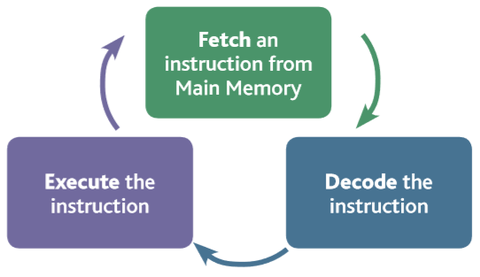
6)manages the movement of instructions and data to and from peripheral devices - 26what is a fetch-execute cycle
- 27von neumann architecture
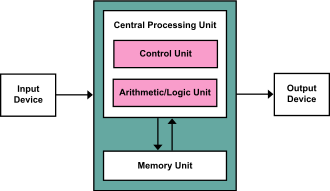
- 28what does a CPU consist of?-the main memory
-the processor
-the cache memory
they are linked by system buses (wires) - 29what does the processor consist of?-ALU (Arithmetic Logic Unit)
-control unit counter - 30what does the ALU do?calculations
- 31what does the CONTROL UNIT COUNTER do?controls the order that the data is moving around the CPU by counting which line of code the program is on.
- 32what are the two types of memory-RAM (Random Access Memory)
-ROM (Read Only Memory) - 33define BINARYthese are digits stored as either 0 or 1
- 34define COREA processing unit within a CPU. CPUs can have multiple cores.
- 35define BUSThe wires through which data travels from one part of a computer to another on the motherboard.
- 36define MOTHERBOARDprinted circuit board which holds the critical parts of a computer system
- 37define CLOCK-SPEEDThe speed of a computer CPU, measued in hertz
- 38define LEVEL 1 CACHEthis is located on the cpu and is high speed memory used by the cpu
- 39define CACHEA piece of temporary memory. It can refer to a part of the RAM, storage disk, CPU, or an area for storing web pages.
- 40processor speedmeasured in Hertz(cycles per second)
- 41Hz =?1 instruction per second
- 42KHz = ?1024 instructions per second
- 43MHz =?1 million instructions per cycle
- 44GHz = ?1 billion instructions per cycle
- 45How do common characteristics of CPU affect its performance?1)CLOCK SPEED- the higher it is, the better the performance
2)the larger the CACHE SIZE, the better the performance because more instructions can be stored(but it is expensive!)
3)the more CORES the better the performance. Because the different cores can share more tasks between each other - 46role and operation of main memorycpu === cache === main memory
- 47what is RAM? and what are the features of it?RANDOM ACCESS MEMORY
-volatile(data is lost when power is turned off)
-read+ write = the user can change the data stored - 48what is ROM? and what are the features of it?READ ONLY MEMORY
-non volatile
-READ ONLY = data cannot be changed - 49what is the purpose of RAM?-it acts as a temporary storage area.
-allows the CPU to retrieve data quickly instead of getting it from a secondary storage device which takes LONGER. - 50what is VIRTUAL MEMORY?sections of the hard disk used to store items of RAM which are not currently being used. it is used when the computer does not have enough RAM to hold all the data and programs that a user wants
- 51what is PRIMARY MEMORYmain memory for being accessed by processor
- 52what is SECONDARY STORAGE?storage devices e.g. hard disks
- 53why is it important to have a sufficient amount of RAM?RAM is where the processor goees to fetch data because it is easier and faster compared to the main memory.
The larger amount of RAM, the more instructions that can be executed. Therefore the computer runs more effectively. - 54state 2 differences between SOLID STATE STORAGE and MAGNETIC STORAGESSS is:
-smaller
-more robust(it is harder to damage) - 55what 3 characteristics improve the performance of a CPU-cache memory
-clock speed (the faster the clock speed, the more instructions a CPU can do in one cycle per second)
-number of cores (the more cores it has, the more power it has to run multiple programs at the same time) - 56how is data read from optical media such as a CD (compact disk)?optical media is saved on optical storage device, and it read as patterns of dots. these dots are read using light (usually laser beam). the laser is bounced of the surface, and when it hits the dots, the light is reflected back differently. so data can be read as the difference detected.
- 57why does having cache memory improve the performace of the CPU?cache data is closer to the CPU than the RAM and holds data that the CPU is likely to use again. this improves performance as it is easier and faster to fetch data, the than fetching it repeatedly from RAM, which takes longer.
- 58explain the term VOLATILE MEMORYmemory that is lost when the power is lost
- 59what is normally stored in the non-volatile part of a computer's main memory?secondary storage or long term persistent memory.
e.g. ROM, flash memory, optical disks - 60what are the 3 ways to store SSD (secondary storage device)-magnetic
-electrical
-optical - 61what is magnetic storage?storage data using magnetic media
e.g. hard disk drive - 62what is optical storage?uses light from lasers to read and write data on discs
e.g: CD, DVD - 63what is electrical storage?AKA solid state storage
data stored electrically using flash memory.
flash memory is used in:
-SD cards
-USB flash drives - 64name 3 advantages of SolidStateStorage-small and lightweight
-robust
-longer life (compared to magnetic storage) becasue it uses less power and produces less heat. - 65name 3 advantages of magnetic storage-cheapest out of 3 types of storage
-can hold a lot of data
-data can be read from any part of the storage - 66name 3 advantages of optical storage-durable if kept properly
-data cannot be rewritten or accidently erased
-easily portible - 67name 3 disadvantages of SSS-expensive per GB compared to magnetic storage
-vunerable to power loss, magnetic fields and electric charges
-smaller storage capacity compared to magnetic storage - 68name 3 disadvantages of magnetic storage-not durable(data can be lost over time)
-data can be changed due to magnetic fields
-disk cannot be moved to another computer - 69name 3 disadvantages of optical storage-very slow to transer and access data
-there is no way of knowing the quality of a disc(you dont know how it will last)
-require special drives to read and write
-data cannot be changed - 70what are truth tables-computer work by using logic to solve complex problems
-there are 3 main types of logic:
+AND
+OR
+NOT
(+exclusive OR (XOR)) - 71AND-there are 2 inputs and 1 output
Q= A .B (Q=A x B)
-if both inputs are positive (1 and 1), then the ouput will be positive - 72what is the shape of AND?
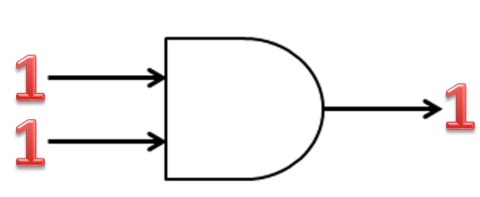
- 73what is the shape of OR?
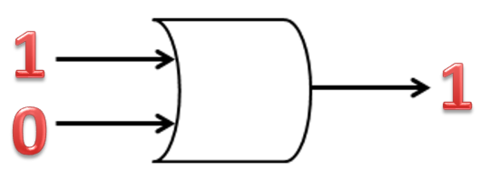
- 74what is the shape of XOR?
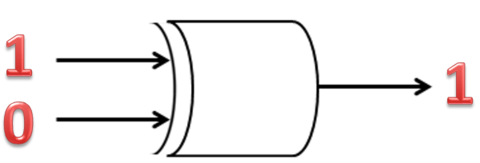
- 75what is the shape of NOT?
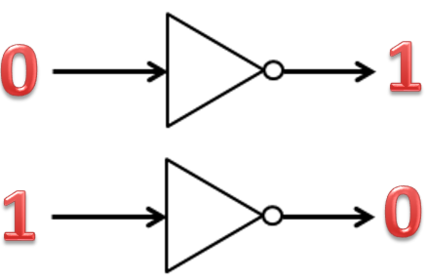
- 76OR-there are 2 inputs and an output
-if one or both inputs are positive, then the outcome will be positive - 77NOT-1 input, 1 output
-it changes the input to the opposite value - 78AND TRUTH TABLE
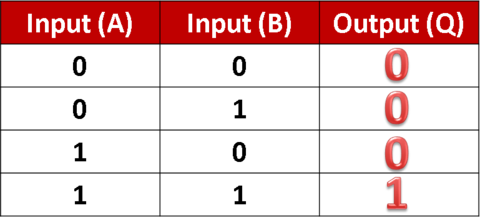
- 79OR TRUTH TABLE
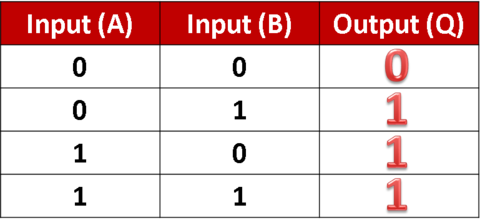
- 80XOR TRUTH TABLE
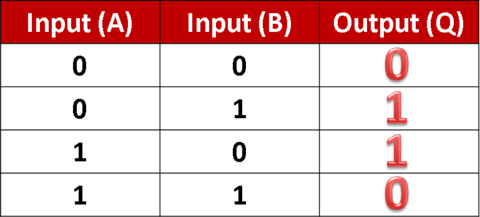
- 81NOT TRUTH TABLE
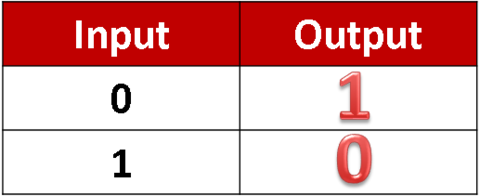
- 82what is the meaning of cloud storage?Cloud storage is a service provided where your data is stored and managed and backed up remotely by a specialist data centre. When you want to gain access to your data or files you connect to the cloud storage servers over a network such as the internet.
- 83what are the advantages of cloud storage? (6)1.No need to purchase a device – money can be spent on other things.
2.Data can be accessed anywhere in the world with an Internet connection.
3.Data will be protected if there is damage to the site where the original data is held.
4.Hosting companies are data storage experts, so data will normally be better protected than by a home protection system or onsite storage.
5.No need to employ someone to be responsible for data backup.
6.Data backup can be done at quieter times, so that it does not affect the running of the business. - 84what are the disadvantages of cloud storage? (5)1.Less control of the data if it is held by a third party.
2.Access to data relies on an Internet connection.
3.Download/upload speeds can be affected by the Internet connection.
4.The hosting company may host data from lots of different companies, which might encourage hackers to target the host company.
5.May not be advisable for sensitive data, as there are strict rules on storing personal data (see Data Protection Act 1998 overleaf). - 85what is an embedded system?An embedded system is a small processor (computer) that is inside a large piece of equipment, e.g. washing machine.
Information
- Description
- GCSE French, Geog, Computing (Computer Science) Flashcards on Topic 1 - Hardware and Software, created by n g on 07/01/2017.
- Created by
- n g
- Views
- 2
- Rating