
Mind map
Network Hardware_PK
Map content
Network Hardware_PK
Network Interface Card
Hub
Switch
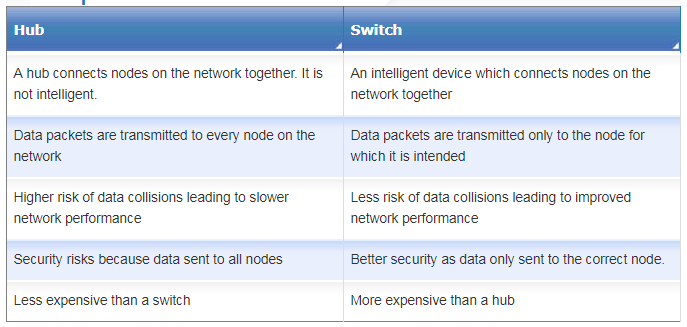
- Add screenshot of hub vs switch table in here
Router
- Reads the data packet's destination address
- Looks up all the paths it has available to get to that address
- Checks on how busy each path is at the moment
- Sends the packet along the least congested (fastest) path
- Exchange protocol information across networks
- Filter traffic - helps prevent unauthorised intrusion by malware
Cables
- Fibre Optic
- very high bandwidth
- uses light signals
- Ethernet cables
- uses electrical signals
- lower bandwidth
- Fibre Optic
WAP
- If you want to connect Wi-Fi devices to a wired network, you need a wireless access point (WAP).
- Wireless technology makes it easy for people to access a network and transmit data without being physically connected i.e. with wires.
- The WAP has a cable connecting it to the network hub or switch.
- A WAP is able to pick up Wi-Fi data packets and convert them into data packets for the wired network, and also the other way around.
Images and files in the map
Information
- Description
- Year 10 Computing Mind Map on Network Hardware_PK, created by Nick Kitchen on 17/01/2018.
- Created by
- Nick Kitchen
- Views
- 0
- History
-
- Created by Paul Kluge · Jan 17, 2018
- Copied by Nick Kitchen · Jan 17, 2018
- Rating