
Mind map
HTML AND CSS
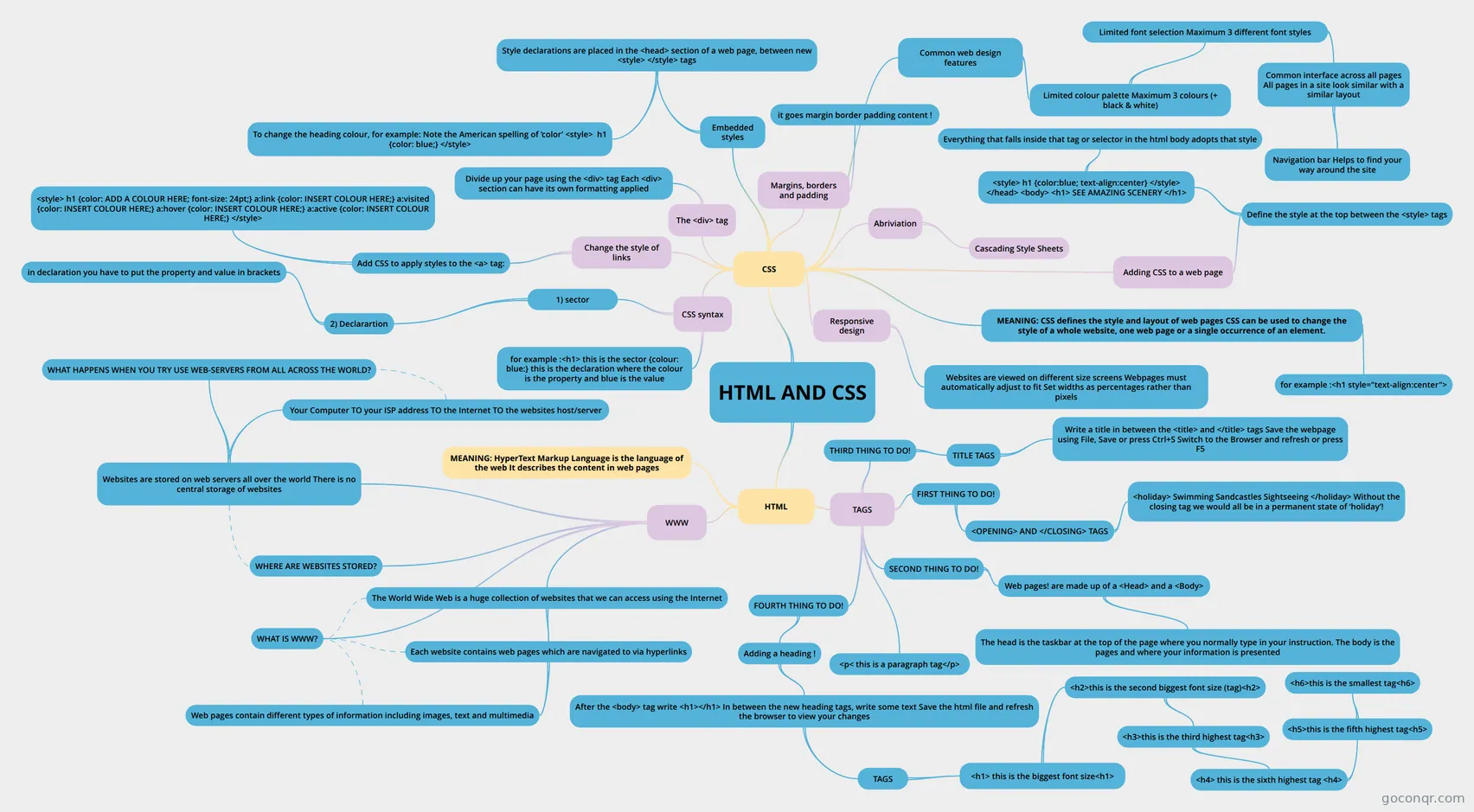
Mind map: HTML and CSS
Map content
HTML AND CSS
HTML
- TAGS
- SECOND THING TO DO!
- Web pages! are made up of a <Head> and a <Body>
- The head is the taskbar at the top of the page where you normally type in your instruction. The body is the pages and where your information is presented
- Web pages! are made up of a <Head> and a <Body>
- FIRST THING TO DO!
- <OPENING> AND </CLOSING> TAGS
- <holiday> Swimming Sandcastles Sightseeing </holiday> Without the closing tag we would all be in a permanent state of ‘holiday’!
- <OPENING> AND </CLOSING> TAGS
- THIRD THING TO DO!
- TITLE TAGS
- Write a title in between the <title> and </title> tags Save the webpage using File, Save or press Ctrl+S Switch to the Browser and refresh or press F5
- TITLE TAGS
- FOURTH THING TO DO!
- Adding a heading !
- After the <body> tag write <h1></h1> In between the new heading tags, write some text Save the html file and refresh the browser to view your changes
- TAGS
- <h1> this is the biggest font size<h1>
- <h2>this is the second biggest font size (tag)<h2>
- <h3>this is the third highest tag<h3>
- <h4> this is the sixth highest tag <h4>
- <h5>this is the fifth highest tag<h5>
- <h6>this is the smallest tag<h6>
- <h5>this is the fifth highest tag<h5>
- <h4> this is the sixth highest tag <h4>
- <h3>this is the third highest tag<h3>
- <h2>this is the second biggest font size (tag)<h2>
- <h1> this is the biggest font size<h1>
- TAGS
- After the <body> tag write <h1></h1> In between the new heading tags, write some text Save the html file and refresh the browser to view your changes
- Adding a heading !
- <p< this is a paragraph tag</p>
- SECOND THING TO DO!
- WWW
- The World Wide Web is a huge collection of websites that we can access using the Internet
- Each website contains web pages which are navigated to via hyperlinks
- Web pages contain different types of information including images, text and multimedia
- Each website contains web pages which are navigated to via hyperlinks
- Websites are stored on web servers all over the world There is no central storage of websites
- WHAT HAPPENS WHEN YOU TRY USE WEB-SERVERS FROM ALL ACROSS THE WORLD?
- Your Computer TO your ISP address TO the Internet TO the websites host/server
- WHERE ARE WEBSITES STORED?
- WHAT IS WWW?
- The World Wide Web is a huge collection of websites that we can access using the Internet
- MEANING: HyperText Markup Language is the language of the web It describes the content in web pages
- TAGS
CSS
- MEANING: CSS defines the style and layout of web pages CSS can be used to change the style of a whole website, one web page or a single occurrence of an element.
- for example :<h1 style="text-align:center">
- Abriviation
- Cascading Style Sheets
- Embedded styles
- Style declarations are placed in the <head> section of a web page, between new <style> </style> tags
- To change the heading colour, for example: Note the American spelling of ‘color’ <style> h1 {color: blue;} </style>
- Style declarations are placed in the <head> section of a web page, between new <style> </style> tags
- CSS syntax
- 1) sector
- 2) Declarartion
- in declaration you have to put the property and value in brackets
- 2) Declarartion
- for example :<h1> this is the sector {colour: blue:} this is the declaration where the colour is the property and blue is the value
- 1) sector
- Adding CSS to a web page
- Define the style at the top between the <style> tags
- <style> h1 {color:blue; text-align:center} </style> </head> <body> <h1> SEE AMAZING SCENERY </h1>
- Everything that falls inside that tag or selector in the html body adopts that style
- <style> h1 {color:blue; text-align:center} </style> </head> <body> <h1> SEE AMAZING SCENERY </h1>
- Define the style at the top between the <style> tags
- Change the style of links
- Add CSS to apply styles to the <a> tag:
- <style> h1 {color: ADD A COLOUR HERE; font-size: 24pt;} a:link {color: INSERT COLOUR HERE;} a:visited {color: INSERT COLOUR HERE;} a:hover {color: INSERT COLOUR HERE;} a:active {color: INSERT COLOUR HERE;} </style>
- Add CSS to apply styles to the <a> tag:
- The <div> tag
- Divide up your page using the <div> tag Each <div> section can have its own formatting applied
- Margins, borders and padding
- it goes margin border padding content !
- Responsive design
- Websites are viewed on different size screens Webpages must automatically adjust to fit Set widths as percentages rather than pixels
- Common web design features
- Limited colour palette Maximum 3 colours (+ black & white)
- Limited font selection Maximum 3 different font styles
- Common interface across all pages All pages in a site look similar with a similar layout
- Navigation bar Helps to find your way around the site
- Common interface across all pages All pages in a site look similar with a similar layout
- Limited font selection Maximum 3 different font styles
- Limited colour palette Maximum 3 colours (+ black & white)
- MEANING: CSS defines the style and layout of web pages CSS can be used to change the style of a whole website, one web page or a single occurrence of an element.
Information
- Description
- Year 8 Computing Mind Map on HTML AND CSS, created by sumukhi vadrevu on 10/03/2019.
- Created by
- sumukhi vadrevu
- Views
- 8
- Rating