
Mind map
Paper 1 Principles of Computing
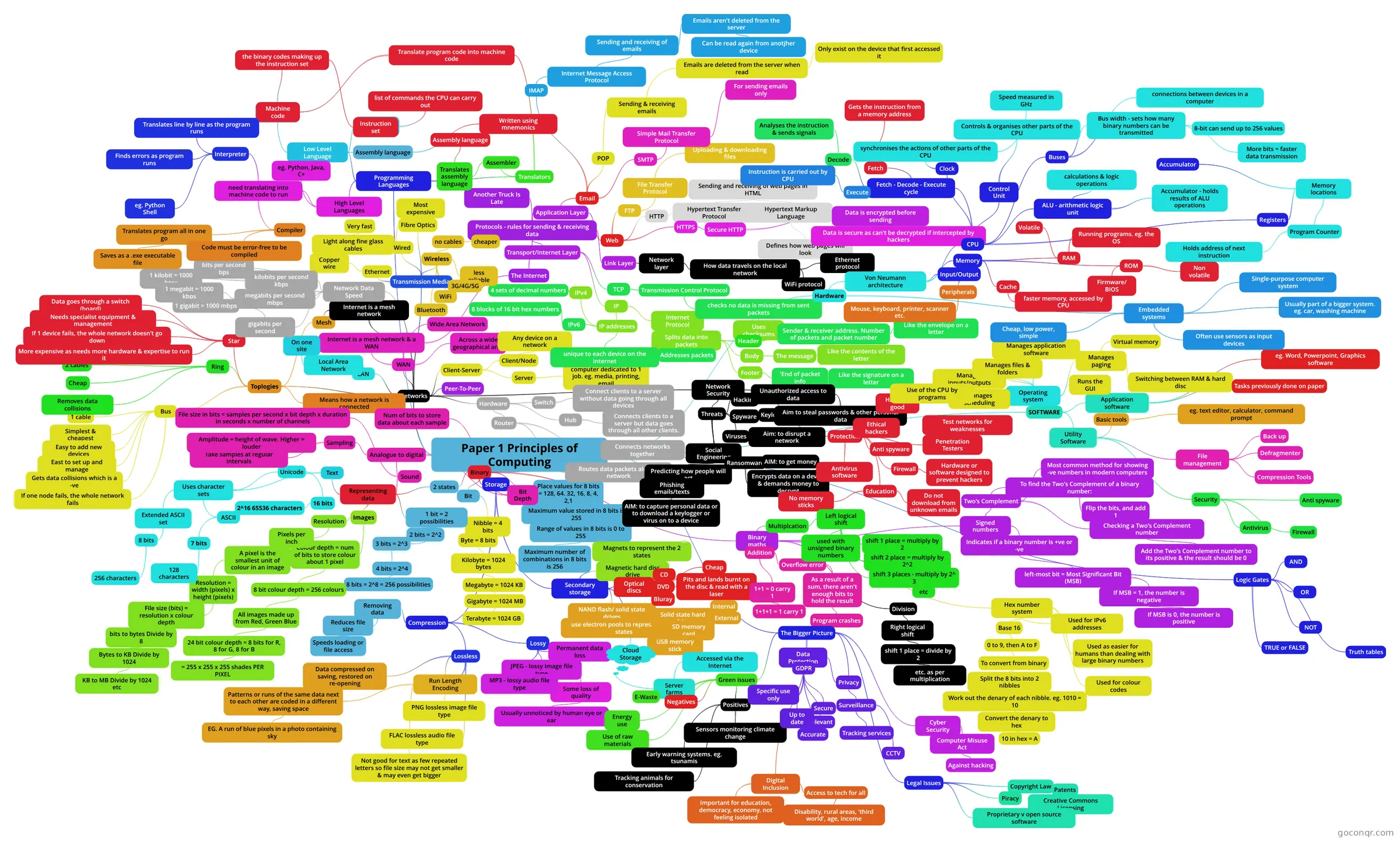
Mind map: Principles of Computing
Map content
Paper 1 Principles of Computing
Binary
- 2 states
- Representing data
- 1 bit = 2 possibilities
- 2 bits = 2^2
- 3 bits = 2^3
- 4 bits = 2^4
- 8 bits = 2^8 = 256 possibilities
- 4 bits = 2^4
- 3 bits = 2^3
- 2 bits = 2^2
- Images
- Colour depth = num of bits to store colour about 1 pixel
- 8 bit colour depth = 256 colours
- All images made up from Red, Green Blue
- 24 bit colour depth = 8 bits for R, 8 for G, 8 for B
- = 255 x 255 x 255 shades PER PIXEL
- 24 bit colour depth = 8 bits for R, 8 for G, 8 for B
- All images made up from Red, Green Blue
- 8 bit colour depth = 256 colours
- Resolution
- Pixels per inch
- A pixel is the smallest unit of colour in an image
- Resolution = width (pixels) x height (pixels)
- File size (bits) = resolution x colour depth
- bits to bytes Divide by 8
- Bytes to KB Divide by 1024
- KB to MB Divide by 1024 etc
- Bytes to KB Divide by 1024
- bits to bytes Divide by 8
- File size (bits) = resolution x colour depth
- Resolution = width (pixels) x height (pixels)
- A pixel is the smallest unit of colour in an image
- Pixels per inch
- Colour depth = num of bits to store colour about 1 pixel
- Text
- Uses character sets
- ASCII
- 7 bits
- 128 characters
- 7 bits
- Unicode
- 16 bits
- 2^16 65536 characters
- 16 bits
- Extended ASCII set
- 8 bits
- 256 characters
- 8 bits
- ASCII
- Uses character sets
- Sound
- Analogue to digital
- Sampling
- Take samples at regular intervals
- Amplitude = height of wave. Higher = louder
- Take samples at regular intervals
- Bit Depth
- Num of bits to store data about each sample
- Sampling
- File size in bits = samples per second x bit depth x duration in seconds x number of channels
- Analogue to digital
- 1 bit = 2 possibilities
- Representing data
- Bit
- Nibble = 4 bits
- Byte = 8 bits
- Kilobyte = 1024 bytes
- Megabyte = 1024 KB
- Gigabyte = 1024 MB
- Terabyte = 1024 GB
- Gigabyte = 1024 MB
- Megabyte = 1024 KB
- Kilobyte = 1024 bytes
- Byte = 8 bits
- Nibble = 4 bits
- Place values for 8 bits = 128, 64. 32, 16, 8, 4, 2,1
- Maximum value stored in 8 bits is 255
- Range of values in 8 bits is 0 to 255
- Maximum number of combinations in 8 bits is 256
- Range of values in 8 bits is 0 to 255
- Maximum value stored in 8 bits is 255
- Storage
- Compression
- Removing data
- Reduces file size
- Speeds loading or file access
- Reduces file size
- Lossy
- Permanent data loss
- Some loss of quality
- Usually unnoticed by human eye or ear
- Some loss of quality
- JPEG - lossy image file type
- MP3 - lossy audio file type
- Permanent data loss
- Lossless
- Data compressed on saving, restored on re-opening
- Run Length Encoding
- Patterns or runs of the same data next to each other are coded in a different way, saving space
- EG. A run of blue pixels in a photo containing sky
- Not good for text as few repeated letters so file size may not get smaller & may even get bigger
- Patterns or runs of the same data next to each other are coded in a different way, saving space
- PNG lossless image file type
- FLAC lossless audio file type
- Removing data
- Secondary storage
- Magnetic hard disc drive
- Magnets to represent the 2 states
- Optical discs
- CD
- DVD
- Bluray
- Pits and lands burnt on the disc & read with a laser
- Cheap
- NAND flash/ solid state drives
- use electron pools to represent the 2 states
- Solid state hard drive
- Internal
- External
- SD memory card
- USB memory stick
- Cloud Storage
- Server farms
- Accessed via the Internet
- Server farms
- Magnetic hard disc drive
- Compression
- Binary maths
- Addition
- 1+1 = 0 carry 1
- 1+1+1 = 1 carry 1
- Overflow error
- As a result of a sum, there aren't enough bits to hold the result
- Program crashes
- As a result of a sum, there aren't enough bits to hold the result
- 1+1 = 0 carry 1
- Multiplcation
- Left logical shift
- used with unsigned binary numbers
- shift 1 place = multiply by 2
- shift 2 place = multiply by 2^2
- shift 3 places - multiply by 2^ 3
- etc
- Left logical shift
- Division
- Right logical shift
- shift 1 place = divide by 2
- etc. as per multiplication
- shift 1 place = divide by 2
- Right logical shift
- Signed numbers
- Indicates if a binary number is +ve or -ve
- left-most bit = Most Significant Bit (MSB)
- If MSB = 1, the number is negative
- If MSB is 0, the number is positive
- If MSB = 1, the number is negative
- left-most bit = Most Significant Bit (MSB)
- Two's Complement
- Most common method for showing -ve numbers in modern computers
- To find the Two's Complement of a binary number:
- Flip the bits, and add 1
- Checking a Two's Complement number
- Add the Two's Complement number to its positive & the result should be 0
- Indicates if a binary number is +ve or -ve
- Hex number system
- Base 16
- 0 to 9, then A to F
- To convert from binary
- Split the 8 bits into 2 nibbles
- Work out the denary of each nibble. eg. 1010 = 10
- Convert the denary to hex
- 10 in hex = A
- Convert the denary to hex
- Work out the denary of each nibble. eg. 1010 = 10
- Split the 8 bits into 2 nibbles
- To convert from binary
- 0 to 9, then A to F
- Used for IPv6 addresses
- Used as easier for humans than dealing with large binary numbers
- Used for colour codes
- Base 16
- Addition
- 2 states
Networks
- Toplogies
- Means how a network is connected
- Bus
- Simplest & cheapest
- Easy to add new devices
- Gets data collisions which is a -ve
- If one node fails, the whole network fails
- 1 cable
- East to set up and manage
- Ring
- 2 cables
- Removes data collisions
- Cheap
- Star
- Data goes through a switch (board)
- If 1 device fails, the whole network doesn't go down
- Needs specialist equipment & management
- More expensive as needs more hardware & expertise to run it
- Mesh
- Internet is a mesh network
- Internet is a mesh network
- LAN
- Local Area Network
- On one site
- Local Area Network
- WAN
- Wide Area Network
- Across a wide geographical area
- Internet is a mesh network & a WAN
- The Internet
- Protocols - rules for sending & receiving data
- Application Layer
- Web
- FTP
- File Transfer Protocol
- Uploading & downloading files
- File Transfer Protocol
- HTTP
- Hypertext Transfer Protocol
- Sending and receiving of web pages in HTML
- Hypertext Markup Language
- Defines how web pages will look
- Hypertext Markup Language
- Sending and receiving of web pages in HTML
- Hypertext Transfer Protocol
- HTTPS
- Secure HTTP
- Data is encrypted before sending
- Data is secure as can't be decrypted if intercepted by hackers
- Data is encrypted before sending
- Secure HTTP
- FTP
- Email
- SMTP
- Simple Mail Transfer Protocol
- For sending emails only
- Simple Mail Transfer Protocol
- POP
- Sending & receiving emails
- Emails are deleted from the server when read
- Only exist on the device that first accessed it
- Emails are deleted from the server when read
- Sending & receiving emails
- IMAP
- Internet Message Access Protocol
- Sending and receiving of emails
- Emails aren't deleted from the server
- Can be read again from anotjher device
- Emails aren't deleted from the server
- Sending and receiving of emails
- Internet Message Access Protocol
- SMTP
- Web
- Transport/Internet Layer
- TCP
- Transmission Control Protocol
- checks no data is missing from sent packets
- Uses checksums
- checks no data is missing from sent packets
- Transmission Control Protocol
- IP
- Internet Protocol
- Splits data into packets
- Addresses packets
- Header
- Sender & receiver address. Number of packets and packet number
- Like the envelope on a letter
- Sender & receiver address. Number of packets and packet number
- Body
- The message
- Like the contents of the letter
- The message
- Footer
- 'End of packet info
- Like the signature on a letter
- 'End of packet info
- Splits data into packets
- IP addresses
- unique to each device on the internet
- IPv4
- 4 sets of decimal numbers
- IPv6
- 8 blocks of 16 bit hex numbers
- Internet Protocol
- TCP
- Another Truck Is Late
- Link Layer
- Network layer
- How data travels on the local network
- Ethernet protocol
- WiFi protocol
- How data travels on the local network
- Network layer
- Application Layer
- Protocols - rules for sending & receiving data
- The Internet
- Client-Server
- Client/Node
- Any device on a network
- Server
- computer dedicated to 1 job. eg. media, printing, email
- Client/Node
- Peer-To-Peer
- Hardware
- Switch
- Connect clients to a server without data going through all devices
- Hub
- Connects clients to a server but data goes through all other clients.
- Router
- Connects networks together
- Routes data packets along a network
- Switch
- Network Security
- Threats
- Hacking
- Unauthorised access to data
- Viruses
- Aim: to disrupt a network
- Spyware
- Keyloggers
- Aim to steal passwords & other personal data
- Unauthorized access to data
- Aim to steal passwords & other personal data
- Keyloggers
- Social Engineering
- Predicting how people will act
- Phishing emails/texts
- AIM: to capture personal data or to download a keylogger or virus on to a device
- Phishing emails/texts
- Predicting how people will act
- Ransomware
- AIM: to get money
- Encrypts data on a device & demands money to decrypt
- Hacking
- Protection
- Antivirus software
- Anti spyware
- Firewall
- Hardware or software designed to prevent hackers
- Education
- No memory sticks
- Do not download from unknown emails
- Ethical hackers
- Hack for good
- Penetration Testers
- Test networks for weaknesses
- Threats
- Transmission Media
- Ethernet
- Copper wire
- Fibre Optics
- Light along fine glass cables
- Very fast
- Most expensive
- Light along fine glass cables
- Wireless
- no cables
- cheaper
- less reliable
- 3G/4G/5G
- WiFi
- Bluetooth
- no cables
- Wired
- Ethernet
- Network Data Speed
- bits per second bps
- kilobits per second kbps
- 1 kilobit = 1000 bpss
- megabits per second mbps
- 1 megabit = 1000 kbps
- gigabits per second
- 1 gigabit = 1000 mbps
- Toplogies
Logic Gates
- AND
- OR
- NOT
- TRUE or FALSE
- Truth tables
SOFTWARE
- Operating system
- Manages inputs/outputs
- Manages files & folders
- Manages application software
- Runs the GUI
- Manages scheduling
- Use of the CPU by programs
- Manages paging
- Virtual memory
- Switching between RAM & hard disc
- Application software
- eg. Word, Powerpoint, Graphics software
- Tasks previously done on paper
- Utility Software
- Basic tools
- eg. text editor, calculator, command prompt
- File management
- Back up
- Defragmenter
- Compression Tools
- Security
- Antivirus
- Anti spyware
- Firewall
- Basic tools
- Operating system
Hardware
- Von Neumann architecture
- CPU
- Fetch - Decode - Execute cycle
- Fetch
- Gets the instruction from a memory address
- Decode
- Analyses the instruction & sends signals
- Execute
- Instruction is carried out by CPU
- Fetch
- ALU - arithmetic logic unit
- calculations & logic operations
- Accumulator - holds results of ALU operations
- Registers
- Memory locations
- Accumulator
- Program Counter
- Holds address of next instruction
- Memory locations
- Control Unit
- Controls & organises other parts of the CPU
- Clock
- synchronises the actions of other parts of the CPU
- Speed measured in GHz
- synchronises the actions of other parts of the CPU
- Buses
- connections between devices in a computer
- Bus width - sets how many binary numbers can be transmitted
- 8-bit can send up to 256 values
- More bits = faster data transmission
- Fetch - Decode - Execute cycle
- Memory
- RAM
- Volatile
- Running programs. eg. the OS
- ROM
- Non volatile
- Firmware/ BIOS
- Cache
- faster memory, accessed by CPU
- RAM
- Input/Output
- Peripherals
- Mouse, keyboard, printer, scanner etc.
- Peripherals
- CPU
- Embedded systems
- Single-purpose computer system
- Usually part of a bigger system. eg. car, washing machine
- Cheap, low power, simple
- Often use sensors as input devices
- Von Neumann architecture
Programming Languages
- Low Level Language
- Instruction set
- list of commands the CPU can carry out
- Machine code
- the binary codes making up the instruction set
- Instruction set
- the binary codes making up the instruction set
- Assembly language
- Written using mnemonics
- Instruction set
- Translators
- Translate program code into machine code
- Machine code
- Assembler
- Translates assembly language
- Assembly language
- Translates assembly language
- Translate program code into machine code
- High Level Languages
- eg. Python, Java, C+
- need translating into machine code to run
- Compiler
- Translates program all in one go
- Saves as a .exe executable file
- Code must be error-free to be compiled
- Translates program all in one go
- Interpreter
- Translates line by line as the program runs
- Finds errors as program runs
- eg. Python Shell
- Compiler
- Low Level Language
The Bigger Picture
- Green issues
- E-Waste
- Energy use
- Use of raw materials
- Negatives
- Positives
- Sensors monitoring climate change
- Early warning systems. eg. tsunamis
- Tracking animals for conservation
- Privacy
- Data Protection
- GDPR
- Secure
- Relevant
- Accurate
- Up to date
- Specific use only
- GDPR
- Surveillance
- CCTV
- Tracking services
- Data Protection
- Cyber Security
- Computer Misuse Act
- Against hacking
- Computer Misuse Act
- Digital Inclusion
- Access to tech for all
- Disability, rural areas, 'third world', age, income
- Important for education, democracy, economy, not feeling isolated
- Access to tech for all
- Legal Issues
- Copyright Law
- Patents
- Creative Commons Licensing
- Piracy
- Proprietary v open source software
- Copyright Law
- Green issues
Information
- Description
- GCSE Computer Science Mind Map on Paper 1 Principles of Computing, created by Eden Goddard on 20/10/2019.
- Created by
- Eden Goddard
- Views
- 0
- Rating